
Introduction
Welcome to the user manual for your PerchMe Smart Bird Feeder Camera. This device is designed to enhance your birdwatching experience by combining a high-capacity bird feeder with an advanced camera system. It features AI recognition for over 10,000 bird species, 1080p HD video recording, full-color night vision, and solar charging capabilities. This manual provides essential information for setup, operation, maintenance, and troubleshooting to ensure optimal performance and enjoyment of your smart bird feeder.
Product Overview
Included Components:
- PerchMe Smart Bird Feeder Camera
- Solar Panel
- Hummingbird Feeder
- Installation Package (screws, straps)
- User Manual (this document)
Key Features:
- Smart AI Recognition: Identifies over 10,000 bird species with automatic recording triggered by motion detection.
- 1080p HD Camera: Captures clear footage with instant notifications to your smartphone or tablet.
- Wide-Angle Lens & Full-Color Night Vision: Provides a broad field of view and clear, vibrant footage even at night.
- Weatherproof & Durable Design: Constructed with IP65 weather-resistant materials for outdoor use.
- Solar Charging: Equipped with a rechargeable solar panel for continuous power.
- Large Capacity: 1.5L container minimizes refill frequency.
- Two-Way Audio: Allows for real-time voice interaction and audible alarms.

Figure 1: PerchMe Smart Bird Feeder Camera with included solar panel and hummingbird feeder.

Figure 2: The smart AI recognition system identifies over 11,000 bird species, providing detailed information.
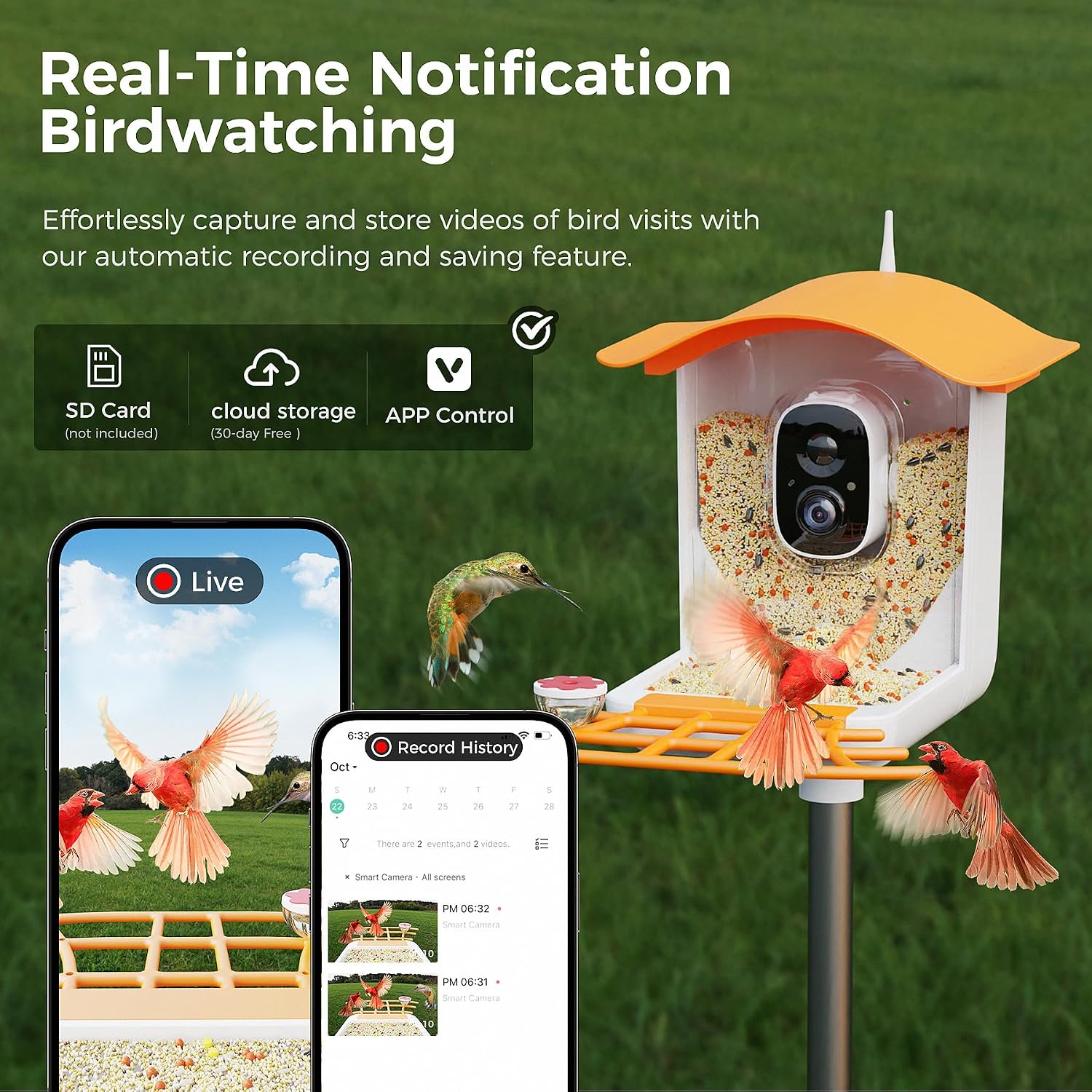
Figure 3: Real-time notifications and automatic recording capture every bird visit, accessible via the app.

Figure 4: The 160-degree wide-angle lens and full-color night vision ensure comprehensive and clear footage day or night.

Figure 5: The IP65 dustproof and waterproof construction, along with drainage holes, protects the feeder in various weather conditions.

Figure 6: The 5200mAh battery and 360-degree adjustable solar panel provide long-lasting, sustainable power.

Figure 7: Utilize the two-way audio function for real-time voice communication or to activate an audible alarm.

Figure 8: Easily share captured bird moments with friends and family through the app.
Setup
1. Mounting the Feeder:
The PerchMe Smart Bird Feeder Camera offers versatile installation options:
- Wall Mount: Securely attach the feeder to a wall using the provided screws.
- Tree Mount: Use the included straps to mount the feeder to a tree.
- Pole Mount: Attach the feeder to a pole for elevated placement.
Ensure the feeder is securely mounted to prevent access by predators and positioned away from windows to avoid bird collisions.

Figure 9: The feeder supports pole, screw, and tree strap installation methods for flexible placement.
2. Powering the Device:
The feeder is primarily solar-powered. Position the solar panel to receive maximum direct sunlight for efficient charging. For initial setup or in low-light conditions, the camera can also be charged via a Type-C cable.

Figure 10: The feeder utilizes dual power supply, primarily solar, with an option for Type-C charging.
3. App Installation and Connection:
Download the VicoHome app (or the recommended app in the included quick start guide) from your device's app store. Follow the in-app instructions to connect your smart bird feeder camera to your Wi-Fi network (2.4Ghz Wi-Fi is required). This will enable live viewing, notifications, and access to recorded footage.
Operating Instructions
1. Filling the Feeder:
Fill the large-capacity seed container with appropriate bird food for your target species. The clear back design enhances seed visibility to attract birds quickly. The included hummingbird feeder can be filled with nectar.
2. Using the Camera and AI Recognition:
The camera automatically detects motion and begins recording when birds approach. The advanced AI recognition system identifies the bird species and sends instant notifications to your connected device. You can customize sensitivity settings within the app.
Video 1: An overview of the INVOCOO Smart Bird Feeder with Camera, demonstrating its features and functionality.
Video 2: Experience bird watching at a new level with the smart bird feeder, capturing detailed interactions.
Video 3: A brief demonstration of the Smart Bird Feeder with Solar Panel, highlighting its compact design.
Video 4: Detailed look at the INVOCOO Smart Bird Feeder Camera with Solar Panel, showcasing its components.
Video 5: The Perchme Smart Bird Feeder Camera with AI Recognition in action, demonstrating its ability to identify birds.
Video 6: Observe clear close-ups of birds and record their activities directly from the bird camera.
Video 7: Enjoy your birdwatching experience with the smart bird feeder, capturing beautiful moments.
Video 8: See how the smart bird feeder helps birds decorate your yard with their presence.
3. Two-Way Audio Function:
The two-way audio feature allows you to listen to the birds and also use an audible alarm to deter unwanted visitors like squirrels. Access this function through the app interface.
Maintenance
Regular maintenance ensures the longevity and optimal performance of your bird feeder camera, and promotes bird health.
- Cleaning: Clean the feeder regularly to prevent mold and bacterial growth. The transparent seed compartment is easy to monitor. Note that the tray may not fully drain water, so ensure it is covered or cleaned frequently, especially in wet climates, to prevent seeds from getting wet and germinating. The tray cannot be fully disassembled for cleaning.
- Refilling: Monitor seed levels through the clear back and refill as needed. The large capacity reduces the frequency of refills.
- Solar Panel: Keep the solar panel clean and free of debris to ensure efficient charging. Periodically check the panel and its cable for any damage or wear.
- Camera Lens: Gently clean the camera lens with a soft, dry cloth to maintain clear image quality.
Troubleshooting
| Problem | Possible Cause | Solution |
|---|---|---|
| Camera not connecting to Wi-Fi. | Incorrect Wi-Fi password, out of range, or 5GHz network. | Ensure correct 2.4GHz Wi-Fi password. Move feeder closer to router. Restart camera and router. |
| Solar panel not charging battery. | Insufficient sunlight, dirty panel, or damaged cable/panel. | Relocate feeder to an area with more direct sunlight. Clean the solar panel. Check cable for damage. If issues persist, charge directly via Type-C. |
| Cloudy spot on camera footage. | Moisture inside the lens or on the exterior. | Ensure the camera housing is sealed properly. Allow time for condensation to clear. If external, gently clean the lens. |
| Seeds getting wet and germinating in the tray. | Rainwater accumulation due to inadequate drainage. | Position the feeder under an eave or covered area. Regularly clean out wet seeds to prevent spoilage. |
| No notifications or recordings. | Motion detection sensitivity too low, app permissions, or storage issues. | Adjust motion detection sensitivity in the app. Check app notification permissions. Ensure sufficient cloud or SD card storage. |
Specifications
| Feature | Detail |
|---|---|
| Brand | PerchMe |
| Model Number | B0CDXGVQKP |
| Target Species | Lovebird, Birds, Cardinal, Chickadee, Finch, Grosbeak, Junco, Oriole, Dove, Robin, Bluebird |
| Recommended Uses | Seed, Mealworm |
| Material | High quality ABS |
| Special Features | Night Vision, Motion Sensor, AI Recognition, Two-Way Audio |
| Mounting Type | Wall Mount, Tree Mount, Pole Mount |
| Product Dimensions | 12.01"L x 7.8"W x 11.22"H |
| Power Source | Solar Powered (with Type-C charging option) |
| Included Components | A Hummingbird Feeder, User Manual, Birdfy Lite Camera, Installation Package |
| Color | Mango Tango |
| Item Weight | 6.47 pounds |
| UPC | 716831539267 |
Warranty and Support
Your PerchMe Smart Bird Feeder Camera comes with a 30-day free video storage for reviewing and cherishing precious bird moments. For any questions, concerns, or issues with your product, please reach out to our customer service team. We are committed to ensuring your satisfaction.
For additional support, you may refer to the official User Manual PDF: PerchMe Smart Bird Feeder Camera User Manual (PDF)
You can also visit the PerchMe Store for more information and products: PerchMe Store