
1. Introduction
Thank you for choosing the Ulody P15 Ergonomic Gaming Chair. This manual provides essential information for the safe assembly, operation, and maintenance of your new chair. Please read these instructions carefully before use and retain them for future reference.

Image 1.1: The Ulody P15 Ergonomic Gaming Chair, showcasing its design and features.
2. Safety Warnings
- Maximum Weight Capacity: The chair is designed to support a maximum weight of 200 kg (400 lbs). Do not exceed this limit to prevent damage or injury.
- Dimensions: The chair's maximum dimensions are 68 x 58 x 127 cm. Ensure adequate space for safe operation.
- Secure Assembly: Always ensure all fastening screws are securely tightened during assembly and periodically check for tightness.
- Stable Surface: Use the chair only on a flat, stable, and level surface to prevent tipping.
- Children and Pets: Keep children and pets away from the chair during assembly and ensure they do not play with the chair unsupervised.
- Moving Parts: Be cautious of moving parts during adjustment to avoid pinching.
3. Package Contents
Before assembly, verify that all components are present and undamaged. If any parts are missing or damaged, please contact customer support.
- Backrest
- Seat Cushion with Armrests and Footrest Mechanism
- 5-Star Metal Base
- Gas Lift Cylinder
- Gas Lift Cover
- Casters (5x)
- Headrest Pillow
- Lumbar Support Cushion (with massage function)
- Assembly Hardware (screws, washers, Allen key)
- Instruction Manual
4. Assembly Instructions
The assembly process has been simplified for user convenience. Detailed instructions and necessary tools are included in the package. Follow the steps below for a smooth assembly.
- Attach Casters to Base: Insert each of the five casters into the holes at the end of the 5-star metal base until they click securely into place.
- Install Gas Lift: Place the gas lift cylinder into the center hole of the 5-star base. Cover it with the gas lift cover.
- Attach Mechanism to Seat: Secure the seat mechanism to the underside of the seat cushion using the provided screws. Ensure the front of the mechanism faces the front of the seat.
- Connect Seat to Gas Lift: Carefully place the assembled seat onto the gas lift cylinder.
- Attach Backrest: Align the backrest with the seat and secure it using the designated screws. The backrest fixation uses a triangular screw pattern for enhanced stability.
- Install Headrest and Lumbar Support: Attach the headrest pillow and lumbar support cushion to the backrest as desired. The lumbar support cushion may have a USB cable for its massage function; connect it to a suitable power source (e.g., power bank, not included).
- Final Check: Ensure all screws are tightened and the chair is stable before use.
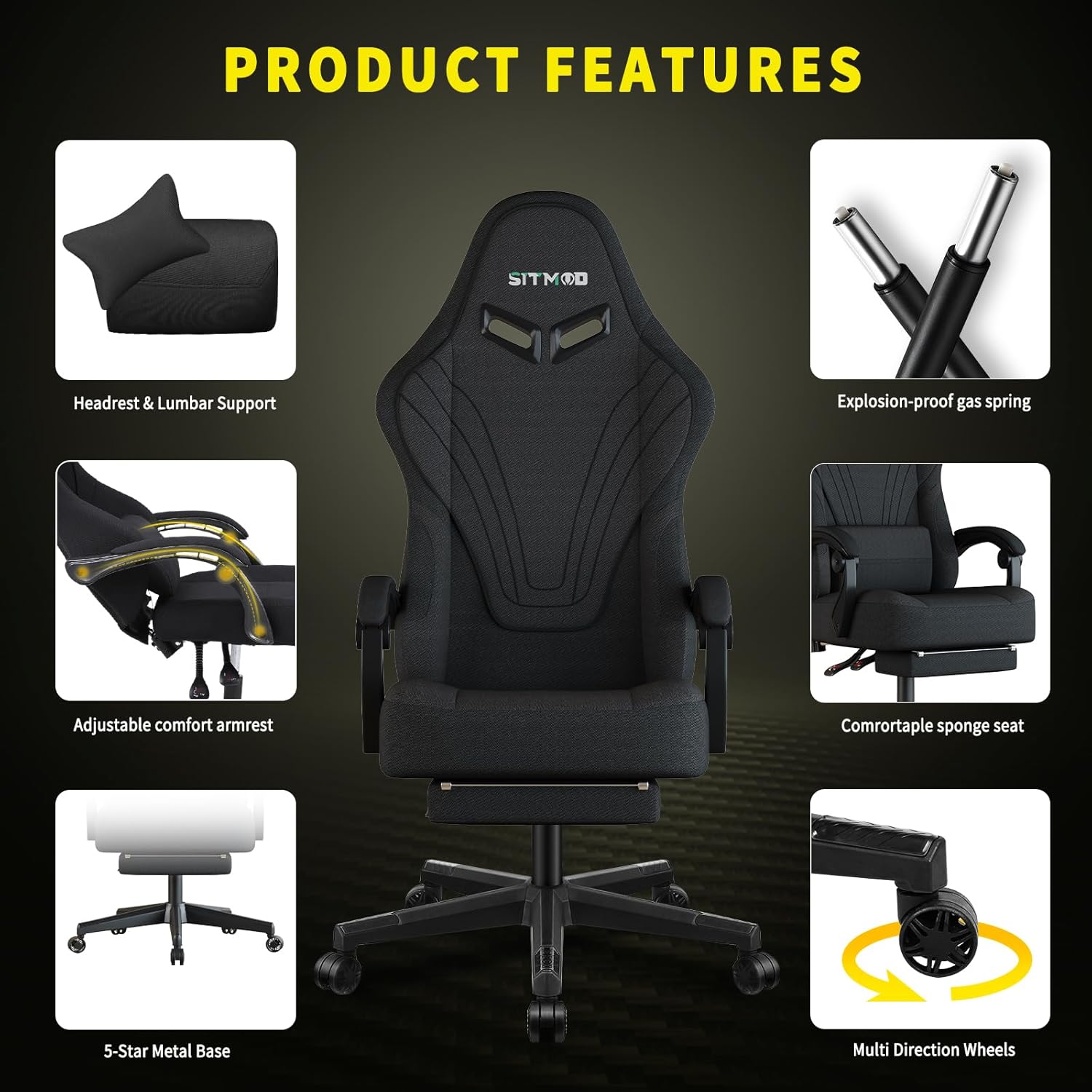
Image 4.1: Key components and features of the Ulody P15 Gaming Chair.
5. Operating Instructions
Your Ulody P15 chair offers multiple adjustments for personalized comfort.
- Height Adjustment: Locate the lever under the seat on the right side. Pull the lever up while seated to lower the chair, or pull it up while standing to raise the chair. Release the lever at the desired height.
- Backrest Recline: Use the recline lever, typically located on the right side of the seat, to adjust the backrest angle between 90° and 150°. Lean back to the desired angle and release the lever to lock it in place.
- Footrest Extension: Pull the footrest handle located under the front of the seat to extend the footrest. Push it back in to retract.
- Armrest Adjustment: The padded armrests are adjustable. Locate the button or lever under each armrest to adjust their height.
- Lumbar Support and Headrest: The headrest pillow and lumbar support cushion are adjustable. Position them to provide optimal support for your neck and lower back. The lumbar cushion features a massage function; connect its USB cable to a power source to activate.
- Swivel Function: The chair features a 360° swivel for easy movement and access.

Image 5.1: Demonstrating the 150-degree reclining function with the footrest extended.

Image 5.2: The chair's massage lumbar cushion and adjustable features.
6. Maintenance
Proper maintenance ensures the longevity and performance of your Ulody P15 chair.
- Cleaning: Wipe the chair with a damp cloth or spot clean as needed. Avoid harsh chemicals or abrasive cleaners that may damage the material.
- Screw Tightness: Periodically check all screws and bolts to ensure they remain tight. Re-tighten if necessary.
- Caster Care: Keep the casters clean from dust and debris to ensure smooth rolling.
- Gas Lift: Do not attempt to disassemble or repair the gas lift cylinder yourself. Contact professional service if it malfunctions.
7. Troubleshooting
If you encounter any issues with your Ulody P15 chair, refer to the following common solutions:
- Chair Sinks or Does Not Stay Up: The gas lift cylinder may be faulty. Contact customer support for a replacement.
- Chair Wobbles: Check all assembly screws and ensure they are securely tightened. Make sure the chair is on a flat surface.
- Casters Not Rolling Smoothly: Clean any hair or debris from the caster wheels. If still problematic, casters may need replacement.
- Squeaking Noises: Apply a small amount of lubricant to moving parts or joints. Check for loose screws.
- Lumbar Massage Not Working: Ensure the USB cable is properly connected to a functioning power source.
8. Specifications
| Feature | Specification |
|---|---|
| Brand | Ulody |
| Model Number | P15 |
| Color | Black |
| Product Dimensions (L x W x H) | 68 x 58 x 127 cm (26.8 x 22.8 x 50 inches) |
| Weight | 19 kg (41.8 lbs) |
| Maximum Load Capacity | 200 kg (400 lbs) |
| Material | Metal (frame), Breathable Mesh, High-density Sponge |
| Recline Angle | 90° to 150° |
| Swivel | 360° |
| Special Features | Ergonomic Design, Adjustable Height, Reclining Backrest, Extendable Footrest, Adjustable Armrests, Headrest Pillow, Lumbar Support Cushion (with massage function) |
| Care Instructions | Wipe or spot clean |

Image 8.1: Detailed dimensions and weight recommendations for the Ulody P15 chair.

Image 8.2: Ergonomic design illustrating support for the human spine.
9. Warranty and Support
Ulody stands by the quality of its products. Your Ulody P15 chair comes with the following:
- 30-Day Return Policy: If you are not satisfied with your purchase, you may return it within 30 days.
- 1-Year Free Accessory Replacement: In case of any issues with accessories or parts, a free replacement is available for one year from the date of purchase.
- Customer Support: If you encounter any problems or have questions, please do not hesitate to contact Ulody customer service for assistance.