1. Introduction
Thank you for choosing the P47 TeQ400 Bluetooth 4.2 Wireless Foldable Headset. This manual provides detailed instructions to help you set up, operate, and maintain your headset, ensuring optimal performance and longevity. Please read this manual carefully before use.
2. Package Contents
Verify that all items listed below are included in your package:
- 1 x P47 TeQ400 Bluetooth Headset
- 1 x Micro USB Charging Cable
- 1 x 3.5mm Auxiliary Audio Cable
- 1 x User Manual
3. Product Overview
The P47 TeQ400 headset features a foldable design for portability, Bluetooth 4.2 for stable wireless connectivity, and integrated controls for music playback, call management, and mode switching. It supports Bluetooth, FM radio, and TF card playback modes.
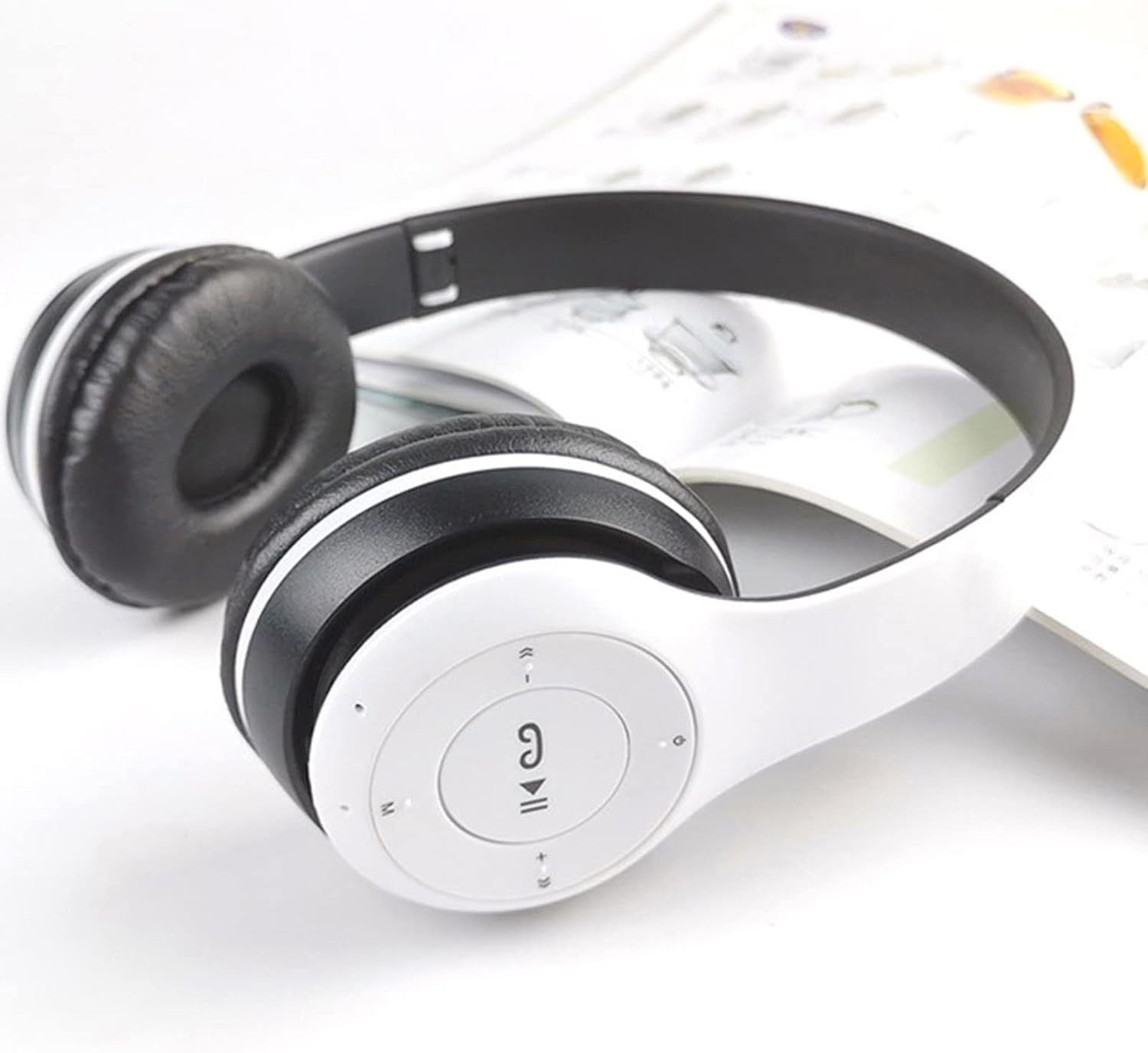
Image: The right earcup of the P47 TeQ400 headset, showing the integrated control buttons for power, volume, track skipping, and mode selection.
Key Features:
- Bluetooth 4.2 Technology: Provides stable and fast wireless audio transmission.
- Foldable Design: Enhances portability and ease of storage.
- Multi-mode Playback: Supports Bluetooth, FM radio, and TF (MicroSD) card audio playback.
- Integrated Microphone: For hands-free calling.
- Ergonomic Design: Designed for comfortable wear during extended use.
4. Setup
4.1 Charging the Headset
- Connect the Micro USB charging cable to the charging port on the headset.
- Connect the other end of the cable to a USB power source (e.g., computer USB port, USB wall adapter 5V 1A).
- The LED indicator will illuminate, typically red, during charging.
- Charging takes approximately 2 hours. The LED indicator will change color or turn off once fully charged.
4.2 Bluetooth Pairing
- Ensure the headset is fully charged.
- Press and hold the Power button on the headset until the LED indicator flashes blue and red alternately, indicating it is in pairing mode.
- On your device (smartphone, tablet, computer), enable Bluetooth and search for available devices.
- Select "P47" or "TeQ400" from the list of found devices.
- Once paired, the LED indicator will typically flash blue slowly or remain solid blue.
- If prompted for a password, enter "0000".
5. Operating Instructions
5.1 Power On/Off
- Power On: Press and hold the Power button until the LED indicator lights up.
- Power Off: Press and hold the Power button until the LED indicator turns off.
5.2 Bluetooth Mode
- After successful pairing, the headset will automatically connect to the last paired device when powered on.
- Play/Pause: Press the Play/Pause button.
- Next Track: Press the 'Next' button (usually '+').
- Previous Track: Press the 'Previous' button (usually '-').
- Volume Up: Press and hold the '+' button.
- Volume Down: Press and hold the '-' button.
5.3 FM Radio Mode
- Press the 'M' (Mode) button to switch to FM radio mode.
- Press the Play/Pause button once to automatically scan and save available FM stations (frequency range: 87.5-108 MHz).
- Use the 'Next' and 'Previous' buttons to navigate between saved stations.
5.4 TF Card Playback Mode
- Insert a TF (MicroSD) card with MP3 audio files into the designated slot.
- The headset will automatically switch to TF card mode and begin playing music. If not, press the 'M' (Mode) button to select TF card mode.
- Use the Play/Pause, Next, Previous, Volume Up, and Volume Down buttons as in Bluetooth mode.
5.5 Answering Calls
- Answer/End Call: Press the Play/Pause button once when a call comes in or to end an ongoing call.
- Reject Call: Press and hold the Play/Pause button for approximately 2 seconds.
- Redial Last Number: Double-press the Play/Pause button.
5.6 Wired Mode (AUX)
- Connect one end of the 3.5mm auxiliary audio cable to the AUX port on the headset.
- Connect the other end to the 3.5mm audio output of your device.
- The headset will automatically switch to wired mode. Note that in wired mode, headset controls (volume, track, calls) may not function, and control will be primarily from the connected device.
6. Maintenance
- Clean the headset regularly with a soft, dry cloth. Do not use harsh chemicals or abrasive materials.
- Avoid exposing the headset to extreme temperatures, humidity, or direct sunlight.
- Store the headset in a cool, dry place when not in use, preferably in its folded state to protect the earcups.
- This product is not waterproof. Avoid contact with water or other liquids.
- Do not attempt to disassemble or repair the headset yourself, as this will void any potential warranty and may cause damage.

Image: The P47 TeQ400 headset shown in its compact, folded position, ideal for storage and travel.
7. Troubleshooting
If you encounter issues with your P47 TeQ400 headset, please refer to the following common problems and solutions:
- Headset does not power on:
Ensure the headset is fully charged. Connect it to a power source using the Micro USB cable and allow it to charge for at least 30 minutes before attempting to power on again. - Cannot pair with device:
Make sure the headset is in pairing mode (LED flashing blue and red). Ensure Bluetooth is enabled on your device and it is within 10 meters of the headset. Try turning Bluetooth off and on again on your device. Forget previous pairings on your device and try pairing again. - No sound or low volume:
Check the volume levels on both the headset and your connected device. Ensure the headset is properly paired and connected. If using AUX cable, ensure it is fully inserted and try another cable if available. - FM radio not working or poor reception:
Ensure you are in an area with good FM signal. Perform an automatic station scan again. The AUX cable can sometimes act as an antenna, try connecting it even if not using wired mode. - TF card not playing:
Ensure the TF card is inserted correctly and contains compatible audio files (e.g., MP3 format). Try reinserting the card or using a different TF card.
8. Specifications
| Feature | Specification |
|---|---|
| Bluetooth Version | 4.2 + EDR |
| Wireless Distance | Up to 10 meters |
| FM Frequency Range | 87.5 - 108 MHz |
| Frequency Response | 50Hz - 20KHz |
| Signal-to-Noise Ratio | 88 dB |
| Output Power | 35 mW |
| Charging Input | Micro USB, 5V 1A |
| Charging Time | Approximately 2 hours |
| Talk Time | Up to 6 hours |
| Standby Time | Up to 18 hours |
| Material | Acrylonitrile Butadiene Styrene (ABS) |
| Compatible Devices | Phone, Computer, Tablet, Car Audio System |
| Water Resistance | Not waterproof |
| Headphone Jack | 3.5 mm Jack |
| Form Factor | Over-Ear |
| Ear Placement | Supra-aural |
| Sound Isolation | Acoustic isolation |
9. Warranty and Support
Specific warranty information for the P47 TeQ400 headset is not provided in this manual. For details regarding warranty coverage, returns, or technical support, please refer to the retailer or point of purchase where you acquired the product. Keep your proof of purchase for any warranty claims.


