
1. Introduction
This manual provides detailed instructions for the Hohosb 3 in 1 Foldable Zinc Alloy Wireless Charger Stand, Model A80. This device is designed to efficiently charge your compatible Apple devices simultaneously, offering convenience and a compact design.

Image 1.1: The Hohosb 3 in 1 Foldable Wireless Charger Stand and its accessories.
2. Product Features
- 3-in-1 Charging: Simultaneously charges compatible iPhone (12 series and newer), Apple Watch (2-9, SE, Ultra, Ultra 2), and AirPods (2/3/Pro/Pro 2 with wireless charging case).
- Foldable Design: Allows for compact storage and portability, making it suitable for travel.
- Magnetic Alignment: Equipped with strong magnets for secure and automatic alignment of MagSafe-compatible iPhones.
- Adjustable Viewing Angles: Supports multi-angle viewing for iPhones in both landscape and portrait modes.
- Premium Construction: Features a zinc alloy frame, ABS panel with sun pattern technology, and a glass panel for durability and aesthetic appeal.
- Safety Features: Integrated smart chip with over-voltage, over-current, short-circuit protection, and temperature control.

Image 2.1: Internal design and material highlights.
3. Package Contents
Verify that all items are present in the package:
- Hohosb 3 in 1 Foldable Magnetic Charging Station
- 18W QC3.0 Adapter
- USB-C to USB-A Charging Cable
4. Setup Instructions
- Unfold the Charger: Gently unfold the charging station from its compact, folded state. The hinges allow for various configurations, including a vertical stand or a flat charging pad.
- Connect Power: Insert the provided USB-C end of the charging cable into the port on the charging station. Connect the USB-A end of the cable to the 18W QC3.0 adapter.
- Plug into Wall Outlet: Plug the 18W QC3.0 adapter into a standard wall power outlet. A small indicator light on the charger will illuminate, confirming it is powered on.
Video 4.1: Demonstration of unfolding the charger and connecting power.
5. Operating Instructions
5.1 Charging an iPhone
- Ensure your iPhone is MagSafe compatible (iPhone 12 series or newer) or uses a MagSafe-compatible case.
- Place your iPhone onto the central magnetic charging pad. The magnets will automatically align the phone for optimal charging.
- The phone can be positioned vertically for messaging or facial recognition, or horizontally for video viewing.

Image 5.1: Magnetic attachment and charging of an iPhone.
5.2 Charging an Apple Watch
- Place your Apple Watch onto the dedicated charging puck located at the top of the stand.
- Ensure the watch is correctly oriented for charging. The watch should sit flat on the puck.

Image 5.2: Proper placement of an Apple Watch for charging.
5.3 Charging AirPods
- Place your AirPods (2/3/Pro/Pro 2 with wireless charging case) onto the flat charging pad at the base of the stand.
- Ensure the AirPods case is centered on the charging pad for effective power transfer.

Image 5.3: Overview of the 3-in-1 charging capabilities.
5.4 Flat Charging Mode
- The charging station can be fully unfolded to lay flat on a surface.
- In this mode, all three devices can be charged simultaneously on the flat surface.

Image 5.4: Flat charging configuration.
6. Compatibility
The Hohosb 3 in 1 Foldable Wireless Charger Stand is compatible with the following devices:
- iPhones: iPhone 15 Series, iPhone 14 Series, iPhone 13 Series, iPhone 12 Series. (Not compatible with iPhone 11 or earlier models).
- MagSafe Cases: Compatible with MagSafe cases. Non-MagSafe cases may weaken the magnetic connection and affect charging.
- AirPods: AirPods 2/3/Pro/Pro 2. (Note: AirPods 2/3 require a wireless charging case).
- Apple Watch: iWatch 9/8/7/6/5/4/3/2/SE/Ultra/Ultra 2. (Note: Only for Apple Watch, not for Samsung or other smartwatches).
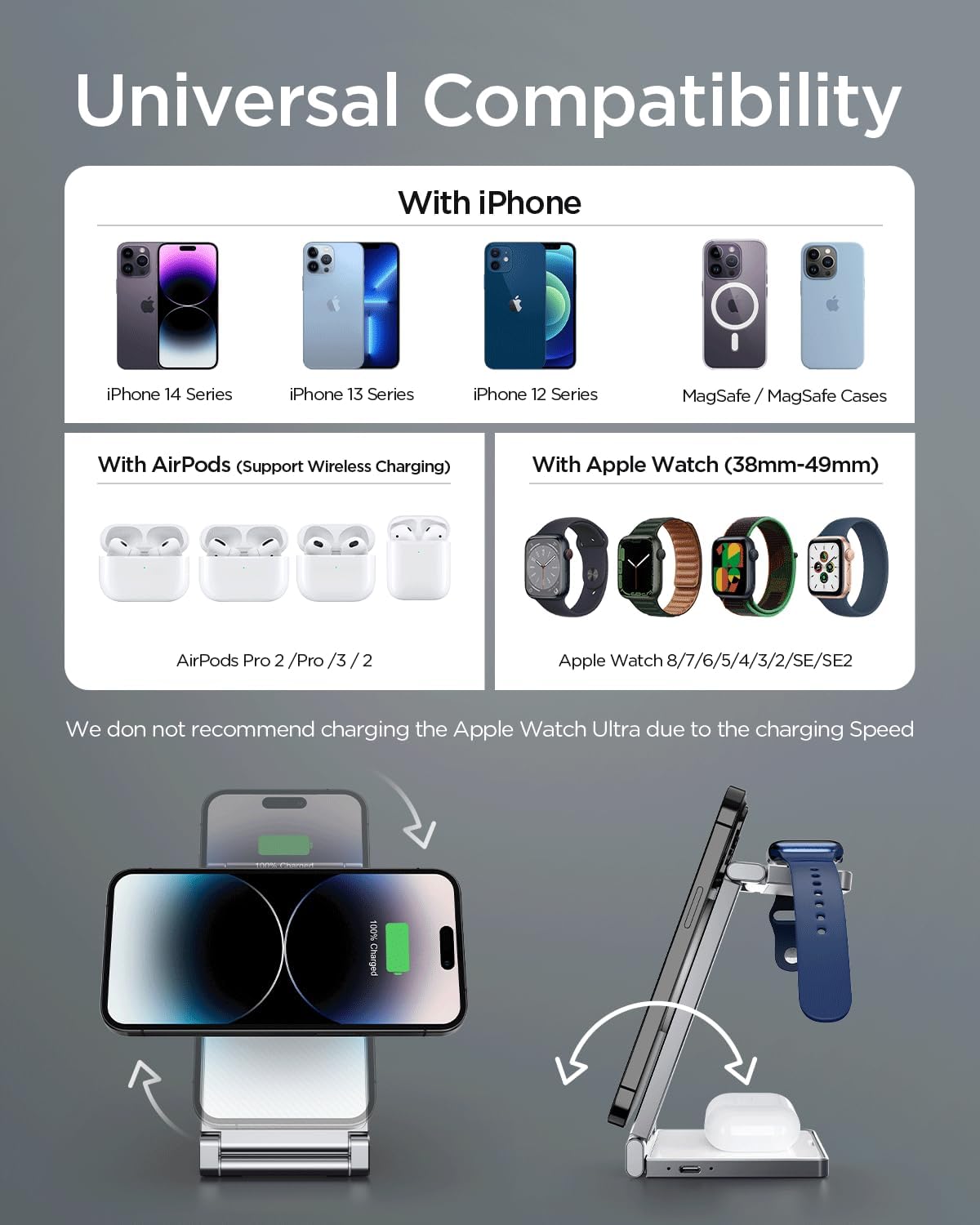
Image 6.1: Universal compatibility overview.
7. Maintenance
- Cleaning: Use a soft, dry cloth to clean the surface of the charging station. Avoid using abrasive cleaners or solvents.
- Storage: When not in use, fold the charger into its compact form to protect the charging surfaces and save space. Store in a cool, dry place.
- Cable Care: Avoid bending or crimping the charging cable excessively to prevent damage.
8. Troubleshooting
- Device Not Charging:
- Ensure the charging station is properly connected to the 18W QC3.0 adapter and a working power outlet.
- Verify that your device is correctly aligned on its respective charging area. For iPhones, ensure it is MagSafe compatible or using a MagSafe case.
- Remove any metal objects, card clips, or ring clips from your phone case as these can interfere with wireless charging.
- For AirPods 2/3, confirm they are in a wireless charging case.
- Slow Charging:
- Ensure you are using the provided 18W QC3.0 adapter and cable. Using lower-wattage adapters may result in slower charging speeds.
- Charging multiple devices simultaneously may distribute power, potentially affecting individual device charging speed.
- Weak Magnetic Connection:
- Ensure your iPhone is MagSafe compatible or has a MagSafe-compatible case. Non-MagSafe cases can significantly weaken the magnetic hold.
- Check for any debris or obstructions between the phone and the charging pad.
- Overheating:
- The charger has built-in temperature control. If overheating occurs, disconnect devices and allow the charger to cool down.
- Ensure the charger is placed in a well-ventilated area and not covered.
9. Specifications
| Feature | Specification |
|---|---|
| Model Number | A80 |
| Dimensions (Folded) | 8.58 x 4.53 x 1.46 inches |
| Item Weight | 9.3 ounces |
| Input Voltage | 9 Volts |
| Amperage | 2 Amps |
| Total USB Ports | 1 (USB-C input) |
| Special Features | Fast Charging, Magnetic, MagSafe Compatible, Travel, Wireless Charging |
| Manufacturer | Hohosb |
10. Safety Information
- This wireless charging station is equipped with a smart chip and professional magnetic insulation film.
- It emits no harmful radiation and is safe for use around all family members.
- Features multiple protection mechanisms: over-voltage protection, over-current protection, short-circuit protection, and temperature control.
- Do not disassemble or attempt to repair the device yourself. Contact customer support for assistance.
- Avoid exposing the device to extreme temperatures, direct sunlight, or moisture.

Image 10.1: Safety features for overnight charging.
11. Warranty and Support
For warranty information or technical support, please refer to the product packaging or contact Hohosb customer service directly. Contact details can typically be found on the manufacturer's official website or through your point of purchase.