
1. Introduction
The UNI-T UT256 Series True RMS Fork Meters are highly reliable instruments designed for accurate electrical measurements. Their unique fork design allows for convenient, non-contact current measurement by simply positioning the wire within the fork opening. These meters are built without mechanical parts in the current sensing mechanism, enhancing durability and reliability. The UT256 series features include auto-ranging, True RMS measurement, data hold, auto power off, continuity buzzer, low battery indication, input protection, and an LCD backlight for clear readings.
2. Safety Information
WARNING: To ensure safe operation and service of the tester, follow these instructions carefully. Failure to observe these warnings can result in severe injury or death.
- This instrument is designed according to EN61010-1, EN61010-2-032, EN61010-2-033 and conforms to double insulation, CAT II 600V, CAT III 300V and pollution degree 2.
- If the equipment is used in a manner not specified by the manufacturer, the protection provided by the equipment may be impaired.
- Do not apply voltage over 600V between any meter terminal and ground.
- Do not apply voltage over 600V between any two terminals.
- Use caution when working with voltages above AC 30V r.m.s. or DC 60V. Such voltages pose a shock hazard.
- Never input voltage or current which exceeds the specified limit.
- Before measuring resistance, diode, and continuity, please disconnect all power and fully discharge all capacitors to avoid inaccuracy.
3. Product Overview
3.1 External Structure
Familiarize yourself with the components of your UNI-T UT256 Series Fork Meter:
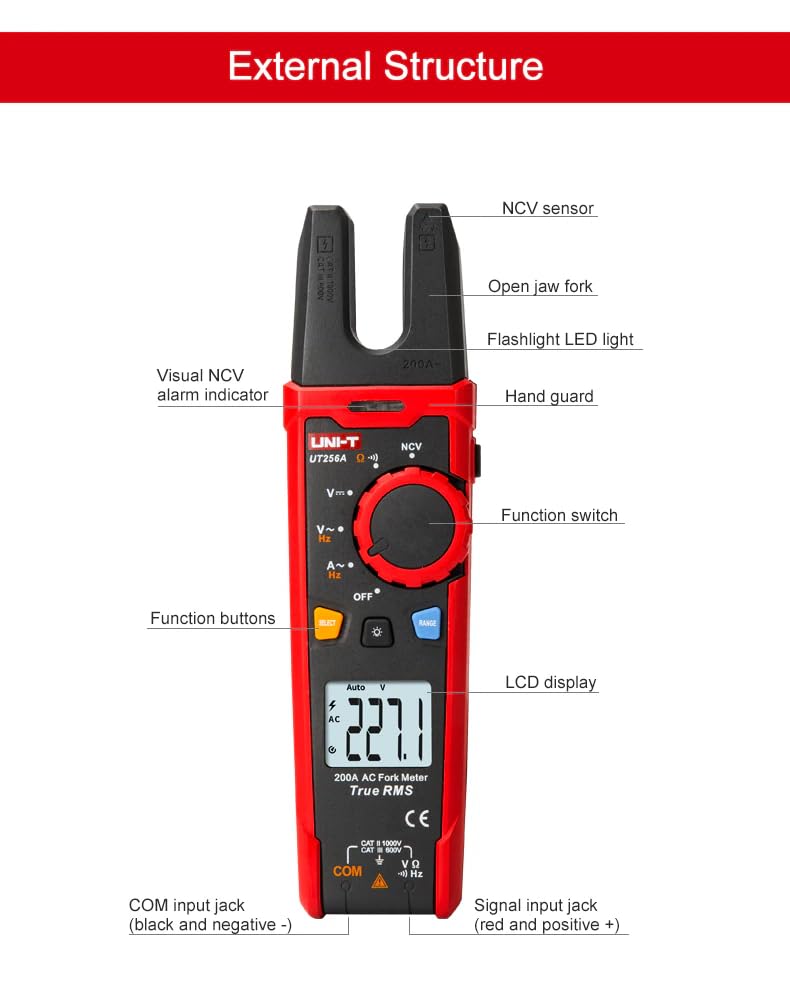
This diagram labels key components of the UNI-T UT256, including the NCV sensor, open jaw fork, flashlight, hand guard, visual NCV alarm indicator, function switch, function buttons, LCD display, and input jacks.
3.2 Package Contents
Upon opening the package, verify that all standard accessories are present:
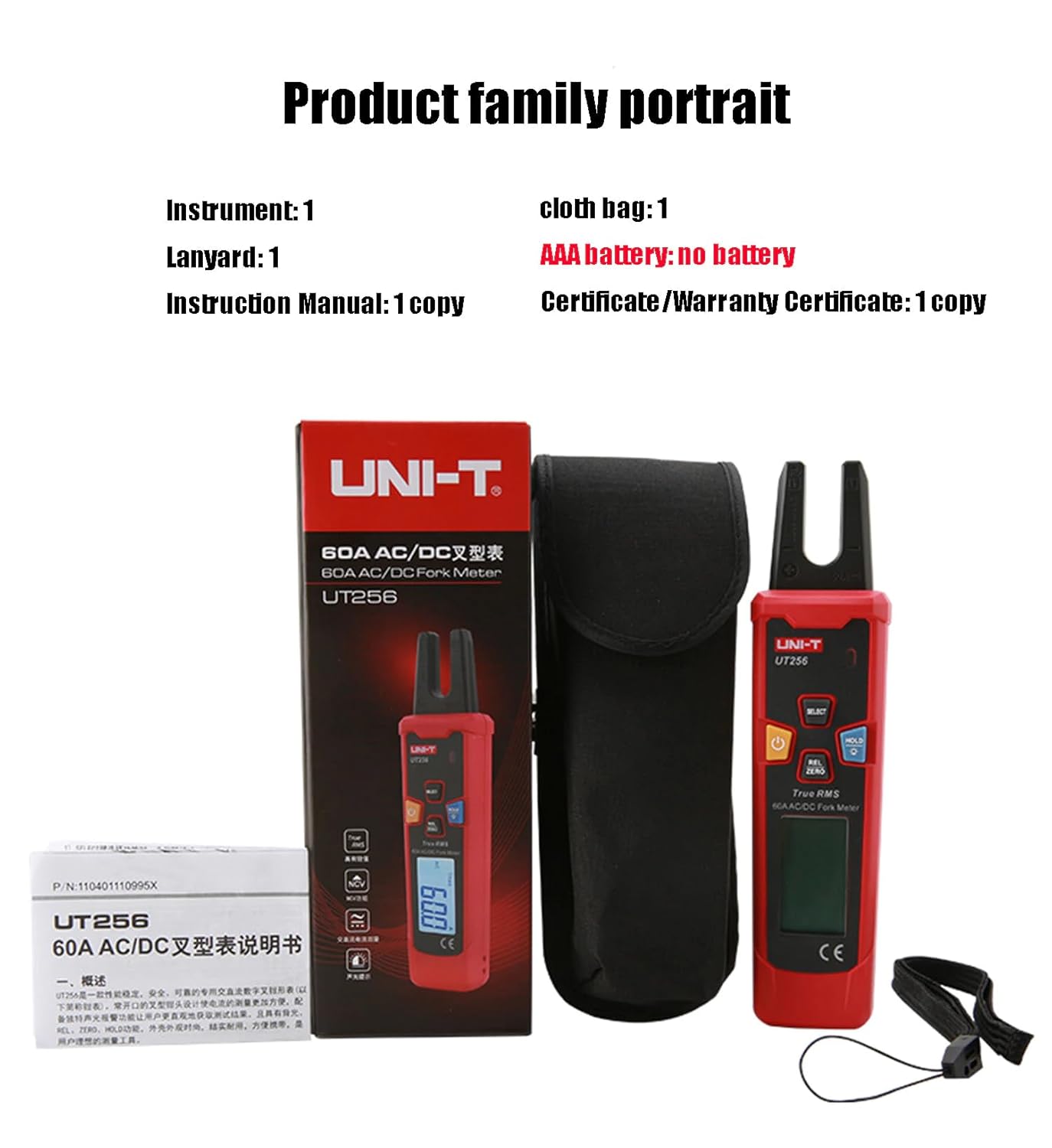
The image displays the items included in the UNI-T UT256 package: the fork meter, a cloth carrying bag, a lanyard, and the instruction manual. Note that AAA batteries are not included.
- UNI-T UT256 Series Fork Meter (1)
- Lanyard (1)
- Instruction Manual (1 copy)
- Cloth Carrying Bag (1)
- Certificate/Warranty Certificate (1 copy)
4. Setup
4.1 Battery Installation
The UT256 Series Fork Meter requires two AAA 1.5V batteries (not included). To install or replace batteries:
- Locate the battery compartment on the back of the meter.
- Open the battery compartment cover.
- Insert two AAA 1.5V batteries, ensuring correct polarity (+/-).
- Close the battery compartment cover securely.
5. Operating Instructions
5.1 Current Measurement
The unique fork design allows for non-contact AC/DC current measurement up to 60A. To measure current:

This image shows the UNI-T UT256 True RMS Fork Meter being used to measure current in an electrical panel. The fork design allows for non-contact current measurement.
- Turn the function switch to the appropriate AC or DC current range.
- Position the single conductor wire of interest within the open jaw fork.
- Read the current value displayed on the LCD.
5.2 NCV (Non-Contact Voltage) Function
The NCV function allows for detection of AC voltage without direct contact, enhancing safety.
- Turn the function switch to the NCV position.
- Move the NCV sensor (located at the top of the fork) close to the conductor or outlet.
- The meter will indicate the presence of AC voltage through a buzzer alarm and a flashing LED light.
5.3 Data Hold
Press the 'HOLD' button to freeze the current reading on the display. Press it again to release the hold function.
5.4 Auto Power Off
The meter features an auto power off function to conserve battery life. If no operation is performed for approximately 30 minutes, the meter will automatically power off. This feature can typically be disabled by holding a specific button during power-on (refer to the full manual for details).
5.5 Continuity Test
To check for circuit continuity:
- Turn the function switch to the continuity position.
- Connect the test leads (if applicable for this model, otherwise use the fork for current path).
- If the resistance is below a certain threshold, the buzzer will sound, indicating continuity.
5.6 USB Communication
The UT256 series may support USB communication for data logging and analysis on a computer. This typically involves connecting the meter to a PC via a USB cable and using dedicated software.
6. Maintenance
To ensure the longevity and accuracy of your UNI-T UT256 Series Fork Meter:
- Cleaning: Wipe the meter with a damp cloth and mild detergent. Do not use abrasives or solvents.
- Battery Care: Remove batteries if the meter is not used for an extended period to prevent leakage. Replace batteries when the low battery indicator appears.
- Storage: Store the meter in a dry, dust-free environment, away from direct sunlight and extreme temperatures.
7. Troubleshooting
If you encounter issues with your meter, consider the following common troubleshooting steps:
- No Display/Power: Check battery installation and ensure batteries are not depleted. Replace if necessary.
- Inaccurate Readings: Ensure proper function selection and correct connection to the circuit. Verify that the meter is within its specified operating conditions.
- No Continuity Beep: Check if the circuit is truly continuous and if the function switch is set correctly.
- NCV Not Working: Ensure the NCV sensor is close enough to the AC voltage source.
For persistent issues, refer to the detailed troubleshooting section in the complete manual or contact customer support.
8. Specifications
The following table outlines the key technical specifications for the UNI-T UT256 Series Fork Meter:
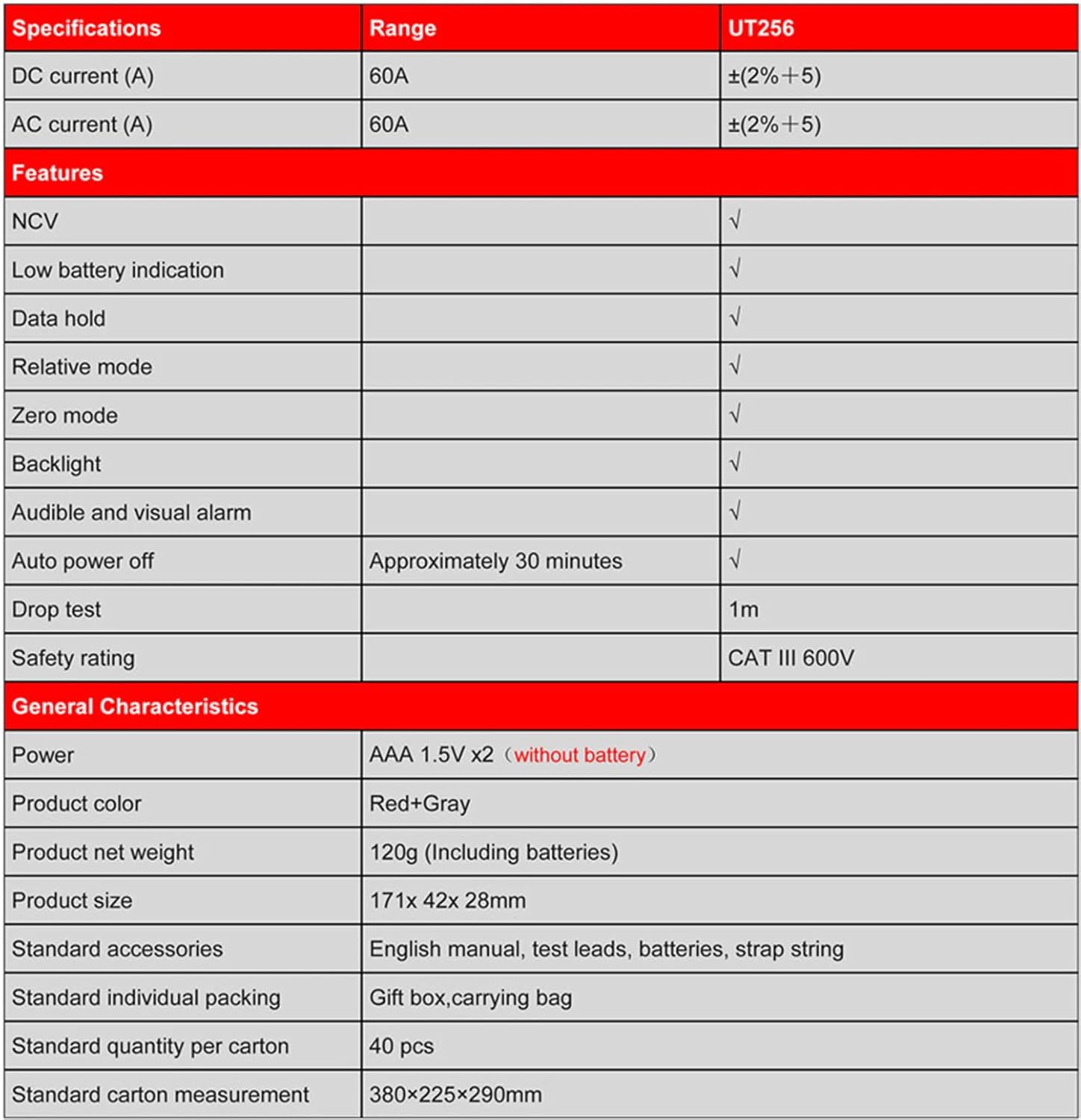
This table provides comprehensive specifications for the UT256, including current ranges, features like NCV and data hold, power requirements, dimensions, and standard accessories.
| Specification | Value (UT256) |
|---|---|
| DC Current (A) | 60A (±(2%+5)) |
| AC Current (A) | 60A (±(2%+5)) |
| NCV | Yes |
| Low battery indication | Yes |
| Data hold | Yes |
| Relative mode | Yes |
| Zero mode | Yes |
| Backlight | Yes |
| Audible and visual alarm | Yes |
| Auto power off | Approximately 30 minutes |
| Drop test | 1m |
| Safety rating | CAT III 600V |
| Power | AAA 1.5V x2 (without battery) |
| Product color | Red+Gray |
| Product net weight | 120g (Including batteries) |
| Product size | 171x 42x 28mm |
| Standard accessories | English manual, test leads, batteries, strap string |
| Standard individual packing | Gift box, carrying bag |
9. Warranty and Support
Your UNI-T UT256 Series Fork Meter comes with a manufacturer's warranty, as detailed in the included Warranty Certificate. For warranty claims, technical support, or service inquiries, please refer to the contact information provided in your product packaging or visit the official UNI-T website.


