
1. Product Overview
The matell DC 12V Remote Battery Disconnect Switch (Model BS-120X) is designed to provide convenient remote control over your vehicle's battery connection. This device helps prevent battery drain during long-term parking, protects against theft, and extends battery lifespan by allowing you to disconnect the battery remotely. It features smart voltage monitoring and a low standby current to ensure efficient operation.

Image: The matell BS-120X remote battery disconnect switch unit with two accompanying remote controls.
2. Key Features
- Remote Control Functionality: Allows for convenient battery disconnection and reconnection from a distance of 30-70 meters.
- Smart Voltage Control: Automatically disconnects power if the battery voltage drops below 11.9V for 5 minutes (in smart mode), preventing deep discharge. Reconnection is prevented if voltage is above 13.3V (e.g., during driving).
- Anti-Theft Protection: Disconnecting the battery can deter vehicle theft.
- Low Standby Current: Consumes only 0.005A, significantly lower than typical vehicle standby currents, to minimize battery drain.
- Durable Construction: Made with pure copper components for reliable performance and low resistance.
- Magnetic Latching Relay: Ensures stable open and closed states without continuous power consumption, enhancing reliability.

Image: Illustration of the magnetic latching relay and pure copper construction for enhanced durability and efficiency.
3. Specifications
| Parameter | Value |
|---|---|
| Rated Current | 120 Amps |
| Starting Current | 500 Amps |
| Instantaneous Current | 2400 Amps |
| Rated Voltage | 12 Volts (DC) |
| Voltage Range | 10V ~ 16V |
| Power-off Threshold | 11.9V ± 0.2V |
| Loss of Power Delay Disconnection Time | 5 minutes |
| Standby Power Consumption | 0.005 Amps (5mA) |
| Operating Temperature | -4°F to 194°F (-20°C to 90°C) |
| Waterproof Rating | IPX6 |
| Product Dimensions (L x W x H) | 4.92 x 3.35 x 1.42 inches (125 x 85 x 36 mm) |
| Weight | 1.01 Pounds (0.46 kg) |
| Suitable for Vehicle Engine Displacement | Below 4.0L |

Image: Detailed dimensions of the matell BS-120X switch and its components.
4. Safety Information
- Always disconnect the negative battery terminal first when working on your vehicle's electrical system.
- Ensure all connections are secure and free from corrosion. Loose connections can cause overheating or malfunction.
- Wear appropriate personal protective equipment, such as safety glasses and gloves, during installation.
- Do not attempt to install this device if you are unfamiliar with automotive electrical systems. Consult a qualified technician if necessary.
- Ensure the switch is compatible with your vehicle's battery terminal type (flat-head terminals are generally compatible).
- Keep remote controls away from children and moisture.
5. Installation Guide
Follow these steps for proper installation of the matell BS-120X battery disconnect switch:
- Prepare the Battery: Ensure your vehicle's ignition is off and all accessories are disconnected. Locate your vehicle's battery.
- Disconnect Negative Terminal: Carefully remove the negative battery terminal clamp from the battery.
- Connect the Switch: Connect the main body of the matell switch to the negative pole of the battery. Ensure a tight and secure connection.
- Connect Positive Power Cord: Connect the red positive power cord from the switch to the positive terminal of the battery. This completes the installation.

Image: Visual guide for connecting the switch to the battery terminals.
5.1. Battery Terminal Compatibility
The matell BS-120X switch is designed for use with flat-head battery terminals, which are common in approximately 95% of vehicles. It is not compatible with column-head battery terminals.
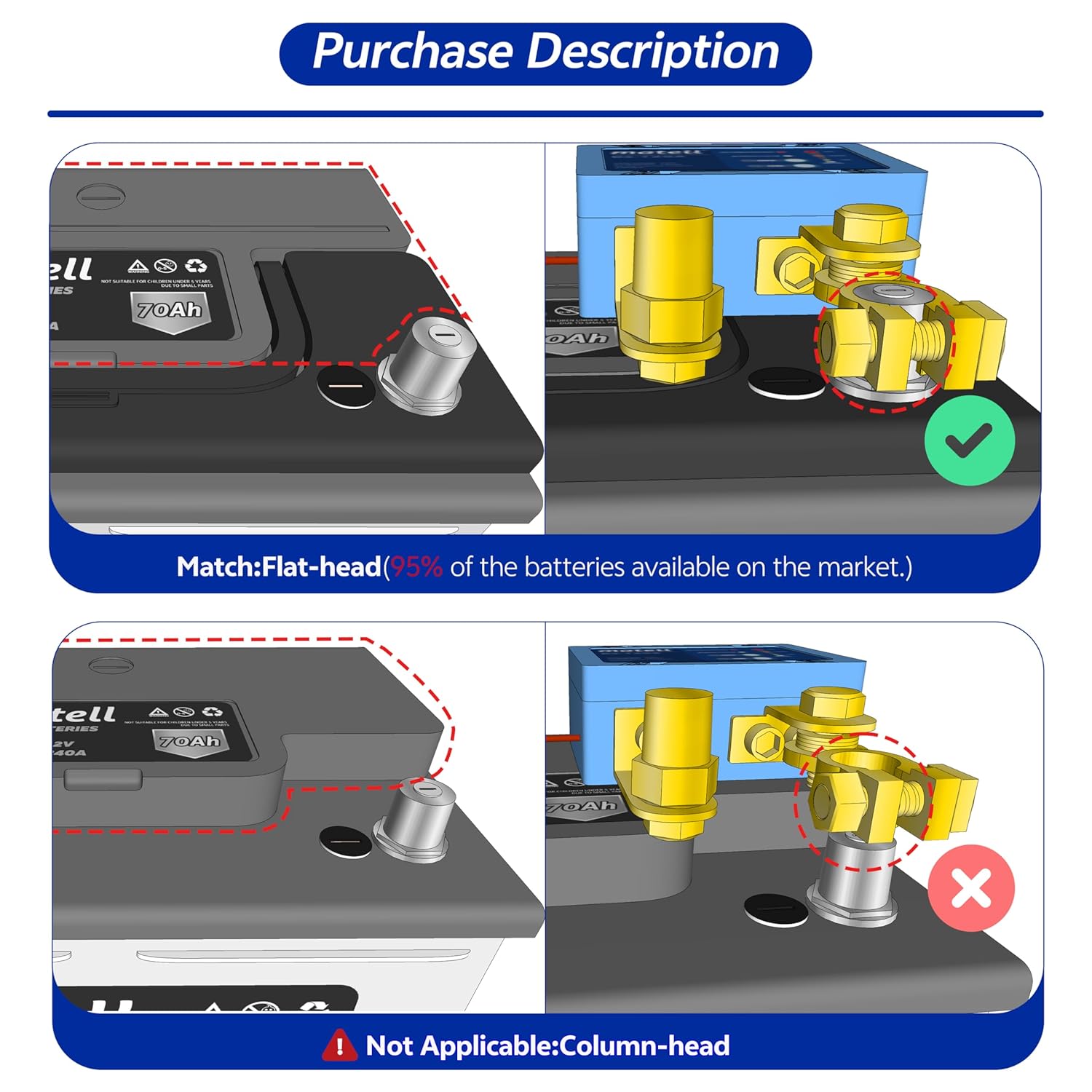
Image: Illustration of compatible flat-head battery terminals versus incompatible column-head terminals.
6. Operating Instructions
The matell BS-120X switch is operated using the provided remote controls.
6.1. Remote Control Operation
- Press the ON button on the remote to connect the battery and supply power to the vehicle.
- Press the OFF button on the remote to disconnect the battery and cut off power to the vehicle.
The remote control has an effective range of 30-70 meters.

Image: The remote control in use, demonstrating its operational range for various vehicle types.
6.2. Smart Voltage Control Mode
In smart mode, the switch continuously monitors the battery voltage. If the voltage drops below 11.9V for a continuous period of 5 minutes, the switch will automatically disconnect the battery to prevent excessive discharge. This feature helps preserve battery health and ensures sufficient power for starting the vehicle later.
When the vehicle is running and the battery voltage is above 13.3V, the remote control will not be able to disconnect the switch. This prevents accidental power cuts during driving.
7. Maintenance
- Inspect Connections: Periodically check all battery terminal connections to ensure they are clean, tight, and free from corrosion.
- Clean the Unit: Keep the switch unit clean and free of dirt, dust, and moisture. Use a dry cloth for cleaning.
- Remote Battery Replacement: The remote controls require CR2032 batteries. Replace them when the remote's range decreases or it stops responding.
- Environmental Protection: While the unit has an IPX6 waterproof rating, avoid prolonged exposure to extreme conditions or direct submersion.
8. Troubleshooting
| Problem | Possible Cause | Solution |
|---|---|---|
| Switch does not respond to remote control. |
|
|
| Battery still drains after disconnection. |
|
|
| Vehicle alarm triggers upon disconnection. | Vehicle's alarm system is sensitive to power interruption. | Some vehicle alarm systems may trigger when the battery is disconnected. Consult your vehicle's manual or an automotive technician for solutions specific to your vehicle's alarm system. |
| Switch automatically disconnects frequently. | Vehicle battery voltage consistently drops below 11.9V. | This indicates a weak or aging battery, or a significant parasitic drain. Test your vehicle's battery and charging system, or check for other electrical issues. |
9. Warranty and Support
For warranty information, technical support, or service inquiries, please refer to the product packaging or visit the official matell website. Keep your purchase receipt as proof of purchase.


