
1. Introduction
Thank you for choosing the Tvdugim CR-A1 Under Desk Treadmill. This manual provides essential information for the safe and efficient operation, maintenance, and troubleshooting of your new walking pad. Please read this manual thoroughly before first use and retain it for future reference.

Image: A person walking on the Tvdugim CR-A1 treadmill positioned under a standing desk, demonstrating its use in an office or home environment.
2. Important Safety Information
To reduce the risk of serious injury, read all important precautions and instructions in this manual before using the treadmill. Tvdugim assumes no responsibility for personal injury or property damage sustained by or through the use of this product.
- Always consult with a physician before beginning any exercise program.
- Keep children and pets away from the treadmill during operation.
- Place the treadmill on a level surface with at least 0.6 meters (2 feet) of clear space behind it.
- Wear appropriate exercise clothing and athletic shoes.
- Do not use the treadmill if you weigh more than 110 kg (242 lbs).
- Unplug the treadmill from the power outlet when not in use or before cleaning.
- Do not operate the treadmill if the power cord or plug is damaged.
3. Package Contents
The Tvdugim CR-A1 Under Desk Treadmill comes fully assembled. Please ensure all components are present upon unboxing:
- Tvdugim CR-A1 Under Desk Treadmill
- Remote Control
- Power Cord
- User Manual (this document)
4. Setup
The Tvdugim CR-A1 Under Desk Treadmill requires no assembly. Simply unbox and place it in your desired location.
- Remove the treadmill from its packaging.
- Place the treadmill on a flat, stable surface. Ensure there is adequate space around the unit for safe operation.
- Plug the power cord into a grounded electrical outlet.
- Ensure the safety key (if applicable, though not explicitly mentioned, it's a common treadmill feature) is correctly placed.
5. Product Overview
The Tvdugim CR-A1 is a compact and portable under-desk treadmill designed for home and office use. It features a durable alloy steel frame and an ABS material casing.
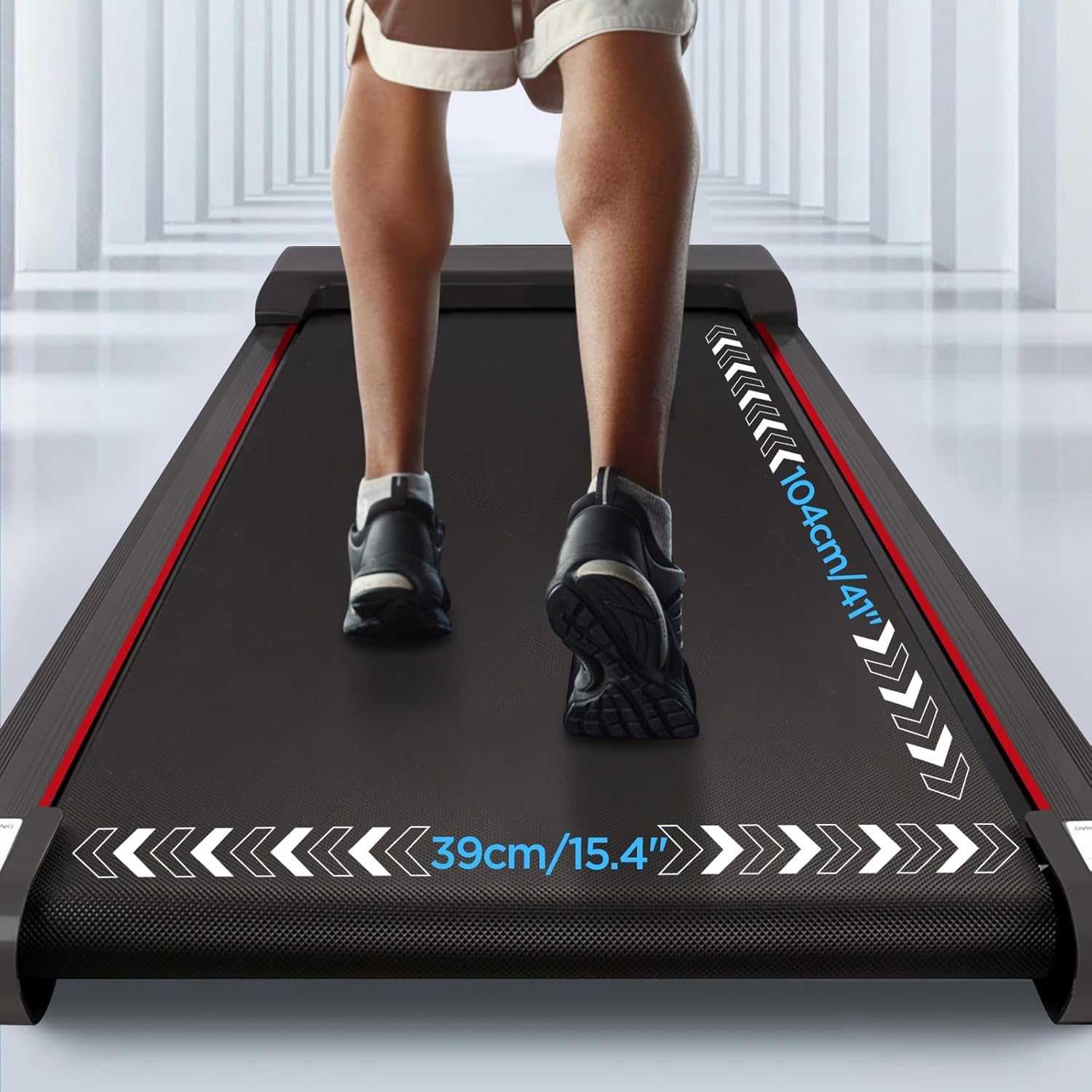
Image: Close-up view of the treadmill belt, indicating a walking area length of 104 cm (41 inches) and a width of 39 cm (15.4 inches).
5.1. LCD Display
The integrated LCD display provides real-time feedback on your workout. It automatically cycles through various metrics.

Image: The treadmill's LCD display showing workout data such as Time, Speed, Distance, and Calories. Illustrations indicate a walking mode (1-4 km/h) and a running mode (4-8 km/h).
- Time: Duration of your workout.
- Speed: Current walking/running speed.
- Distance: Total distance covered.
- Calories: Estimated calories burned.
5.2. Remote Control
The included remote control allows you to adjust settings without interrupting your workout.
6. Operation
6.1. Powering On/Off
- Plug the power cord into a wall outlet.
- Press the power button on the treadmill or remote control to turn the unit on.
- To turn off, press the power button again or unplug the unit.
6.2. Using the Remote Control
The remote control allows you to start, stop, adjust speed, and cycle through display modes.
Remote Control Pairing (if not working)
If the remote control does not function, it may need to be paired with the treadmill:

Image: A hand holding the remote control with instructions for pairing: 1. Turn on the power, 2. Hold the "+" button on the remote for 3 seconds, 3. The remote will beep until connected.
- Ensure the treadmill is powered on.
- Press and hold the + button on the remote control for 3 seconds.
- The remote will emit beeping sounds until it successfully connects to the treadmill.
6.3. Workout Modes
- Walking Mode: Typically 1-4 km/h. Ideal for light activity or working while walking.
- Running Mode: Typically 4-8 km/h. Suitable for jogging or a more intense workout.
Use the speed adjustment buttons on the remote control to select your desired speed.
7. Storage and Movement
The Tvdugim CR-A1 is designed for easy storage and portability.

Image: The treadmill shown being stored underneath a sofa, illustrating its compact design. An inset image highlights the built-in transport wheels for easy relocation.
- Space-Saving Design: With dimensions of approximately 123 cm x 49 cm x 12.5 cm (48.4" x 20" x 4.9"), it can be stored under a bed, sofa, or desk.
- Transport Wheels: Built-in wheels allow for easy movement of the treadmill without lifting. Simply tilt and roll to your desired location.
8. Maintenance
Regular maintenance ensures the longevity and optimal performance of your treadmill.
- Cleaning: Wipe down the treadmill with a damp cloth after each use to remove sweat and dust. Do not use abrasive cleaners.
- Belt Lubrication: The walking belt requires periodic lubrication to reduce friction and extend its lifespan. Refer to the specific instructions for treadmill belt lubrication, typically every 3-6 months depending on usage.
- Belt Adjustment: If the walking belt becomes off-center or slips, it may need adjustment. Consult a professional or refer to detailed instructions for belt tensioning and alignment.
9. Troubleshooting
If you encounter issues with your treadmill, refer to the following common problems and solutions:
| Problem | Possible Cause | Solution |
|---|---|---|
| Treadmill does not power on. | Power cord not plugged in; power switch off; circuit breaker tripped. | Ensure power cord is securely plugged in. Check power switch. Reset circuit breaker if necessary. |
| Remote control not working. | Remote not paired; dead batteries. | Refer to Section 6.2 Remote Control Pairing. Replace remote batteries. |
| Walking belt slips or hesitates. | Belt too loose; insufficient lubrication. | Adjust belt tension (consult support if unsure). Lubricate the walking belt as per maintenance instructions. |
| Unusual noise during operation. | Loose components; foreign object; motor issue. | Inspect for loose parts and tighten. Check for any objects under the belt. If noise persists, contact customer support. |
10. Specifications
Detailed technical specifications for the Tvdugim CR-A1 Under Desk Treadmill:
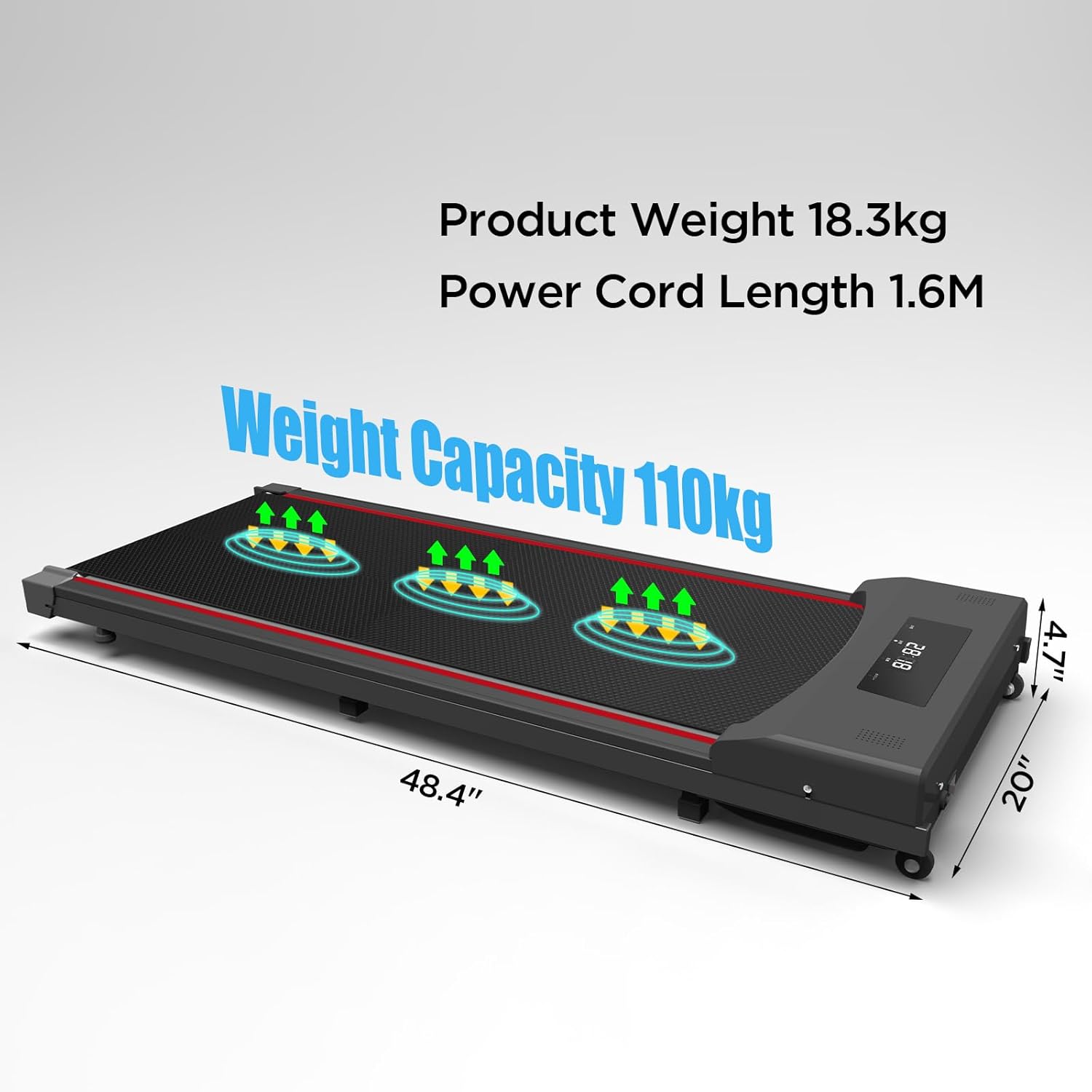
Image: An overhead view of the treadmill with key specifications overlaid: Product Weight 18.3kg, Power Cord Length 1.6M, Weight Capacity 110kg. Dimensions are shown as 48.4" length, 20" width, and 4.7" height.
| Feature | Detail |
|---|---|
| Model Number | CR-A1 |
| Product Dimensions (L x W x H) | 123 cm x 49 cm x 12.5 cm (48.4" x 20" x 4.9") |
| Item Weight | 22 kg (48.5 lbs) |
| Maximum Weight Recommendation | 110 kg (242 lbs) |
| Deck Length | 40 Inches (approx. 101.6 cm) |
| Frame Material | Alloy Steel |
| Material | Acrylonitrile Butadiene Styrene (ABS) |
| Display Type | LCD |
| Special Feature | Portable |
| Assembly Required | No |
11. Warranty and Customer Support
Tvdugim is committed to providing a positive customer experience and guarantees your satisfaction. For any questions, concerns, or assistance with your CR-A1 Under Desk Treadmill, please contact our customer support team.
Our support team is available to help you with troubleshooting, parts replacement, or any other inquiries you may have regarding your product.
Please refer to your purchase documentation or the official Tvdugim website for specific warranty terms and contact information.