
1. Product Overview
This manual provides instructions for the Rszfnjxry Fast Charge Hub and 2-pack batteries designed for the Insta360 X3 camera. This product offers efficient charging and convenient storage for your batteries and microSD cards.
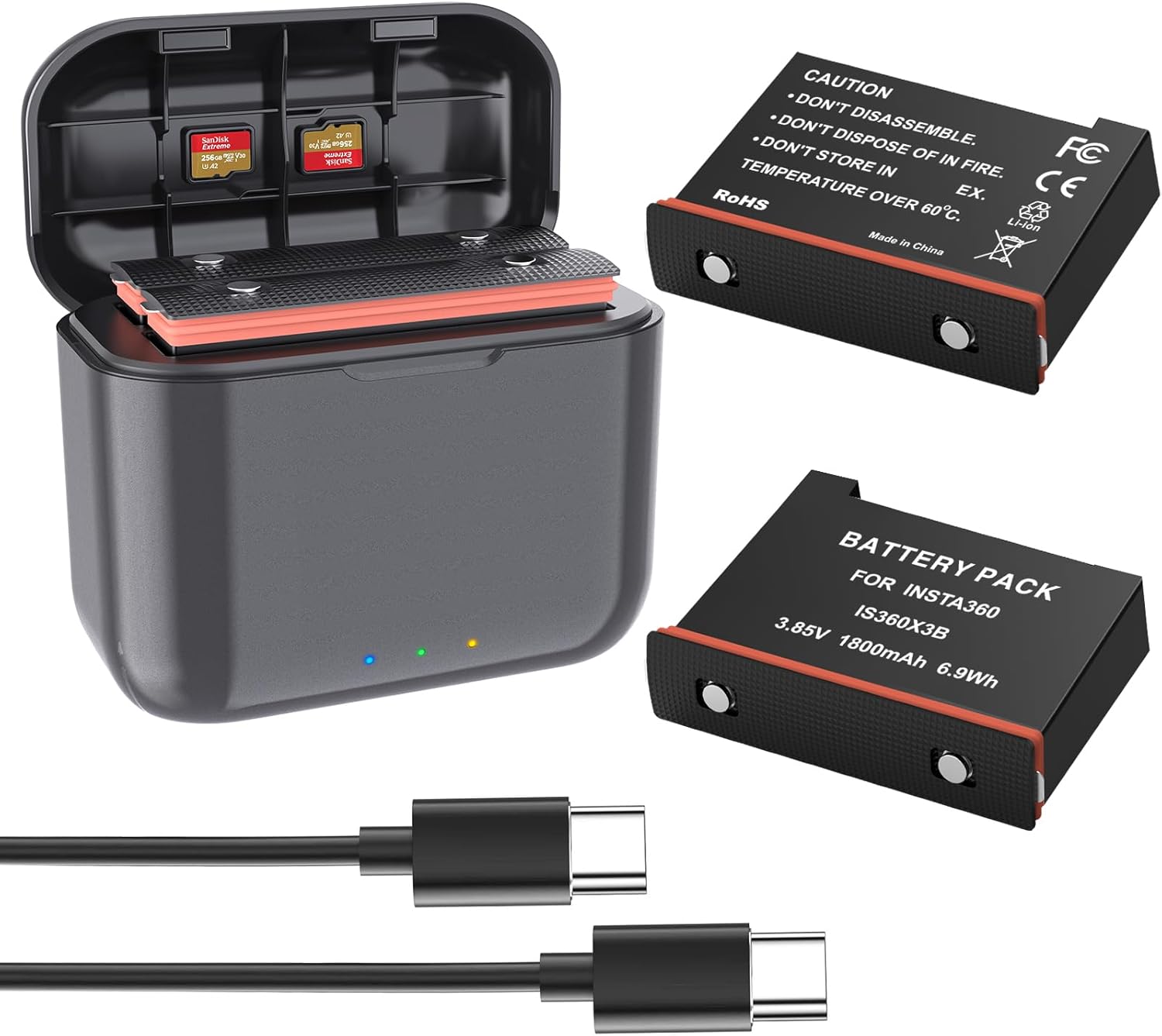
Image 1.1: The Rszfnjxry Fast Charge Hub, two Insta360 X3 compatible batteries, and a USB Type-C cable. The hub is open, showing slots for batteries and microSD cards.
Package Contents:
- 2 x Insta360 X3 Li-ion Batteries
- 1 x Insta360 X3 Fast Charger Hub
- 1 x USB Type-C Cable
2. Safety Information
Please read and understand all safety instructions before using this product. Failure to follow these instructions may result in electric shock, fire, or other hazards.
- Do not disassemble the batteries or the charging hub.
- Do not dispose of in fire.
- Do not store in temperatures over 60°C (140°F).
- Keep out of reach of children.
- Use only the provided USB Type-C cable or a certified equivalent.
- Avoid exposing the product to water or excessive moisture. A waterproof case is recommended for underwater shooting with the Insta360 X3 camera.
- The battery charger is equipped with safety protections against overcharging, short circuit, over temperature, over-current, and over-voltage.
Image 2.1: Detail of an Insta360 X3 battery showing printed safety warnings regarding disassembly, fire, and temperature limits.
3. Setup and Charging
3.1 Inserting Batteries and SD Cards
- Open the lid of the Fast Charge Hub.
- Insert up to two Insta360 X3 batteries into the designated slots. Ensure proper orientation.
- Optionally, insert up to two microSD cards into the dedicated storage slots within the hub.

Image 3.1: The Fast Charge Hub with batteries and microSD cards in their slots, positioned next to an Insta360 X3 camera, illustrating its compact size and multi-functionality.
3.2 Connecting for Charging
- Connect the supplied USB Type-C cable to the charging port on the Fast Charge Hub.
- Connect the other end of the USB Type-C cable to a power source. A 12V/2A power adapter is recommended for optimal fast charging. The hub supports PD3.0/PD2.0 fast charging protocols.

Image 3.2: The Fast Charge Hub illustrating its fast charging capabilities, reaching 80% charge in approximately 35 minutes and 100% in 75 minutes when using a 12V/2A PD3.0 power adapter.
Charging time may vary depending on the specifications of the power adapter used.

Image 3.3: The Fast Charge Hub can be powered by various USB Type-C sources such as laptops, power banks, car chargers, and wall adapters, supporting PD3.0/PD2.0 fast charging protocols.
4. Operating the Charger Hub
4.1 LED Indicator Guide
The Fast Charge Hub features intelligent LED indicators to display the charging status:
- Power Indicator (Blue Light):
- Blue Light on: Power is connected.
- Light off: Power is disconnected.
- Charging Light Indicator:
- Flashing Orange: Charging, battery level < 80%.
- Flashing Green: Charging, 80% ≤ battery level < 100%.
- Solid Green: Battery level = 100% (fully charged).
- Flashing Red: Malfunction.
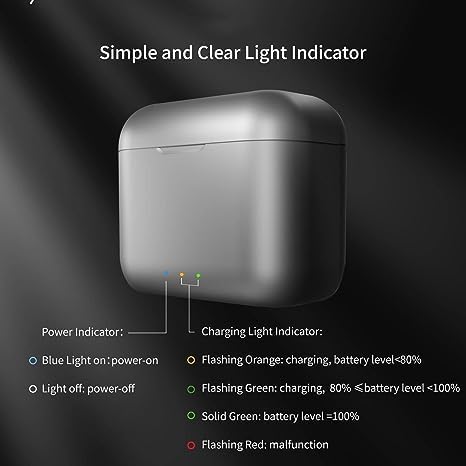
Image 4.1: A visual guide to the LED indicators on the Fast Charge Hub, detailing the meaning of blue, orange, green, and red light states for power and charging status.
5. Maintenance
- Keep the charging hub and batteries clean and dry. Use a soft, dry cloth for cleaning.
- Store the product in a cool, dry place away from direct sunlight and extreme temperatures.
- Avoid dropping or subjecting the product to strong impacts.
- If the product will not be used for an extended period, charge the batteries to approximately 50% before storage and recharge them every three months to maintain battery health.
6. Troubleshooting
6.1 Common Issues and Solutions
| Issue | Possible Cause | Solution |
|---|---|---|
| Charger not powering on (Blue light off) | No power supply or faulty cable. | Check USB Type-C cable connection. Try a different power adapter or USB port. |
| Batteries not charging (No charging light) | Batteries not inserted correctly or faulty. | Ensure batteries are fully seated. Try charging one battery at a time. If issue persists, battery may be faulty. |
| Flashing Red light indicator | Malfunction detected (e.g., over-temperature, short circuit). | Disconnect power, remove batteries, and allow the hub to cool down. Reinsert batteries and reconnect power. If the issue persists, discontinue use and contact support. |
| Slow charging | Low power output from adapter. | Use a power adapter that supports 12V/2A (PD3.0/PD2.0) for optimal fast charging. |
7. Specifications
| Feature | Detail |
|---|---|
| Product Dimensions (Hub) | 3.15 x 3.15 x 1.57 inches |
| Item Weight (Hub) | 6.4 ounces |
| Battery Type | Li-ion |
| Battery Rated Capacity | 1800mAh |
| Battery Rated Voltage | 3.85V |
| Battery Limited Charge Voltage | 4.40V |
| Battery Rated Power | 6.93Wh |
| Charger Input | 12V/2A (Recommended), 9V/2.22A, 5V/3A |
| Charger Output Voltage | 4.35V/2.5A |
| Charging Protocols Supported | PD3.0/PD2.0 |
| Approximate Charging Time (80%) | 35 minutes (with 12V/2A PD3.0 adapter) |
| Approximate Charging Time (100%) | 75 minutes (with 12V/2A PD3.0 adapter) |
| SD Card Storage Slots | 2 |
| Safety Certification | UL |
8. Warranty and Support
For warranty information and technical support, please refer to the manufacturer's official website or contact their customer service directly. The manufacturer is Rszfnjxry.
For additional support or inquiries, please visit the Rszfnjxry Store on Amazon.