
SKMEI 2091
SKMEI Analog Digital Retro Watch User Manual
Model: 2091
1. Introduction
Thank you for choosing the SKMEI Analog Digital Retro Watch, Model 2091. This user manual provides comprehensive instructions for setting up, operating, and maintaining your watch. Designed for durability and functionality, this watch combines classic analog display with modern digital features, making it suitable for various activities and daily wear.

Front view of the SKMEI Analog Digital Retro Watch.
2. Key Features
- Dual Time Display: Features both analog hands and a digital display for versatile timekeeping.
- Japanese Quartz Movement: Ensures accurate and precise timekeeping.
- EL Backlight: Provides clear visibility of the digital display in low-light conditions.
- Stopwatch Function: Ideal for timing activities and exercises.
- Daily Alarm: Set reminders for important events or to wake up.
- Calendar Function: Displays date and day of the week.
- Water Resistance: Rated 50 meters (164 feet), suitable for daily splashes, rain, and short periods of swimming. Not suitable for showering, hot water, or prolonged underwater activities. Do not press buttons underwater.
- Durable Construction: Features a soft polyurethane strap and a stainless steel back for comfort and longevity.
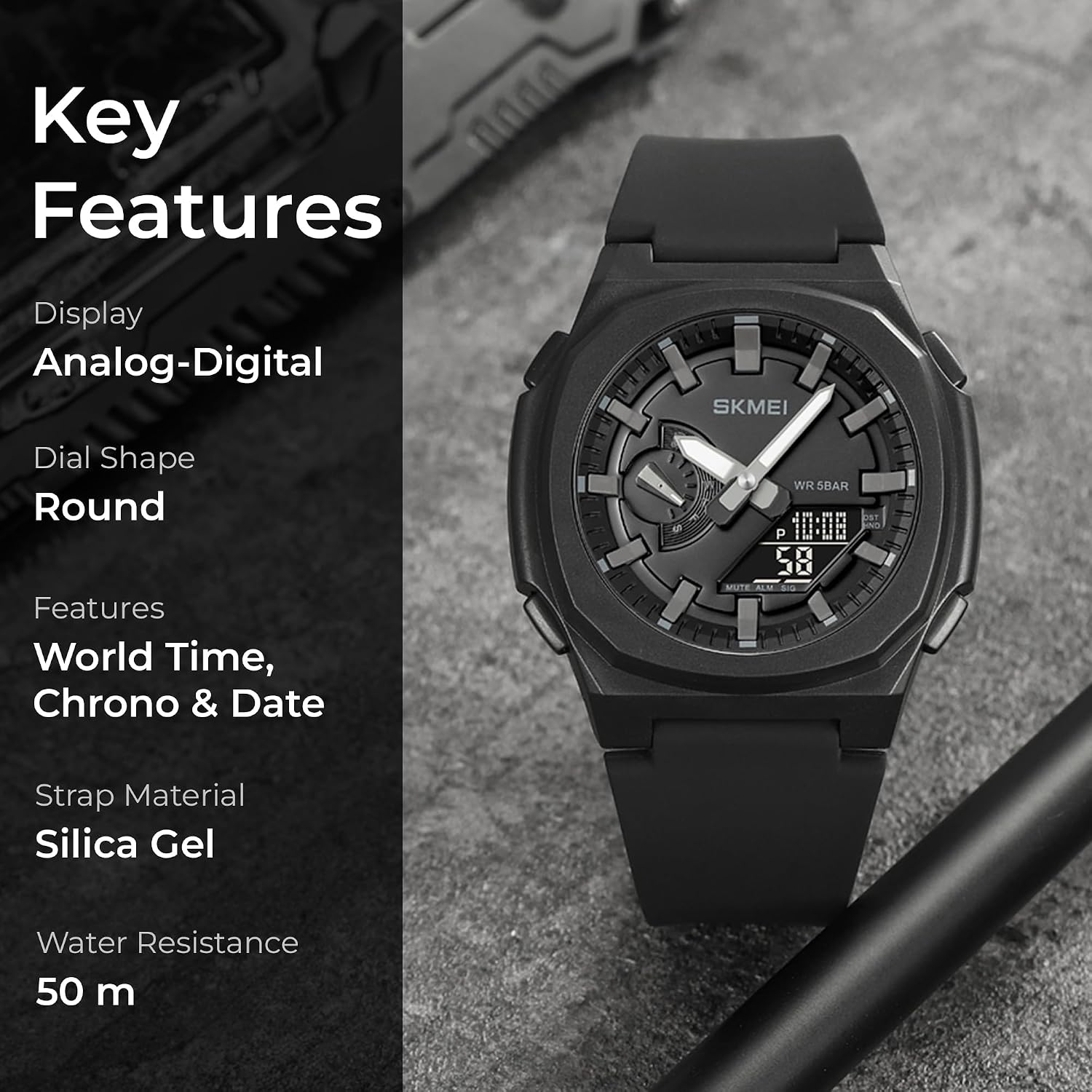
Visual representation of the watch's key features.
3. Setup
3.1 Initial Battery Activation
Your watch comes with a pre-installed C-type battery. If the digital display is not active upon first use, it may be in a power-saving mode or require a slight jolt. If the watch does not function, ensure the battery is properly seated. For battery replacement, professional service is recommended.
3.2 Setting Time and Date
The watch typically has 4 buttons: Mode (M), Light (L), Start/Stop (S), and Reset/Adjust (R). The exact button layout may vary, but the functions are standard.
- Enter Time Setting Mode: Press the Mode (M) button repeatedly until the time setting (e.g., flashing seconds) is displayed.
- Adjust Values: Use the Start/Stop (S) button to increase the flashing value (seconds, minutes, hours, date, month, day of week).
- Navigate Fields: Press the Reset/Adjust (R) button to move to the next setting field (e.g., from seconds to minutes).
- Exit Setting Mode: Once all settings are adjusted, press the Mode (M) button to return to the normal time display.
For analog time adjustment, typically a crown on the side of the watch is pulled out and rotated. Push it back in to start the analog movement.
4. Operating Instructions
4.1 Basic Time Display
In normal time mode, the watch displays the current time (digital and analog), day of the week, and date.
4.2 Using the Backlight
Press the Light (L) button to illuminate the digital display for a few seconds, allowing you to read the time in dark environments.
4.3 Stopwatch Function
- Press the Mode (M) button until the stopwatch mode is displayed (usually indicated by 'ST' or 'STOP').
- Press the Start/Stop (S) button to start timing.
- Press the Start/Stop (S) button again to pause timing.
- Press the Reset/Adjust (R) button to reset the stopwatch to zero.
4.4 Alarm Function
- Press the Mode (M) button until the alarm mode is displayed (usually indicated by 'AL' or 'ALARM').
- Press the Reset/Adjust (R) button to select the hour or minute to set. The selected digit will flash.
- Use the Start/Stop (S) button to adjust the hour or minute.
- Press the Mode (M) button to exit alarm setting mode.
- To activate/deactivate the alarm, typically press the Start/Stop (S) button while in alarm mode. An alarm icon will appear/disappear.
4.5 Dual Time Zone Display
This watch supports dual time display. Refer to the setting instructions to configure the second time zone if available, or simply use the digital display for a different time zone while the analog hands show the primary time.
5. Maintenance
5.1 Water Resistance Guidelines
Your SKMEI watch is water-resistant up to 50 meters (164 feet). This means it can withstand splashes, rain, and brief immersion in water, such as during hand washing or light swimming. Important:
- Do not press any buttons while the watch is submerged in water.
- Avoid exposure to hot water, steam, or extreme temperature changes (e.g., hot showers, saunas), as this can compromise the water seals.
- The watch is not designed for diving or high-pressure water activities.
5.2 Cleaning Your Watch
Wipe the watch case and strap regularly with a soft, damp cloth. For the polyurethane strap, mild soap and water can be used. Ensure the watch is completely dry before wearing it again. Avoid using harsh chemicals or abrasive materials, which can damage the watch's finish.
5.3 Battery Replacement
The watch uses a C-type battery. When the display dims or the watch stops functioning, it's time for a battery replacement. It is highly recommended to have the battery replaced by a qualified watch technician to ensure proper sealing and maintain water resistance.

Rear view of the watch, highlighting the stainless steel back and silica gel strap.
6. Troubleshooting
- Digital Display is Blank: Check if the battery needs replacement. If recently replaced, ensure it's inserted correctly.
- Time is Inaccurate: Re-set the time following the instructions in Section 3.2. If the issue persists, the battery may be low, or the movement might require service.
- Buttons Not Responding: Ensure the watch is not in a locked mode (if applicable, though not common for this model). Try pressing buttons firmly. If unresponsive, there might be internal damage or water ingress.
- Condensation Under Crystal: This indicates a breach in the water resistance. Stop using the watch immediately and seek professional repair to prevent further damage.
7. Specifications
| Feature | Detail |
|---|---|
| Model Number | 2091 |
| Brand | SKMEI |
| Movement | Japanese Quartz Digital |
| Water Resistance | 50 Meters (164 Feet) |
| Strap Material | Polyurethane (Silica Gel) |
| Case Material | Stainless Steel Back |
| Battery Type | 1 C (Included) |
| Product Dimensions | 25.5 x 4.57 x 1.4 cm |
| Product Weight | 49.7 grams |
| Department | Men |
| First Available Date | March 10, 2024 |
| ASIN | B0CDQQ5Q2Y |

Detailed dimensions of the watch.
8. Warranty and Support
Your SKMEI watch comes with a 12-month warranty from the date of purchase, covering manufacturing defects. Additionally, SKMEI is committed to providing lifetime customer service for this product.
For warranty claims, technical support, or any inquiries regarding your watch, please contact SKMEI customer service through the retailer where you purchased the product or visit the official SKMEI website for contact information.
Please retain your proof of purchase for warranty validation.
Ask a question about this manual
Ask about setup, troubleshooting, compatibility, parts, safety, or missing instructions. Manuals+ will review the question and use this page’s manual context to help answer it.