
1. Introduction
The OSIM uGlow PoreCare is a facial device designed for deep pore cleansing and impurity extraction. It features Softskin Vacuum Technology, a warm nose compress function, and LED aftercare pore solutions to address various skin concerns. This manual provides essential information for the safe and effective use of your device.
2. Product Components
The OSIM uGlow PoreCare device comes with several components to facilitate a comprehensive pore treatment:
- uGlow PoreCare Device: The main handheld unit with controls for suction levels, temperature, and LED light.
- 4 Interchangeable Suction Probes: Designed for different pore concerns and skin areas.
- LED Covers: For targeted light therapy.
- USB Charging Cable: For recharging the device.
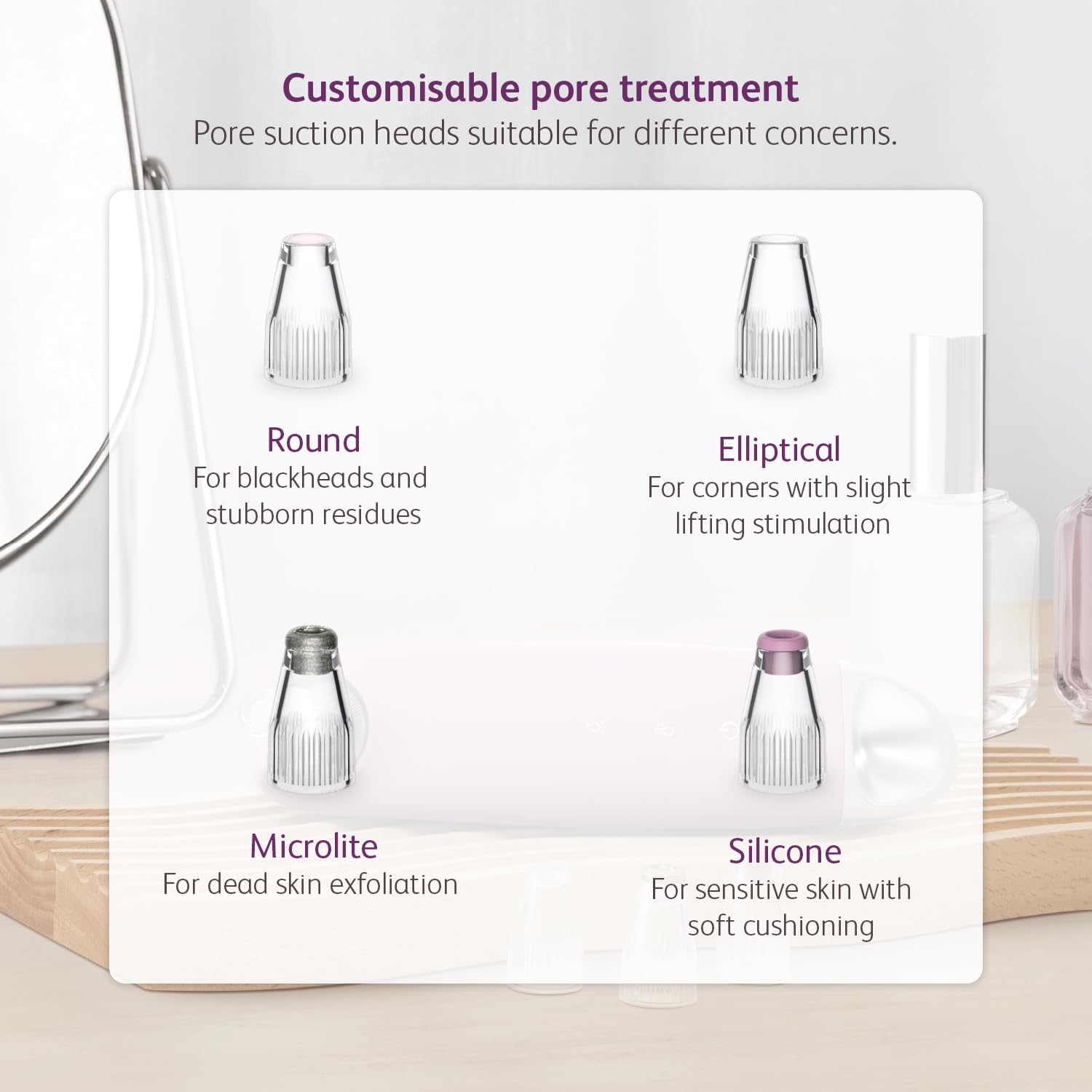
Image: The uGlow PoreCare device shown with its four distinct interchangeable suction heads, each designed for specific pore treatments.

Image: The uGlow PoreCare device highlighting its LED light therapy feature, with red, blue, and yellow LED covers.
3. Setup
3.1 Charging the Device
Before first use, fully charge the uGlow PoreCare device using the provided USB charging cable. Connect the cable to the charging socket on the device and a suitable USB power adapter (5V-1A recommended). The device's indicator lights will show charging status.
3.2 Attaching Suction Probes or LED Covers
Select the desired suction probe or LED cover based on your treatment needs. Gently twist and attach it to the head of the device until it is securely in place. Ensure a snug fit to maintain optimal suction or light contact.
4. Operating Instructions
4.1 Preparation: Warm Nose Compress
To prepare your skin for deep cleansing, use the adjustable warm nose compress function. This helps to open up pores and loosen accumulated debris, making extraction easier.
- Ensure the device is clean and charged.
- Activate the warm compress function (refer to device controls).
- Gently place the warm compress area of the device against your nose or other areas where pores need opening.
- Hold for a few minutes to allow pores to soften.

Image: Step 1 of pore cleansing, demonstrating the use of the adjustable warm nose compress to open pores.
4.2 Pore Extraction: Softskin Vacuum Technology
The device utilizes Softskin Vacuum Technology to gently extract impurities from your pores. It offers 5 adjustable suction levels to suit different skin types and needs.
- After using the warm compress, select an appropriate suction probe.
- Turn on the device and select the lowest suction strength (Level 1) initially.
- Place the probe flat against your skin and move it in one continuous direction.
- Important: Do not keep the device in the same spot for more than 3 seconds to avoid skin irritation or bruising.
- Adjust the suction level as needed, increasing gradually if your skin tolerates it.
- Focus on areas with blackheads, whiteheads, and other impurities.

Image: Visual representation of the vacuum technology at work, extracting pore impurities.
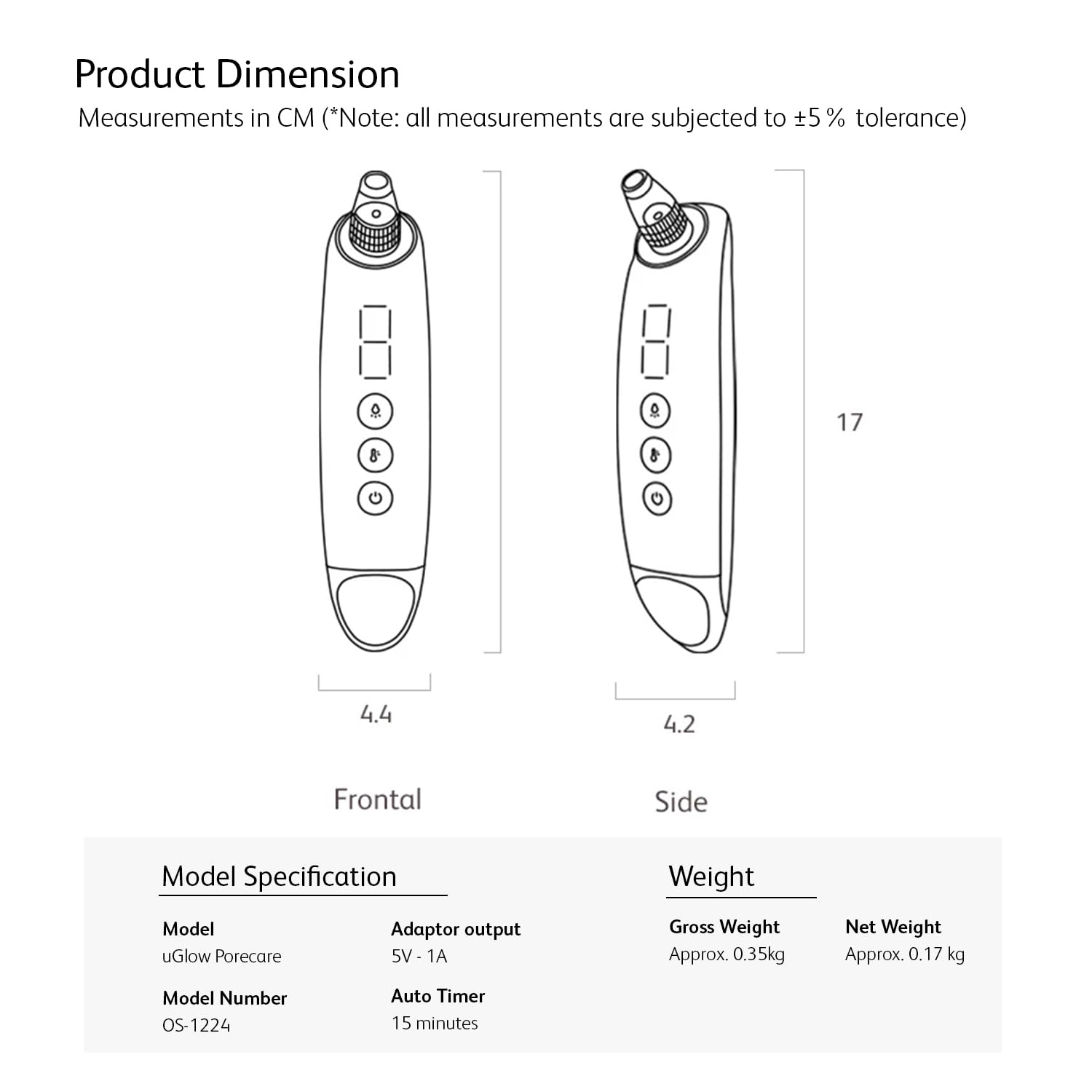
Image: Diagram explaining Softskin Vacuum Technology, showing deep cleansing to minimize pore congestion with 5 adjustable suction levels.
4.3 LED Aftercare Pore Solution
After extraction, use the LED aftercare pore solution to treat and improve various pore concerns with 3 spectrums of light. Attach the appropriate LED cover to the device.
- Red LED: Helps regenerate cell production for pore recovery.
- Blue LED: Soothes the skin and helps clear up inflammation around pores.
- Yellow LED: Reduces skin pigments and brightens dark spots.

Image: The device in use, demonstrating the LED aftercare pore solution with descriptions for Red, Blue, and Yellow light benefits.
4.4 Interchangeable Suction Heads
The uGlow PoreCare includes four distinct suction heads, each designed for specific pore treatments:
- Round: Ideal for blackheads and stubborn residues.
- Elliptical: Suitable for corners and provides slight lifting stimulation.
- Microlite: Used for dead skin exfoliation.
- Silicone: Designed for sensitive skin with soft cushioning.

Image: A display of the four customisable pore treatment suction heads and their recommended uses.
5. Maintenance
5.1 Cleaning the Device and Probes
Regular cleaning ensures hygiene and optimal performance.
- After each use, detach the suction probe or LED cover.
- Rinse the probe/cover under running water and clean with a mild soap.
- Wipe the main device body with a soft, damp cloth. Do not immerse the main unit in water.
- Ensure all parts are completely dry before reattaching or storing.
5.2 Storage
Store the device and its accessories in a cool, dry place, away from direct sunlight and extreme temperatures. Keep out of reach of children.
6. Troubleshooting
If you encounter issues with your OSIM uGlow PoreCare, refer to the following common problems and solutions:
| Problem | Possible Cause | Solution |
|---|---|---|
| Device does not turn on | Low battery; Device malfunction | Charge the device fully; Contact customer support if issue persists. |
| Weak or no suction | Probe not attached correctly; Blockage in the suction head; Low battery | Ensure probe is securely attached; Clean the suction head; Charge the device. |
| LED light not working | LED cover not attached correctly; Device malfunction | Ensure LED cover is securely attached; Contact customer support if issue persists. |
| Skin redness or bruising | Suction level too high; Device held in one spot for too long | Reduce suction level; Keep the device moving continuously; Do not exceed 3 seconds in one spot. |
7. Specifications
Detailed specifications for the OSIM uGlow PoreCare device:
| Feature | Detail |
|---|---|
| Model | uGlow PoreCare |
| Model Number | OS-1224 |
| Adaptor Output | 5V - 1A |
| Auto Timer | 15 minutes |
| Gross Weight | Approx. 0.35 kg |
| Net Weight | Approx. 0.17 kg |
| Product Dimensions (LxWxH) | 17 x 4.4 x 17 cm |
Note: All measurements are subject to ±5% tolerance.

Image: Product dimensions and model specifications for the uGlow PoreCare device.
8. Warranty and Support
The OSIM uGlow PoreCare device comes with a 6-month warranty from the date of purchase. This warranty covers manufacturing defects under normal use conditions.
For warranty claims, technical support, or any other inquiries, please refer to the contact information provided with your purchase or visit the official OSIM website. Please retain your proof of purchase for warranty validation.
9. Official Product Video
Watch the official product video for a visual guide on how to use the OSIM uGlow PoreCare device effectively.
Video: An official demonstration of the OSIM uGlow PoreCare, showcasing its features and usage steps for effective pore cleansing and aftercare.