
1. Introduction
This manual provides essential information for the proper installation, operation, and maintenance of the BAYDE 1794-TB32 Flex I/O Terminal Block. This product is designed for use with Allen-Bradley Flex I/O systems, facilitating reliable electrical connections in industrial environments. Please read this manual thoroughly before using the product to ensure safe and efficient operation.
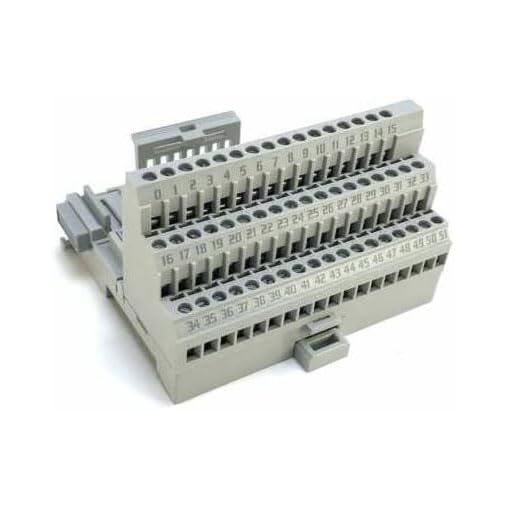
Figure 1: Front view of the 1794-TB32 Flex I/O Terminal Block, showing the screw terminals and module interface.
2. Setup and Installation
The 1794-TB32 terminal block is designed for easy integration into existing Flex I/O systems. Follow these steps for proper setup:
- Mounting: Securely mount the terminal block onto a DIN rail. Ensure it clicks firmly into place.
- Module Connection: Align the Flex I/O module with the terminal block and gently push it down until it seats correctly. Ensure the module is fully engaged with the electrical connectors on the terminal block.
- Wiring: Connect your field devices and control wiring to the appropriate screw terminals. Refer to your system's wiring diagrams for specific connections. Use appropriate wire gauges for the current requirements.
- Verification: Before applying power, double-check all connections for proper polarity and secure fastening. Loose connections can lead to system malfunctions or damage.

Figure 2: Product packaging, indicating factory seal and important handling information. Note the attention sticker regarding debris prevention during mounting.
3. Operating Principles
The 1794-TB32 terminal block serves as the physical interface between the Flex I/O module and the field wiring. It provides 32 screw terminals for connecting input/output signals. Once installed and wired correctly, the terminal block facilitates the reliable transmission of signals to and from the Flex I/O module, enabling the control and monitoring of industrial processes.
- Ensure all wiring is done with power disconnected from the system.
- Tighten screw terminals to the recommended torque specifications to prevent loose connections.
- Verify correct signal routing according to your application's design.
4. Maintenance
Regular maintenance helps ensure the longevity and reliable performance of the 1794-TB32 terminal block.
- Inspection: Periodically inspect the terminal block for any signs of physical damage, corrosion, or loose connections.
- Cleaning: Keep the terminal block free from dust, dirt, and moisture. Use a soft, dry cloth for cleaning. Avoid using solvents or abrasive cleaners.
- Re-tightening: Over time, screw terminals can loosen due to vibration or thermal cycling. Periodically re-tighten all screw connections to ensure optimal contact.
- Environment: Ensure the operating environment remains within the specified temperature and humidity ranges to prevent premature wear.
5. Troubleshooting
If you encounter issues with your 1794-TB32 terminal block, consider the following common troubleshooting steps:
- No Signal/Intermittent Signal:
- Check all wiring connections for tightness and correct termination.
- Verify that the Flex I/O module is securely seated on the terminal block.
- Inspect wires for damage or breaks.
- Physical Damage:
- If the terminal block is physically damaged (e.g., cracked housing, bent pins), it may need replacement.
- System Errors:
- Consult the documentation for your specific Flex I/O module and controller for error codes and diagnostic procedures.
For issues not resolved by these steps, please contact technical support.
6. Specifications
Key specifications for the BAYDE 1794-TB32 Flex I/O Terminal Block:
| Attribute | Value |
|---|---|
| Model No. | 1794-TB32 |
| Brand | BAYDE |
| Connector Type | Screw |
| ASIN | B0CDQ1661K |
| UPC | 614160207027 |
| Manufacturer | BAYDE |
| Date First Available | May 6, 2023 |

Figure 3: Close-up view of the product label, showing model number, serial number (e.g., 10612598281227), and manufacturing details.
7. Warranty and Support
BAYDE ensures the quality of its products. The 1794-TB32 Flex I/O Terminal Block is an original new product, produced by the brand's original factory, ensuring high standards of quality and reliability.
For any inquiries, technical assistance, or support regarding this product, please contact the seller directly. Fast and safe service is a main consideration to ensure a good shopping experience for buyers. If you have other model requirements or need further consultation on PLC/AC Drive/Industry Panel/Module Accessories, please reach out to the seller.
Seller: Yunteng Industry