
Introduction
This manual provides comprehensive instructions for the VINABTY RC1210-A infrared replacement remote control. Designed as a direct replacement for various Medion TV models, this remote offers immediate functionality without the need for complex programming or pairing procedures. Simply insert batteries, and it is ready for use.
The VINABTY RC1210-A is compatible with Medion models including, but not limited to: MSN40032267, MD20076, MD30234, MD30267, MD30272, MD30276, MD30281, MD30325, MD202588, MD30023, MD30025, MD30116, 1D30148, MD30178, and MD30190.
Setup
Battery Installation
- Locate the battery compartment on the back of the remote control.
- Slide open the battery compartment cover.
- Insert two new AAA alkaline batteries, ensuring the positive (+) and negative (-) terminals match the diagrams inside the compartment.
- Close the battery compartment cover securely.
No programming or pairing is required. The remote control is ready for use immediately after battery installation.
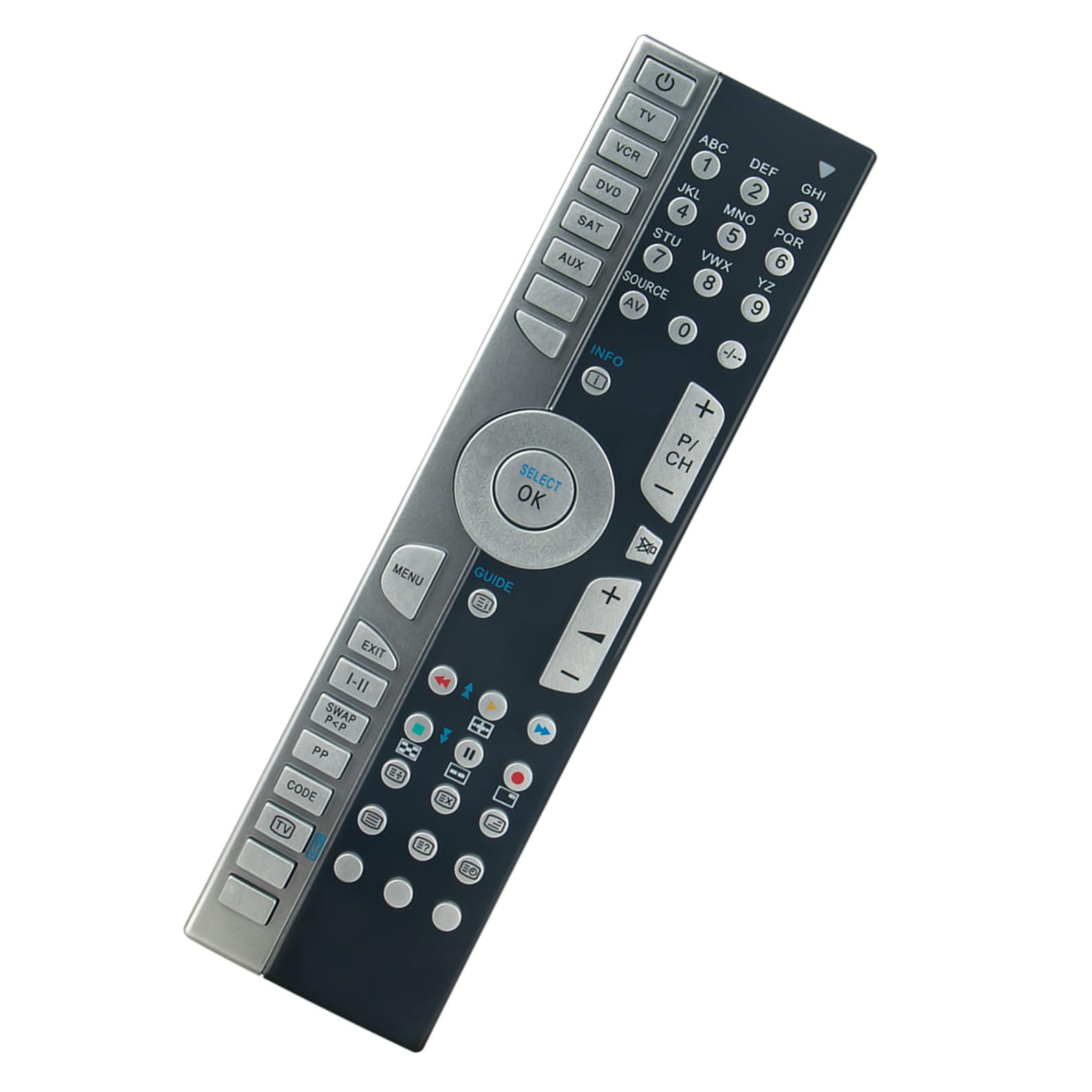
Image: Front view of the VINABTY RC1210-A remote control, showing all buttons and layout.
Operating Instructions
The VINABTY RC1210-A is an infrared remote control designed for intuitive operation of your compatible Medion television. Point the remote directly at your TV's infrared receiver for optimal performance.
Basic Functions
- Power Button (U): Turns the TV on or off.
- Number Buttons (0-9): Directly select channels.
- Volume Up/Down (+/-): Adjusts the sound volume.
- Channel Up/Down (P/CH +/-): Changes channels sequentially.
- Mute Button (X): Mutes or unmutes the TV sound.
- Source/Input (SOURCE/AV): Cycles through available input sources (HDMI, AV, etc.).
- Menu Button (MENU): Accesses the TV's main menu.
- Navigation Buttons (Up, Down, Left, Right, OK/SELECT): Used to navigate through menus and confirm selections.
- Exit Button (EXIT): Exits the current menu or function.
- Info Button (INFO): Displays information about the current program or input.
- Guide Button (GUIDE): Opens the electronic program guide (if supported by your TV).
For specific functions related to DVD, VCR, SAT, or AUX buttons, ensure your Medion TV model supports these functionalities via the remote control.

Image: Angled view of the VINABTY RC1210-A remote control, highlighting its ergonomic design.
Maintenance
To ensure the longevity and optimal performance of your VINABTY RC1210-A remote control, follow these maintenance guidelines:
- Cleaning: Wipe the remote control regularly with a soft, dry cloth. For stubborn dirt, slightly dampen the cloth with water or a mild cleaning solution, then wipe dry immediately. Avoid using abrasive cleaners or solvents.
- Battery Replacement: Replace batteries promptly when the remote's responsiveness decreases or it stops functioning. Always replace both batteries at the same time with new ones of the same type (AAA alkaline).
- Storage: Store the remote control in a cool, dry place away from direct sunlight, extreme temperatures, and high humidity.
- Avoid Drops: Protect the remote from physical impact, as drops can damage internal components.
Troubleshooting
If you encounter issues with your VINABTY RC1210-A remote control, refer to the following troubleshooting steps:
- Remote Not Responding:
- Check if the batteries are inserted correctly with the correct polarity (+/-).
- Replace the batteries with new AAA alkaline batteries.
- Ensure there are no obstructions between the remote control and the TV's infrared receiver.
- Make sure you are within the maximum operating range (approximately 10 meters) and pointing the remote directly at the TV.
- Specific Buttons Not Working:
- Clean the remote control, especially around the non-functioning buttons, to remove any dirt or debris that might be preventing proper contact.
- If only certain advanced functions are not working, verify that your specific Medion TV model supports those functions with a universal or replacement remote.
- Interference:
- Other electronic devices or strong light sources (like direct sunlight or certain types of fluorescent lights) can sometimes interfere with infrared signals. Try operating the remote in a different environment or adjusting lighting conditions.
If the issue persists after following these steps, please contact customer support.
Specifications
| Feature | Specification |
|---|---|
| Model Number | RC1210-A |
| Brand | VINABTY |
| Connectivity Technology | Infrared (IR) |
| Compatible Devices | Television (Medion models) |
| Number of Buttons | 46 |
| Controller Type | Button Control |
| Maximum Range | 10 Meters |
| Battery Type | AAA Alkaline (2 required) |
| Product Dimensions (L x W x H) | 15 cm x 8 cm x 0.8 cm |
Warranty and Support
This VINABTY remote control has been tested before shipment to ensure quality and functionality. As a replacement remote, it is designed for straightforward operation without complex setup.
If you have any questions, require assistance, or encounter issues that cannot be resolved using the troubleshooting guide, please do not hesitate to contact VINABTY customer support. Please refer to your purchase documentation for specific warranty details and contact information.