
1. Introduction
Thank you for choosing the T-LOVENDO.ES Professional Ergonomic Gaming Chair. This manual provides essential information for the proper assembly, operation, and maintenance of your new chair. Designed for comfort and support during extended periods of use, this chair features a breathable and stain-resistant fabric, adjustable armrests, a headrest, and a lumbar cushion. Its adjustable height and reclining backrest ensure optimal ergonomic positioning for both adults and children, making it ideal for gaming, office work, or relaxation.
Please read this manual thoroughly before assembly and use to ensure safe and efficient operation. Keep this manual for future reference.

Image: Front view of the T-LOVENDO.ES Professional Ergonomic Gaming Chair in black and blue, showcasing its ergonomic design and color scheme.
2. Safety Information
To prevent injury or damage to the chair, please observe the following safety precautions:
- Ensure all components are securely fastened before use. Periodically check and tighten all screws and bolts.
- Do not stand on the chair.
- Do not use the chair as a step stool.
- Do not exceed the maximum weight recommendation of 150 kg (330 lbs).
- Keep children away from moving parts during adjustment.
- Avoid exposing the chair to direct sunlight or extreme temperatures, as this may damage the fabric and materials.
- Use the chair on a flat, stable surface to prevent tipping.
3. Package Contents
Before assembly, verify that all parts are present and undamaged. If any parts are missing or damaged, please contact customer support.
| Part | Quantity | Description |
|---|---|---|
| Backrest | 1 | Main back support with integrated frame. |
| Seat Base | 1 | Cushioned seat with attachment points. |
| Armrests | 2 | Left and right armrests. |
| Gas Lift Cylinder | 1 | For height adjustment. |
| Star Base | 1 | Five-point base for stability. |
| Casters (Wheels) | 5 | Smooth-rolling wheels. |
| Mechanism Plate | 1 | Under-seat mechanism for tilt and height. |
| Headrest Cushion | 1 | Adjustable cushion for neck support. |
| Lumbar Cushion | 1 | Adjustable cushion for lower back support. |
| Hardware Kit | 1 | Screws, bolts, washers, Allen key. |
4. Assembly Instructions
Follow these steps carefully to assemble your gaming chair. It is recommended to have a second person assist with some steps.
- Attach Casters to Star Base: Insert each of the five casters into the holes at the end of each leg of the star base. Push firmly until they click into place.
- Insert Gas Lift into Star Base: Place the gas lift cylinder into the center hole of the assembled star base. Ensure it is seated firmly.
- Attach Mechanism Plate to Seat Base: Align the mechanism plate with the pre-drilled holes on the underside of the seat base. Ensure the front of the mechanism faces the front of the seat. Secure with the provided screws using the Allen key.
- Attach Armrests to Seat Base: Attach the armrests to the sides of the seat base using the designated screws. Do not fully tighten yet.
- Attach Backrest to Seat Base and Armrests: Align the backrest with the metal brackets on the seat base and the armrests. Secure the backrest to the seat base brackets and then to the armrests using the remaining screws. Once all screws are in place, tighten all armrest and backrest screws firmly.
- Connect Seat Assembly to Gas Lift: Carefully place the assembled seat and backrest onto the gas lift cylinder, ensuring the center hole of the mechanism plate aligns with the top of the gas lift. Press down firmly to secure.
- Attach Cushions: Attach the headrest cushion to the top of the backrest using its straps. Attach the lumbar cushion to the lower back area of the backrest using its straps. Adjust their positions for optimal comfort.
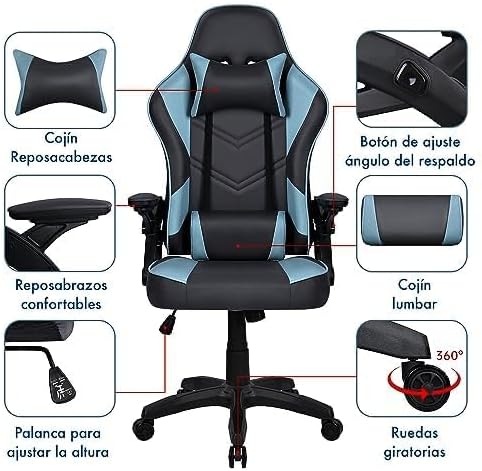
Image: Detailed diagram illustrating the key components and adjustable features of the gaming chair, including the headrest cushion, lumbar cushion, comfortable armrests, backrest angle adjustment button, height adjustment lever, and swivel wheels.
5. Operating Instructions
Your T-LOVENDO.ES gaming chair offers several adjustment features to customize your seating experience:
- Height Adjustment: To raise the seat, lift the lever located on the right side of the seat while taking your weight off the chair. To lower the seat, lift the lever while seated. Release the lever at the desired height.
- Backrest Recline: To recline the backrest, press the buttons on both sides of the chair, near the armrests. Lean back to the desired angle and release the buttons to lock the position. To return to an upright position, press the buttons and lean forward.
- Lumbar and Headrest Cushion Adjustment: The lumbar and headrest cushions are attached with adjustable straps. Slide them up or down to find the most comfortable position for your lower back and neck.
- Armrests: The armrests are fixed for stability and comfort.
- Swivel Function: The chair can rotate 360 degrees for easy movement and access.

Image: The gaming chair positioned in a modern office environment, demonstrating its suitability for both gaming and professional use.
6. Maintenance
Regular maintenance will prolong the life and appearance of your chair:
- Cleaning: The breathable nylon fabric is designed to be easily washable. For general cleaning, wipe the chair with a damp cloth and mild soap. Avoid harsh chemicals or abrasive cleaners. For stubborn stains, a fabric cleaner suitable for nylon can be used, following the product's instructions.
- Hardware Check: Periodically check all screws and bolts to ensure they are tight. Re-tighten if necessary to maintain stability and safety.
- Caster Care: Keep the casters clean from hair and debris to ensure smooth rolling.
- Avoid Direct Sunlight: Prolonged exposure to direct sunlight can cause the fabric to fade or degrade.
7. Troubleshooting
If you encounter any issues with your chair, refer to the following common problems and solutions:
- Chair Sinks or Does Not Hold Height:
- Ensure the gas lift lever is fully engaged.
- The gas lift cylinder may be faulty. Contact customer support for a replacement.
- Chair Wobbles or is Unstable:
- Check all assembly screws and bolts, especially those connecting the backrest, seat, and armrests. Tighten any loose connections.
- Ensure the star base is properly seated on the gas lift.
- Casters Do Not Roll Smoothly:
- Remove any hair, dust, or debris wrapped around the caster wheels.
- Ensure casters are fully inserted into the star base.
- Backrest Does Not Recline or Lock:
- Ensure the recline buttons are fully pressed and released.
- Check for any obstructions in the recline mechanism.
If the problem persists after attempting these solutions, please contact T-LOVENDO.ES customer support.
8. Specifications
| Feature | Detail |
|---|---|
| Model Number | TLV-5925-BLUE |
| Brand | T-LOVENDO.ES |
| Color | Black - Blue |
| Product Dimensions | 66 cm (L) x 66 cm (W) x 122 cm (H) |
| Product Weight | 17 kg |
| Maximum Weight Recommendation | 150 Kilograms |
| Special Features | Foldable Armrests, Adjustable Height, Reclining Backrest, Lumbar Cushion, Headrest Cushion |
| Recommended Uses | Reading, Gaming, Relaxation, Office |
| Material | Breathable Nylon Fabric |
| Country of Origin | China |

Image: Dimensional drawing of the gaming chair, indicating a height of 122cm and a base width/depth of 66cm.
9. Warranty and Support
T-LOVENDO.ES products are manufactured to high-quality standards. For information regarding warranty coverage and customer support, please refer to the purchase documentation or visit the official T-LOVENDO.ES store on Amazon:
When contacting support, please have your model number (TLV-5925-BLUE) and purchase date ready.


