
1. Introduction
This manual provides detailed instructions for the installation, operation, and maintenance of your REEPLAR AC03P9 Control Board. This digital thermostat control board is designed to enhance the temperature management of compatible Pit Boss wood pellet grills and smokers, featuring an LCD display for clear monitoring and precise control.
Please read this manual thoroughly before installation and operation to ensure safe and efficient use of the product.
2. Safety Information
- Always unplug the grill from the power source before attempting any installation, maintenance, or repair.
- Exercise caution when handling electrical components and wires. Ensure all connections are secure and correctly matched.
- Keep hands and tools clear of moving parts, such as the auger motor and fan, during operation.
- Do not operate the control board if any wires are frayed, damaged, or exposed.
- This control board is not compatible with vertical smokers and does not feature Wi-Fi functionality.
3. Package Contents
Verify that all items are present in your package:
- 1 x REEPLAR AC03P9 Control Board with LCD Display
- Necessary wiring harnesses (pre-attached to the control board)
- Mounting screws (if applicable)
Note: Meat temperature probes are not included with this control board.
4. Specifications
| Feature | Description |
|---|---|
| Brand | REEPLAR |
| Model Name | Digital Thermostat Control Board |
| Product Dimensions | 8.39"D x 2.76"W x 1.97"H |
| Controller Type | Push Button |
| Special Feature | Temperature Display |
| Color | Black |
| Specific Uses For Product | Grill Accessories |
| Temperature Control Type | Heating |
| Connectivity Technology | Wired |
| Included Components | Square Thermostat Controller Board |
| Power Source | Corded Electric |
| Item Weight | 0.55 Pounds (8.8 ounces) |
| Voltage | 120 Volts |
| Material | Plastic |
| Shape | Square |
| Display Type | LCD |
| Control Type | Button Control |
| Control Method | Touch |
| Connectivity Protocol | NO WI-FI |
| Mounting Type | Surface Mount |
| Style | Modern |
| Backlight | Yes |
5. Compatibility
The REEPLAR AC03P9 Control Board is compatible with the following Pit Boss Wood Pellet Grill/Smoker models:
- Pit Boss 1100PS1
- Pit Boss PB820
- Pit Boss Pro 1100
- Pit Boss 550 Navigator
- Pit Boss PB440D2
- Pit Boss PB1150G
- Pit Boss PB850G
- Pit Boss PB550G
Please note: This control panel is not compatible with vertical smokers and does not include Wi-Fi functionality.
6. Installation Instructions
Replacing your control board is a straightforward process. Follow these steps carefully:
- Unplug the Grill: Ensure the grill is completely unplugged from the power source before beginning.
- Access the Control Panel: Locate and remove the service door or panel that covers the existing control board. This typically involves unscrewing a few screws.
- Disconnect Old Wires: Carefully disconnect the wires from the old control board. Note the color coding and position of each wire for re-connection. The wires are typically connected to the fan, auger motor, ignition rod, and AC power.
- Remove Old Control Board: Unclip or unscrew the old control board from its housing.
- Install New Control Board: Place the new REEPLAR AC03P9 Control Board into the housing, ensuring it snaps securely into place.
- Connect New Wires: Connect the four wires from the grill to the corresponding colored connectors on the new control board. Match yellow to fan, red to motor, purple to ignition rod, and black to AC.
- Secure Panel: Reattach the service door or panel.
Visual Aids for Installation:
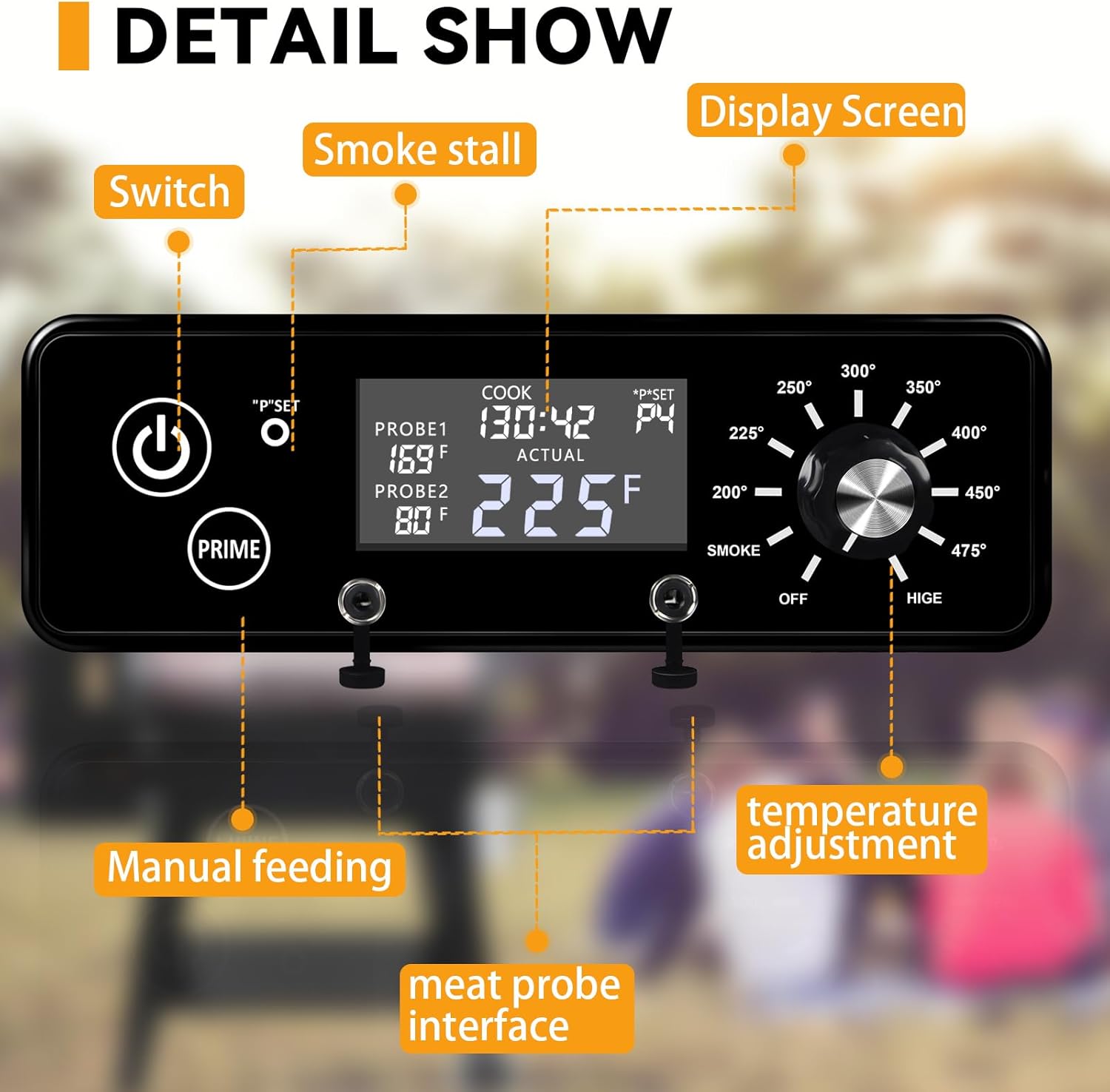
Image: Detailed wiring instructions showing connections for fan (yellow), motor (red), ignition rod (purple), and AC (black).

Image: View of the control board's internal components and connected wiring harnesses.
Installation Video Guides:
Video: Detailed guide on how to replace the controller, including screw removal and wire disconnection. (Source: MARS CAMP Directly)
Video: Step-by-step instructions on replacing the control board on a Pit Boss grill. (Source: Flame Engine)
Video: Guide on how to replace the RTD temperature probe, an essential component of the grill's temperature system. (Source: MARS CAMP Directly)
7. Operating Instructions
The AC03P9 Control Board provides intuitive controls for your grilling experience:
- LCD Digital Display: The clear LCD screen shows current and set temperatures, allowing for easy monitoring.
- Temperature Adjustment Dial: Rotate the dial to select your desired cooking temperature, ranging from 200°F to 475°F, including a dedicated smoke mode.
- "P" Setting (Smoke Mode): Adjust the smoking pattern by setting "P" to control pellet feeding frequency for desired smoke intensity.
- Prime Button (Manual Pellet Feeding): Press and hold the "Prime" button to activate an extra feed of pellets to the burn pot, useful for initial startup or increasing temperature quickly.
- Dual Probe Ports: The control board features two ports for meat probes (probes not included) to monitor internal food temperatures.
Visual Aids for Operation:
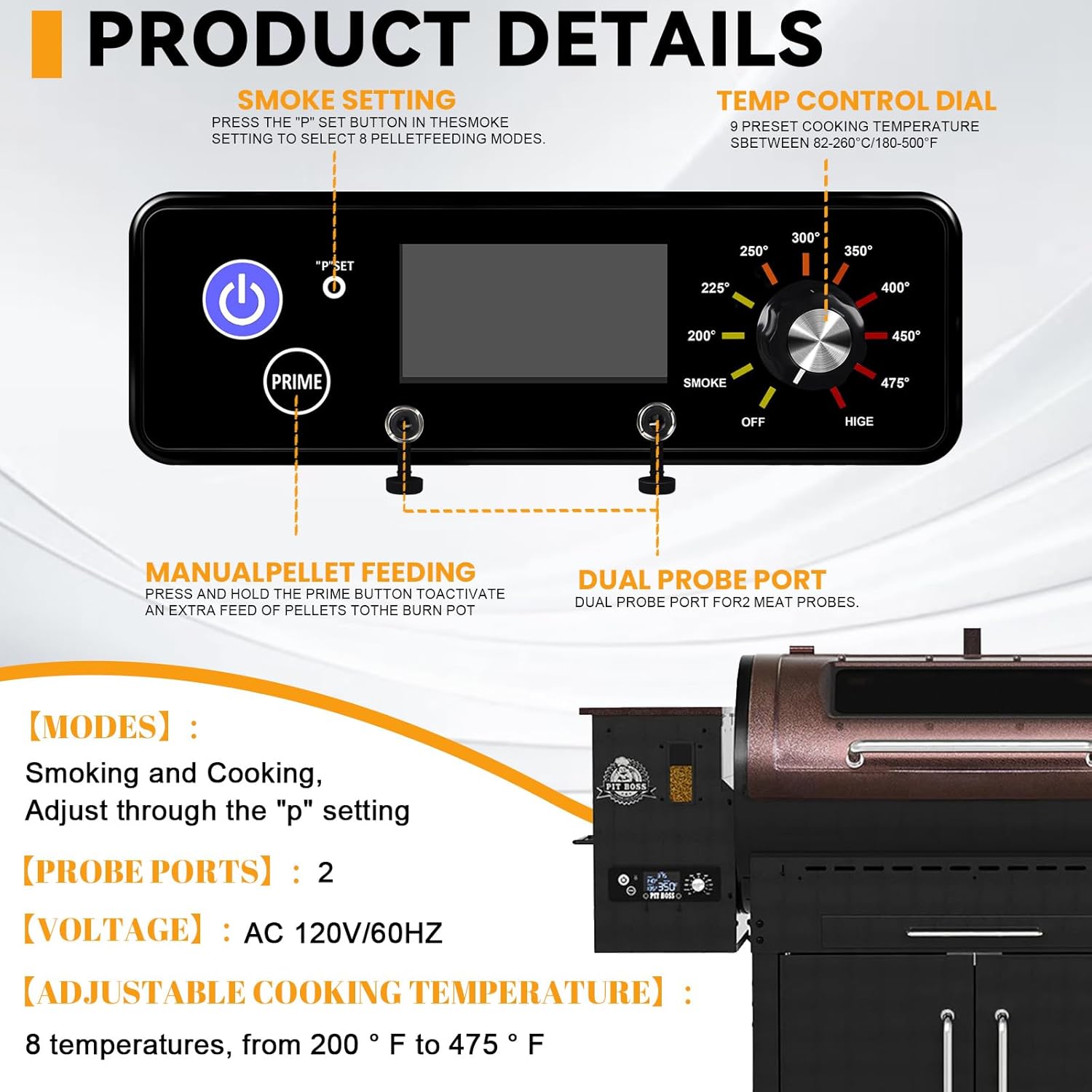
Image: Product details highlighting the smoke setting, temperature control dial, manual pellet feeding button, and dual probe ports.

Image: Close-up showing the display screen, power switch, P-set button, Prime button, temperature adjustment dial, and meat probe interfaces.
Operation Video Guides:
Video: Demonstrates how to use the new version of the controller kit, covering basic functions and settings. (Source: SROKIO)
Video: Explains the Controller PID Preset function for fine-tuning temperature control. (Source: lakey store)
8. Maintenance
To ensure the longevity and optimal performance of your control board:
- Keep the control panel clean and free from grease, dust, and debris. Use a soft, damp cloth for cleaning.
- Regularly inspect all wiring connections to ensure they remain secure.
- Avoid exposing the control board to extreme weather conditions or direct water spray.
- Store the grill in a dry, protected area when not in use.
9. Troubleshooting
If you encounter issues with your control board, consider the following:
- No Power/Display: Ensure the grill is properly plugged into a functioning power outlet. Check all wiring connections to the control board.
- Inaccurate Temperature Readings: Verify that the RTD temperature probe is correctly installed and connected. Ensure the probe is clean and free from buildup.
- Temperature Fluctuations: While the control board aims for precise temperature, some minor fluctuations are normal. If fluctuations are significant or persistent, check for proper pellet feeding and fan operation.
- Pellet Feeding Issues: If pellets are not feeding or feeding excessively, check the auger motor connection and the "P" setting.
For persistent issues, contact customer support.
10. Warranty and Support
While specific warranty details are not provided in the product information, some users have reported a 30-day warranty period. Please refer to the product packaging or contact the manufacturer, REEPLAR, directly for official warranty terms and customer support.
For technical assistance or inquiries, please visit the REEPLAR official website or contact their customer service department.


