
1. Introduction
Thank you for choosing the MAGIC-REFINER M71 75% CNC Aluminum Alloy Custom Wireless Gaming Keyboard. This manual provides detailed instructions for setting up, operating, maintaining, and troubleshooting your new keyboard. Please read this manual thoroughly to ensure optimal performance and longevity of your device.
2. Product Features
2.1. Triple Mode Wireless Connectivity
The M71 keyboard offers versatile connectivity options, supporting Bluetooth, 2.4G wireless, and traditional wired connections. This allows seamless switching between up to three different wireless devices, making it ideal for multi-device office setups and various gaming scenarios.
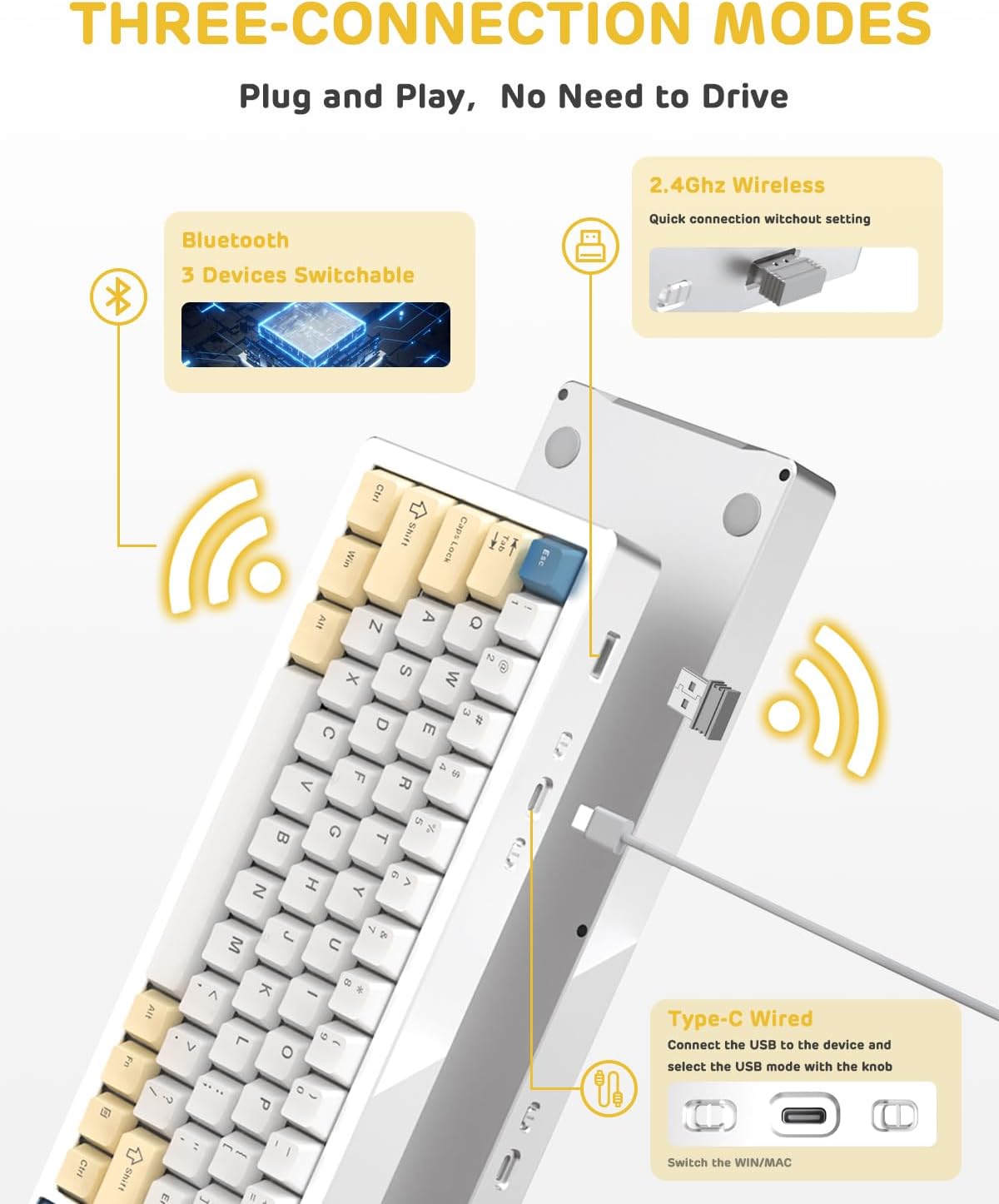
Figure 2.1: Triple Connection Modes
2.2. All Aluminum Alloy Body and Gasket Structure
Constructed from national standard 6063 aluminum alloy, the M71 keyboard boasts exceptional durability, corrosion resistance, and oxidation resistance. Its gasket-mounted design, combined with three layers of Poron Foam, anti-static IXPE under-axis pad, and PET sound-optimized pads, significantly reduces internal vibrations. This results in a stable, quieter, softer, and more cushioned typing experience.
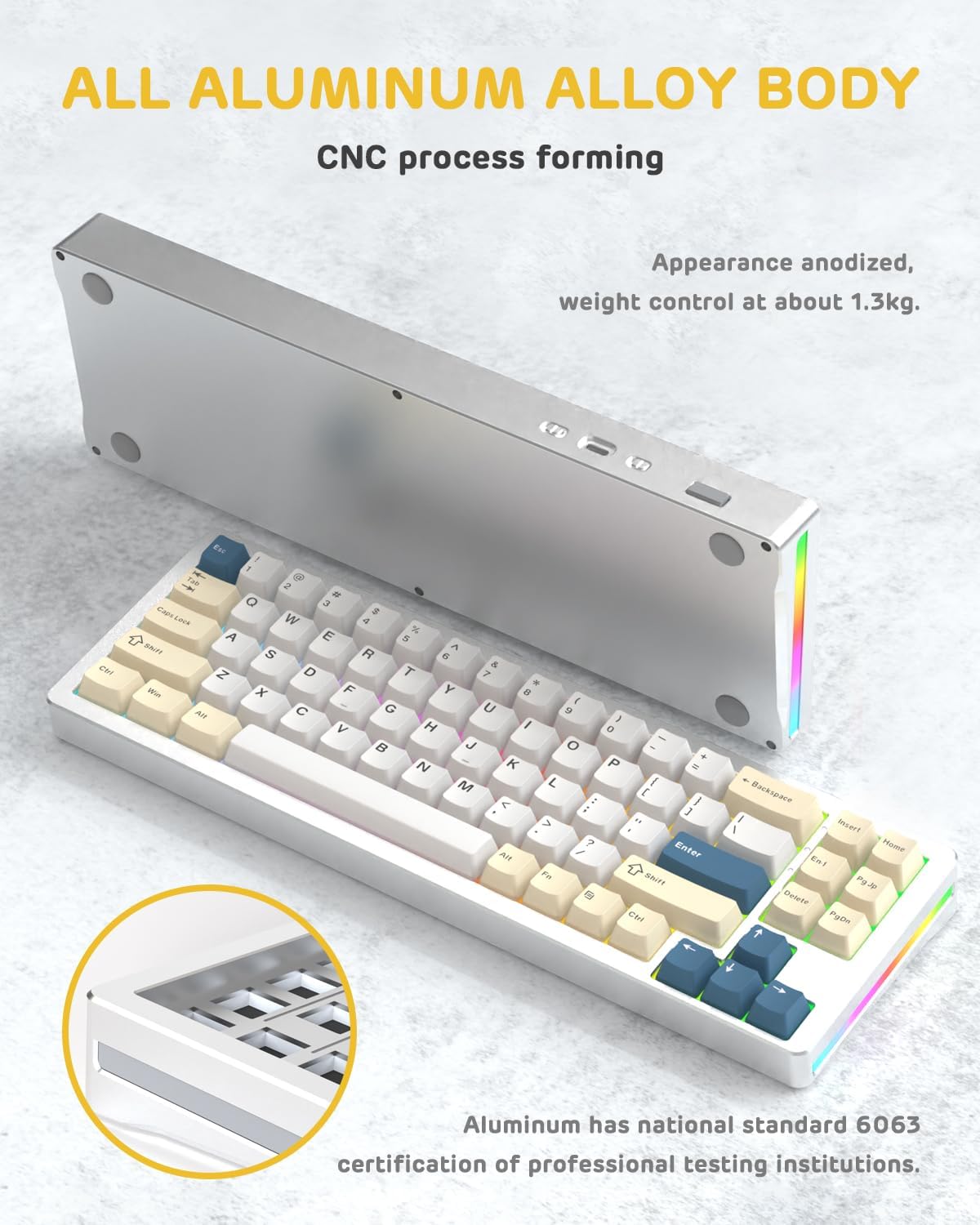
Figure 2.2: All Aluminum Alloy Body
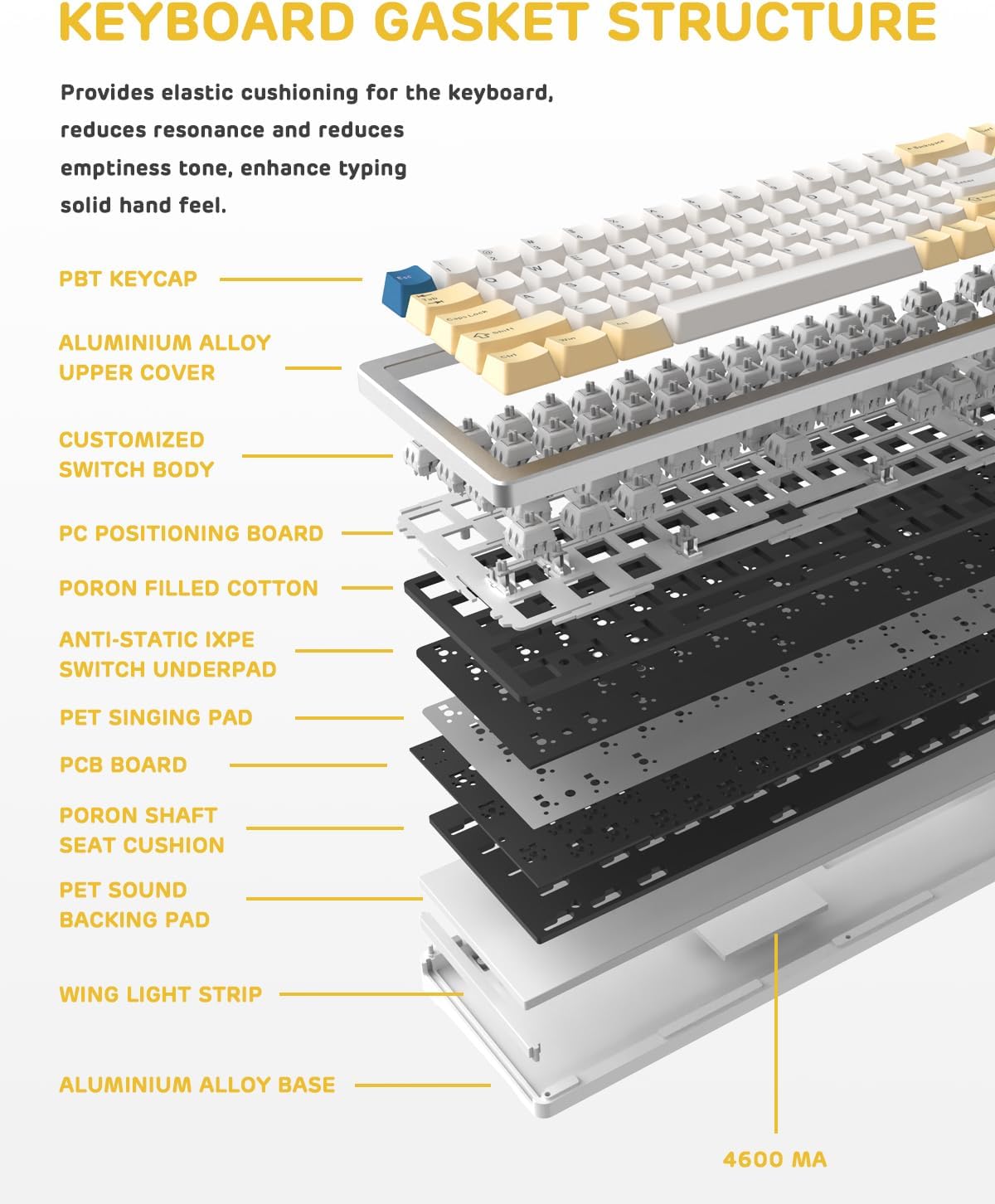
Figure 2.3: Keyboard Gasket Structure Layers
2.3. Hot-Swappable TTC Socket and PBT Keycaps
The hot-swappable PCB allows users to easily replace keyboard switches without soldering, supporting 99.9%+ of 3/5-pin switches on the market. The keyboard comes with customized linear white switches, designed for a lifespan of approximately 50 million keystrokes. High-quality PBT keycaps offer superior wear resistance, heat resistance, and fatigue resistance, ensuring clear, uniform backlighting and extended durability.

Figure 2.4: Hot-Swappable Switches
2.4. Dynamic Backlit RGB Keyboard
Featuring double-sided RGB lighting and 16.8 million customizable chroma backlight effects, the M71 keyboard allows for a personalized visual experience. Custom software is available for advanced customization, including per-key lighting and macro creation.

Figure 2.5: Dynamic RGB Backlighting
2.5. 4600mAh Extra Large Battery
Equipped with a high-capacity 4600mAh battery, the M71 provides continuous power. In low-power wireless mode, the battery can last up to approximately 15 days, minimizing the need for frequent recharging.

Figure 2.6: 4600mAh Battery and Battery Level Indicator
3. Setup Guide
3.1. Initial Setup
- Unpack the keyboard and all accessories from the box.
- Ensure the keyboard is fully charged before first use for optimal battery life. Connect the included USB-C cable to the keyboard and a power source (e.g., computer USB port, USB wall adapter).
3.2. Connecting Your Keyboard
The M71 keyboard supports three connection modes:
- Wired Mode: Connect the USB-C cable from the keyboard to your computer's USB port. The keyboard will automatically switch to wired mode.
- 2.4G Wireless Mode:
- Locate the 2.4G USB receiver (dongle) usually stored in a compartment on the keyboard.
- Plug the USB receiver into an available USB port on your computer.
- Switch the keyboard's mode selector to 2.4G. The keyboard should connect automatically.
- Bluetooth Mode:
- Switch the keyboard's mode selector to Bluetooth.
- On your computer or device, enable Bluetooth and search for new devices.
- Select "MAGIC-REFINER M71" (or similar name) from the list of available devices to pair.
- The keyboard can store up to 3 Bluetooth connections. Refer to the keyboard's specific key combinations (often Fn + 1/2/3) to switch between paired Bluetooth devices.
4. Operating Instructions
4.1. Basic Usage
The M71 keyboard features a 71-key (75%) layout. Standard typing functions operate as expected. For specific functions or multimedia controls, refer to the keycap legends or the manufacturer's software.
4.2. RGB Lighting Control
The keyboard offers dynamic RGB backlighting. Use the dedicated function keys (often combined with the Fn key) to cycle through different lighting modes, adjust brightness, and change lighting speed. For advanced customization, including per-key lighting and macro programming, download and install the official custom software from the MAGIC-REFINER website.
4.3. Checking Battery Level
In wireless mode, you can check the approximate battery level by pressing Fn + Alt(R). The keyboard's indicator lights or specific key backlights will show the current charge status (e.g., 25%, 50%, 75%, 100%).
4.4. Hot-Swapping Switches
To replace a switch:
- Gently pull the keycap off using the included keycap puller.
- Use the switch puller to carefully grip the switch and pull it straight up.
- Align the pins of the new switch with the holes on the PCB.
- Press the new switch firmly into place until it clicks. Ensure the pins are not bent.
- Re-attach the keycap.
5. Maintenance
- Cleaning: Regularly clean the keyboard with a soft, dry cloth. For deeper cleaning, remove keycaps and use compressed air to clear debris. Avoid using harsh chemicals or abrasive materials.
- Battery Care: To prolong battery life, avoid fully discharging the keyboard frequently. Store the keyboard in a cool, dry place when not in use for extended periods.
- Keycap and Switch Handling: When removing or installing keycaps and switches, apply gentle, even pressure to prevent damage to the components or the PCB.
6. Troubleshooting
- Keyboard not responding:
- Ensure the keyboard is charged.
- Check the connection mode (wired, 2.4G, Bluetooth) and ensure it matches your device's connection.
- For 2.4G, ensure the USB dongle is securely plugged in.
- For Bluetooth, re-pair the device if necessary.
- Try connecting the keyboard to a different USB port or computer to rule out port/computer issues.
- Keys not registering or double-typing:
- This could indicate a faulty switch. Try hot-swapping the problematic switch with a known working one or a spare.
- Ensure the switch is fully seated in its socket.
- RGB lighting not working:
- Check if the lighting is turned off or set to minimum brightness using the keyboard's function keys.
- Ensure the keyboard firmware is up to date.
- Battery not charging:
- Try a different USB-C cable or charging port/adapter.
- Ensure the cable is securely connected to both the keyboard and the power source.
7. Specifications
| Feature | Description |
|---|---|
| Model | M71 |
| Keyboard Layout | 71 keys (75% mechanical keyboard) |
| Keyboard Material | National standard 6063 aluminum alloy |
| Product Dimensions | 13.8 x 4.5 x 1.18 inches |
| Item Weight | 3.52 pounds |
| Connectivity Technology | Bluetooth, 2.4G Wireless, Wired (USB-C) |
| Battery Capacity | 4600mAh |
| Keycaps | High-quality PBT |
| Switches | Hot-swappable TTC Socket, Customized Linear White Switch |
| Backlight | Dynamic RGB (16.8 million colors) |
| Compatible Devices | PC, Windows, Mac |
8. Warranty and Support
For warranty information and technical support, please refer to the official MAGIC-REFINER website or contact their customer service directly. Keep your purchase receipt as proof of purchase for warranty claims.