
TUOPUONE RM520N-GL
Quectel RM520N-GL IoT 5G Global Band Module
User Manual
1. Introduction
This manual provides essential information for the proper installation, operation, and maintenance of the Quectel RM520N-GL IoT 5G Global Band Module. This module is designed for a wide range of Internet of Things (IoT) and enhanced Mobile Broadband (eMBB) applications, offering robust 5G connectivity with global band support. Please read this manual thoroughly before using the module to ensure optimal performance and safety.
2. Product Overview
The Quectel RM520N-GL is a high-performance 5G Sub-6GHz module in an M.2 form factor, compliant with 3GPP Release 16 specifications. It supports both Non-Standalone (NSA) and Standalone (SA) modes, providing comprehensive coverage for 5G, 4G, and 3G networks. Its compact design makes it suitable for integration into various embedded systems.



3. Features
- Designed for IoT/eMBB applications, supporting 5G/4G/3G connectivity.
- M.2 form factor for easy integration.
- Full coverage of multi-network standards, including 5G and LTE-A.
- Supports both Non-Standalone (NSA) and Standalone (SA) modes for 5G deployment flexibility.
- Integrated multi-constellation GNSS receiver for fast and accurate positioning.
- Compliant with 3GPP Release 16 specifications.
4. Specifications
| Attribute | Value |
|---|---|
| Manufacturer | TUOPUONE |
| Model Name | Quectel RM520N-GL |
| Form Factor | M.2 |
| 5G Standard | 3GPP Release 16 (Sub-6GHz) |
| Network Support | 5G (NSA/SA), 4G (LTE-A), 3G |
| Compatible Devices | Personal Computer (and other embedded systems) |
| Supported Platforms | Linux, Windows 7, Android |
| GNSS | Multi-constellation receiver |
| First Available Date | August 4, 2023 |
Dimensions
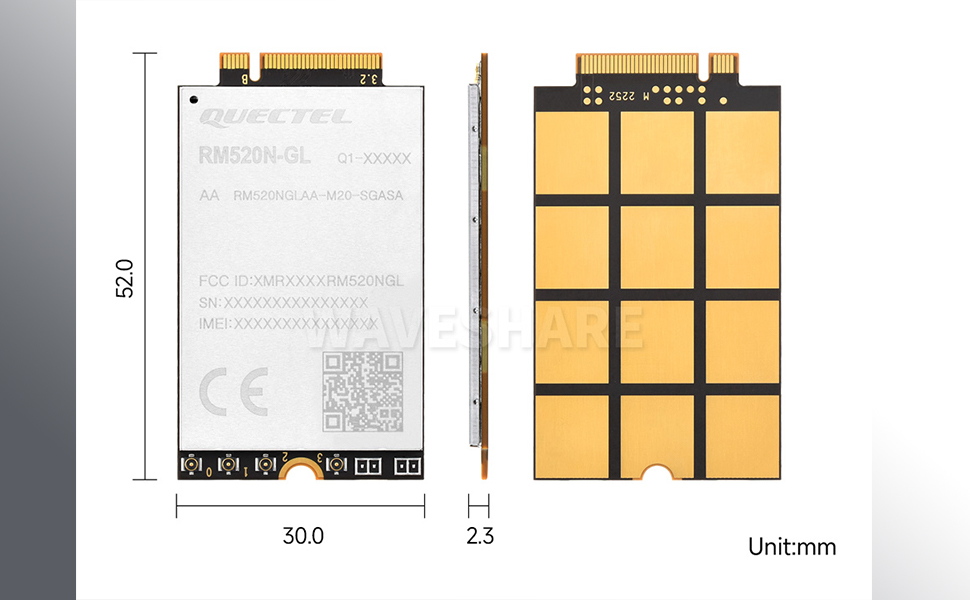
5. Application Scenarios
The Quectel RM520N-GL module is versatile and can be integrated into a wide array of devices and systems requiring reliable 5G connectivity. Common application scenarios include:
- Industrial Routers
- Home Gateways
- Set Top Boxes
- Industrial Laptops
- Consumer Laptops
- Industrial PDAs
- Rugged Industrial PCs
- Digital Signage

6. Setup and Installation
The Quectel RM520N-GL module is designed for integration into host devices with an M.2 slot. Installation typically involves:
- Preparation: Ensure the host device is powered off and disconnected from any power source. Refer to the host device's manual for specific M.2 slot access instructions.
- Module Insertion: Carefully align the module with the M.2 slot. Gently push the module into the slot until it is fully seated.
- Securing the Module: Secure the module with the screw provided by the host device manufacturer, if applicable, to prevent dislodgement.
- Antenna Connection: Connect appropriate 5G antennas to the module's antenna connectors. Ensure a secure connection for optimal signal reception.
- Driver Installation: After physical installation, power on the host device. Install the necessary drivers for the Quectel RM520N-GL module, typically available from the module or host device manufacturer's support website.
- Network Configuration: Configure network settings within the operating system of the host device to enable 5G connectivity.
Note: Always consult the specific documentation for your host device for detailed installation procedures and compatibility information.
7. Operating Instructions
Once installed and configured, the Quectel RM520N-GL module operates as a network interface for your host device. Operation typically involves:
- Power On: The module powers on automatically with the host device.
- Network Connection: The module will attempt to connect to available 5G/4G/3G networks based on its configuration and SIM card (if applicable).
- Status Monitoring: Monitor the connection status through the host device's operating system network settings or dedicated software provided by the module manufacturer.
- Data Usage: Utilize the module for internet access, data transfer, and other network-dependent applications as supported by your host system.
- GNSS Functionality: If using GNSS, ensure proper antenna connection and enable location services on the host device.
8. Maintenance
The Quectel RM520N-GL module is designed for reliable operation with minimal maintenance. Adhere to the following guidelines:
- Keep Clean: Ensure the module and its connectors are free from dust and debris. Use a soft, dry cloth for cleaning.
- Environmental Conditions: Operate the module within its specified temperature and humidity ranges to prevent damage.
- Firmware Updates: Periodically check the manufacturer's website for firmware updates. Applying updates can improve performance, add features, or resolve issues. Follow update instructions carefully.
- Secure Connections: Ensure all antenna connections remain secure. Loose connections can lead to poor signal quality.
9. Troubleshooting
If you encounter issues with your Quectel RM520N-GL module, consider the following troubleshooting steps:
- Module Not Detected:
- Ensure the module is correctly seated in the M.2 slot.
- Verify that the host device's M.2 slot is functional and compatible.
- Check if the necessary drivers are installed and up to date.
- No Network Connection:
- Confirm that antennas are properly connected and not damaged.
- Check SIM card insertion and activation (if applicable).
- Verify network settings and APN configurations in the host device's operating system.
- Ensure you are in an area with network coverage.
- Slow Data Speeds:
- Check signal strength; weak signals can reduce speed.
- Ensure antennas are positioned optimally.
- Verify that the module's firmware is current.
- Consider network congestion in your area.
- GNSS Not Functioning:
- Ensure the GNSS antenna is connected and has a clear view of the sky.
- Verify that location services are enabled on the host device.
For persistent issues, refer to the detailed technical documentation provided by Quectel or contact TUOPUONE customer support.
10. Warranty and Support
For warranty information and technical support regarding your Quectel RM520N-GL module, please refer to the documentation included with your purchase or visit the official TUOPUONE website. Support resources typically include FAQs, driver downloads, firmware updates, and contact information for technical assistance.
Manufacturer: TUOPUONE
Ask a question about this manual
Ask about setup, troubleshooting, compatibility, parts, safety, or missing instructions. Manuals+ will review the question and use this page’s manual context to help answer it.