
Introduction
Thank you for choosing the Shanqiu Mini UPS Battery Backup. This device is designed to provide uninterrupted power to your essential electronic devices during power outages, ensuring continuous operation for items such as routers, modems, and security cameras. Please read this manual carefully to understand the product's features, setup, operation, and maintenance to ensure optimal performance and safety.

Image: The Shanqiu Mini UPS Battery Backup, a compact black device with multiple output ports and power indicator lights.
Product Overview
Key Features
- Uninterruptible Power Supply: Provides continuous power during outages for compatible devices.
- Wide Compatibility: Suitable for routers, modems, security cameras, telephones, fax machines, printers, fingerprint recorders, and LED strip lights.
- Multiple Output Options: Features 1x USB 5V, 1x DC 5V, 1x DC 9V, and 2x DC 12V outputs, allowing simultaneous connection of multiple devices.
- High Capacity Battery: Built-in 20000mAh (74Wh) Lithium Polymer battery.
- Power Bank Functionality: The standard USB output allows the device to function as a power bank for charging mobile devices.
- Robust Construction: Durable aluminum housing.
- Comprehensive Protections: Includes short circuit protection, voltage fluctuation protection, overcharge protection, over-discharge protection, and temperature protection for safe operation.
Package Contents
Verify that all items are present in your package:
- 1 x Shanqiu Mini UPS (Model: FX 5-12Pro-AC)
- 1 x User Manual (this document)
- 1 x AC Charging Cable (EU / US plug compatible)
- 2 x DC Output Cables
- 6 x DC Converter Adapters
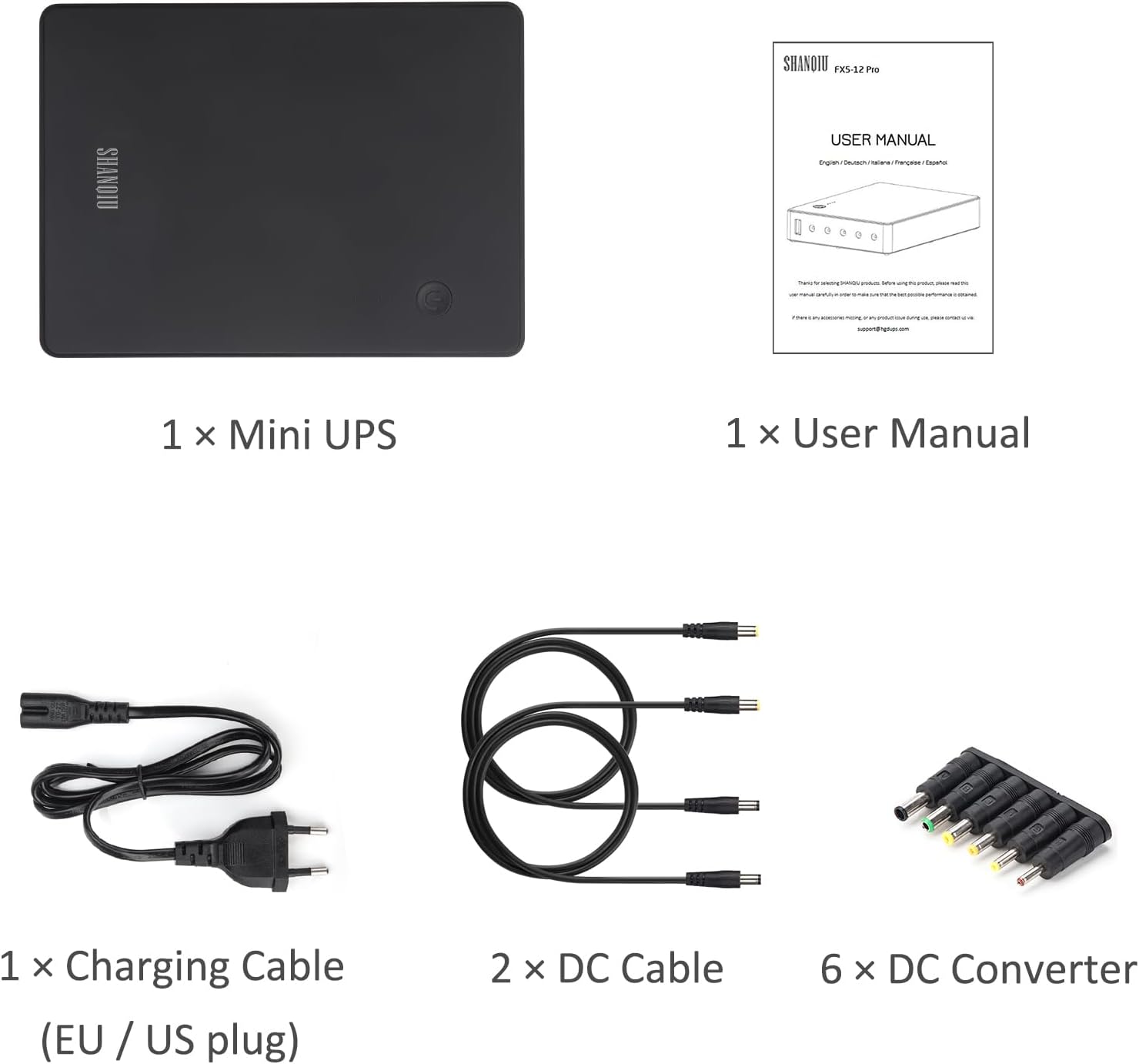
Image: A visual representation of the package contents, including the UPS unit, user manual, charging cable, DC cables, and DC adapters.
Safety Information
To prevent damage to the device or injury to yourself and others, please observe the following safety precautions:
- Do not expose the device to water, moisture, or extreme temperatures.
- Avoid dropping or subjecting the device to strong impacts.
- Do not attempt to disassemble, repair, or modify the device. This will void the warranty and may cause hazards.
- Ensure proper ventilation around the UPS during operation.
- Use only the provided charging cable and DC output cables.
- Verify that the voltage and current requirements of your connected devices match the output specifications of the UPS. Incorrect voltage can damage your devices.
- Keep out of reach of children.

Image: The Shanqiu Mini UPS with its ports clearly labeled: ON/OFF button, 5V USB output, 5V DC output, 9V DC output, two 12V DC outputs, and AC INPUT.

Image: An internal view of the Shanqiu Mini UPS, highlighting its chipset, temperature, battery, and voltage/current protection mechanisms.
Setup Instructions
Follow these steps to set up your Shanqiu Mini UPS:
- Charge the UPS: Connect the provided AC charging cable to the AC INPUT port on the UPS and plug the other end into a standard wall outlet. The LED indicators on the UPS will illuminate to show the charging status. A full charge is indicated when all LEDs are solid.
- Identify Device Voltage: Determine the voltage (5V, 9V, or 12V) and current requirements of the device(s) you intend to power. This information is usually found on the device's original power adapter or in its user manual.
- Select Correct DC Output: Choose the appropriate DC output port on the UPS that matches your device's voltage (5V, 9V, or 12V). For 12V devices, there are two 12V DC output ports available.
- Select DC Converter (if needed): If the DC cable connector does not fit your device, select one of the provided DC converter adapters that matches your device's input port. Attach it to one of the DC output cables.
- Connect Device: Connect one end of the DC output cable (with or without converter) to the selected DC output port on the UPS and the other end to your electronic device.
- Power On: Press the ON/OFF button on the UPS to turn it on. The UPS will begin supplying power to the connected device(s).
For devices requiring USB power, simply connect a standard USB cable from the 5V USB output port to your device.

Image: An example setup showing the Shanqiu Mini UPS connected to an AC power outlet, simultaneously charging a smartphone via USB, and powering a router and a landline phone via DC output cables.
Operating Instructions
Normal Operation
Once set up, the Shanqiu Mini UPS operates automatically. When connected to AC power, it charges its internal battery and simultaneously provides power to connected devices. In the event of a power outage, the UPS will seamlessly switch to battery power, ensuring your devices remain operational without interruption.
Power Indicators
The LED indicators on the UPS display the remaining battery capacity:
- Four solid LEDs: 75-100% battery capacity
- Three solid LEDs: 50-75% battery capacity
- Two solid LEDs: 25-50% battery capacity
- One solid LED: 0-25% battery capacity (recharge soon)
- Flashing LEDs: Indicates charging in progress.
Using as a Power Bank
To use the UPS as a power bank, simply connect your mobile device to the 5V USB output port using a standard USB charging cable. The UPS will provide power to charge your device.

Image: The Shanqiu Mini UPS at the center, surrounded by various compatible devices it can power, including a router, printer, security camera, fingerprint recorder, modem, telephone, and tablet.
Maintenance
The Shanqiu Mini UPS requires minimal maintenance. Follow these guidelines to ensure its longevity:
- Cleaning: Wipe the exterior of the device with a soft, dry cloth. Do not use liquid cleaners or abrasive materials.
- Storage: If storing the UPS for an extended period, ensure it is fully charged and store it in a cool, dry place away from direct sunlight. Recharge it every 3-6 months to maintain battery health.
- Battery Care: Avoid fully discharging the battery frequently, as this can reduce its lifespan. It is recommended to keep the UPS connected to AC power when possible to maintain a full charge.
Troubleshooting
If you encounter issues with your Shanqiu Mini UPS, refer to the following common problems and solutions:
- UPS not turning on:
- Ensure the UPS is charged. Connect it to AC power and check the LED indicators.
- Press and hold the ON/OFF button for a few seconds to ensure it registers.
- Connected device not receiving power:
- Verify the UPS is turned on.
- Check that the DC output cable and any converters are securely connected to both the UPS and the device.
- Confirm that the selected DC output voltage on the UPS matches the device's requirement.
- Ensure the device's power consumption does not exceed the UPS's maximum output (65W total).
- Test the device with its original power adapter to rule out a device issue.
- UPS not charging:
- Ensure the AC charging cable is properly connected to the UPS and the wall outlet.
- Check if the wall outlet is functional by plugging in another device.
- If the issue persists, the charging cable or the UPS itself may be faulty.
- Short battery life:
- The actual runtime depends on the power consumption of the connected devices. Higher power draw will result in shorter battery life.
- Ensure the battery is fully charged before use.
- Battery capacity naturally degrades over time and with usage cycles.
If these steps do not resolve your issue, please contact Shanqiu customer support for further assistance.
Specifications
Detailed technical specifications for the Shanqiu Mini UPS FX 5-12Pro-AC:
| Feature | Specification |
|---|---|
| Model Number | FX 5-12Pro-AC |
| Housing Material | Aluminum Alloy |
| AC Input | 100-240V AC, 50-60Hz |
| Output Voltage (USB) | 5V |
| Output Current (USB) | 3A (shared with DC 5V) |
| Output Voltage (DC OUT) | 5V, 9V, 2x12V |
| Output Current (DC OUT) | 5V/3A (shared with USB), 9V/3A, 12V/5A (total for two 12V ports) |
| Maximum Output Power | 65W |
| Battery Capacity | 20000mAh / 74Wh |
| Battery Type | Lithium Polymer |
| Product Dimensions | 178 x 122 x 32 mm (7.01 x 4.8 x 1.26 inches) |
| Net Weight | 0.830 KGS (1.83 pounds) |

Image: A visual representation of the Shanqiu Mini UPS with its dimensions and a detailed table of specifications.
Warranty and Support
Warranty Information
Shanqiu products are manufactured to high-quality standards. Specific warranty terms and conditions may vary by region and retailer. Please refer to the warranty card included with your product or visit the official Shanqiu website for detailed warranty information.
Customer Support
For technical assistance, troubleshooting, or any inquiries regarding your Shanqiu Mini UPS, please contact Shanqiu customer support. You can typically find contact information on the official Shanqiu website or through the retailer where you purchased the product.
You may also visit the Shanqiu Store on Amazon for additional product information and support resources.

