
1. Important Safety Information
Please read all instructions carefully before assembly and use. Keep this manual for future reference.
- Ensure all parts are present and undamaged before beginning assembly.
- Do not overtighten screws during assembly to avoid damaging components.
- Place the desk on a level surface to prevent instability.
- Do not exceed the maximum weight capacity of the desk surface or shelves.
- Keep electrical components (power strip, LED lights) away from liquids.
- Supervise children around the desk, especially during assembly.
2. Package Contents
Verify that all components listed below are included in your package. Refer to the assembly manual provided in the box for detailed part identification.

Image: The product packaging box, indicating the L-shaped desk and brand.
Included Hardware and Tools:
- Numbered bags of screws, bolts, and connectors.
- Hex key and screwdriver for assembly.
- Adjustable leg pads.
Image: Various bags of numbered hardware and the included screwdriver and hex key.
3. Setup and Assembly
Follow these steps to assemble your Homieasy L Shaped Desk. It is recommended to assemble the desk with two people.
3.1 Frame Assembly
- Unpack all components and lay them out on a clean, soft surface to prevent scratches.
- Assemble the main steel frame components according to the provided diagram in the included manual. The frame is constructed from powder-coated steel for durability.
- Attach the adjustable leg pads to the bottom of each desk leg. These pads help stabilize the desk on uneven floors and protect your flooring.

Image: A close-up view of an adjustable leg pad, demonstrating its installation into a desk leg.
3.2 Reversible Shelves and Fabric Drawer Installation
- Determine the desired orientation of your L-shaped desk (left or right configuration). The shelving units can be installed on either side.
- Secure the storage shelves to the frame using the designated hardware. The shelves are height-adjustable.
- Attach the fabric drawer to its designated position on the desk frame.

Image: A close-up of the fabric drawer, showing its capacity for storing items like books and controllers.

Image: An illustration demonstrating the reversible L-shaped design, allowing shelves to be installed on the left or right.
3.3 Desktop and Monitor Stand Installation
- Place the desktop panels onto the assembled frame and secure them with the appropriate screws. The desktop surface is waterproof and scratch-resistant.
- Install the recessed power strip into the pre-cut opening on the desktop. Ensure it is flush with the surface.
- Attach the monitor stand to the desktop. The monitor stand includes an RGB LED light strip underneath.

Image: A detailed view of the recessed power strip, highlighting its three AC outlets and two USB ports.

Image: A visual guide showing the ergonomic benefits of using the removable monitor stand for correct viewing posture.
4. Operating Instructions
4.1 Using the Power Strip
- Plug the desk's power cord into a standard wall outlet.
- The built-in power strip provides 3 AC outlets (120V/12A) and 2 USB ports (5V/2A) for charging your devices.
- Ensure devices are compatible with the power strip's specifications before plugging them in.
4.2 Operating the LED Strip
The monitor stand features an RGB LED light strip with 3000 colors and various modes.
- Remote Control: Use the included remote control to power on/off, change colors, adjust brightness, select dynamic modes, music sync, and set timer functions. Refer to the remote control guide for specific button functions.
- App Control: Download the designated app (details in the included manual) to control the LED strip from your smartphone, offering advanced customization options.
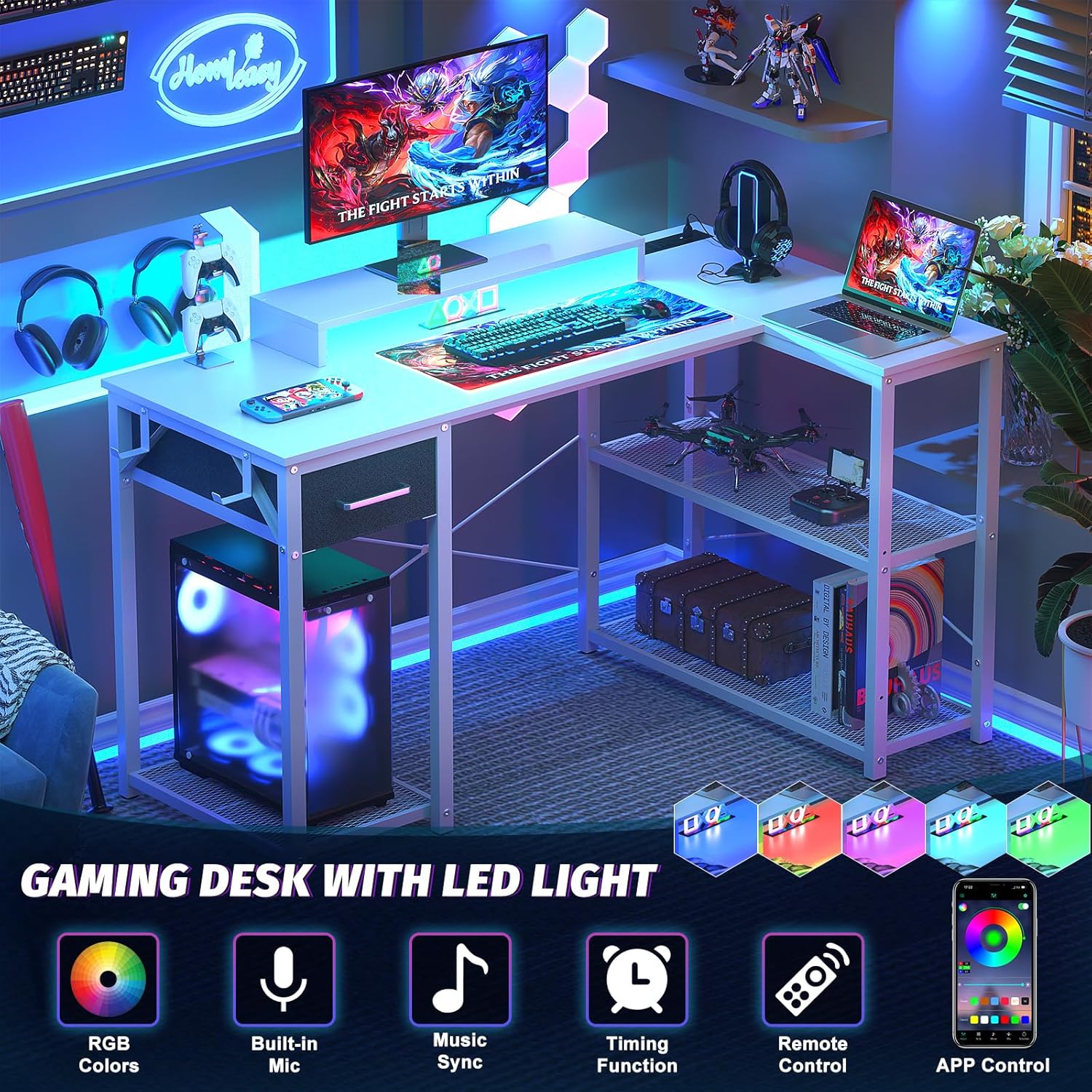
Image: The L-shaped desk set up for gaming, showcasing the vibrant RGB LED lighting and icons representing features like RGB colors, built-in mic, music sync, timing function, remote control, and app control.
4.3 Utilizing Storage Features
- Storage Shelves: Use the reversible under-desk shelves to store books, office supplies, or gaming devices. The bottom shelf is suitable for a PC tower.
- Fabric Drawer: The fabric drawer is ideal for collecting small items, magazines, or stationery, keeping your desktop clutter-free.
- Monitor Stand: Position your monitor on the stand to achieve a comfortable viewing height, reducing neck strain and freeing up desktop space.
5. Maintenance and Care
Proper care will ensure the longevity and appearance of your Homieasy desk.
- Desktop Surface: The engineered wood desktop is waterproof and scratch-resistant. Wipe clean with a damp cloth and mild detergent. Avoid abrasive cleaners.
- Steel Frame: The powder-coated steel frame is designed to resist rust. Clean with a soft, dry cloth. Avoid harsh chemicals that may damage the finish.
- Fabric Drawer: Spot clean the fabric drawer with a mild fabric cleaner as needed. Allow to air dry completely.
- General: Periodically check all screws and connections to ensure they remain tight. Retighten if necessary.
6. Troubleshooting
6.1 Assembly Issues
- Parts not fitting: Double-check the assembly diagrams in the manual. Ensure you are using the correct parts and orientation for each step.
- Desk is wobbly: Ensure all screws are securely tightened. Adjust the leg pads on the bottom of the desk legs to stabilize it on uneven surfaces.
6.2 Electrical Components
- Power strip not working: Verify that the desk's power cord is securely plugged into a functional wall outlet. Check if the outlet itself is receiving power.
- LED strip not lighting up: Ensure the LED strip is properly connected to its power source. If using the remote, check its battery. If using the app, ensure Bluetooth connection is active.
7. Specifications
| Feature | Detail |
|---|---|
| Brand | Homieasy |
| Model Number | 43SLSDOLS |
| Shape | L-Shape |
| Product Dimensions (D x W x H) | 20"D x 47.2"W x 49.7"H |
| Color | Grey (Desk surface is White) |
| Style | Modern |
| Base Material | Alloy Steel (Powder Coated) |
| Top Material Type | Engineered Wood |
| Special Features | Storage Shelf, Monitor Stand, LED Strip, Power Strip (3 AC Outlets, 2 USB Ports), Reversible Design, Adjustable Leg Pads, Fabric Drawer |
| Number of Drawers | 1 (Fabric) |
| Assembly Required | Yes |
| Tools Included | Yes |

Image: A diagram illustrating the precise dimensions of the L-shaped desk, including width, depth, and height of various sections.
8. Warranty and Support
Homieasy is committed to providing professional customer support and a risk-free purchase experience.
- If you encounter any problems related to your Homieasy L Shaped Desk, including missing parts, damage, or dissatisfaction, please contact us immediately.
- Our customer service team aims to address your concerns within 24 hours.
Contact Information:
- Email: support@homieasy.com