
MOOER PRIME P2
MOOER P2 Multi-Effects Pedal Processor User Manual
Model: PRIME P2
Brand: MOOER
Introduction
The MOOER P2 Multi-Effects Pedal Processor is a compact and powerful digital audio device designed for guitar and bass players. Utilizing MOOER's unique MNRS technology, it offers a wide range of high-quality amp models and effects. Its intuitive touch screen interface and extensive connectivity options make it suitable for performance, practice, and recording.
Setup
Unboxing and Initial Inspection
Carefully remove all components from the packaging. Verify that all items listed in the packing list are present and undamaged.
Charging the Device
The P2 is equipped with a 3000 mAh rechargeable lithium-ion battery.
Connect the device to a power source using the provided USB-C cable. A full charge takes approximately 2.5 hours and provides up to 5 hours of battery life.

Image description: An illustration showing the MOOER P2's battery capacity (3000 mAh), battery life (5 hours), and charging time (2.5 hours), alongside the device and its accessories.
Connecting Your Instrument
Connect your electric guitar or bass to the input jack of the P2.
For stereo output, use a 1-in-2 (TRS to 2 x TS) adapter cable from the stereo output jack to your amplifier or audio interface.
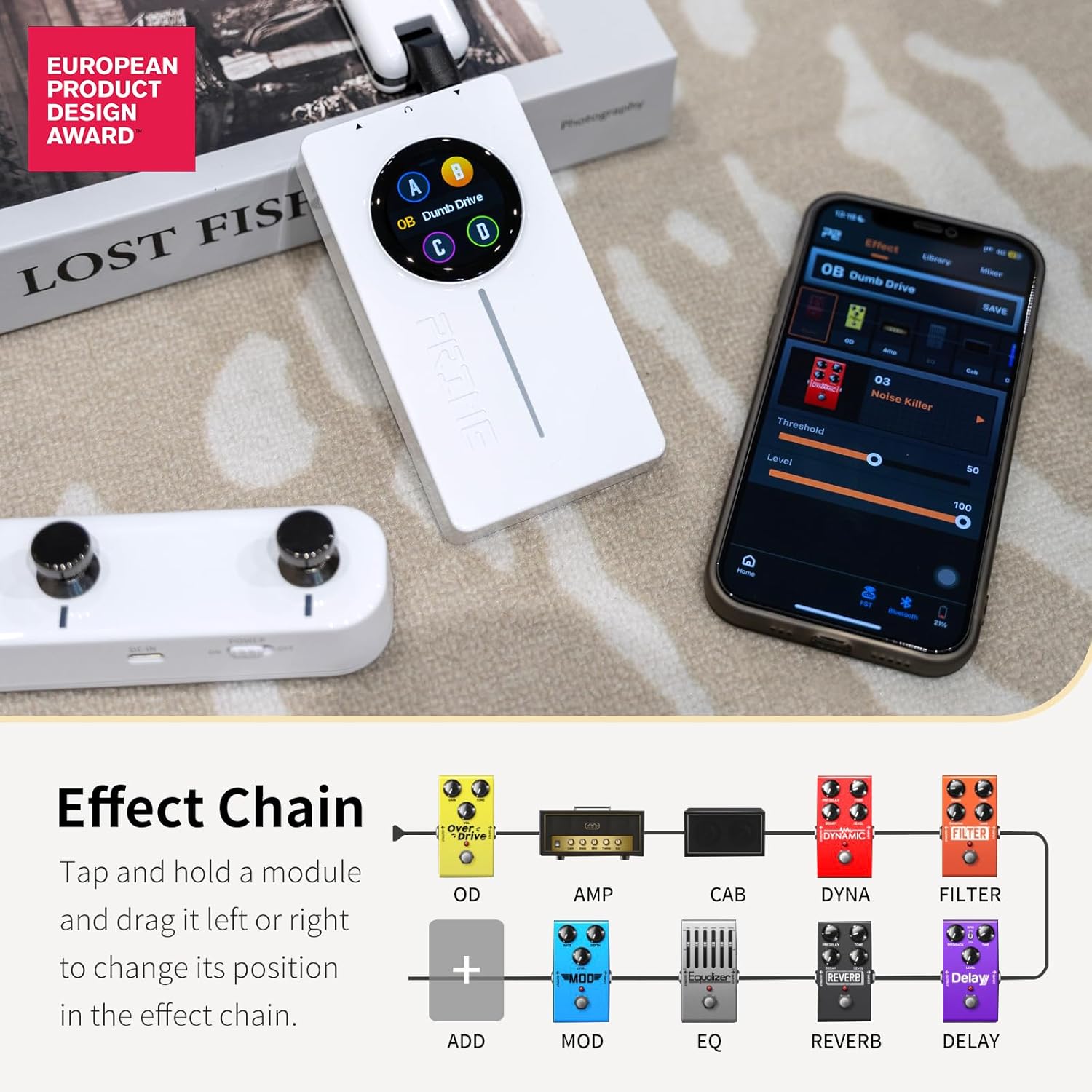
Image description: A close-up view of the MOOER P2 showing its input and stereo output jacks, highlighting its true stereo capabilities.
App Installation and Connection
The MOOER Prime P2 is primarily controlled via a dedicated mobile application.
Download the "MOOER Studio" app from the official MOOER website or your device's app store (Android, HarmonyOS, iOS compatible).
Enable Bluetooth on your mobile device and pair it with the P2. The app allows for extensive control over effects, presets, and settings.

Image description: The MOOER P2 device displayed next to a smartphone showing the MOOER Studio app interface, demonstrating the touch screen and app control.
Operating the MOOER P2
Touch Screen Interface
The 1.3-inch touch screen displays the currently selected preset. Swipe down to access the Tools screen, which includes volume control, tuner, battery status, and Bluetooth connection status.

Image description: A visual representation of the MOOER P2's touch screen interface, illustrating how to swipe down to access various tools like tuner, volume, and battery indicators.
Effect Chain Configuration
The P2 features 57 classic and experimental effect models. You can easily configure your effects chain within the app. Tap and hold a module, then drag it left or right to change its position in the effect chain.

Image description: A diagram illustrating the customizable effect chain of the MOOER P2, showing various effect modules like OD, Amp, Cab, Dyna, and Filter, and how they can be rearranged.
Bass-Specific Updates (Firmware 1.5.6)
The latest firmware update (version 1.5.6) introduces significant enhancements for bass players:
- New AMP Models: 10 new bass amp models (slots 53-62) have been added.
- New CAB Simulations: 10 new bass cabinet simulations (slots 56-65) are now available.
- New Overdrive Effects: Two new overdrive effects for bass (slots 27 and 29) have been included.
Video description: An official MOOER video detailing the new firmware update for the Prime P2, specifically highlighting the new bass amp models, cabinet simulations, and overdrive effects.
Guitar-Specific Updates (Firmware 1.5.6)
Guitar players also benefit from new additions in firmware 1.5.6:
- New Overdrive Effects: 10 new overdrive effects (slots 19-26, and 28) have been added to the OD module.
- New Choptones CAB SIMs: 30 authorized Choptones guitar cabinet models (CT) are incorporated within the CAB module (slots 26-55).
Cloud Official Area Optimization
The Cloud Official Area in the app has been optimized. It now expands the GNR area with divisions for Preamp and Entire sampling files, allowing for easier downloads and sharing of tones.
Fine-Tuning Mode
A new fine-tuning mode for parameter adjustment has been implemented. This mode allows for precise control over effect parameters, addressing previous issues where the parameter bar moved too fast. To activate, press and hold the parameter bar in the app. Your mobile device will vibrate to confirm entry into fine-tuning mode.
Wireless Footswitch Optimization
The wireless footswitch functionality has been optimized to prevent misoperation during playing. The combination of B and C footswitches entering the "LD" mode now requires a pressing of 0.3 seconds to be activated. This prevents accidental mode changes.
Maintenance
To ensure the longevity and optimal performance of your MOOER P2, follow these maintenance guidelines:
- Keep the device clean and free from dust and debris. Use a soft, dry cloth for cleaning.
- Avoid exposing the device to extreme temperatures, humidity, or direct sunlight.
- Do not attempt to disassemble or repair the device yourself, as this will void the warranty.
- Store the device in a safe place when not in use, preferably in its original packaging or a protective case.
Troubleshooting
Common Issues and Solutions
| Problem | Possible Cause | Solution |
|---|---|---|
| Device not powering on | Low battery; Power button not pressed long enough | Charge the device fully. Press and hold the power button for 2-3 seconds. |
| No sound output | Incorrect cable connection; Volume too low; Incorrect preset/effect chain | Check all cable connections. Increase volume on the device and connected equipment. Verify effect chain in the app. |
| Bluetooth connection issues | Bluetooth not enabled; Device too far from phone; Interference | Ensure Bluetooth is on for both devices. Keep devices within range. Minimize interference from other wireless devices. |
| App parameters difficult to adjust precisely | Standard adjustment mode | Use the new fine-tuning mode by pressing and holding the parameter bar. |
Specifications
| Feature | Detail |
|---|---|
| Item Weight | 5.3 ounces (0.15 Kilograms) |
| Product Dimensions | 3.91 x 2.17 x 0.75 inches |
| Model Number | PRIME P2 |
| Batteries | 1 Lithium Polymer battery (included) |
| Battery Life | Up to 5 hours |
| Charging Time | Approx. 2.5 hours |
| Hardware Interface | Bluetooth, USB-OTG, MIDI Extension |
| Signal Format | Analog |
| Color | P2 Black |
| Country of Origin | China |
Warranty and Support
For warranty information, technical support, or service inquiries, please visit the official MOOER website or contact their customer service directly. Keep your proof of purchase for warranty claims.
Official MOOER Website: www.mooeraudio.com
Ask a question about this manual
Ask about setup, troubleshooting, compatibility, parts, safety, or missing instructions. Manuals+ will review the question and use this page’s manual context to help answer it.