Introduction
This manual provides essential information for the proper installation, operation, and maintenance of the MERIK Home Access Plus 150 Electronic Board, Model PC150. This board is a 100% original replacement part manufactured by PowerTech, designed to ensure optimal performance and compatibility with your Home Access Plus 150 system.
Please read this manual thoroughly before attempting any installation or operation to ensure safety and correct functionality.
Safety Information
Always observe the following safety precautions:
- Disconnect Power: Before installing or servicing the electronic board, ensure that all power to the Home Access Plus 150 system is disconnected at the main circuit breaker.
- Professional Installation Recommended: Installation should ideally be performed by a qualified technician to prevent damage to the board or the system, and to ensure proper operation.
- Electrostatic Discharge (ESD) Precautions: Electronic components are sensitive to static electricity. Handle the board by its edges and use an anti-static wrist strap if available.
- Correct Orientation: Ensure the board is installed in the correct orientation as per the original system's design.
- Avoid Moisture: Do not expose the electronic board to moisture or extreme temperatures.
Setup and Installation
This section outlines the general steps for replacing or installing the electronic board. Refer to your Home Access Plus 150 system's primary manual for specific wiring diagrams and detailed instructions.
- Power Disconnection: Ensure the main power supply to the Home Access Plus 150 system is completely turned off. Verify with a voltage tester.
- Access the Control Panel: Open the system's control panel enclosure to access the existing electronic board.
- Disconnect Existing Board (if replacing): Carefully disconnect all wires and connectors from the old board. Label each wire as you disconnect it to ensure correct re-connection. Note the position of any mounting screws or clips.
- Remove Old Board (if replacing): Unscrew or unclip the old board from its mounting points.
- Install New Board: Position the new MERIK PC150 electronic board in the enclosure, aligning it with the mounting points. Secure it with the appropriate screws or clips.
- Connect Wiring: Reconnect all wires and connectors to the new board, following the labels made during disconnection. Ensure all connections are secure and correctly seated. Pay close attention to power input, sensor inputs, and output connections.
- Initial Inspection: Before closing the enclosure, visually inspect all connections to confirm they are correct and no wires are pinched.
- Close Enclosure: Securely close the control panel enclosure.
- Restore Power: Carefully restore power to the Home Access Plus 150 system.

Figure 1: Top-down view of the MERIK Home Access Plus 150 Electronic Board (PC150). This image shows the overall layout of the circuit board, including various integrated circuits, capacitors, resistors, and connection terminals. The green terminal blocks for wiring connections are visible at the bottom.

Figure 2: Side view of the electronic board, highlighting the green terminal blocks where external wires are connected. This perspective provides a clearer view of the height of components and the screw terminals for secure wiring.
Operating Instructions
The MERIK PC150 electronic board functions as the core control unit for the Home Access Plus 150 system. Once properly installed and powered, it will integrate with the existing system components (e.g., sensors, keypads, actuators) to manage access control and security functions.
- System Initialization: Upon first power-up after installation, the system may undergo an initialization sequence. Refer to your Home Access Plus 150 system's main user manual for details on this process.
- Functionality Check: Test all connected components (e.g., door sensors, gate openers, alarm triggers) to ensure they communicate correctly with the new board and respond as expected.
- Programming: Any specific programming or configuration for your Home Access Plus 150 system (e.g., user codes, sensor zones) will be done through the system's interface, not directly on the board. The board facilitates these operations.

Figure 3: An angled view of the electronic board, providing a perspective on the arrangement of various electronic components such as integrated circuits, relays, and heat sinks. This view helps in understanding the component density and layout.
Maintenance
The MERIK PC150 electronic board is designed for long-term reliability and requires minimal maintenance. However, periodic checks can help ensure its longevity and proper function.
- Dust Removal: Periodically, with the power disconnected, gently clean any accumulated dust from the board using a soft brush or compressed air. Ensure no residue is left behind.
- Connection Check: Annually, or if issues arise, verify that all wire connections to the terminal blocks are secure and free from corrosion.
- Environmental Conditions: Ensure the control panel enclosure remains sealed and protected from moisture, extreme temperatures, and pests.
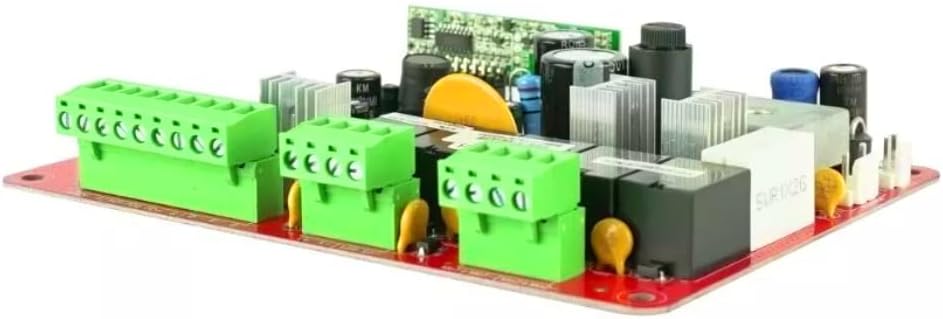
Figure 4: Another angled view of the electronic board, offering a different perspective on the component placement and the overall compact design. This image further illustrates the various types of components mounted on the red PCB.
Troubleshooting
If you experience issues with your Home Access Plus 150 system after installing the new electronic board, consider the following common troubleshooting steps:
| Problem | Possible Cause | Solution |
|---|---|---|
| System does not power on. | No power supply; incorrect wiring; faulty power source. | Check main power supply. Verify all power connections to the board are secure and correct. Test the power source. |
| Components (e.g., sensors) not responding. | Incorrect wiring; faulty component; programming issue. | Verify wiring for the specific component. Test the component if possible. Check system programming via the main control unit. |
| Intermittent system failures. | Loose connections; environmental interference; power fluctuations. | Inspect all connections for tightness. Ensure the system is protected from environmental factors. Consider a surge protector for the power supply. |
| Board appears damaged. | Physical damage during installation; power surge. | If physical damage is evident, the board may need replacement. Contact support. |
If troubleshooting steps do not resolve the issue, it is recommended to contact a qualified technician or MERIK customer support for further assistance.
Specifications
- Product Name: Electronic Board for Home Access Plus 150
- Brand: MERIK
- Model Number: PC150
- Manufacturer: PowerTech
- Color: Green
- Components Included: Board and Instruction Manual
- Dimensions (L x W x H): 25.4 x 25.4 x 7.62 cm (approximately 10 x 10 x 3 inches)
- ASIN: B0CDN1D478
Warranty and Support
As a 100% original replacement part from PowerTech, this electronic board is designed for reliability. For specific warranty terms and conditions, please refer to the original purchase documentation or contact MERIK customer support.
For technical support, installation queries, or warranty claims, please contact MERIK or PowerTech through their official support channels. Always provide your product model number (PC150) and purchase details when seeking assistance.
You can visit the MERIK store for more information: MERIK Official Store


