
1. Introduction
This manual provides detailed instructions for the assembly, operation, maintenance, and troubleshooting of your HOOBRO Literature Organizer, model BK27WF01. This 27-compartment wooden organizer is designed for efficient storage and sorting of documents, mail, and various office or classroom supplies.

Figure 1: HOOBRO Literature Organizer BK27WF01
2. Specifications
The HOOBRO Literature Organizer BK27WF01 features the following specifications:
- Material: Engineered Wood
- Color: Black
- Product Dimensions: 12"D x 28.1"W x 23.8"H (30.5 cm D x 71.5 cm W x 60.5 cm H)
- Number of Compartments: 27
- Shelf Type: Compartment Shelves / Divider Shelves
- Special Feature: 27-Slot File Organizer, Wooden Literature Organizer, Adjustable Shelves, Pull Rings
- Mounting Type: Countertop
- Recommended Uses: Files & Folders, Magazines, Books, Office Supplies
- Indoor/Outdoor Usage: Indoor
- Required Assembly: Yes

Figure 2: Product Dimensions
3. Setup Instructions
Follow these steps for quick and easy assembly of your literature organizer. Ensure all parts are present before beginning.
3.1 Unpacking and Part Identification
- Carefully unpack all components from the box.
- Verify that all hardware and panels are included according to the packing list.
3.2 Assembly Steps
- Assemble the Outer Frame: Connect the side panels to the bottom and top panels using the provided screws and connectors. Ensure all connections are secure.
- Install Vertical Dividers: Insert the vertical divider panels into the pre-drilled slots in the top and bottom panels.
- Insert Horizontal Shelves: Slide the horizontal shelves into the grooves of the vertical dividers. These shelves are designed to be removable for customized compartment sizes.
- Attach Pull Rings: Secure the metal pull rings to the designated holes on the side panels. These aid in moving the assembled unit.

Figure 3: Assembly Step 1 - Base Construction

Figure 4: Assembly Step 2 - Top Panel Attachment

Figure 5: Assembly Step 3 - Shelf Insertion

Figure 6: Assembly Step 4 - Final Assembly
3.3 Assembly Video
Video 1: Official HOOBRO Wooden 27-Slot Literature Organizer Assembly Guide. This video demonstrates the assembly process and key features of the organizer.
4. Operating Instructions
The HOOBRO Literature Organizer is designed for versatile use in various environments.
4.1 Utilizing Compartments
- Each of the 27 compartments is suitable for standard letter and A4-sized papers, magazines, comics, and brochures.
- Use the provided labels to clearly identify the contents of each slot for quick access.

Figure 7: Using Labels for Organization
4.2 Adjusting Shelf Configuration
The internal horizontal shelves are removable, allowing you to customize compartment sizes to accommodate larger items or create fewer, larger sections.
- To remove a shelf, gently pull it out from its grooves.
- To re-insert, align the shelf with the desired grooves and slide it into place.
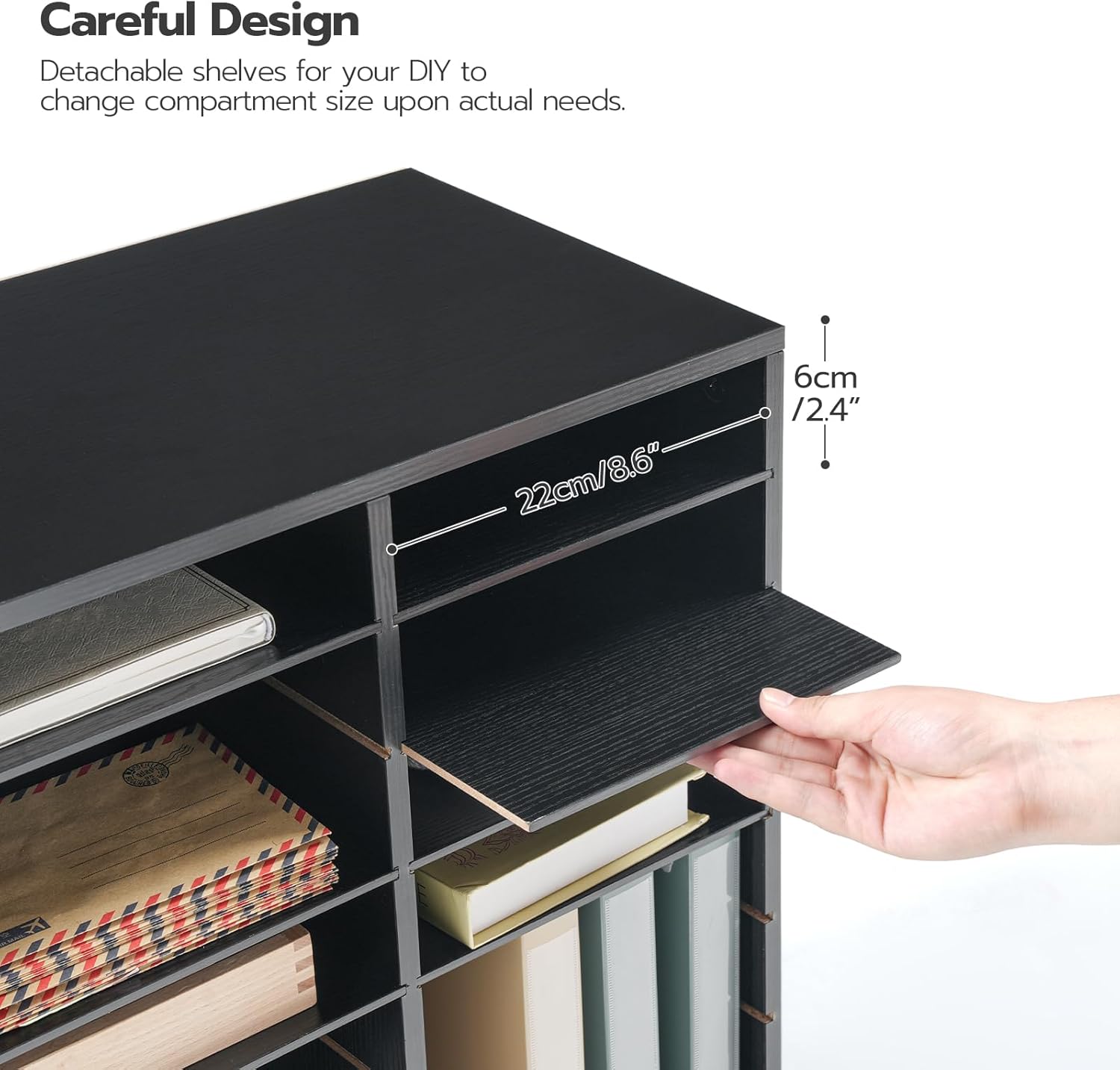
Figure 8: Detachable Shelves for Customization

Figure 9: Customizable Compartment Layouts
4.3 Moving the Organizer
The organizer is equipped with metal pull rings on both sides to facilitate movement.
- When moving the unit, especially when loaded, use the pull rings to lift and reposition it carefully.
- Avoid dragging the unit to prevent damage to the base or floor.

Figure 10: Metal Pull Rings for Easy Movement
5. Maintenance
Proper care will ensure the longevity and appearance of your HOOBRO Literature Organizer.
5.1 Cleaning
- Wipe the surface with a soft, damp cloth.
- Avoid using harsh chemicals or abrasive cleaners, as these can damage the engineered wood finish.
- Dry immediately with a clean, dry cloth to prevent moisture damage.
5.2 General Care
- Keep the organizer away from direct sunlight and extreme temperature changes to prevent warping or fading.
- Avoid placing excessively heavy items on top of the organizer or in individual compartments to maintain structural integrity.

Figure 11: Particleboard Construction for Durability
6. Troubleshooting
If you encounter any issues with your HOOBRO Literature Organizer, refer to the following common solutions:
6.1 Shelves Do Not Stay in Place
- Check Assembly: Ensure that the vertical dividers are fully seated in their respective slots and that the horizontal shelves are correctly aligned with the grooves.
- Even Weight Distribution: Avoid placing heavy items unevenly, which can cause shelves to shift. Distribute weight as evenly as possible across compartments.
- Verify Shelf Condition: Inspect shelves for any damage or warping that might prevent them from fitting securely.
6.2 Unit Appears Unstable
- Tighten Connections: Re-check all screws and connectors to ensure they are tightened securely.
- Level Surface: Place the organizer on a flat, level surface. Uneven surfaces can cause wobbling.
- Avoid Overloading: Do not exceed the recommended weight capacity of the organizer.
7. Warranty and Support
HOOBRO is committed to providing quality products. For any questions, concerns, or warranty inquiries regarding your Literature Organizer BK27WF01, please contact HOOBRO customer support.
You can find more information and contact details by visiting the official HOOBRO store: HOOBRO Store on Amazon.