AR991

Smart Sensor AR991 Digital Grain Moisture Meter User Manual

Model: AR991

1. Introduction

The Smart Sensor AR991 Digital Grain Moisture Meter is a precision instrument designed for rapidly and accurately measuring the moisture content and temperature of various types of grain. This device is essential for applications in grain purchase, storage, and processing, ensuring optimal quality control.

Key features include an LCD display with backlight for clear readings in low light, a built-in speaker for audible reporting of measurements, and an ergonomic design for comfortable handling. It is capable of measuring moisture in 14 different grain types, including wheat, corn, rice, peanuts, and soybeans.

2. Safety Information

Please read and understand all safety instructions before operating the device to prevent injury or damage. Keep this manual for future reference.

  • Do not expose the meter to extreme temperatures, high humidity, or direct sunlight.
  • Avoid dropping the device or subjecting it to strong impacts.
  • Keep the probes clean and dry. Do not use abrasive cleaners.
  • Do not attempt to disassemble or modify the meter. Refer all servicing to qualified personnel.
  • Keep out of reach of children. The probes are sharp.
  • Ensure the probes are fully inserted into the grain sample for accurate readings.

3. Product Overview

Familiarize yourself with the components of your Smart Sensor AR991 Digital Grain Moisture Meter.
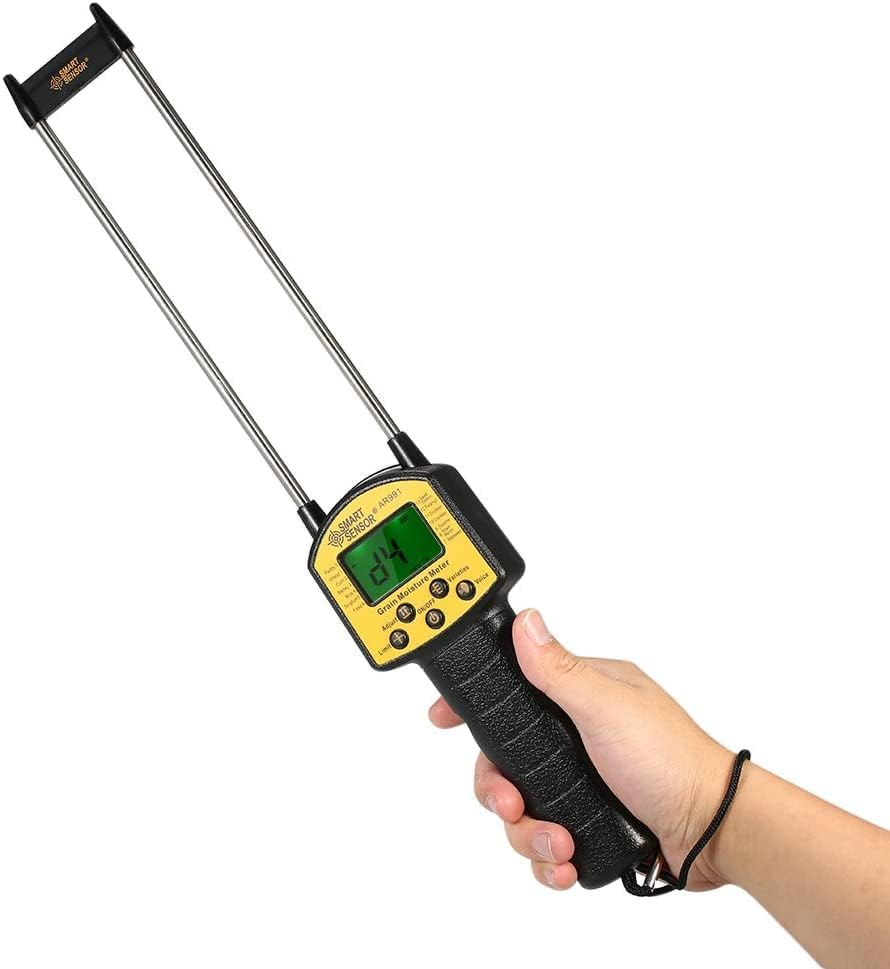
Smart Sensor AR991 Digital Grain Moisture Meter held in hand, showing the LCD display and probes.

Figure 3.1: The Smart Sensor AR991 Digital Grain Moisture Meter in use, demonstrating its ergonomic design and clear LCD display.

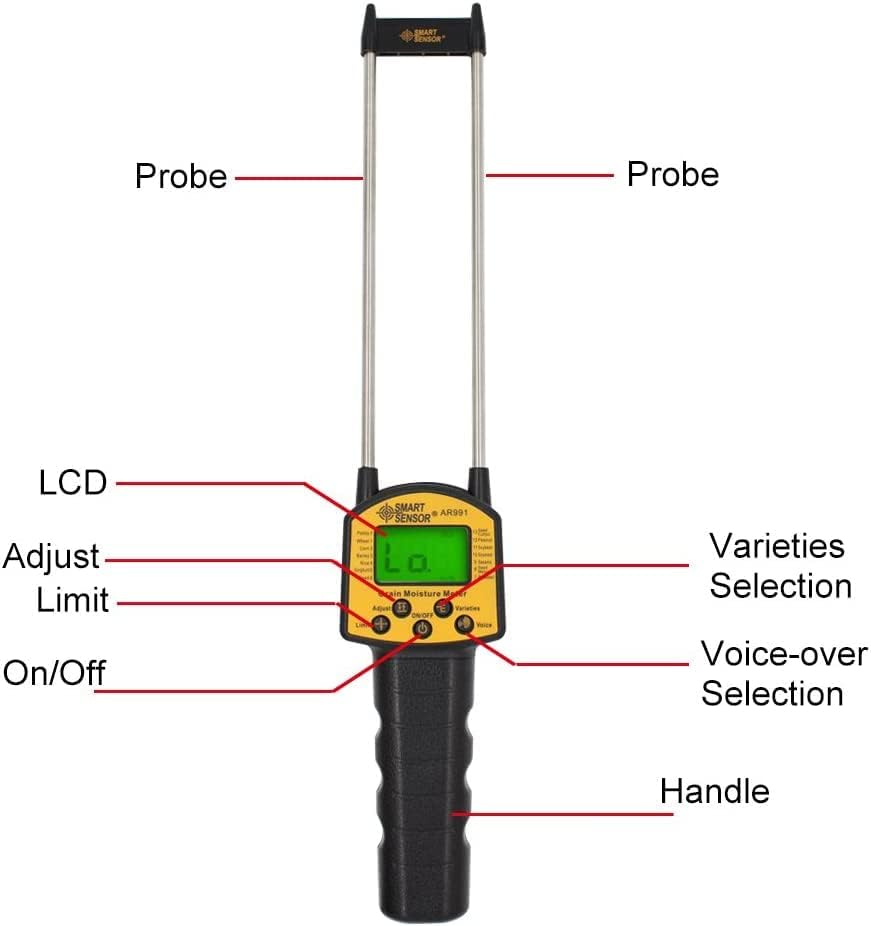
Labeled diagram of the Smart Sensor AR991 Digital Grain Moisture Meter components including probes, LCD, adjust buttons, limit button, on/off button, varieties selection, voice-over selection, and handle.

Figure 3.2: Detailed view of the AR991 meter with key components labeled for easy identification.

  • Probes: Two long, sharp metal probes for insertion into grain samples.
  • LCD Display: Backlit screen showing moisture content, temperature, and selected grain type.
  • Control Buttons: Including On/Off, Adjust, Limit, Varieties Selection, and Voice-over Selection.
  • Speaker: Located on the back for audible reading reports.
  • Handle: Ergonomically designed for a comfortable and secure grip.
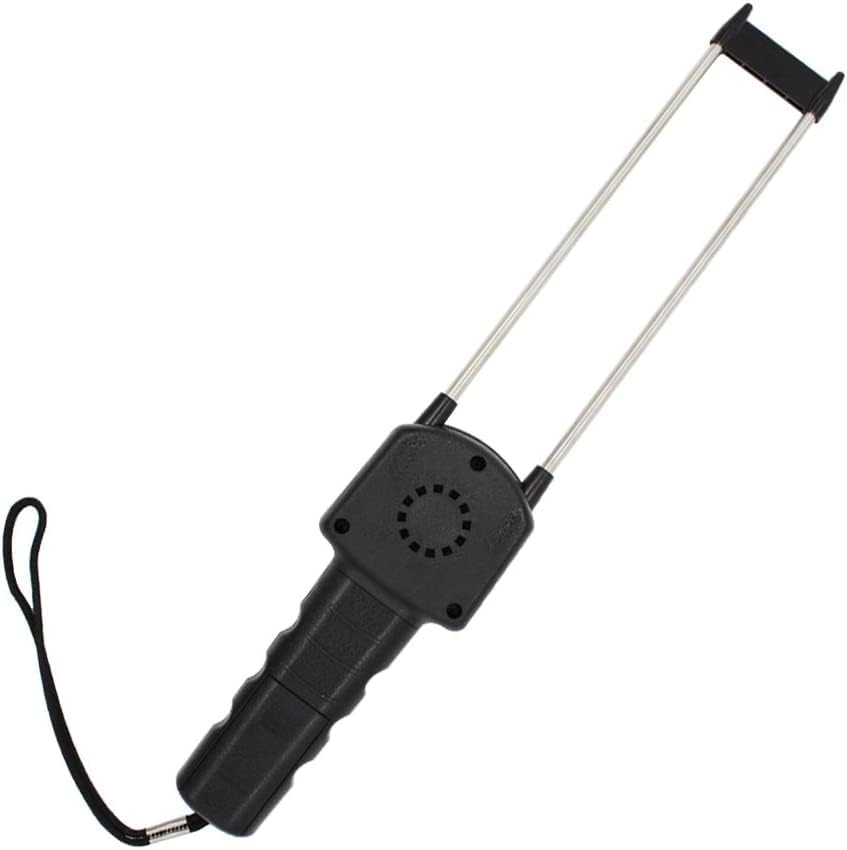
Back view of the Smart Sensor AR991 Digital Grain Moisture Meter, showing the speaker grill.

Figure 3.3: Rear view of the meter highlighting the integrated speaker.

4. Setup

The Smart Sensor AR991 is designed for ease of use. Before first use, ensure the device has sufficient power.

  1. Battery Installation (if applicable): While the device is typically ready for use, if the display does not power on, check the battery compartment (usually located on the handle) and install or replace batteries as needed. Use the specified battery type (e.g., 4x AA batteries, not included).
  2. Initial Inspection: Inspect the probes for any damage or debris. Ensure they are clean and straight.

5. Operating Instructions

Follow these steps to accurately measure grain moisture content.

  1. Power On: Press the On/Off button to turn on the meter. The LCD display will illuminate.
  2. Select Grain Type: Press the Varieties Selection button to cycle through the available grain types (e.g., Wheat, Corn, Rice, Peanut, Soybeans, etc.). Ensure the displayed grain type matches the sample you are testing.

    Chart showing various grain types and their typical moisture content ranges for testing, including Rapeseed, Sesame, Soymeal, Seed Cotton, Soybean, Peanut, Barley, Rice, Sorghum, Watermelon Seed, Paddy, Wheat, Corn, and Feed.

    Figure 5.1: Reference chart for various grain types supported by the meter and their typical moisture ranges.
    Smart Sensor AR991 Digital Grain Moisture Meter positioned next to various piles of different grains, illustrating its versatility.

    Figure 5.2: The meter's applicability across a wide range of grain types.

  3. Insert Probes: Carefully insert the two probes into the grain sample. Ensure the probes are fully submerged and stable within the grain for an accurate reading.
    Smart Sensor AR991 Digital Grain Moisture Meter with its probes inserted into a pile of wheat, displaying a moisture reading on the LCD screen.

    Figure 5.3: Demonstrating proper probe insertion into a grain sample.

  4. Read Measurement: The moisture content percentage and temperature will be displayed on the LCD screen.
  5. Voice-over Function: If enabled, the meter's speaker will audibly report the measurement. Press the Voice-over Selection button to toggle this feature on or off.
  6. Adjust/Limit Functions: Use the Adjust button for calibration or fine-tuning if necessary (refer to specific calibration procedures if provided by manufacturer). The Limit button may be used to set thresholds for moisture content.
  7. Power Off: Press the On/Off button again to turn off the meter when finished.

6. Maintenance

Proper maintenance ensures the longevity and accuracy of your moisture meter.

  • Cleaning: After each use, wipe the probes and the body of the meter with a soft, dry cloth. Do not use water or chemical solvents. Ensure no grain residue remains on the probes.
  • Storage: Store the meter in a cool, dry place, away from direct sunlight and extreme temperatures. Keep the protective cap on the probes if provided.
  • Battery Replacement: If the display becomes dim or the meter does not power on, replace the batteries promptly. Remove batteries if the device will not be used for an extended period to prevent leakage.

7. Troubleshooting

Refer to this section for common issues and their solutions.

ProblemPossible CauseSolution
Meter does not power on.Low or dead batteries; incorrect battery installation.Replace batteries; ensure batteries are inserted with correct polarity.
Inaccurate readings.Probes not fully inserted; incorrect grain type selected; probes are dirty.Ensure probes are fully inserted; select correct grain type; clean probes thoroughly.
No voice output.Voice-over function is off.Press the Voice-over Selection button to activate.
Display is dim.Low battery power.Replace batteries.

8. Specifications

Technical specifications for the Smart Sensor AR991 Digital Grain Moisture Meter.

  • Model: AR991
  • Brand: Generic (Smart Sensor)
  • Item Weight: 9.17 ounces
  • Country of Origin: India
  • Manufacturer: Spancare Pharmaceuticals
  • ASIN: B0CDLQM76G
  • Measurement Range: Varies by grain type (refer to operating instructions for specific ranges).
  • Display: LCD with backlight
  • Features: Voice-over function, energy-saving backlight control.
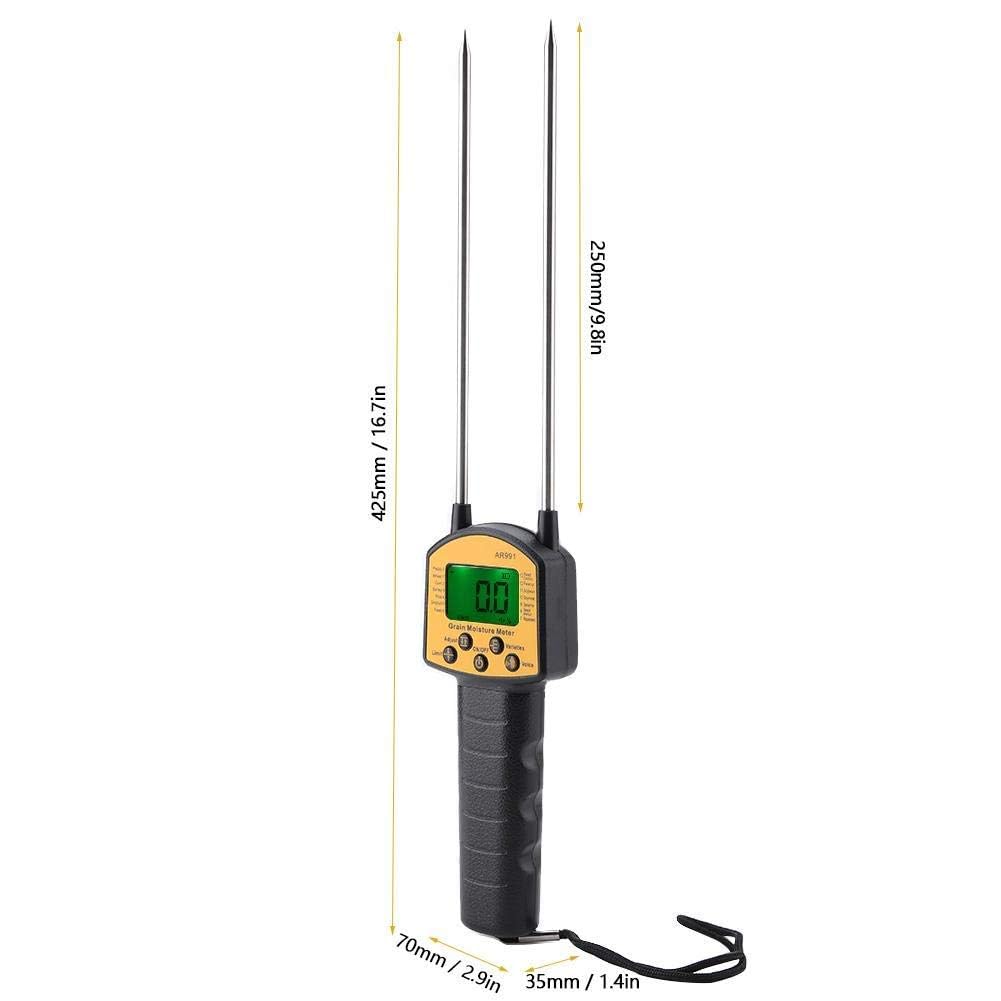
Dimensions of the Smart Sensor AR991 Digital Grain Moisture Meter, showing a length of 425mm (16.7in) for the probes and a handle width of 70mm (2.9in) and thickness of 35mm (1.4in).

Figure 8.1: Physical dimensions of the AR991 meter.

9. Warranty and Support

For warranty information or technical support, please contact the manufacturer directly.

  • Manufacturer: Spancare Pharmaceuticals, India
  • Customer Care Number: +918377935124
  • First Available Date: August 3, 2023

Please retain your purchase receipt as proof of purchase for any warranty claims.

© 2023 Generic. All rights reserved.

Documents - AR991 – AR991
[pdf] Specifications Accessories
Ledger Vouchers MxRady Lab grain moisture meter ar991 5 imimg data5 RQ RY SB SELLER 391686 |||
MXRADY LAB SOLUTIONS PVT LTD. GRAIN MOISTURE METER MODEL NO. S.NO. DM-1G 2 MD7822 3 AR991 4 GM-640 5 GRAIN MOISTURE METER DM-1G SPECIFICATIONCATION Test object: foodstuff and other nonmetal grain sample, such as rice, wheat, maize, so bean and rapeseed. Test range: 3 -- 35 Repeat e...
score:45 filesize: 1.66 M page_count: 5 document date: 2019-08-26
[pdf] User Manual Specifications Catalog
Ledger Vouchers MxRady Lab کاتالوگ قیمت رطوبت سنج علوفه AR 991 SMARTSENSOR AR991 Grain Moisture Meter CATALOG ndtkala co 2023 07 |||
GRAIN MOISTURE METER AR991 Description: Backlight LCD display: This handheld digital grain moisture tester with a large LCD screen can display the data clearly. Back-light makes you easy to read and accurate in low light areas or night. Used for fast and accurate measurement of moisture in the proce...
score:44 filesize: 790.68 K page_count: 1 document date: 2023-07-17
[pdf] User Manual Specifications
Smart Sensor AR991 SMART SENSOR Grain Moisture Meter Others Melaka Malaysia Ayer Keroh Supplier Suppliers Supply Supplies Carlssoon Technologies Sdn Bhd cdn1 npcdn net userfiles 21133 attachment 4112238 20220823 24c75b666cc6ec1ebd4ab421d7a745e9 |||
GRAIN MOISTURE METER AR991 Description: Backlight LCD display: This handheld digital grain moisture tester with a large LCD screen can display the data clearly. Back-light makes you easy to read and accurate in low light areas or night. Used for fast and accurate measurement of moisture in the proce...
score:42 filesize: 246.96 K page_count: 1 document date: 2022-07-20
[pdf] User Manual Troubleshooting Guide Specifications Warranty
44602 espressomachine manual Andrew Tabarretti Instruction Manual Omcan omcan instruction |||
Automatic Espresso Machine Model CM-CN-0019 Item 44602 Instruction Manual Revised - 03/21/2025 Toll ... 191 192 193 196 197 AR983 Terminal Block for 44602 198 AR984 AR985 AR986 AR987 AR988 AR989 AR990 AR991 Transformer Holder for 44602 199 Keeping Lines Rubber Strip for 44602 200 Keeping Lines ...
score:41 filesize: 6.74 M page_count: 32 document date: 2025-03-21
[pdf] User Manual
Инструкция Влагомер зерна Granol AR991 руководство Менеджер Minicam24 ru Диапазон измерения влажности для разных видов Зерно Код риса P0 11 55 Пшеница P1 Кукуруза P2 5 50 Ячмень vlagomer zerna granol ar991 srsltid AfmBOopsNrI khPzyT aqEBFTFbmQJQzR5iz2pRCbRma5Du RdPpyaVD minicam24 upload content manual ruДиапазон Ячменьminicam24 RdPpyaVDminicam24 AfmBOoq1yBjCUzDd4TEpn1Rsh64GNFiRy4pwQLhv1ac8q1KmMHOKlSc4 AfmBOorUkYigbs5X6VD6G7q9iq8pUIKqdc0aw 3R28OiUZRhTe0V3KECminicam24 AfmBOoq1yBjCUzDd4TEpn1Rsh64GNFiRy4pwQLhv1ac8q1KmMHOKlSc4minicam24 AfmBOopYrjCoPNet9iLNHWGN07fQWgeXFCMZCCP1XFid 6Dk9jubgGL AfmBOoqIFwcgtyySC1CZvSemeNr4byRx i aPV1w0Ct2nAqZKMvjG Wvminicam24 AfmBOooLYySHwvWzt61jnfHXKVuLi 4bZ8wmjvsSDLBcfZ9Liy5VmTq3minicam24 AfmBOoo1ElYAIRq43z1DzkQRANMkmaZIHfNNMommHFKsjthboM63wCWaminicam24 AfmBOoqSXAMPOiOPXSpe mms58 mgTUkwwSVcNWXRWlNcq7OAAXi0Hn8minicam24 AfmBOoqvTZY6S Msi3ncqAWw3qH1cRN5ZDmBiWcPm0AlBFmEGm58Bp hminicam24 6Dk9jubgGLminicam24 ||| ||| Granol AR991 1.0 minicam24.ru 1. 3 2. . 3 3. . 3 4. . 3 5. 4 6. 4 7. 4 8. . 5 9. . 5 10. 5 11. 5 12. . 5 13. 5 13.1 / On / Off . 5 13.2 5 13.3 . 6 13.4 . 6 13.5 6 14. . 6 15. 7 16. - . 7 17. . ||| Granol AR991 1.0 minicam24.ru 1. 3 2. . 3 3. . 3 4. . 3 5. 4 6. 4 7. 4 8. . 5 9. . 5 10. 5 11. 5 12. . 5 13. 5 13.1 / On / Off . 5 13.2 5 13.3 . 6 13.4 . 6 13.5 6 14. . 6 15. 7 16. - . 7 17. . ||| Granol AR991 1.0 minicam24.ru 1. 3 2. . 3 3. . 3 4. . 3 5. 4 6. 4 7. 4 8. . 5 9. . 5 10. 5 11. 5 12. . 5 13. 5 13.1 / On / Off . 5 13.2 5 13.3 . 6 13.4 . 6 13.5 6 14. . 6 15. 7 16. - . 7 17. . ||| Granol AR991 1.0 minicam24.ru 1. 3 2. . 3 3. . 3 4. . 3 5. 4 6. 4 7. 4 8. . 5 9. . 5 10. 5 11. 5 12. . 5 13. 5 13.1 / On / Off . 5 13.2 5 13.3 . 6 13.4 . 6 13.5 6 14. . 6 15. 7 16. - . 7 17. . ||| Granol AR991 1.0 minicam24.ru 1. 3 2. . 3 3. . 3 4. . 3 5. 4 6. 4 7. 4 8. . 5 9. . 5 10. 5 11. 5 12. . 5 13. 5 13.1 / On / Off . 5 13.2 5 13.3 . 6 13.4 . 6 13.5 6 14. . 6 15. 7 16. - . 7 17. . ||| Granol AR991 1.0 minicam24.ru 1. 3 2. . 3 3. . 3 4. . 3 5. 4 6. 4 7. 4 8. . 5 9. . 5 10. 5 11. 5 12. . 5 13. 5 13.1 / On / Off . 5 13.2 5 13.3 . 6 13.4 . 6 13.5 6 14. . 6 15. 7 16. - . 7 17. . ||| Granol AR991 1.0 minicam24.ru 1. 3 2. . 3 3. . 3 4. . 3 5. 4 6. 4 7. 4 8. . 5 9. . 5 10. 5 11. 5 12. . 5 13. 5 13.1 / On / Off . 5 13.2 5 13.3 . 6 13.4 . 6 13.5 6 14. . 6 15. 7 16. - . 7 17. . ||| Granol AR991 1.0 minicam24.ru 1. 3 2. . 3 3. . 3 4. . 3 5. 4 6. 4 7. 4 8. . 5 9. . 5 10. 5 11. 5 12. . 5 13. 5 13.1 / On / Off . 5 13.2 5 13.3 . 6 13.4 . 6 13.5 6 14. . 6 15. 7 16. - . 7 17. .
Granol AR991 1.0 minicam24.ru 1. ........................ 3 2. ......................................................................................................... 3 3. ................................................................................................. 3 4. .......
score:38 filesize: 324.79 K page_count: 8 document date: 2021-10-05
[pdf] User Manual Troubleshooting Guide Specifications Warranty
44602 espressomachine manual Andrew Tabarretti cdn restaurantsupply 4 6 manualcdn stage ||| ||| Automatic Espresso Machine Model CM-CN-0019 Item 44602 Instruction Manual Revised - 03/21/2025 Toll Free: 1-800-465-0234 Fax: 905-607-0234 Email: service omcan.com www.omcan.com Table of Contents Model CM-CN-0019 Section Page General Inform
Automatic Espresso Machine Model CM-CN-0019 Item 44602 Instruction Manual Revised - 03/21/2025 Toll ... 191 192 193 196 197 AR983 Terminal Block for 44602 198 AR984 AR985 AR986 AR987 AR988 AR989 AR990 AR991 Transformer Holder for 44602 199 Keeping Lines Rubber Strip for 44602 200 Keeping Line...
score:27 filesize: 6.74 M page_count: 32 document date: 2025-03-21
[pdf] User Manual
AR991 英文说明书 cdr Rock SMART SENSOR MODEL Grain Moisture Meter User Manual Thank you for purchasing Smart Sensor s product Please read this manual before using the S705aceeff9494513af4dfe7c2cad6a29oae01 alicdn kf S705aceeff9494513af4dfe7c2cad6a29o |||
...
score:25 filesize: 4.77 M page_count: 3 document date: 2016-09-02
[pdf] Document
Dvir Zilberberg הוראות שימוש באנגלית SMART SENSOR AR991 מודד לחות בדגנים וזרעים AR991EN zshop co il 2024 06 |||
...
score:18 filesize: 679.14 K page_count: 1 document date: 2024-06-05
Uniglobal Business: Comprehensive Range of Scientific & Industrial Instruments
Explore Uniglobal Business's extensive catalog of high-quality scientific and industrial instruments, including hygrometers, pH meters, soil meters, refractometers, alcohol testers, air quality monitors, and more. Serving diverse industries with precision and reliability.
score:17 filesize: 9.06 M page_count: 32 document date: 2025-09-08
[pdf] Document
Parts Breakdown Omcan AR814 Coping for 44602 17 AR838 Thickness Degree Alignment Jig Upside 41 AR862 Underside Pallet Gear 68 AR815 Cover Plate of  parts omcan assets PARTS BREAKDOWN |||
Parts Breakdown Model CM-CN-0019 44602 Parts Breakdown Model CM-CN-0019 44602 Item No. Descriptio ... der Mechanism 180 for 44602 AR968 Right Seal for 44602 181 AR985 AR986 AR987 AR988 AR989 AR990 AR991 Keeping Lines Rubber Strip for 44602 200 Keeping Lines Board for 44602 201 Connecting Le...
score:17 filesize: 1.94 M page_count: 5 document date: 2024-08-27
[pdf] Document
Parts Breakdown Omcan 44602 parts omcan breakdown |||
Parts Breakdown Model CM-CN-0019 44602 Parts Breakdown Model CM-CN-0019 44602 Item No. Descriptio ... der Mechanism 180 for 44602 AR968 Right Seal for 44602 181 AR985 AR986 AR987 AR988 AR989 AR990 AR991 Keeping Lines Rubber Strip for 44602 200 Keeping Lines Board for 44602 201 Connecting Le...
score:17 filesize: 2.12 M page_count: 5 document date: 2024-08-27
[pdf] Frequently Asked Questions Reference Guide Guide Catalog
untitled BOSCHWiperBladesCatalogue V399720909 g ec2 images amazon G 02 automotive
A1 Contents Car Light Commercial Vehicle Programme Aerotwin A2 Super Plus Twin A8 Rear Bl ... S AR532S AR533S AR534S AR550S AR551S AR552S AR566S AR601S AR604S AR606S AR607S AR650S AR728S AR813S AR991S AR992S AR997S 3397007206 3397009000 3397007207 3397118903 3397007042 3397007181 3397007180 3...
score:11 filesize: 2.23 M page_count: 33 document date: 2012-11-07
[pdf] Catalog
Verwendung Applications Affectations Impiego Применение B1 116M Largeur du logement de balai d essuie glace 16 mm 19M 19 2AA Utiliser l adaptateur 2 notice montage 91S3otAdGGSimages na ssl images amazon I 91S3otAdGGS |||
de Verwendung en Applications fr Affectations it Impiego ru B 1.1 Benutze ... ..118912 650/450 1 803 ..001803 650/450 OAM 1 H450 ..004763 450 Civic Hybrid FA 01.06-08.11 1 AR991S ..118991 650/575 1 655 ..010302 650/550 FD 01.06-12.07 1 A392S ..007392 700/575 01.08 ...
score:9 filesize: 896.05 K page_count: 76 document date: 2013-11-06