
1. Introduction
This manual provides instructions for the SymWell Replacement Remote Control, designed for use with various robot vacuum cleaner models including k600, k602g, k700, k760, rc-1633, dj35, and dj36. This remote offers essential control functions for your compatible robot vacuum.
Please note that this is a general replacement remote and may not offer all functions present on an original equipment manufacturer (OEM) remote. It operates without batteries, which must be purchased separately.
2. Setup
2.1. Battery Installation
The remote control requires two AAA batteries (not included). Follow these steps to install them:
- Locate the battery compartment cover on the back of the remote control.
- Slide the cover downwards or press the latch to open it.
- Insert two AAA batteries, ensuring the positive (+) and negative (-) terminals align correctly with the markings inside the compartment.
- Replace the battery compartment cover, sliding it back into place until it clicks securely.
After battery installation, the remote control is ready for use. No pairing is typically required for these general replacement remotes; they should function directly with compatible vacuum models.
3. Operation
The SymWell Replacement Remote Control features several buttons for controlling your robot vacuum. Refer to the image below for button identification and their corresponding functions.
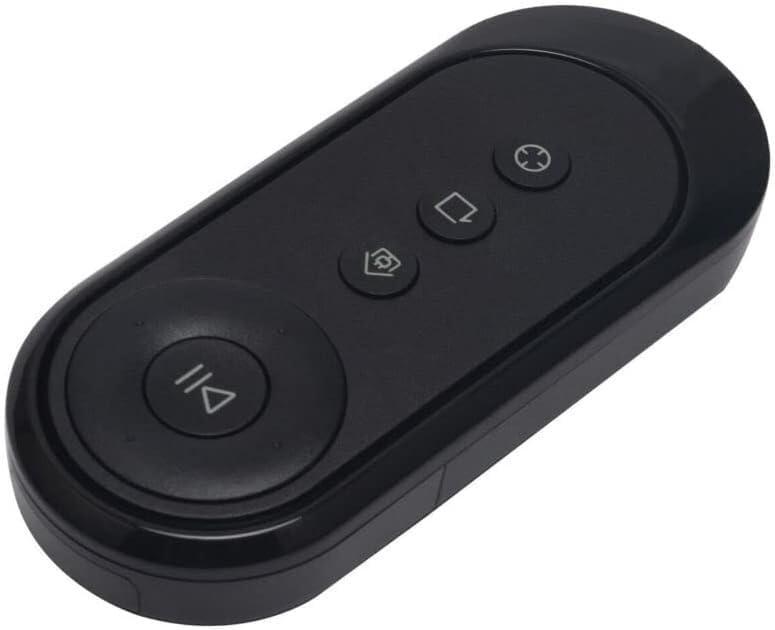
Image 1: Front view of the SymWell Replacement Remote Control. It is a black, elongated oval-shaped remote with four circular buttons. A large button at the bottom features a play/pause symbol. Above it, from left to right, are three smaller buttons: one with a home/docking station symbol, one with a square/return symbol, and one with a circular cleaning pattern symbol.
3.1. Button Functions
- Play/Pause Button (Large, Bottom): Initiates or pauses the vacuum cleaner's cleaning cycle. Press once to start, press again to pause.
- Home/Dock Button (Top Left): Commands the robot vacuum to return to its charging dock.
- Spot/Area Clean Button (Top Middle): Activates a focused cleaning mode for a specific area. The symbol typically indicates a square or a return path.
- Auto/Edge Clean Button (Top Right): Initiates an automatic cleaning mode or an edge cleaning mode, depending on the vacuum model. The symbol often represents a circular or spiral cleaning pattern.
Point the remote control directly at the robot vacuum cleaner for optimal signal transmission. Ensure there are no obstructions between the remote and the vacuum.
4. Maintenance
To ensure the longevity and proper functioning of your remote control, follow these simple maintenance guidelines:
- Cleaning: Wipe the remote control with a soft, dry cloth. For stubborn dirt, slightly dampen the cloth with water. Avoid using harsh chemicals or abrasive cleaners.
- Battery Replacement: Replace batteries when the remote's range decreases or it becomes unresponsive. Always replace both batteries at the same time with new ones of the same type.
- Storage: Store the remote control in a cool, dry place away from direct sunlight and extreme temperatures. If storing for extended periods, remove the batteries to prevent leakage.
- Handling: Avoid dropping the remote control or exposing it to excessive force, as this can damage internal components.
5. Troubleshooting
If you encounter issues with your SymWell Replacement Remote Control, refer to the following common solutions:
| Problem | Possible Cause | Solution |
|---|---|---|
| Remote not responding. | Dead or incorrectly installed batteries. | Check battery orientation. Replace with fresh AAA batteries. |
| Limited range or intermittent response. | Low batteries; Obstruction between remote and vacuum; Interference. | Replace batteries. Ensure a clear line of sight. Move closer to the vacuum. |
| Certain functions do not work. | This is a general replacement remote; not all functions may be supported by your specific vacuum model. | Verify compatibility with your vacuum's original remote functions. This remote provides essential controls. |
| Remote appears damaged. | Physical damage. | If the remote is physically damaged, it may need to be replaced. |
If the problem persists after trying these solutions, please refer to the support section.
6. Specifications
- Model Number: 9314109582307
- Compatible Devices: k600, k602g, k700, k760, rc-1633, dj35, dj36 Robot Vacuum Cleaners
- Power Source: 2 x AAA Batteries (not included)
- Color: Black
- Item Weight: 0.32 ounces (approximately 9 grams)
- Package Dimensions: 2.5 x 2 x 1 inches (approximately 6.35 x 5.08 x 2.54 cm)
- Manufacturer: SymWell
7. Warranty and Support
7.1. Warranty Information
Specific warranty details for this general replacement remote control are not provided in the product information. Please refer to the retailer's return policy or contact the seller directly for information regarding returns or defects.
7.2. Customer Support
For further assistance or inquiries, please contact your point of purchase or the seller, SymTech (Seller ID: A20D57CKYIUEDY), through the Amazon platform. Provide your order details and a clear description of the issue for efficient support.
You can typically find seller contact information on your order history page on Amazon.