
ALORAIR VentirMax 570S
ALORAIR VentirMax 570S Crawlspace Ventilation Fan
User Instruction Manual
1. Introduction
The ALORAIR VentirMax 570S is a high-performance crawlspace ventilation fan designed to improve air quality and manage humidity in enclosed spaces such as crawl spaces, basements, attics, garages, and grow tents. Featuring a robust stainless steel construction with an IP55 rating, this fan is built for durability and resistance to dust, water, and rust. It includes a built-in humidistat for automatic humidity control and an antifreeze thermostat for protection in cold conditions.

Image 1.1: Front view of the ALORAIR VentirMax 570S Crawlspace Ventilation Fan.
2. Safety Information
Please read all safety instructions carefully before operating the fan. Failure to follow these instructions may result in electric shock, fire, or serious injury.
- Power Disconnection: Always disconnect the fan from the power supply before performing any servicing, cleaning, or maintenance.
- Residential Use: This device is intended for residential use only. Do not use in commercial or industrial settings unless explicitly stated.
- Electrical Safety: Ensure the power outlet matches the fan's voltage requirements (115 Volts AC). Do not use extension cords unless absolutely necessary and ensure they are rated for the fan's wattage.
- Placement: Install the fan in a location where it is protected from direct exposure to excessive moisture or physical damage.
- Obstruction: Do not obstruct the fan's intake or exhaust vents. Maintain clear space around the fan for optimal airflow.
- Children and Pets: Keep children and pets away from the fan during operation.
3. Package Contents
Verify that all items listed below are included in your package. If any items are missing or damaged, please contact ALORAIR customer support.

Image 3.1: Included components and product dimensions.
| Item | Quantity |
|---|---|
| VentirMax 570S Air-Out Ventilator Fan | 1 |
| User Manual | 1 |
| Power Adapter | 1 |
| Plastic Expansion Pipe | 4 |
| Stainless Steel Screw | 8 |
| Nut | 4 |
4. Specifications
| Specification | Value |
|---|---|
| Model Name | VentirMax 570S |
| Air Flow Capacity | 570 CFM (Cubic Feet Per Minute) |
| Noise Level | < 55 dBA |
| Power Source | AC |
| Voltage | 115 Volts (AC) |
| Wattage | 50 watts |
| Operating Humidity Range | 10% ~ 80% RH |
| Operating Temperature Range | 37°F ~ 158°F (2.8°C ~ 70°C) |
| Product Dimensions (D x W x H) | 3.3" x 14.8" x 10.6" |
| Item Weight | 6.76 Pounds |
| IP Rating | IP55 (Dustproof, Weatherproof, Liquid Resistance) |
| Material | Stainless Steel |
| Certification | ETL |
| Recommended Coverage Area | Up to 950 sq.ft. |
5. Setup and Installation
The VentirMax 570S is designed for straightforward installation. Before beginning, ensure you have measured the size of your crawl space vent opening to confirm compatibility. The fan panels can be trimmed if necessary to match non-standard foundation openings.
Installation Steps:
- Prepare the Opening: Ensure the vent opening is clean and clear of any debris. If trimming is required, carefully cut the fan panels to fit the opening.
- Position the Fan: Place the fan into the vent opening, ensuring it is securely seated. The fan is designed to accelerate indoor and outdoor air circulation.
- Secure the Fan: Use the provided stainless steel screws and nuts to firmly attach the fan to the foundation or mounting surface. Use the plastic expansion pipes if mounting into masonry.
- Connect Power: Plug the 6ft grounded power cord into a standard 115V AC electrical outlet. The fan is now ready for operation.

Image 5.1: Fan installed in a crawlspace, demonstrating airflow.
6. Operating Instructions
The VentirMax 570S features a simple knob control panel for easy operation and humidity management.
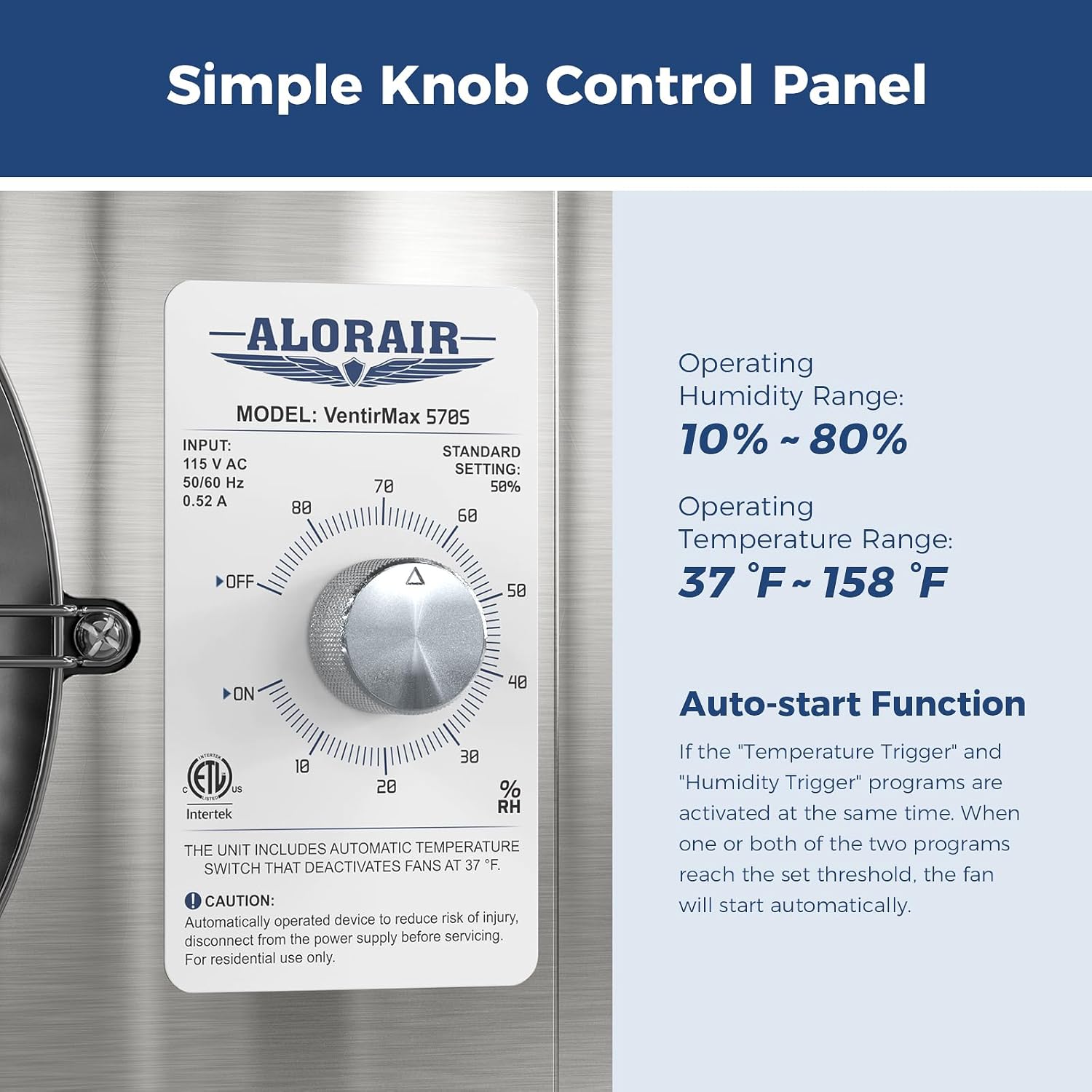
Image 6.1: Simple knob control panel for humidity and power settings.
Humidity Control:
- The fan's humidistat allows you to set the desired humidity level between 10% and 80% Relative Humidity (RH).
- Turn the knob to select your target humidity percentage.
- When the ambient humidity rises above the set threshold, the fan will automatically turn on to reduce moisture.
- Once the humidity drops below the set level, the fan will automatically turn off.
Antifreeze Thermostat:
- The fan is equipped with a built-in antifreeze thermostat.
- If the ambient temperature falls below 37°F (2.8°C), the fan will automatically stop running to prevent damage from freezing.
- Operation will resume automatically when the temperature rises above this threshold.
Auto-Start Function:
- The fan features an auto-start function based on both temperature and humidity triggers.
- If either the temperature or humidity trigger (or both) reaches the set threshold, the fan will automatically begin operation.
Application Areas:
The VentirMax 570S is ideal for use in various wet or enclosed areas to improve air quality and balance humidity.
Image 6.2: Examples of suitable installation locations.
7. Maintenance
Regular maintenance ensures the longevity and optimal performance of your VentirMax 570S fan.
Cleaning the Fan:
- Disconnect Power: Always unplug the fan from the power outlet before cleaning.
- Exterior Cleaning: Wipe the exterior of the fan with a soft, damp cloth. Do not use harsh chemicals or abrasive cleaners.
- Isolation Mesh: The fan is equipped with an 8 mm isolation net to prevent particulates from entering. Periodically inspect and gently clean any accumulated dust or debris from the mesh using a soft brush or vacuum cleaner. This helps maintain airflow and prolongs the fan's service life.

Image 7.1: Detail of the built-in isolation mesh.

Image 7.2: Detail of the antifreeze thermostat.
8. Troubleshooting
This section addresses common issues you might encounter with your VentirMax 570S fan.
| Problem | Possible Cause | Solution |
|---|---|---|
| Fan is not running. | No power supply. | Check if the power cord is securely plugged into a working outlet. Verify the outlet has power. |
| Fan is not running. | Ambient temperature is below 37°F (2.8°C). | The antifreeze thermostat has automatically stopped the fan. Operation will resume when the temperature rises above 37°F. This is normal operation. |
| Fan is not running. | Humidity is below the set threshold. | The humidistat has automatically turned off the fan. Adjust the humidity setting higher or wait for humidity to increase. This is normal operation. |
| Fan is running but airflow is weak. | Isolation mesh is clogged with debris. | Disconnect power and clean the isolation mesh as described in the Maintenance section. |
| Fan is unusually loud. | Loose mounting or vibration. | Ensure the fan is securely mounted and all screws are tightened. Check for any objects obstructing the fan blades. |
9. Warranty and Support
ALORAIR stands behind the quality of its products. The VentirMax 570S Crawlspace Ventilation Fan comes with a 2-year warranty.
For warranty claims, technical assistance, or any questions regarding your ALORAIR product, please contact our dedicated customer support team. Our associates are available to provide support before and after your purchase.
Please refer to the contact information provided on the ALORAIR official website or your purchase documentation for the most current support details.
Online Resources: For additional information, FAQs, and product registration, visit the official ALORAIR website: www.alorair.com
Ask a question about this manual
Ask about setup, troubleshooting, compatibility, parts, safety, or missing instructions. Manuals+ will review the question and use this page’s manual context to help answer it.