
1. Introduction
Thank you for choosing the Anbull 110V to 12V Converter. This power supply is designed to convert AC 110V/220V input to a stable 12V DC output, suitable for a wide range of applications. It features an ON/OFF switch and supports various current ratings up to 50A (600W max). This manual provides essential information for safe and efficient operation, installation, and maintenance of your device.
Please read this manual thoroughly before using the product and retain it for future reference.
2. Safety Instructions
To ensure safe operation and prevent damage, observe the following precautions:
- Always connect the ground wire to a proper earth ground.
- Ensure the input voltage selector switch (110V/220V) is set correctly for your region's power supply before connecting to AC power. Incorrect setting can cause damage.
- Do not exceed the maximum output current of 50A or power of 600W. For motor devices, consider the higher starting current.
- This power supply is designed for indoor use only. Avoid exposure to moisture, rain, or extreme temperatures.
- Ensure adequate ventilation around the unit. Do not block cooling vents.
- Disconnect power before performing any maintenance or making connections.
- Do not open the casing. There are no user-serviceable parts inside. Refer all servicing to qualified personnel.
- The unit features built-in protection against over/under voltage, over current, and over heat. However, proper usage is still critical.

Image: The power supply unit highlighting its built-in safety features including protection against lightning, over current, over voltage, and overheating.
3. Package Contents
Verify that all items are present in the package:
- Anbull 110V to 12V Converter Power Supply Unit
- AC Power Cord
- Battery Clips (Red and Black)
- Screwdriver
- Mounting Bracket and Screws/Washers

Image: The Anbull 110V to 12V Converter unit displayed with all its accompanying accessories, including the power cord, battery clips, a screwdriver, and mounting hardware.
4. Product Overview and Features
The Anbull 110V to 12V Converter is a robust power supply designed for various DC applications. Key features include:
- Dual Input Voltage: Automatically adjusts for AC 110V or 220V input.
- High Output Capacity: Provides 12V DC output, with current ranging from 1A to 50A, and a maximum power of 600W.
- Integrated ON/OFF Switch: For convenient power control.
- Versatile Output Terminals: Features negative (black) and positive (red) screw terminals that also support 4mm banana plugs and direct battery clip connections.
- Comprehensive Protection: Includes over/under voltage, over current, over heat protection, and fan heat dissipation.
- Compact and Portable Design: Weighs approximately 1.2 kg.
- Wide Application: Ideal for LED strips, car stereos, CCTV cameras, and other 12V powered systems.

Image: A visual representation of the diverse applications for the Anbull 110V to 12V Converter, such as powering LED displays, electrical equipment, medical devices, solar systems, and air compressors.
5. Setup and Installation
5.1. Input Voltage Selection
Before connecting the power supply to an AC outlet, ensure the voltage selector switch on the side of the unit is set to the correct voltage for your region (110V or 220V). Incorrect selection can damage the unit.

Image: A detailed view of the power supply unit, illustrating the voltage selector switch. Users must choose between 110V (left position) and 220V (right position) based on their local power grid.
5.2. Connecting Output Devices
The power supply offers flexible connection options for your 12V DC devices:
- Direct Wire Connection:
- Step 1: Using the provided screwdriver, unscrew the terminals (red for positive, black for negative) and remove the copper fittings.
- Step 2: Insert the stripped ends of your device's wires into the corresponding terminal holes. Ensure proper polarity (positive to red, negative to black).
- Step 3: Tighten the screws securely to ensure a firm connection.
- Banana Plug Connection: The terminals are designed to accept 4mm banana plugs directly. Insert the banana plugs into the center of the screw terminals.
- Battery Clip Connection: For quick and easy connection to devices with battery clips, simply clamp the red clip to the positive (+) terminal rod and the black clip to the negative (-) terminal rod.

Image: A step-by-step guide on how to connect wires to the power supply's terminals. It shows unscrewing the terminals, inserting the wire, and then tightening the screws for a secure connection.

Image: A close-up view demonstrating the ease of connecting car battery clips to the power supply's terminals, also indicating the 4mm banana plug compatibility.
5.3. Mounting (Optional)
The power supply can be wall-mounted using the provided bracket and screws. Ensure the mounting surface is stable and can support the unit's weight (2.65 lbs / 1.2 kg). Allow sufficient space around the unit for ventilation.
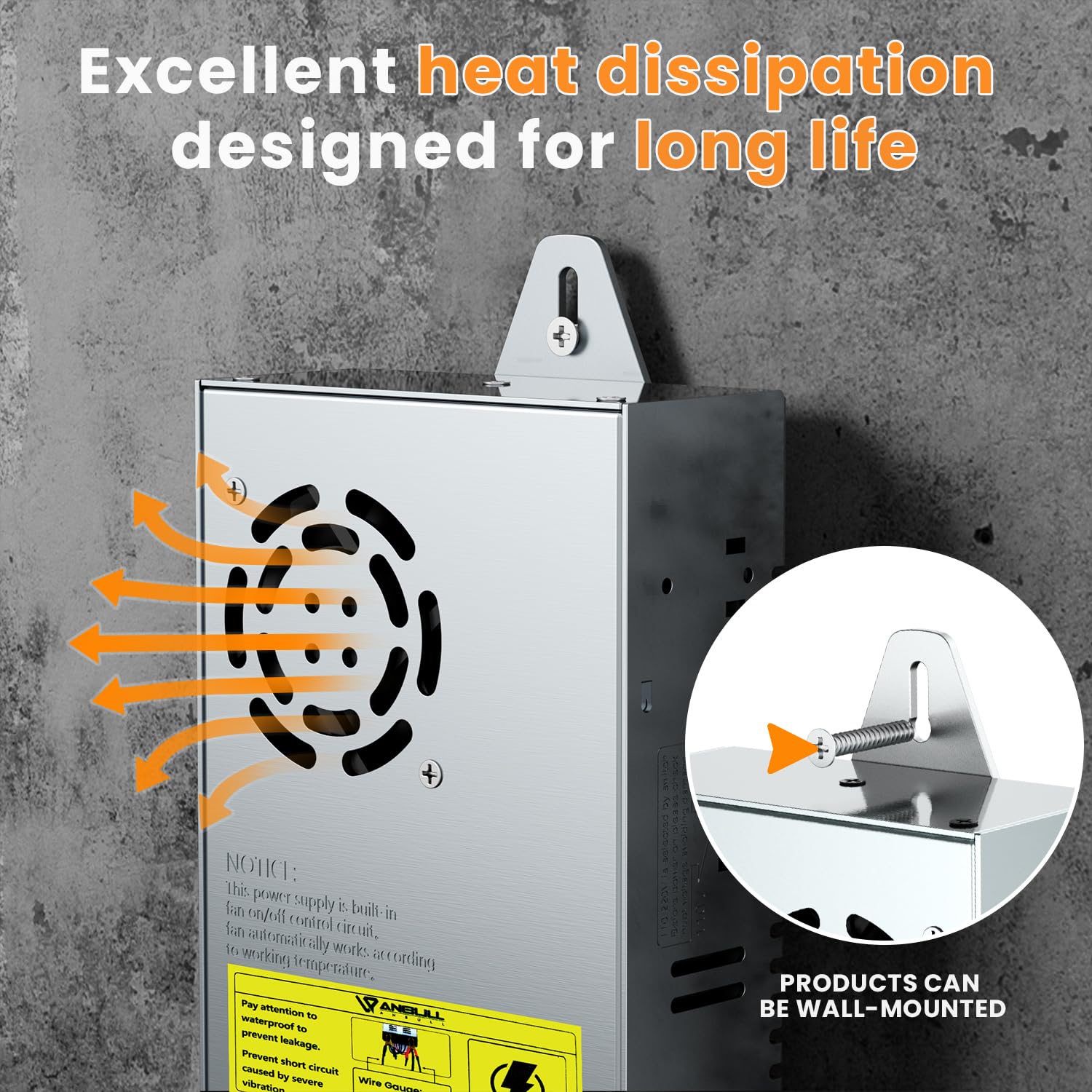
Image: The power supply unit shown mounted on a wall, emphasizing its excellent heat dissipation design with arrows indicating airflow, and an inset image detailing the mounting bracket.
6. Operating Instructions
- Verify Connections: Double-check all input and output connections for proper polarity and secure fastening.
- Select Voltage: Ensure the 110V/220V selector switch is set correctly for your local power supply.
- Connect AC Power: Plug the AC power cord into a suitable wall outlet.
- Power On: Flip the ON/OFF switch on the power supply to the "ON" position. The unit will begin supplying 12V DC power to your connected devices.
- Monitor Load: While the unit has protection features, avoid continuously operating at or near the maximum 50A/600W capacity, especially with inductive loads like motors which have high starting currents. For resistive loads like LED strips, ensure the total current draw does not exceed 50A.
- Power Off: To disconnect power, flip the ON/OFF switch to the "OFF" position, then unplug the AC power cord from the wall outlet.
7. Maintenance
- Cleaning: Disconnect power before cleaning. Use a soft, dry cloth to wipe the exterior. Do not use liquid cleaners or solvents.
- Ventilation: Regularly check that the ventilation openings and fan are free from dust and debris to ensure proper heat dissipation.
- Storage: When not in use for extended periods, store the unit in a cool, dry place away from direct sunlight and moisture.
- Inspection: Periodically inspect the power cord and terminals for any signs of damage or wear.
8. Troubleshooting
| Problem | Possible Cause | Solution |
|---|---|---|
| No power output |
|
|
| Output voltage is unstable |
|
|
| Unit is overheating |
|
|
9. Specifications
| Parameter | Value |
|---|---|
| Brand | Anbull |
| Model | B0828GPDS4 |
| Input Voltage | AC 110V/220V (selectable) |
| Output Voltage | DC 12V |
| Output Current Range | 1A - 50A |
| Max Power Output | 600W |
| Product Dimensions | 9 x 4.5 x 1.97 inches (22.86 x 11.43 x 5 cm) |
| Net Weight | 2.65 Pounds (1.2 kg) |
| Protection Features | Over/Under Voltage, Over Current, Over Heat, Short Circuit |
| Cooling | Fan Heat Dissipation |
10. Warranty and Support
Anbull products are manufactured to high quality standards. For warranty information or technical support, please refer to the contact details provided with your purchase or visit the official Anbull website. Please have your model number (B0828GPDS4) and purchase date ready when contacting support.
Manufacturer: Ankul