
1. Introduction
This manual provides essential information for the safe and effective use of your SPANN replacement battery. This high-quality Lithium-Polymer battery is designed to be compatible with specific Razer mouse models, including the Razer Basilisk Ultimate, NAGA PRO, and those using part numbers RC30-031701, RZ01-03420, and RZ01-034200100. Please read this manual thoroughly before installation and use.
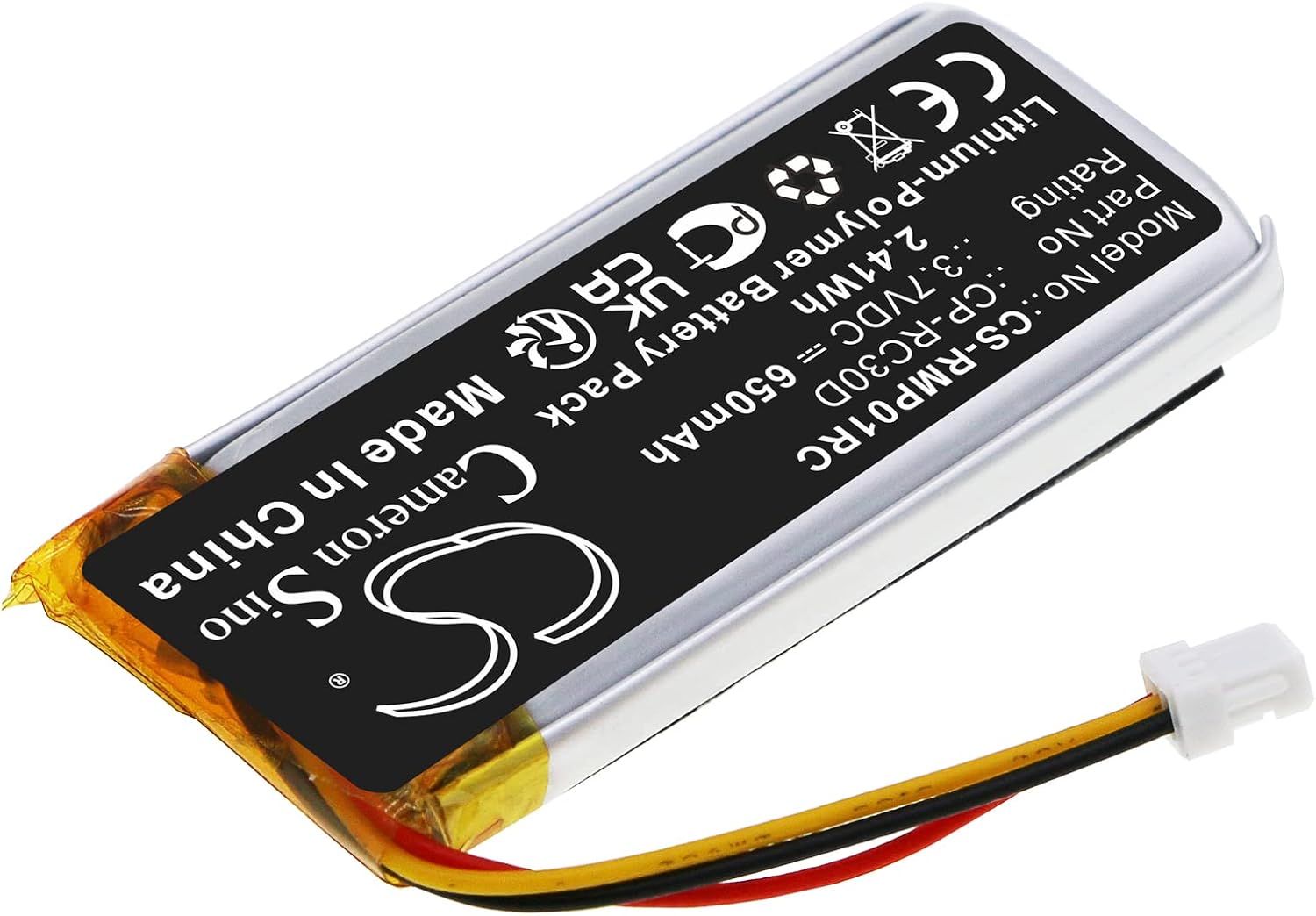
Figure 1: SPANN Replacement Battery. This image shows the overall view of the SPANN replacement battery, highlighting its compact design and the attached connector cable.
2. Safety Precautions
- Do not disassemble, puncture, or modify the battery. This can lead to fire, explosion, or leakage.
- Avoid exposing the battery to extreme temperatures (above 60°C/140°F or below 0°C/32°F), direct sunlight, or moisture.
- Keep the battery away from children and pets.
- Use only compatible chargers.
- If the battery shows signs of damage, swelling, or leakage, discontinue use immediately.
- Dispose of batteries responsibly according to local regulations. Do not dispose of in household waste.
3. Setup and Installation
Replacing the battery in your Razer mouse requires careful handling. It is recommended to consult the original device's service manual or a reputable online guide for specific disassembly and reassembly instructions for your particular mouse model (e.g., Razer Basilisk Ultimate, NAGA PRO).
- Power Off Device: Ensure your Razer mouse is completely powered off and disconnected from any charging source.
- Disassemble Mouse: Carefully open the mouse casing according to your specific model's instructions. This may involve removing screws hidden under glide pads.
- Locate Old Battery: Identify the existing battery and its connector.
- Disconnect Old Battery: Gently disconnect the old battery's connector from the mouse's circuit board. Do not pull on the wires.
- Remove Old Battery: Carefully remove the old battery. It may be lightly adhered in place.
- Connect New Battery: Connect the SPANN replacement battery's connector to the corresponding port on the mouse's circuit board. Ensure the connector is fully seated and oriented correctly.

Figure 2: Battery Connector. This image provides a close-up view of the battery's 3-pin connector, which needs to be securely attached to the mouse's internal port.
- Position New Battery: Place the new battery securely within the mouse casing. Ensure it does not obstruct any moving parts or put pressure on other components.
- Reassemble Mouse: Carefully reassemble the mouse casing, ensuring all screws and clips are properly secured.
- Initial Charge: After installation, fully charge the new battery before its first use.
4. Operating Instructions
Once installed, the SPANN replacement battery operates like the original battery in your Razer mouse. It is a Lithium-Polymer battery, which means it has no memory effect, allowing you to charge it at any time without reducing its overall capacity.
- Charging: Charge the battery using the standard charging methods provided with your Razer mouse (e.g., USB cable, charging dock).
- Usage: The battery provides power to your mouse for wireless operation. Battery life will vary depending on usage patterns, mouse settings (e.g., RGB lighting, polling rate), and environmental factors.
- Over-Protection: The battery is designed with built-in protection against over-charge, over-discharge, over-heat, over-current, and short-circuit conditions to ensure safe operation.
5. Maintenance
Proper maintenance can extend the lifespan of your battery:
- Storage: If storing the mouse or battery for an extended period, store it in a cool, dry place, ideally with the battery charged to about 50%. Avoid storing fully charged or fully depleted.
- Temperature: Operate and store the battery within recommended temperature ranges to prevent degradation.
- Cleaning: Keep the battery and its contacts clean and free from dust or debris.
6. Troubleshooting
If you encounter issues with your SPANN replacement battery, consider the following:
| Problem | Possible Cause / Solution |
|---|---|
| Mouse does not power on after battery replacement. |
|
| Battery not charging. |
|
| Short battery life. |
|
If troubleshooting steps do not resolve the issue, please contact SPANN customer support.
7. Specifications

Figure 3: Battery Label. This image displays the battery's label, showing key specifications such as model number, part number, voltage, and capacity.
- Model No.: CS-RMP01RC
- Part No.: CP-RC30D
- Battery Type: Lithium-Polymer
- Voltage: 3.7V
- Capacity: 650mAh / 2.41Wh
- Dimensions: Approximately 42.00 x 19.50 x 9.00mm (1.65 x 0.77 x 0.35 inches)
- Weight: Approximately 38g (1.34 ounces)
- Protection: Over-charge, over-discharge, over-heat, over-current, short-circuit protection.
8. Warranty and Support
Your SPANN replacement battery comes with a 365-day warranty from the date of purchase. This warranty covers manufacturing defects and ensures the product meets its stated specifications.
Our products undergo strict quality inspection. If you have any questions, concerns, or require technical assistance, please do not hesitate to contact SPANN customer support. Please have your purchase details ready when contacting support.
For support, please refer to the contact information provided with your purchase or visit the official SPANN website.