
KIMAFUN KM-GWP91
KIMAFUN 2.4G Fitness Headset Wireless Microphone User Manual
Model: KM-GWP91
1. Introduction
Thank you for choosing the KIMAFUN 2.4G Fitness Headset Wireless Microphone. This device is designed for professional use in various active environments, including water sports, fitness instruction, and public speaking. Its IP67 waterproof and sweatproof rating ensures reliable performance in challenging conditions. This manual provides detailed instructions for setup, operation, maintenance, and troubleshooting to help you maximize your product's potential.
2. Product Overview
2.1 Key Features
- Professional IP67 Waterproof: Resistant to sweat, moisture, and dust, preventing water ingress.
- Designed for Fitness: Features detachable waterproof microphone heads, ideal for swimming coaches, yoga instructors, and other active professionals.
- Ergonomic Design & Comfortable: Lightweight (0.1lbs) and secure-fit design ensures the microphone stays in place during rigorous activities.
- Clearer Sound Quality: Incorporates a smart noise-canceling chip and omnidirectional pickup technology for loud and clear voice capture.
- Wide Compatibility: Includes adapter cables for smartphones/PCs and a 6.35mm (1/4") adapter for various audio devices like voice amplifiers, mixers, and speakers.
2.2 Package Contents
Please verify that all items are present in your package:
- 1 x Transmitter Headset Brace
- 2 x Waterproof Head Microphone
- 1 x Receiver
- 1 x 6.35mm Adapter
- 1 x Splitter Cable
- 1 x Charging Cable
- 2 x Rubber Covers
- 4 x Windscreen Foam
- 1 x User Manual (this document)
- 1 x Carrying Bag
2.3 Product Components

Image: The KIMAFUN GWP91 wireless microphone system, showing the headset and the compact receiver with various adapters.

Image: Illustration of the detachable microphone head, emphasizing the waterproof connection point. Ensure this section is screwed tight before use.

Image: A diagram illustrating the wide compatibility of the microphone system with various devices, including amplifiers, mixers, PA systems, speakers, smartphones, tablets, laptops, and computers. Note: Not compatible with Bluetooth speakers less than 15W power or devices without a 'MIC IN' port.
3. Setup
3.1 Initial Charging
Before first use, fully charge both the transmitter headset and the receiver. The charging time is approximately 2 hours, providing 5-6 hours of continuous working time. Use the provided charging cable.

Image: The headset and receiver connected to a power source via the charging cable, illustrating the Type-C and magnetic charge ports.
3.2 Automatic Pairing
The KIMAFUN GWP91 features automatic pairing for ease of use:
- Ensure both the transmitter headset and the receiver are charged.
- Long press the power button on both the transmitter and the receiver for 3 seconds simultaneously to switch them on.
- The devices will automatically search for each other and pair.
- Once successfully paired, the pairing indicators on both the transmitter and receiver will change from flashing to a steady light.

Image: A visual guide demonstrating the 3-second press on the power buttons of both the headset and receiver for automatic pairing.
3.3 Connecting to Audio Device
Connect the receiver to your desired audio device (amplifier, mixer, speaker, smartphone, PC) using the appropriate adapter cable (6.35mm adapter or splitter cable for 3.5mm jacks). Ensure the connection is secure.
4. Operating Instructions
4.1 Wearing the Headset
Place the headset comfortably and securely on your head. The lightweight and ergonomic design ensures it stays in place during high-impact activities. Position the microphone head appropriately for optimal voice capture.
4.2 Adjusting Volume
The system features volume control directly on the device. Adjust the volume to a comfortable level for both you and your audience. Further volume adjustments can be made on your connected audio device.
4.3 Wireless Range
In an open area, the transmission distance can reach up to 50 meters (165 feet). For optimal performance, especially in environments with potential interference, it is recommended to test the actual wireless distance before formal use.
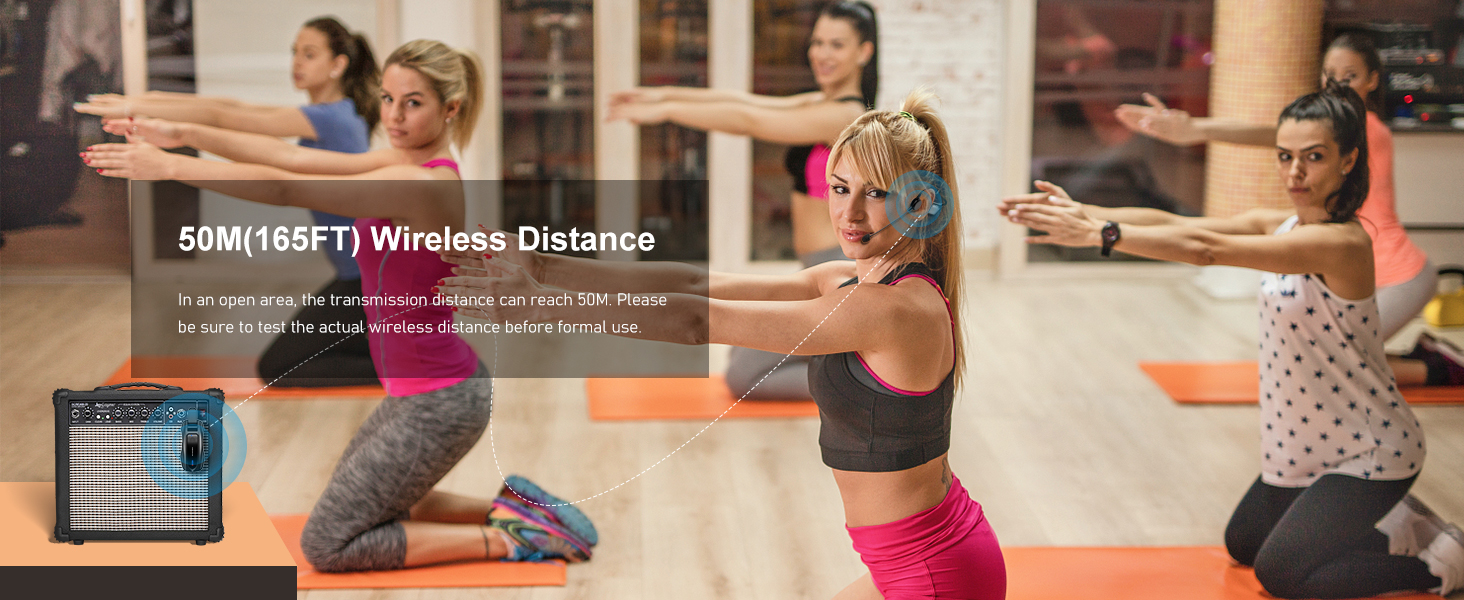
Image: A visual representation of the 50-meter (165-foot) wireless transmission range, showing a fitness instructor using the microphone with a speaker in a large open space.
4.4 Usage Scenarios

Image: A collage of images demonstrating the wireless waterproof microphone in various settings, including swimming, cycling, pilates, and surfing, highlighting its versatility for water sports and fitness activities.
4.5 Official Product Videos
Fitness Headset Wireless Waterproof Sweatproof Microphone
Video: An official product video from the seller showcasing the features and benefits of the KIMAFUN Fitness Headset Wireless Waterproof Sweatproof Microphone. This video demonstrates the product's use in various fitness environments and highlights its waterproof capabilities.
Wireless Fitness Headset Microphone GWP91 series
Video: An official product video from the seller providing an overview of the GWP91 series wireless fitness headset microphone. It covers key aspects of the product's design and functionality.
5. Maintenance
To ensure the longevity and optimal performance of your KIMAFUN GWP91 microphone system, follow these maintenance guidelines:
- Cleaning: After use, especially in wet or sweaty environments, wipe down the headset and receiver with a clean, damp cloth. Ensure all components are dry before storage.
- Waterproof Seal: Always ensure the detachable microphone head is screwed on tightly to maintain the IP67 waterproof rating.
- Charging: Recharge the devices regularly. While rated for 5-6 hours of continuous use, some users report needing to recharge after shorter periods (e.g., 1-hour classes). It is good practice to fully charge the devices before each significant use.
- Storage: Store the microphone system in the provided carrying bag in a cool, dry place away from direct sunlight and extreme temperatures.
- Battery Care: Avoid completely draining the battery frequently. For long-term storage, charge the battery to about 50% every few months to preserve battery health.
6. Troubleshooting
If you encounter issues with your KIMAFUN GWP91, please refer to the following troubleshooting steps:
| Problem | Possible Cause | Solution |
|---|---|---|
| Difficulty pairing / No connection | Low battery; Incorrect pairing procedure; Interference. | Ensure both devices are fully charged. Repeat the automatic pairing process (long press power button for 3 seconds on both). Move away from other 2.4Ghz devices. |
| No sound / Low volume | Microphone not connected properly; Volume too low; Incorrect input on audio device. | Check all cable connections. Increase volume on both the microphone and the connected audio device. Ensure the audio device is set to the correct input (e.g., 'MIC IN'). |
| Poor sound quality (nasal, feedback) | Microphone position; Environmental interference; Speaker proximity. | Adjust microphone position relative to your mouth. Ensure windscreen foam is properly installed. Increase distance between microphone and speaker to reduce feedback. Check for strong electromagnetic interference. |
| Short battery life | Battery degradation; Incomplete charging. | Ensure devices are fully charged before use. If battery life significantly degrades over time, contact customer support. |
| On/Off button finicky | Mechanical issue. | Ensure a firm and consistent press. If the issue persists, it may indicate a hardware problem requiring service. |
If the problem persists after attempting these solutions, please contact KIMAFUN customer support for further assistance.
7. Specifications
| Feature | Specification |
|---|---|
| Model Name | KIMAFUN KM-GWP91 |
| Connectivity Technology | 2.4G Wireless |
| Microphone Form Factor | Headset |
| Polar Pattern | Omnidirectional |
| Audio Sensitivity | 68 dB |
| Frequency Range | 2400-2483 MHz |
| Power Source | Battery Powered |
| Battery Type | Lithium Polymer |
| Number of Batteries | 2 (included) |
| Working Time | 5-6 continuous hours |
| Charging Time | 2 hours |
| Wireless Distance | Up to 50 meters (165 feet) in open area |
| Item Weight | 0.4 Kilograms (14.1 ounces) |
| Waterproof Rating | IP67 |
| Compatible Devices | Audio Mixer, Amplifier, Smartphone, Tablet/Laptop/Computer, Speaker |
| Connector Type | 6.35 mm Jack, 3.5 mm Jack |
| UPC | 783798297998 |
| Country of Origin | China |
| First Available | August 3, 2023 |
8. Warranty and Support
8.1 Return Policy
This product is subject to a 30-day return policy for refund or replacement. Please refer to your point of purchase for specific return instructions and conditions.
8.2 Customer Support
For any questions, technical support, or warranty claims not covered in this manual, please contact KIMAFUN customer service. Contact information can typically be found on the product packaging or the official KIMAFUN website.
Related documentsKM-GWP91


Ask a question about this manual
Ask about setup, troubleshooting, compatibility, parts, safety, or missing instructions. Manuals+ will review the question and use this page’s manual context to help answer it.