Introduction
This manual provides essential instructions for the safe and efficient operation of your Sway Air Fitz Desktop Bluetooth Media Speaker. Please read this manual thoroughly before using the device and retain it for future reference.
Safety Information
- Do not expose the speaker to water or excessive moisture. This product is not waterproof.
- Avoid extreme temperatures.
- Do not disassemble or attempt to repair the device yourself. This will void the warranty.
- Use only the provided USB charging cord for charging.
- Keep out of reach of children.
Package Contents
Ensure all items are present in the package:
- Sway Air Fitz Desktop Bluetooth Media Speaker
- USB Charging Cord
- Audio Jack (Auxiliary Cable)
Product Overview
Familiarize yourself with the components of your Sway Air Fitz speaker.
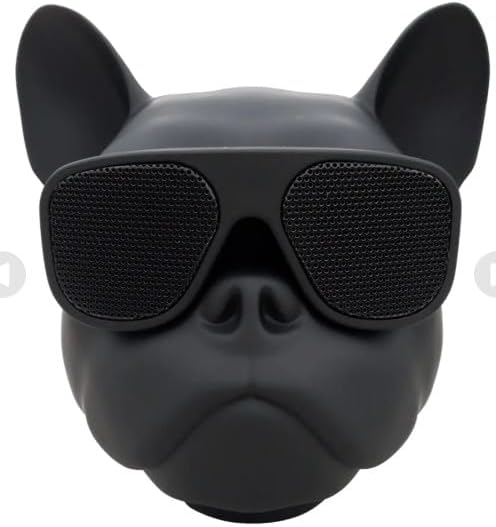
Image 1: Front view of the Sway Air Fitz Desktop Bluetooth Media Speaker. It features a black French Bulldog design with integrated speakers behind dark sunglasses.

Image 2: Packaging box for the Sway Air Fitz speaker, showing the product image and key features like 5 watts output, TWS capability, AUX-IN, FM Radio, USB, and TF Card support.
The speaker features a compact design, with controls typically located on the unit for power, volume, and mode selection. Specific button functions are detailed in the "Operating Instructions" section.
Setup
1. Charging the Speaker
- Connect the provided USB charging cord to the charging port on the speaker.
- Connect the other end of the USB cable to a compatible USB power adapter (not included) or a computer's USB port.
- The charging indicator light will illuminate. Once fully charged, the light may change color or turn off.
2. Powering On/Off
- To power on, press and hold the power button until you hear an audible prompt or see an indicator light.
- To power off, press and hold the power button again until the device shuts down.
3. Bluetooth Pairing
- Ensure the speaker is powered on and in Bluetooth pairing mode (indicated by a flashing LED).
- On your device (smartphone, tablet, etc.), enable Bluetooth and search for available devices.
- Select "Air Fitz" from the list of devices.
- Once paired, the speaker will provide an audible confirmation, and the LED indicator will stop flashing.
4. TWS (True Wireless Stereo) Pairing (Optional)
If you have two Air Fitz speakers, you can pair them for a stereo sound experience:
- Ensure both speakers are powered on and not connected to any Bluetooth device.
- On one speaker, press and hold the TWS pairing button (refer to the speaker's physical controls for exact button).
- The speakers will automatically search for and pair with each other.
- Once paired, connect your device via Bluetooth to one of the speakers as described in step 3. Both speakers will then play audio in stereo.
Operating Instructions
1. Mode Selection
Press the "M" (Mode) button to switch between Bluetooth, FM Radio, Auxiliary Input, and Memory Card modes.
2. Volume Control
- Press the "+" button to increase volume.
- Press the "-" button to decrease volume.
3. Playback Control (Bluetooth/Memory Card)
- Press the "Play/Pause" button to play or pause audio.
- Press and hold "+" for next track.
- Press and hold "-" for previous track.
4. FM Radio Operation
- Switch to FM Radio mode using the "M" button.
- Press the "Play/Pause" button to automatically scan and save available FM stations.
- Use the "+" and "-" buttons to navigate between saved stations.
5. Auxiliary Input (AUX)
- Connect one end of the provided audio jack cable to the AUX port on the speaker.
- Connect the other end to the audio output of your external device.
- Switch the speaker to Auxiliary mode using the "M" button.
6. Memory Card Slot
- Insert a compatible memory card (e.g., TF card) into the designated slot.
- The speaker will automatically switch to Memory Card mode or you may need to select it using the "M" button.
- Use the playback controls to manage your audio files.
Maintenance
- Clean the speaker with a soft, dry cloth. Do not use abrasive cleaners or solvents.
- Store the speaker in a cool, dry place when not in use.
- Avoid dropping the speaker or subjecting it to strong impacts.
Troubleshooting
| Problem | Solution |
|---|---|
| Speaker does not power on. | Ensure the speaker is fully charged. Connect to a power source and try again. |
| Cannot pair via Bluetooth. |
|
| No sound. |
|
| FM radio reception is poor. | Reposition the speaker to improve signal reception. Ensure no strong interference sources are nearby. |
Specifications
| Feature | Detail |
|---|---|
| Model Name | SWAY-DESK-AIRFITZ |
| Bluetooth Version | 5.0 |
| Output Power | 5 Watts |
| TWS Capable | Yes |
| Connectivity | Bluetooth, Auxiliary, Memory Card (TF), FM Radio |
| Control Method | Touch |
| Power Source | Rechargeable Battery, Corded Electric (via USB) |
| Product Dimensions | 4"D x 4"W x 5"H |
| Item Weight | 9 Ounces |
| Material | Plastic (Premium Rubber Molding) |
| Color | Black |
| UPC | 850005123743 |
Warranty and Support
This product comes with a 1 Year Warranty from the manufacturer, Sway.
For warranty claims or technical support, please visit the official website: swayshop.com/pages/warranty.
Please have your model number (SWAY-DESK-AIRFITZ) and proof of purchase ready when contacting support.