
Introduction
This manual provides instructions for the Mxfdegf 360 Degree Rotating Protective Case. This case is designed to protect your tablet and enhance its usability with features like a rotating stand and magnetic closure. Please read this manual carefully to ensure proper installation and use of your new tablet case.
Compatibility
This protective case is universally designed for 9 to 10.5 inch tablets. It is compatible with a wide range of devices, including but not limited to:
- TECLAST T40S 10.4 inch Tablet
- Apple iPad Air 1/iPad Air 2/iPad 2017 2018 9.7/iPad 568/iPad 7 10.2 2019/iPad 8 10.2 2020/iPad 9 10.2 2021
- Samsung Galaxy Tab E 9.6" 2015 (SM-T560/T561/T565/T567)
- Samsung Galaxy Tab A 10.1 (2016) SM-T580/T585/T587
- Samsung Galaxy Tab A 10.1 (2019) SM-T510/T515/T517
- Samsung Galaxy Tab A7 10.4 Inch (SM-T500/T505/T507)
- Samsung Galaxy Tab S5e 10.5 Inch 2019 (SM-T720/T725/T727)
- Samsung Galaxy Tab A8 10.5 inch 2022 Model (SM-X200/X205/X207)
- Samsung Galaxy Tab S8 2022
- Samsung Galaxy Tab S7 11 inch 2020 (Model SM-T870/T875/T878)
- Amazon Kindle Fire HD10 2015/2017/2019/HD10 2019 (10.1")/HD10 2021
- TCL TAB 10s 9080G (2021), TCL Tab Pro 5G Tablet
Important Note: This case does not feature a back camera opening and does not support auto sleep/wake functionality for any tablets. Please verify your tablet's dimensions before purchase to ensure a proper fit.

Image: The case is compatible with tablets measuring between 9 and 10.5 inches. Please measure your tablet to confirm compatibility.
Key Features
- 360 Degree Rotating Stand: Allows for versatile viewing in both landscape and portrait orientations.
- Adjustable Viewing Angles: Multiple grooves provide stable angles for typing, watching videos, or video calls.
- Magnetic Closure: Secures the case firmly, protecting your tablet from dust and scratches when closed.
- Durable Protection: Constructed from high-quality synthetic leather and plastic materials to guard against scratches, shocks, and everyday wear.
- Secure Clasps: Four adjustable clasps hold your tablet securely in place without obstructing normal use.
- Lightweight Design: Offers robust protection without adding significant bulk to your tablet.
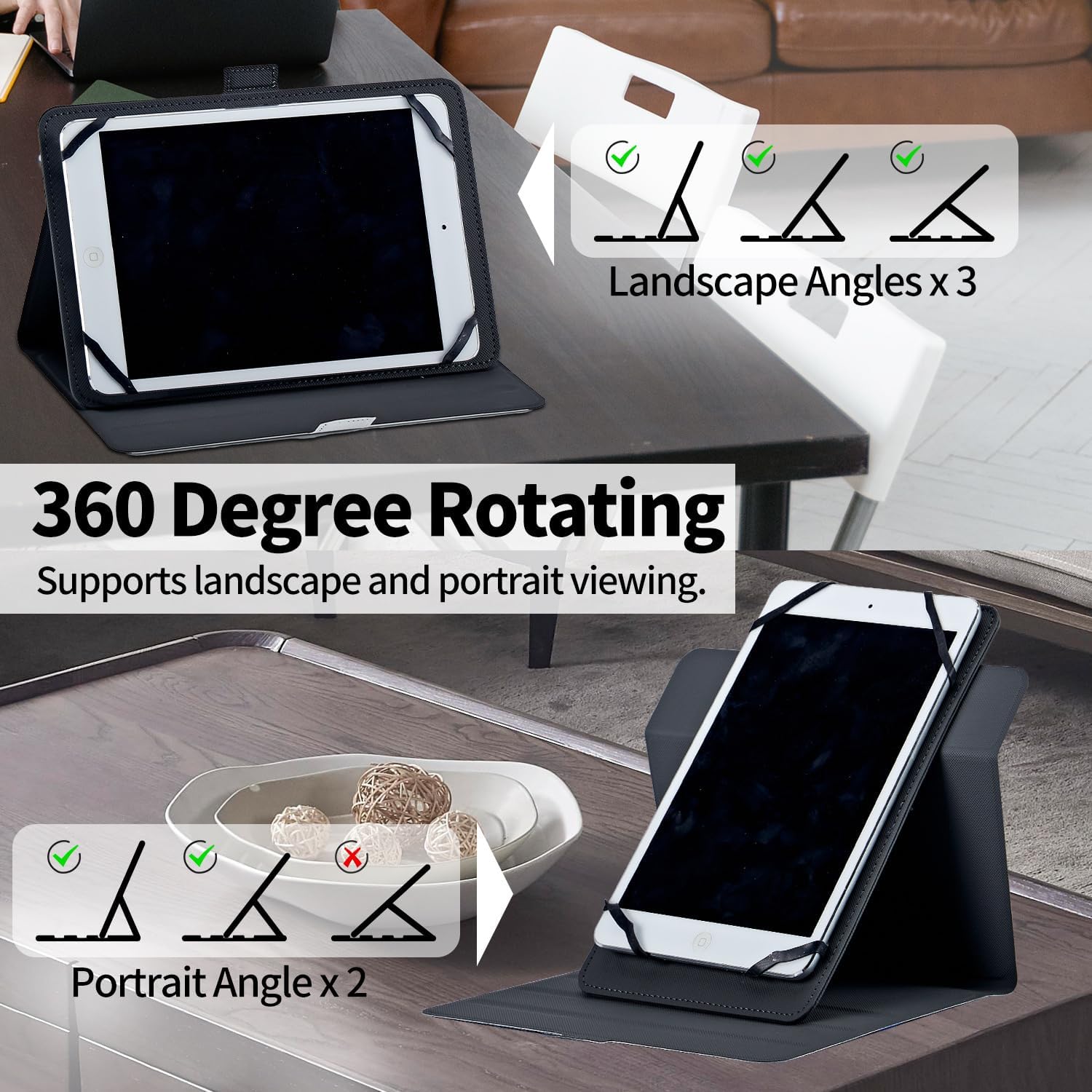
Image: The case features a 360-degree rotating mechanism, allowing for multiple landscape and portrait viewing angles.

Image: Close-up view highlighting the built-in elastic band, 360-degree rotation capability, and adjustable stand angle.

Image: The case includes two anti-slip grooves to ensure a steady and secure stand for your tablet.
Setup: Tablet Installation
- Open the Case: Lay the case flat on a clean surface with the interior facing upwards.
- Position the Tablet: Carefully place your tablet onto the interior of the case, ensuring it is centered.
- Secure with Clasps: Gently stretch each of the four elastic clasps over the corners of your tablet. Ensure the clasps firmly grip all four corners to prevent the tablet from slipping.
- Check Fit: Once all clasps are in place, gently tug on the tablet to confirm it is securely held. The adjustable snap design allows for a snug fit.
- Close the Case: Fold the cover over your tablet and secure it with the magnetic closure.

Image: Visual guide demonstrating the easy installation of the tablet using the adjustable snap clasps.
Operating the Case
Using the 360 Degree Rotating Stand
- Open the Case: Unfold the front cover of the case.
- Rotate Tablet: The central mechanism allows your tablet to rotate 360 degrees. Gently turn your tablet to achieve either a landscape or portrait orientation.
- Set Viewing Angle: Utilize the grooves on the inside of the case to prop up your tablet at your desired viewing angle. There are multiple grooves for different inclinations. Ensure the tablet rests securely in a groove to prevent it from slipping.
Magnetic Closure
The case features a magnetic strap closure. To close, simply fold the front cover over your tablet and align the strap. The magnetic force will secure the case, keeping your tablet protected when not in use.

Image: The tablet case in use, demonstrating how it functions as a stand for comfortable viewing.
Maintenance
To ensure the longevity and appearance of your Mxfdegf tablet case, follow these simple maintenance guidelines:
- Cleaning: Wipe the exterior of the case with a soft, damp cloth. For stubborn dirt, a mild soap solution can be used, followed by wiping with a clean, damp cloth. Avoid harsh chemicals or abrasive cleaners.
- Drying: Allow the case to air dry completely after cleaning. Do not expose it to direct sunlight or high heat, as this may damage the material.
- Storage: When not in use, store the case in a cool, dry place away from direct sunlight.
- Avoid Sharp Objects: Keep the case away from sharp objects to prevent scratches or punctures to the synthetic leather.
Troubleshooting
- Tablet Does Not Fit: Ensure your tablet's dimensions are within the 9-10.5 inch range. If your tablet is outside this range, it may not fit correctly.
- Tablet Slips from Clasps: Ensure all four elastic clasps are securely stretched over the corners of your tablet. The clasps are designed to hold various tablet thicknesses; adjust them carefully.
- Stand is Unstable: Make sure the tablet is properly seated in one of the anti-slip grooves. Adjust the position until it feels stable.
- No Back Camera Opening: This case is designed without a back camera opening. To use your tablet's rear camera, you will need to remove the tablet from the case.
- Auto Sleep/Wake Not Working: This case does not support the auto sleep/wake function. You will need to manually lock/unlock your tablet.
Specifications
| Feature | Detail |
|---|---|
| Product Dimensions | 7 x 5 x 0.6 inches |
| Item Weight | 6.8 ounces |
| Material | Faux Leather |
| Color | Hummingbird Red Flower |
| Form Factor | Flip |
| Special Features | Heavy Duty Protection, Kickstand |
| Compatible Devices | Tablets (9-10.5 inch) |
Warranty Information
Please refer to the product packaging or the retailer's website for specific warranty details. General warranty terms typically cover manufacturing defects for a limited period from the date of purchase.
Customer Support
For any questions, concerns, or assistance with your Mxfdegf tablet case, please contact the retailer or manufacturer directly. Contact information can usually be found on the product packaging or the official brand website.