
1. Product Overview
The YILUBAO 532nm-100 Green Laser Diode Module is a compact and powerful laser light source designed for various industrial, laboratory, and DIY applications. It emits a visible green laser dot at a wavelength of 532nm and comes with a 12V DC power adapter for convenient operation. The module features an aerospace aluminum housing, K9 glass lenses, and an integrated constant current driver board, ensuring stable performance and durability. A built-in heat sink fan allows for extended working hours.
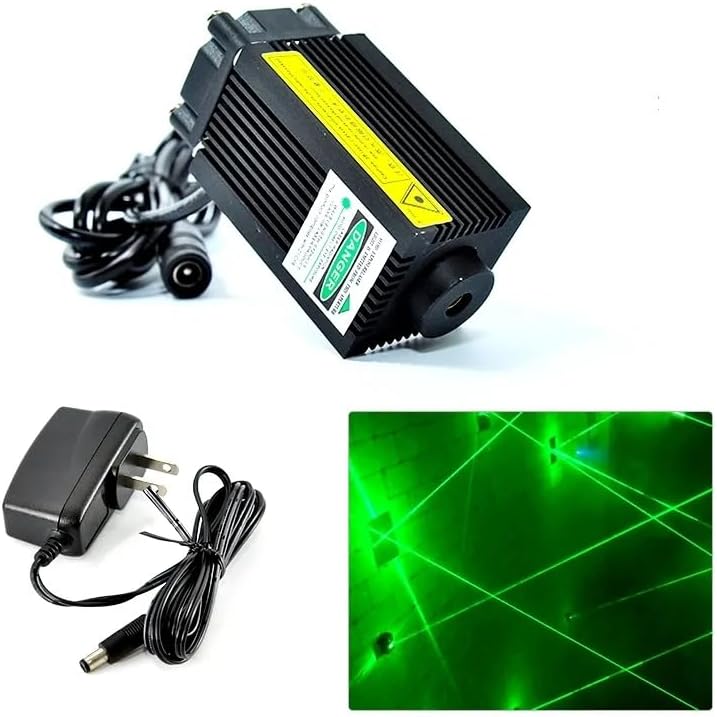
Image 1.1: The 532nm-100 Green Laser Diode Module, its 12V power adapter, and an illustration of its green laser output.
2. Safety Information
WARNING: LASER RADIATION. AVOID DIRECT EYE EXPOSURE.
This product emits laser radiation. Improper use or direct exposure to the laser beam can cause severe eye injury or blindness. Always adhere to the following safety precautions:
- Never look directly into the laser aperture or at the reflected beam.
- Use appropriate laser safety goggles when operating the module.
- Ensure the laser is pointed away from people, animals, and reflective surfaces.
- Keep out of reach of children.
- Do not disassemble or modify the laser module. Unauthorized modifications can lead to hazardous radiation exposure.
- Operate in a controlled environment where accidental exposure is minimized.
3. Package Contents
Verify that all items listed below are present in your package:
- 1 x 532nm Green Laser Diode Module
- 1 x 12V DC Power Adapter (US-plug, EU-plug, or UK-plug, shipped randomly)

Image 3.1: The laser module and its accompanying 12V power adapter.
4. Setup
Follow these steps to set up your laser module:
- Positioning: Place the laser module on a stable, flat surface in your desired operating location. Ensure the area is clear of obstructions and reflective materials.
- Power Connection: Connect the DC plug from the 12V power adapter to the power input jack on the laser module's cable. The DC cable length is approximately 1.2 meters.

Image 4.1: Detail of the DC power input jack (5.5*2.1mm) on the laser module's cable.
- Power Supply: Plug the 12V power adapter into a suitable wall outlet.
- Mounting (Optional): If permanent installation is required, the module can be mounted using the screw holes on its base. Refer to the "Specifications" section for mounting dimensions.
5. Operating Instructions
Once the module is set up, operation is straightforward:
- Power On: After connecting the power adapter to the module and plugging it into the wall outlet, the laser module will automatically power on and emit a green laser dot.
- Usage: Direct the laser dot to your desired target. Ensure no direct eye exposure occurs.
- Power Off: To turn off the laser, simply unplug the 12V power adapter from the wall outlet or disconnect the DC plug from the module.
Note on Continuous Operation: The module is equipped with a powerful heat sink fan for extended operation. However, to ensure optimal lifespan (rated at 8000 hours), it is recommended to rest the module for 1 minute after every 1 hour of continuous use.
6. Maintenance
Proper maintenance will help prolong the life and performance of your laser module:
- Cleaning: Keep the laser aperture and lens clean. Use a soft, lint-free cloth and, if necessary, a small amount of lens cleaning solution. Avoid abrasive materials that could scratch the lens.
- Heat Management: Ensure the heat sink fins and fan are free from dust and debris to allow for proper airflow and cooling. Periodically clean the fan blades gently with compressed air.
- Storage: When not in use, store the laser module in a cool, dry place, away from direct sunlight and extreme temperatures.
7. Troubleshooting
If you encounter issues with your laser module, refer to the following common problems and solutions:
| Problem | Possible Cause | Solution |
|---|---|---|
| Laser does not turn on. |
|
|
| Laser beam is dim or flickering. |
|
|
| Module feels excessively hot. |
|
|
If the problem persists after trying these solutions, please contact YILUBAO customer support.
8. Specifications
Detailed technical specifications for the 532nm Green Laser Diode Module:
| Parameter | Value |
|---|---|
| Brand | YILUBAO (MTO-Laser) |
| Model | 532nm-100 |
| Wavelength | 532nm (Green) |
| Output Power | 100mW |
| Power Supply | DC 12V |
| Working Current | 260mA |
| Spot Shape | Dot |
| Focusable | No (Non-adjustable focus) |
| Output Wave Band | Visible Light |
| Module Material | Aerospace Aluminum |
| Lens Material | K9 Glass, PVC Focus Lens |
| Operating Temperature | -40℃ to 75℃ (-40℉ to 167℉) |
| Working Medium | Semiconductor |
| Working Life | 8000 hours (with recommended rest periods) |
| Dimensions (Module) | 33mm x 55mm |
| DC Cable Length | 1.2 meters |
| Structural Features | Aluminum shell + laser diode + K9 glass lenses + Constant current driver board |
| Bulb Features | Constant current driver board, Heat management with fan |
| Mounting Type | Surface Mount, Pole Mount |

Image 8.1: Dimensional drawing of the laser module, indicating mounting hole positions and sizes (e.g., M6, 2.5cm).
9. Warranty and Support
For warranty information and customer support, please refer to the seller or the official YILUBAO website. Specific warranty terms and conditions may vary depending on your region and point of purchase.
For technical assistance or troubleshooting beyond this manual, please contact the seller directly or visit the YILUBAO store on Amazon: YILUBAO Store