
Introduction
This manual provides essential information for the safe and effective use of your Coulax Pro Sonic Electric Toothbrush M304. Please read these instructions carefully before first use and retain them for future reference.

Image: The Coulax Pro Sonic Electric Toothbrush M304, showcasing the handle, 8 replacement brush heads, and product packaging.
Safety Information
For your safety and to ensure proper operation, please observe the following:
- Although the toothbrush is IPX7 waterproof, it is recommended not to soak it in water for prolonged periods.
- Do not use the toothbrush while charging.
- Keep the device out of reach of small children.
- Replace brush heads every 3 months or earlier if they show signs of wear.
- Consult a dentist before use if you have existing oral problems or have recently undergone dental interventions.
- Avoid direct contact with products containing essential oils or coconut oil, as these may damage the brush head bristles.
Package Contents
Verify that all items are present in the package:
- 1 x Electric Toothbrush Handle
- 8 x Replacement Brush Heads
- 1 x USB Charging Cable
Setup
1. Initial Charging
Before first use, fully charge the toothbrush. Connect the USB charging cable to the toothbrush and a compatible USB power adapter (lower than 6.3V). A full charge takes approximately 3 hours and provides up to 120 days of use.
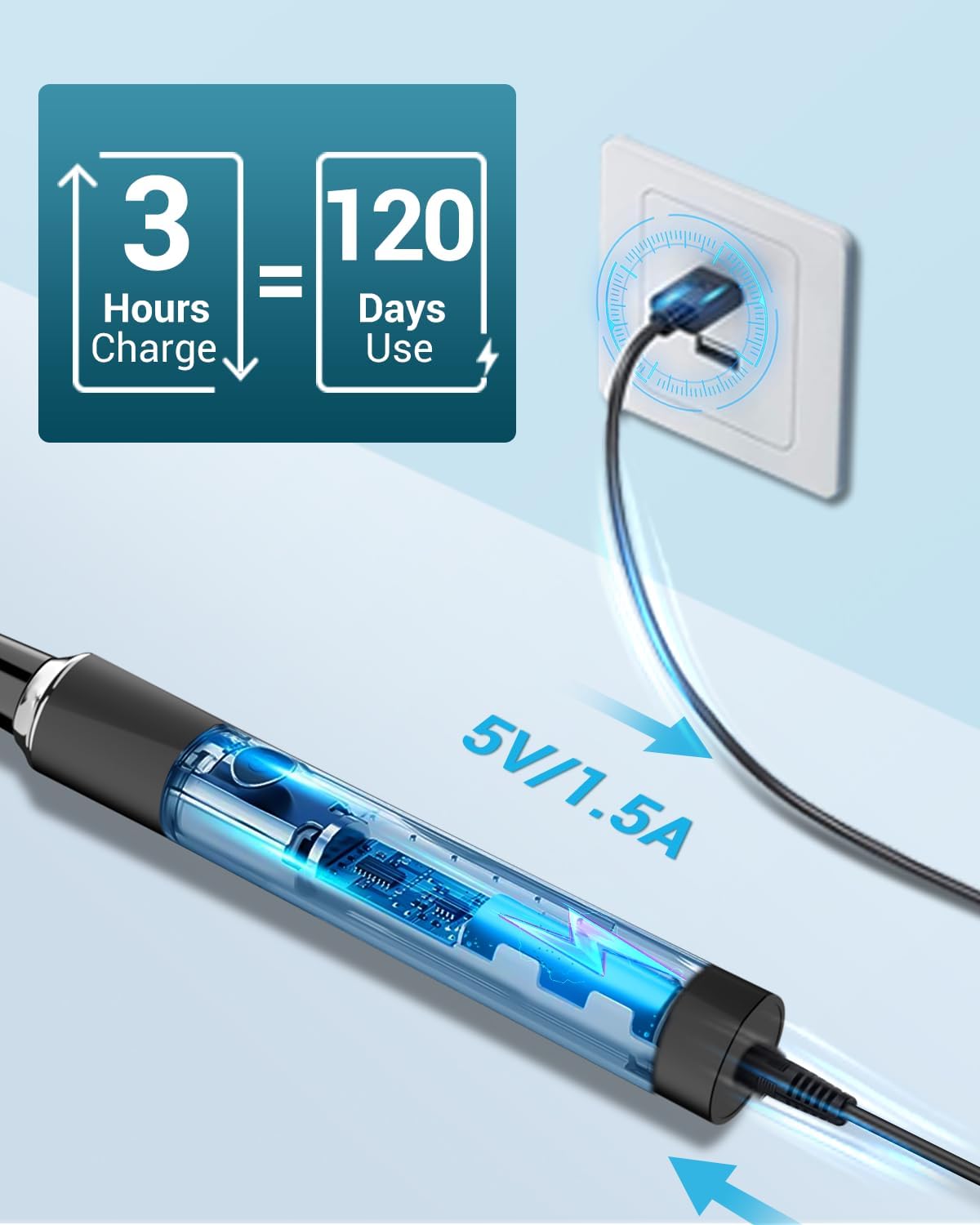
Image: Illustration of the toothbrush being charged via a USB cable connected to a wall adapter.
2. Attaching the Brush Head
Align the brush head with the metal shaft on the toothbrush handle and push it down firmly until it clicks into place.

Image: A close-up view of the toothbrush handle and a brush head, illustrating how they connect.
Operating Instructions
- Wet the Brush Head: Wet the brush head and apply a small amount of toothpaste.
- Power On: Press the power button to turn on the toothbrush.
- Select Mode: Press the power button repeatedly to cycle through the 5 cleaning modes:
- Sensitive: For beginners or sensitive teeth.
- Clean: For daily standard cleaning.
- White: For removing surface stains.
- Polish: For a brighter tooth appearance.
- Massage: For improving gum health and blood circulation.
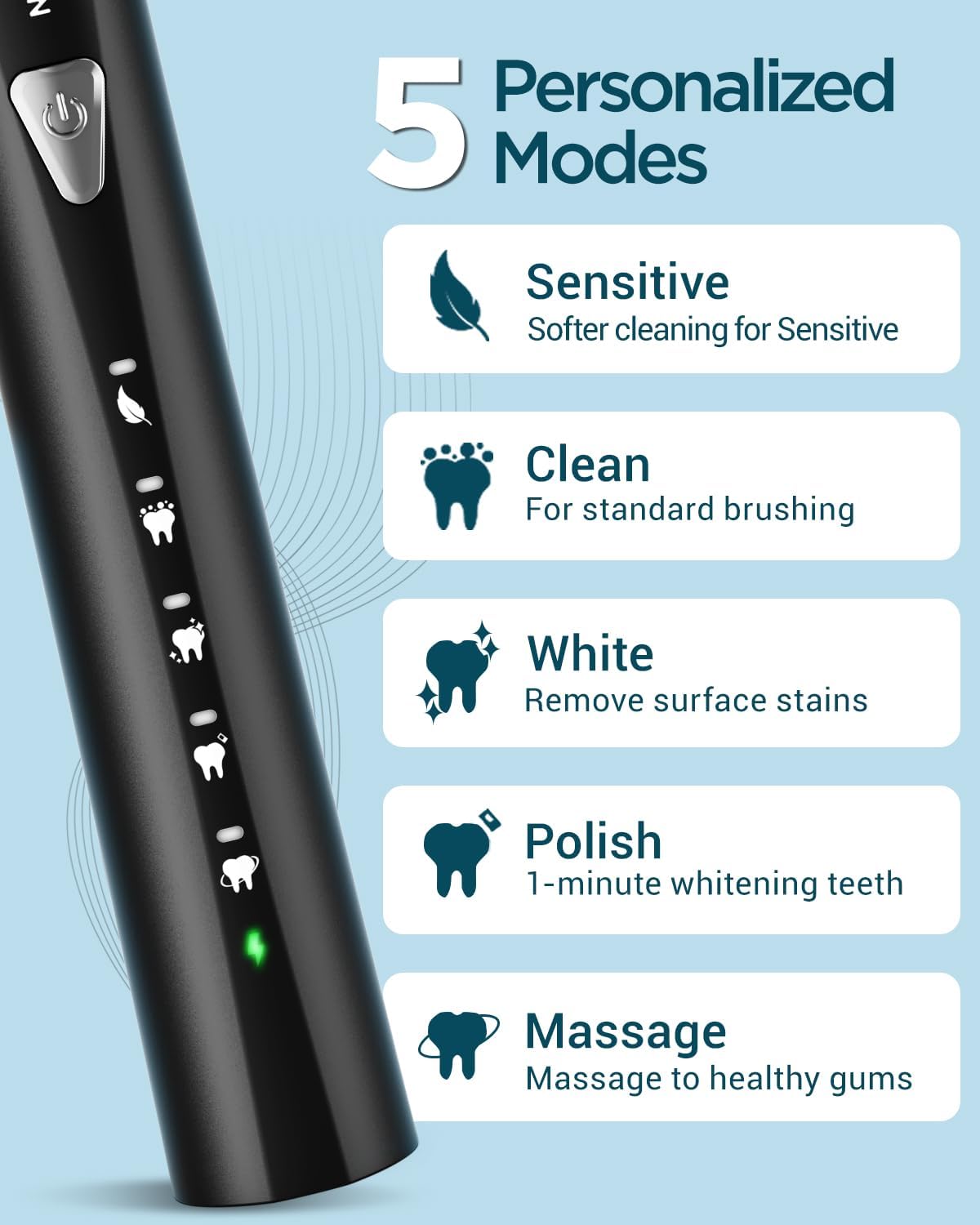
Image: The toothbrush handle displaying the five distinct cleaning modes and their indicators.
- Brushing Technique: Gently guide the toothbrush along all dental surfaces. Do not scrub aggressively. The toothbrush features a built-in 2-minute smart timer, pausing every 30 seconds to remind you to change the brushing area (quadrant of your mouth).
- Power Off: After the 2-minute cycle, the toothbrush will automatically turn off. You can also press and hold the power button to turn it off manually.
- Rinse: Rinse your mouth and the toothbrush thoroughly after brushing.

Image: A user demonstrating proper brushing technique, highlighting the 2-minute timer and 30-second interval reminders for each quadrant of the mouth.
Maintenance
Cleaning the Toothbrush
- After each use, rinse the brush head and bristles thoroughly under running water.
- Wipe the toothbrush handle with a damp cloth. Do not use abrasive cleaners or harsh chemicals.
- Ensure the charging port cover is securely closed when not charging to maintain IPX7 waterproof integrity.

Image: The toothbrush partially submerged in water, illustrating its IPX7 waterproof capability.
Replacing Brush Heads
Dentists recommend replacing brush heads every 3 months for optimal hygiene and effectiveness. Your Coulax Pro toothbrush comes with 8 replacement brush heads, providing a supply for up to 2 years.

Image: A display of eight replacement brush heads, indicating a 2-year supply based on 3-month replacement intervals.
The brush heads feature U-shaped DuPont bristles designed for deep cleaning between teeth and rounded tops to protect sensitive gums.

Image: Detailed view of the toothbrush bristles, highlighting their U-shape, rounded tips, and soft DuPont material for effective and gentle cleaning.
Troubleshooting
| Problem | Possible Cause | Solution |
|---|---|---|
| Toothbrush does not turn on. | Low battery or no charge. | Charge the toothbrush for at least 3 hours. Ensure the USB cable is properly connected. |
| Reduced vibration or performance. | Low battery or worn-out brush head. | Recharge the toothbrush. Replace the brush head if it has been used for over 3 months or shows wear. |
| Toothbrush turns off unexpectedly. | Low battery. | Charge the toothbrush. |
| Brush head feels loose. | Brush head not fully seated. | Push the brush head down firmly onto the metal shaft until it clicks. |
Specifications
| Feature | Detail |
|---|---|
| Model Number | M304 |
| Brand | Coulax Pro |
| Power Source | Battery Powered (1 Lithium Ion battery included) |
| Charging Time | Approximately 3 hours |
| Battery Life | Up to 120 days per charge |
| Brushing Modes | 5 (Sensitive, Clean, White, Polish, Massage) |
| Smart Timer | 2-minute auto-off with 30-second interval reminders |
| Waterproof Rating | IPX7 |
| Brush Head Type | U-shaped DuPont bristles, soft firmness |
| Included Brush Heads | 8 replacement heads |
| Country of Origin | China |
| Package Dimensions | 22.5 x 9 x 3.4 cm |
| Weight | 200 g |
Warranty and Support
Your Coulax Pro Sonic Electric Toothbrush M304 is covered by a 1-year warranty from the date of purchase.
For customer service and support, please contact Coulax Pro directly. Online support services are available.
Contact information for support is often found on the product packaging or the manufacturer's official website.
Note: Please retain your proof of purchase for warranty claims.