1. Product Overview
The La Crosse Technology V61-WSDTHR is a comprehensive Wi-Fi weather station designed for personal remote monitoring. It provides accurate indoor and outdoor temperature and humidity readings, rainfall data, wind speed and direction, and barometric pressure. With its Wi-Fi connectivity, you can access your weather data remotely via the La Crosse View app, ensuring you stay informed about your local conditions anytime, anywhere.

Figure 1: Overview of the La Crosse Technology V61-WSDTHR Weather Station components.
2. What's in the Box
Verify that all components are present and in good condition before proceeding with setup.
- V61-WSDTHR Display Unit
- LTV-WSDTH01 Outdoor Wind/Temperature/Humidity Sensor
- LTV-R3 Self-Emptying Rain Gauge
- Power Cord for Display Unit
- Mounting Hardware for Outdoor Sensors
- User Manual (this document)
- Batteries (for sensors, typically not included or pre-installed)

Figure 2: Included outdoor sensors: LTV-R3 Rain Gauge and LTV-WSDTH01 Wind/Temp/Humidity Sensor.
3. Setup Guide
3.1. Sensor Placement and Installation
Proper placement of your outdoor sensors is crucial for accurate readings. The wireless range is up to 400 feet (121 meters) in open air.
- LTV-WSDTH01 Wind/Temperature/Humidity Sensor:
- Mount the sensor in an open area, away from obstructions like buildings, trees, or fences, which can block wind flow or affect temperature readings.
- Ensure the wind vane and anemometer cups can rotate freely.
- Mount at a height of at least 6 feet (1.8 meters) for optimal wind measurement.
- The integrated solar panel helps extend battery life; ensure it receives adequate sunlight.
- Insert required batteries (check sensor compartment for type and polarity).
- LTV-R3 Self-Emptying Rain Gauge:
- Place the rain gauge on a level surface in an open area, away from structures or foliage that could block rainfall.
- Ensure the self-emptying mechanism is clear of debris.
- Insert required batteries (check sensor compartment for type and polarity).
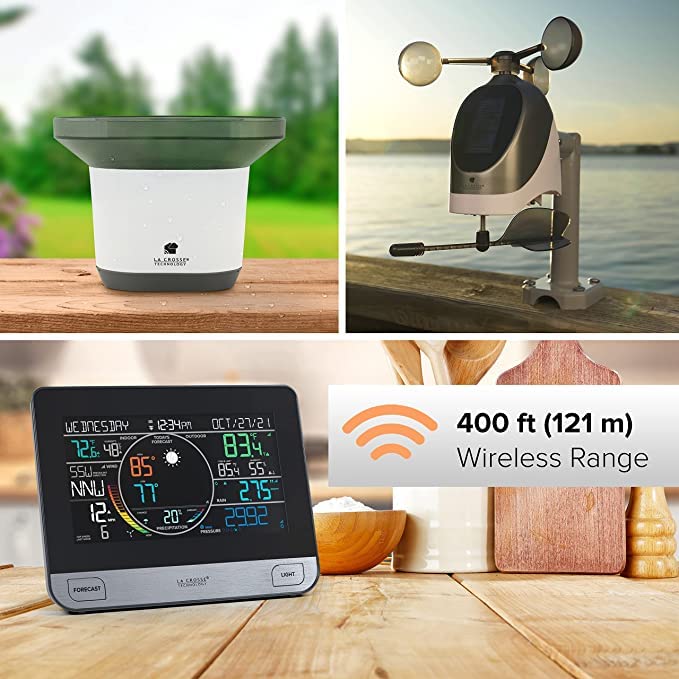
Figure 3: Recommended placement for outdoor sensors and wireless range.
3.2. Display Unit Setup
- Connect the power cord to the display unit and plug it into a standard electrical outlet.
- The display will power on and begin searching for sensor signals.
- Place the display unit indoors, within the 400-foot wireless range of the outdoor sensors. Avoid placing it near large metal objects or electronics that could interfere with the signal.
3.3. Wi-Fi Connection and App Setup
Connecting your weather station to Wi-Fi enables remote monitoring and access to advanced features via the La Crosse View app.
- Download the La Crosse View app from your mobile device's app store (iOS or Android).
- Create an account or log in if you already have one.
- Follow the in-app instructions to add your V61-WSDTHR weather station. This typically involves scanning a QR code on the display unit or manually entering its device ID.
- During the Wi-Fi setup process, ensure your mobile device is connected to a 2.4 GHz Wi-Fi network. The V61-WSDTHR primarily connects to 2.4 GHz networks. If your router broadcasts both 2.4 GHz and 5 GHz networks with the same name, you may need to temporarily disable the 5 GHz band or move further from the router to ensure your device connects to the 2.4 GHz band during setup.
- Once connected, the display unit will synchronize time and date via the internet, and your weather data will be accessible through the app.
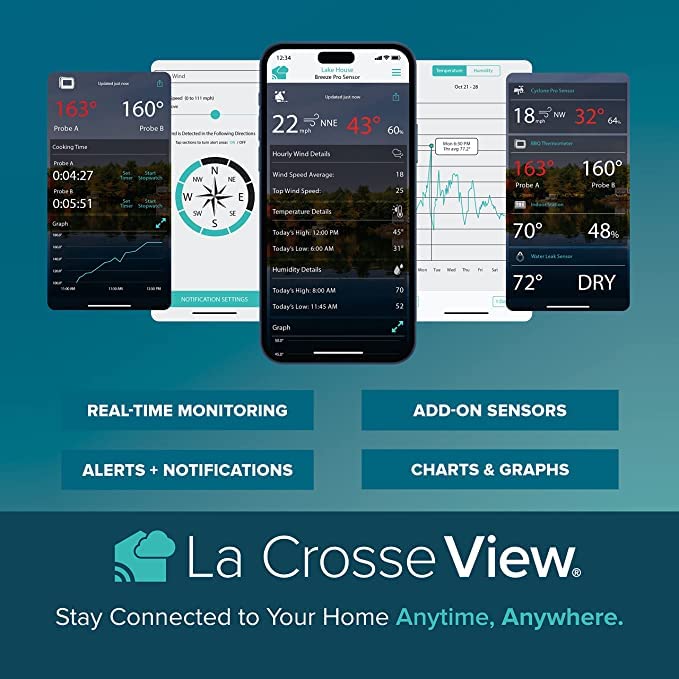
Figure 4: La Crosse View app features for real-time monitoring and data analysis.
4. Operation
4.1. Display Unit Features
The V61-WSDTHR features a high-definition LCD with adjustable and auto-dim backlight for easy readability.

Figure 5: High contrast display with key data points.
- Internet Time & Date: Automatically updates via Wi-Fi.
- Indoor Conditions: Displays indoor temperature and humidity.
- Wind Speed + Direction: Shows current wind speed, direction, and an animated wind speed graph.
- Today's Forecast: Provides forecast icons, high/low temperatures, and chance of precipitation.
- Outdoor Conditions: Displays outdoor temperature and humidity.
- Rainfall Data: Shows daily, weekly, or monthly rainfall accumulation.
- Pressure & Extra Sensors: Displays barometric pressure and data from any connected add-on sensors.
- Forecast Button: Press to view detailed daily and hourly forecasts.
- Light Button: Adjusts backlight brightness or activates auto-dim feature.
4.2. La Crosse View App
The La Crosse View app extends the functionality of your weather station, allowing you to monitor conditions, receive alerts, and view historical data from anywhere.
- Real-Time Monitoring: View current indoor and outdoor conditions, wind data, rainfall, and pressure.
- Alerts + Notifications: Set custom alerts for temperature, humidity, wind, or rain thresholds.
- Charts & Graphs: Access historical data with visual charts and graphs to track trends over time.
- Add-on Sensors: Integrate additional La Crosse View compatible sensors (e.g., water leak sensors, soil moisture sensors, BBQ thermometers) to expand your monitoring capabilities.

Figure 6: Expand your system with compatible add-on sensors.
5. Maintenance
- Battery Replacement: Replace batteries in outdoor sensors annually or when the low battery indicator appears on the display unit or app. Use high-quality alkaline batteries. Ensure proper polarity.
- Sensor Cleaning:
- Rain Gauge: Periodically check the rain gauge funnel for debris (leaves, insects) and clear as needed to ensure accurate rainfall measurement.
- Wind Sensor: Ensure the wind cups and wind vane rotate freely. Gently clean any accumulated dust or debris.
- Temperature/Humidity Sensor: Keep the sensor housing clean and free from obstructions.
- Display Unit: Clean the display screen with a soft, lint-free cloth. Avoid abrasive cleaners.
6. Troubleshooting
If you encounter issues with your weather station, refer to the following common troubleshooting steps:
| Problem | Possible Cause | Solution |
|---|---|---|
| No outdoor data on display. | Sensors out of range, low sensor batteries, interference. |
|
| Wi-Fi connection issues. | Incorrect Wi-Fi password, 5 GHz network interference, router settings. |
|
| Inaccurate rainfall readings. | Rain gauge obstructed, not level. |
|
| Inaccurate wind readings. | Wind sensor obstructed, not mounted correctly. |
|
7. Specifications
| Feature | Detail |
|---|---|
| Model Number | V61-WSDTHR |
| Display Dimensions | 8.3" W x 6.33" H x 1.13" D (21.1cm W x 16.1cm H x 2.89cm D) |
| Power Source (Display) | 5V AC Adapter (included) |
| Power Source (Sensors) | Battery Powered (type not specified, typically AA or AAA, check sensor compartments) |
| Connectivity | Wi-Fi (2.4 GHz) |
| Wireless Range | Up to 400 feet (121 meters) in open air |
| Indoor Temperature Range | (Not specified, typical household range) |
| Outdoor Temperature Range | (Not specified, typical outdoor range) |
| Rainfall Measurement | Up to 27.5 inches (70 cm) per event (self-emptying) |
| Wind Speed Measurement | Up to 111 mph (178 km/h) |
| Material | Plastic |
8. Warranty and Support
La Crosse Technology products are designed for reliability and performance. For specific warranty details, please refer to the warranty card included with your product or visit the official La Crosse Technology website. For technical support, product registration, or to purchase replacement parts, please visit the La Crosse Technology support page or contact their customer service directly.
Official Website: www.lacrossetechnology.com
Customer Service: Refer to the website for contact information (phone, email, or live chat).