
PHILIPS S7887/55
Philips SHAVER Series 7000 S7887/55 User Manual
Model: S7887/55 | Brand: PHILIPS
Introduction
Welcome to the user manual for your new Philips SHAVER Series 7000 S7887/55 Rotary Shaver. This manual provides essential information on how to safely and effectively use, maintain, and troubleshoot your shaver. Please read this manual thoroughly before first use and keep it for future reference.

Image: Philips SHAVER Series 7000 S7887/55 in its retail packaging, highlighting key features like SkinIQ technology and Nano SkinGlide Coating.
Important Safety Information
Always follow basic safety precautions when using electrical appliances to reduce the risk of fire, electric shock, and personal injury.
- Do not immerse the power adapter in water or any other liquid.
- Keep the appliance and adapter dry. Do not use the appliance with wet hands.
- Always unplug the shaver before cleaning it with water.
- This appliance can be used by children aged from 8 years and above and persons with reduced physical, sensory or mental capabilities or lack of experience and knowledge if they have been given supervision or instruction concerning use of the appliance in a safe way and understand the hazards involved.
- Children shall not play with the appliance. Cleaning and user maintenance shall not be made by children without supervision.
- Only use the original Philips power adapter supplied with the product.
- Do not use the shaver if it is damaged, especially the shaving heads or the power adapter.
- For hygienic reasons, only one person should use the shaver.
What's in the Box
Carefully unpack your Philips SHAVER Series 7000 S7887/55 and check that all items are present and in good condition.
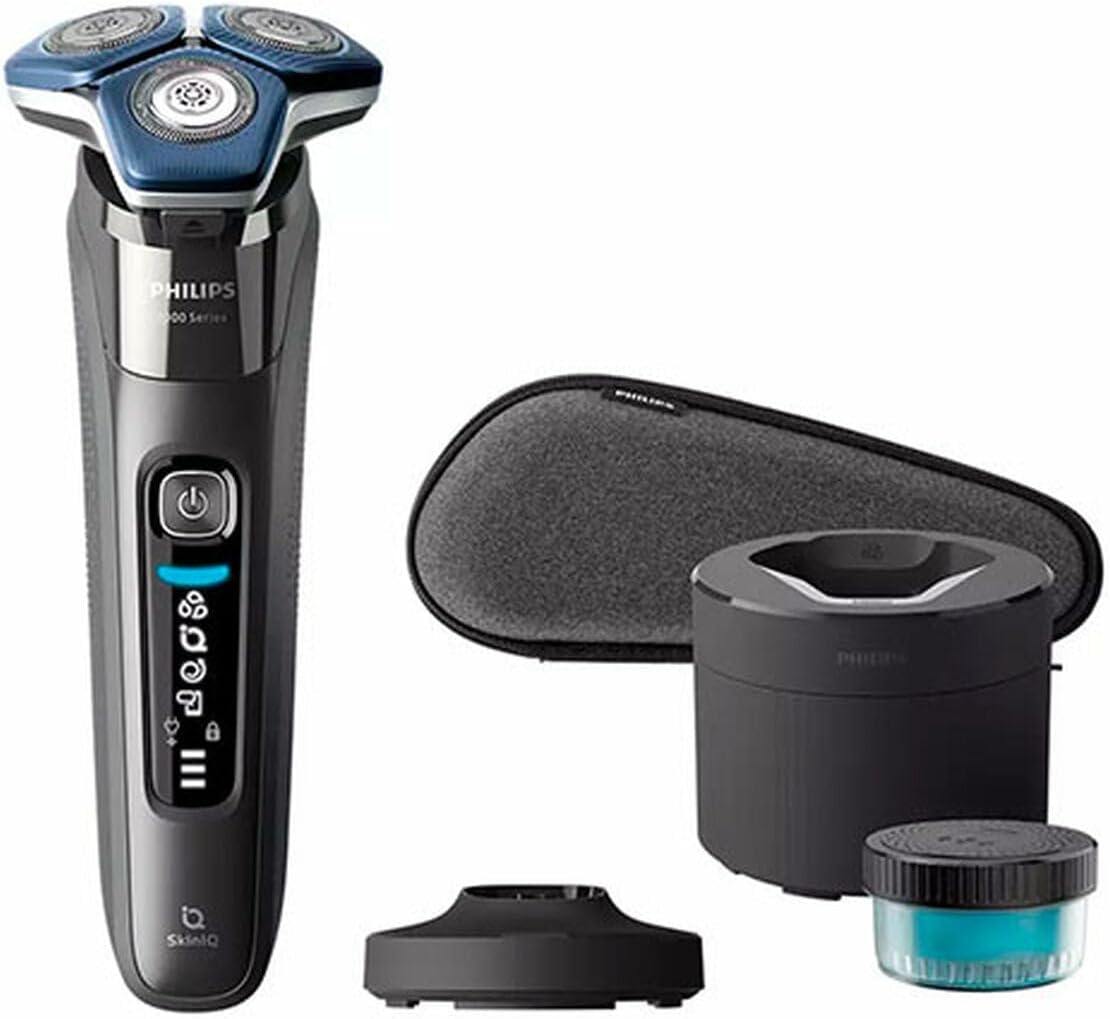
Image: The Philips SHAVER Series 7000 S7887/55 shaver displayed with its accompanying accessories, including the cleaning pod, travel case, and charging stand.
- Philips SHAVER Series 7000 S7887/55 Rotary Shaver
- Quick Clean Pod (or Charging Stand/Cleaning Station)
- Travel Case
- Power Adapter
- User Manual (this document)
Getting Started (Setup)
Charging the Shaver
Before first use, fully charge your shaver. A full charge takes approximately 1 hour and provides up to 60 minutes of shaving time.
- Ensure the shaver is dry before charging.
- Connect the power adapter to the charging stand or directly to the shaver (if applicable).
- Plug the adapter into a wall outlet.
- The battery indicator on the shaver will show charging progress.
- Once fully charged, unplug the adapter.
Initial Use
For optimal performance, allow your skin to adapt to the new shaver for a few weeks. Shave regularly for at least three weeks to allow your skin and beard to adjust.
Operating Instructions
Shaving Dry
- Ensure your face is clean and dry.
- Press the on/off button to switch on the shaver.
- Move the shaving heads in small, circular motions over your skin.
- Apply gentle pressure to ensure close contact with the skin.
Shaving Wet (with foam or gel)
- Wet your face and apply shaving foam or gel.
- Press the on/off button to switch on the shaver.
- Move the shaving heads in small, circular motions over your skin.
- Rinse the shaving heads under running water during shaving to prevent clogging.
Using the Integrated Trimmer
If your model includes an integrated pop-up trimmer, slide the trimmer release button to activate it. Use it for precise trimming of sideburns or mustaches.
Cleaning and Maintenance
Daily Cleaning
- After each shave, switch off the shaver.
- Open the shaving head unit (refer to your shaver's specific mechanism).
- Rinse the shaving heads and the hair chamber thoroughly under warm running water.
- Shake off excess water and leave the shaving head unit open to air dry.
Using the Quick Clean Pod
For a more thorough cleaning, use the Quick Clean Pod (if included). Follow the instructions provided with the Quick Clean Pod for proper use and solution replacement.
Replacing Shaving Heads
For optimal shaving performance, replace the shaving heads every 12 months or when the shaver indicates replacement is needed. Replacement heads are available from Philips retailers or online.
Troubleshooting
| Problem | Possible Cause | Solution |
|---|---|---|
| Shaver does not turn on. | Battery is empty. | Charge the shaver for at least 1 hour. |
| Shaver does not shave well. | Shaving heads are dirty or worn out. | Clean the shaving heads thoroughly. Replace shaving heads if they are older than 12 months. |
| Shaver makes unusual noise. | Hair or debris caught in the shaving unit. | Clean the shaving unit thoroughly. If the problem persists, contact Philips customer support. |
Specifications
- Brand: PHILIPS
- Model: S7887/55 (Series 7000)
- Power Source: Battery Powered
- Battery Run Time: Up to 60 minutes
- Charging Time: Approx. 1 hour
- Head Type: Rotary
- Blade Material: Stainless Steel
- Special Features: SkinIQ Technology, Nano SkinGlide Coating, 360-D Flexing Heads, Wet & Dry use
- Recommended Use: Beard
Warranty and Support
For detailed warranty information, product registration, or technical support, please visit the official Philips website or contact Philips customer service in your region. Keep your proof of purchase for warranty claims.
You can find more information and support at: www.philips.com
Ask a question about this manual
Ask about setup, troubleshooting, compatibility, parts, safety, or missing instructions. Manuals+ will review the question and use this page’s manual context to help answer it.