
Yintiny TMB8 / CD2-LH168
Yintiny Desktop Bluetooth 5.0 CD Player User Manual
Model: TMB8 / CD2-LH168
Introduction
Thank you for purchasing the Yintiny Desktop Bluetooth 5.0 CD Player. This portable retro suitcase-style CD player is designed to provide high-quality audio playback from various sources, including CDs, Bluetooth devices, and USB drives. Its compact design and built-in rechargeable battery make it ideal for use at home or on the go. Please read this manual carefully before operating the device to ensure proper use and to maximize its lifespan.
Safety Information
- Do not expose the device to rain, moisture, or extreme temperatures.
- Avoid placing the device near heat sources suchs as radiators, heat registers, stoves, or other apparatus (including amplifiers) that produce heat.
- Use only attachments/accessories specified by the manufacturer.
- Unplug this apparatus during lightning storms or when unused for long periods of time.
- Do not block any ventilation openings. Install in accordance with the manufacturer's instructions.
- Refer all servicing to qualified service personnel. Servicing is required when the apparatus has been damaged in any way, such as power-supply cord or plug is damaged, liquid has been spilled or objects have fallen into the apparatus, the apparatus has been exposed to rain or moisture, does not operate normally, or has been dropped.
- Keep the device away from strong magnetic fields.
Package Contents
Please check the package contents upon opening. If any items are missing or damaged, please contact customer support.
- Yintiny Suitcase CD Player
- Remote Control
- Type-C Charging Cable
- User Manual (this document)
Product Overview
Familiarize yourself with the various parts and controls of your Yintiny CD Player.

Figure 1: Front view of the Yintiny CD Player with the lid open, revealing the CD tray, tone arm, and control buttons on the right side. The Yintiny logo is visible on the inside of the lid.

Figure 2: Top-down view of the Yintiny CD Player with the lid closed, showcasing its compact, white suitcase-like design with a brass clasp at the front.
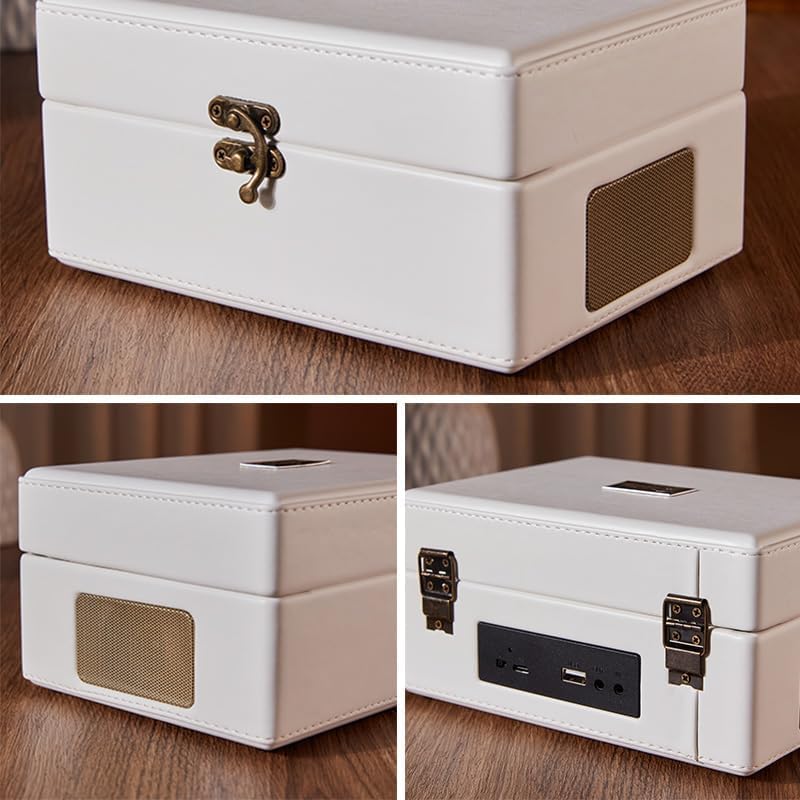
Figure 3: Detailed view of the side panels of the CD player. One image shows the speaker grille, and another shows the rear panel with various ports including USB, AUX, and power input.
Controls and Ports:
- Power Button: Turns the device on/off.
- Mode Button: Switches between CD, Bluetooth, USB, and AUX modes.
- Play/Pause Button: Starts or pauses playback.
- Previous/Next Track Buttons: Skips to the previous or next track.
- Volume Knob: Adjusts the audio volume.
- CD Tray: For inserting audio CDs.
- USB Port: For playing music from USB flash drives.
- AUX Input: For connecting external audio devices via a 3.5mm cable.
- Headphone Jack: For private listening.
- Type-C Charging Port: For connecting the power adapter.
- Built-in Speakers: Stereo speakers for audio output.
Setup
1. Charging the Device:
Before first use, it is recommended to fully charge the CD player. Connect the provided Type-C charging cable to the charging port on the back of the unit and the other end to a compatible USB power adapter (not included) or a computer USB port. The charging indicator light will illuminate during charging and turn off when fully charged. A full charge provides approximately 5 hours of continuous playback.
2. Powering On/Off:
Press and hold the Power button located on the control panel to turn the device ON or OFF.
Operating Instructions
1. CD Playback:
- Open the lid of the CD player.
- Gently place a CD (CD, CD-R, CD-RW, MP3, WMA format supported) onto the spindle, ensuring it is seated correctly.
- Close the lid.
- Press the Mode button until "CD" mode is selected (indicated by a display or voice prompt).
- The CD player will automatically begin reading and playing the disc.
- Use the Play/Pause, Previous/Next Track buttons, and Volume knob to control playback.
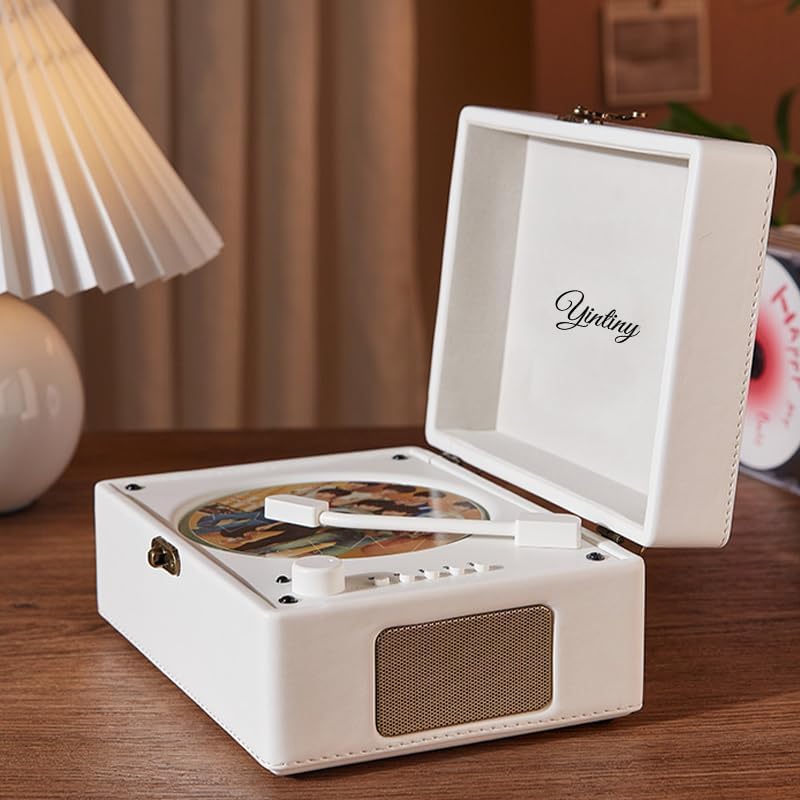
Figure 4: The Yintiny CD Player with its lid open, a CD spinning on the tray, placed on a wooden desk next to a lamp, illustrating its use in a home environment.
2. Bluetooth Mode:
- Press the Mode button until "Bluetooth" mode is selected. The device will enter pairing mode, indicated by a flashing light or voice prompt.
- On your mobile device (smartphone, tablet, etc.), enable Bluetooth and search for available devices.
- Select "Yintiny CD Player" (or similar name) from the list of devices.
- Once paired, you can play audio from your mobile device through the CD player's speakers.
- Control playback and volume either from your mobile device or using the CD player's controls.

Figure 5: A smartphone held in hand, displaying a music playback screen, with the Yintiny CD Player in the background, illustrating its Bluetooth 5.0 connectivity feature.
3. USB Playback:
- Insert a USB flash drive into the USB port on the back of the device.
- Press the Mode button until "USB" mode is selected.
- The device will automatically detect and play compatible audio files (e.g., MP3, WMA) from the USB drive.
- Use the Play/Pause, Previous/Next Track buttons, and Volume knob to control playback.
4. AUX Input:
- Connect an external audio device (e.g., MP3 player, computer) to the AUX input port on the back of the CD player using a 3.5mm audio cable (not included).
- Press the Mode button until "AUX" mode is selected.
- Play audio from your external device. The sound will be output through the CD player's speakers.
- Adjust volume using the CD player's Volume knob or the external device's volume control.
5. Using the Remote Control:
The included remote control allows for convenient operation from a distance. Functions include power on/off, mode selection, play/pause, track skipping, and volume adjustment. Ensure the remote control has a working battery (1 LR44 battery included) and is pointed towards the front of the CD player for optimal performance.
Maintenance
- Cleaning: Use a soft, dry cloth to wipe the exterior of the device. Do not use liquid cleaners or aerosol sprays. For the CD lens, use a specialized CD lens cleaner if necessary.
- Storage: When not in use for extended periods, store the device in a cool, dry place away from direct sunlight and dust.
- Battery Care: To prolong battery life, avoid fully discharging the battery frequently. Charge the device regularly, even if not in use, to maintain battery health.
Troubleshooting
| Problem | Possible Cause | Solution |
|---|---|---|
| No power | Battery is depleted; Power adapter not connected properly. | Charge the device fully; Ensure the Type-C cable is securely connected. |
| CD not playing / Disc error | CD is dirty or scratched; Incorrect CD format; CD not seated properly. | Clean the CD with a soft cloth; Ensure the CD is placed correctly on the spindle; Check if the CD format is supported (CD, CD-R, CD-RW, MP3, WMA). |
| No sound | Volume is too low; Device is muted; Incorrect mode selected. | Increase the volume using the knob; Check if the device is muted; Ensure the correct mode (CD, Bluetooth, USB, AUX) is selected. |
| Bluetooth pairing failed | Device is too far; Bluetooth not enabled on mobile device; Player not in pairing mode. | Move devices closer; Enable Bluetooth on your mobile device; Ensure the CD player is in Bluetooth pairing mode. |
| Remote control not working | Battery is dead; Obstruction between remote and player. | Replace the LR44 battery in the remote; Remove any obstructions. |
Specifications
| Model Number | TMB8 / CD2-LH168 |
| Brand | Yintiny |
| Supported CD Formats | CD, CD-R, CD-RW, MP3, WMA |
| Speaker Output | 5W x 2 |
| Power Supply | AC 100-240V, 50Hz/60Hz |
| Rated Voltage | 5V/2A |
| Battery Capacity | 3600 mAh (Lithium-ion) |
| Battery Life | Approx. 5 hours continuous playback |
| Connectivity | Bluetooth 5.0, USB, AUX (3.5mm) |
| Dimensions (Main Unit) | 185 x 195 x 86 mm (approx. 7.28 x 7.68 x 3.39 inches) |
| Weight | 1300 Grams (approx. 2.87 lbs) |
| Color | White |
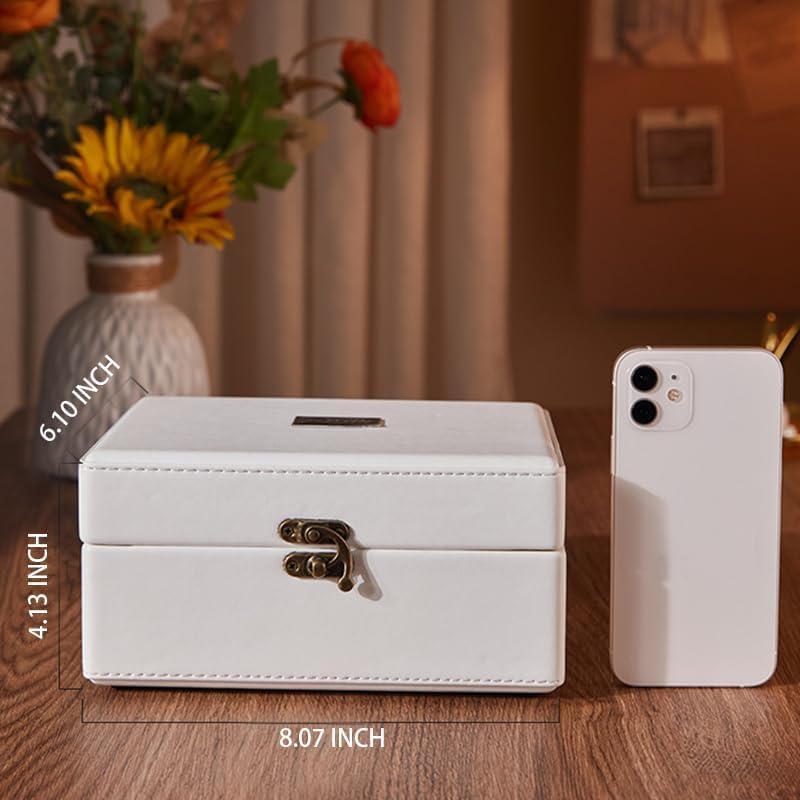
Figure 6: The Yintiny CD Player shown next to a smartphone, with its dimensions labeled: 8.07 inches (length), 4.13 inches (height), and 6.10 inches (width/depth).
Warranty and Support
Yintiny products are manufactured to the highest quality standards. This product is covered by a limited warranty against defects in materials and workmanship from the date of original purchase. Please retain your proof of purchase for warranty claims.
For technical support, troubleshooting assistance, or warranty inquiries, please contact Yintiny customer service. Contact information can typically be found on the product packaging or the official Yintiny website.
Note: Information regarding specific warranty duration or contact details is not available in the provided product data. Please refer to the manufacturer's official channels for the most accurate and up-to-date information.
Ask a question about this manual
Ask about setup, troubleshooting, compatibility, parts, safety, or missing instructions. Manuals+ will review the question and use this page’s manual context to help answer it.