
1. Introduction
This manual provides detailed instructions for the installation, operation, and maintenance of your Fellostar Android 11 Car Stereo. This multimedia player is designed for Ford EcoSport models from 2013 to 2016, offering features such as Apple CarPlay, Android Auto, GPS navigation, Bluetooth connectivity, and a 9.7-inch capacitive touchscreen.
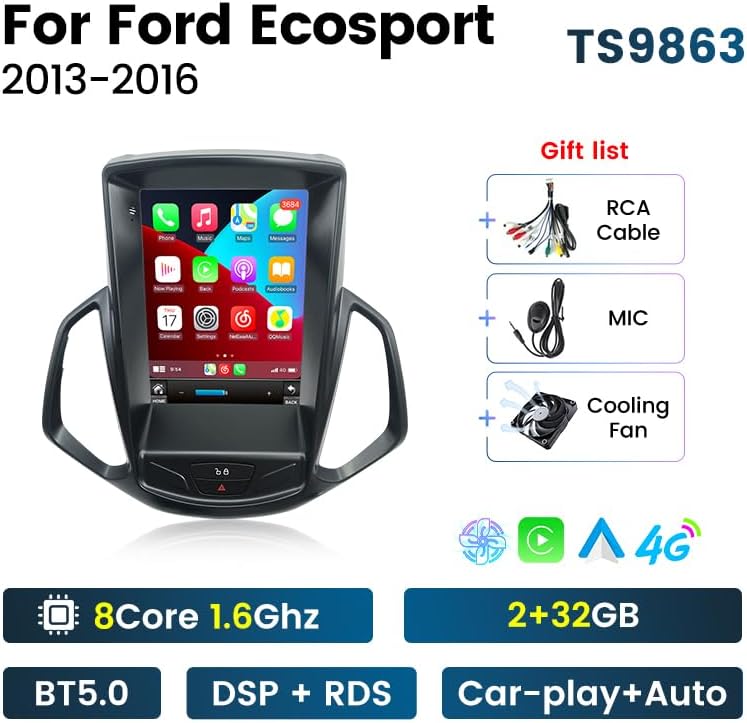
Image: The Fellostar Android 11 Car Stereo unit with its main features highlighted, including the 8-core processor, 2+32GB memory, BT5.0, DSP+RDS, and Car-play+Auto capabilities. Also shown are the included RCA cable, microphone, and cooling fan.
2. Setup and Installation
Before installation, ensure your vehicle is a Ford EcoSport manufactured between 2013 and 2016. It is recommended to disconnect the car battery before beginning the installation process.
2.1 Compatibility Check
To confirm compatibility and ensure you receive the correct wiring harness, please provide your car's model, production year, and a picture of your car's dashboard to Fellostar customer support.
2.2 Back Cover Adjustment
Some installations may require adjusting the position of the unit's back cover for proper fitment. This can be done by removing four screws and selecting the appropriate position (top, upper side, or bottom) before re-securing it.

Image: A diagram illustrating the process of adjusting the back cover of the car stereo unit. It shows removing four screws and repositioning the cover to one of three possible positions: top, upper side, or bottom, to ensure a correct fit in the vehicle's dashboard.
2.3 Installation Overview
The unit is designed for a vertical screen installation, integrating seamlessly into the Ford EcoSport dashboard. Follow the provided wiring diagram for connecting power, speakers, and other accessories.
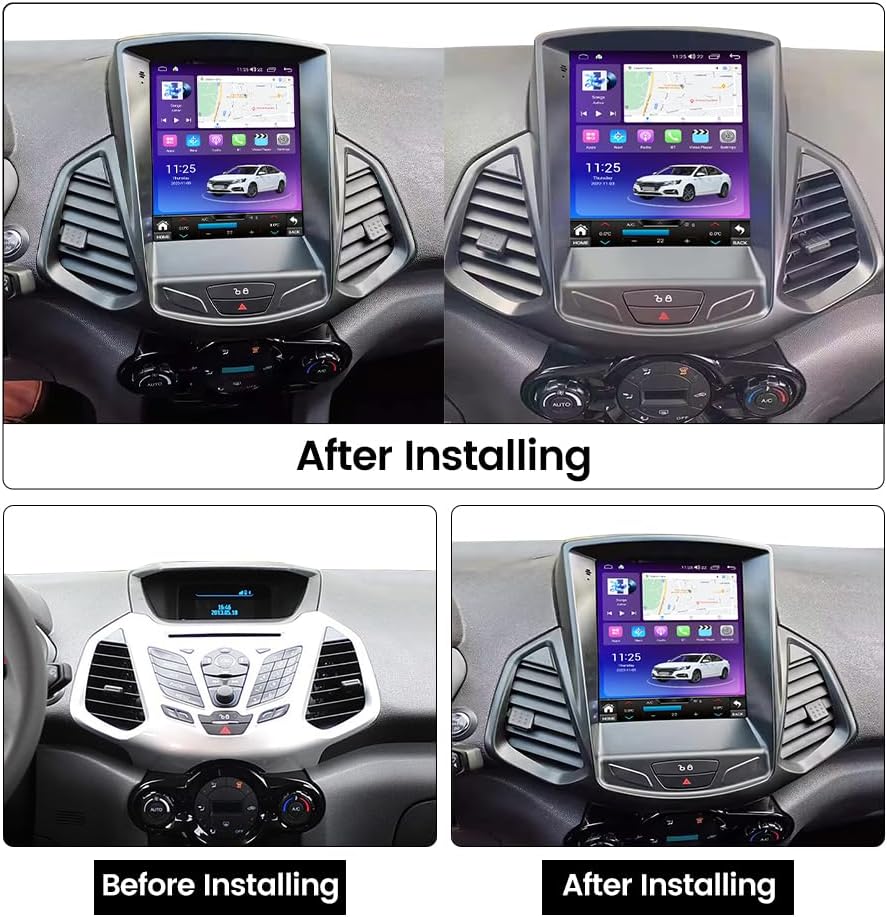
Image: A comparison showing the car dashboard before and after the installation of the Fellostar Android 11 Car Stereo. The 'Before Installing' image shows the original dashboard, while the 'After Installing' image displays the new vertical screen unit seamlessly integrated.
3. Operating Instructions and Features
Your Fellostar car stereo runs on Android 11, providing a stable and responsive user experience on its 9.7-inch capacitive touch screen.
3.1 Core System and Performance
The unit features an 8-core processor (2.0GHz) for enhanced performance and efficient heat dissipation. It includes 2MB of three-level cache for faster operation.

Image: A detailed graphic showcasing the car stereo's internal components and key features. It highlights the 2.0GHz 8-core processor, the DSP (Digital Sound Processor) for high-precision audio tuning, and the integrated CarPlay/Android Auto functionality with a smartphone interface.
3.2 Apple CarPlay and Android Auto
Connect your smartphone via the radio's USB cable to access built-in Apple CarPlay or Android Auto. This allows for voice commands (Siri/Google Assistant) to make calls, get GPS directions, listen to music, and send/receive messages directly from the car stereo display.
3.3 GPS Navigation
The system supports global positioning with preloaded offline maps. For real-time traffic and updated routes, connect to the internet to use online navigation apps such as Google Maps, Sygic, or Waze. It supports 3D maps and voice guidance.
3.4 Bluetooth Functionality
Utilize Bluetooth for hands-free phone calls, music streaming (BT music), and synchronizing your phone contacts. The built-in microphone ensures clear communication.
3.5 Multimedia and Connectivity
- FM/AM RDS Radio: Automatic search and manual tuning, with support for RDS (Radio Data System) to display station information.
- 4G LTE and Wi-Fi: Insert a 4G SIM card (not included) for mobile data connectivity or connect to a Wi-Fi hotspot for internet access, enabling online music, video streaming, and app downloads.
- Split Screen Function: Run two applications simultaneously on the screen.
- Phone Mirror Link: Display your smartphone screen directly on the car stereo.
- Steering Wheel Control (SWC): Control basic functions of the stereo using your vehicle's existing steering wheel buttons.
- Full AV Output: Connect external displays (e.g., headrest monitors) to output video and audio content.

Image: A visual representation of various features: FM/AM RDS Radio interface, Steering Wheel Control functionality, Full AV Output for connecting external screens, and GPS Navigation with support for GPS, GLONASS, and BDS systems.
3.6 Advanced Driving Assistance (Optional)
- ADAS DVR Anti-collision Warning: Supports front vehicle distance prediction, anti-collision warning, and lane departure warning. Note: A compatible ADAS DVR camera must be purchased separately.
- 360° Panoramic Camera: Provides a 360-degree panoramic view for easier parking and maneuvering. Note: A compatible 360° camera system must be purchased separately.
- AHD Reversing Video: Supports high-definition reversing camera input for clear rear view. Note: A compatible AHD reversing camera must be purchased separately.

Image: This graphic illustrates the ADAS DVR Anti-collision warning system, showing visual cues for front distance, front car collision, and lane departure. It also details the Bluetooth function, including BT music, sync contacts, and synchronous call record, with a phone dialer interface.

Image: A comprehensive display of advanced features: 360° panoramic camera view for dead-end surveillance, AHD reversing video for clear rear visibility, support for multiple languages (English, German, French, Spanish, etc.), and a sample UI-Display showing the user interface layout.
4. Maintenance
To ensure the longevity and optimal performance of your car stereo, follow these maintenance guidelines:
- Cleaning: Use a soft, dry cloth to clean the touchscreen and exterior. Avoid abrasive cleaners or solvents.
- Software Updates: Periodically check for and install available software updates to improve performance and add new features.
- Environmental Conditions: Avoid exposing the unit to extreme temperatures or direct sunlight for prolonged periods.
5. Troubleshooting
If you encounter issues with your car stereo, refer to the following common troubleshooting steps:
- No Power: Check all power connections and the vehicle's fuse box. Ensure the car battery is properly connected.
- No Sound: Verify speaker connections. Check volume settings and ensure the mute function is not active.
- Touchscreen Unresponsive: Try restarting the unit. If the issue persists, a factory reset might be necessary (refer to settings menu).
- GPS Signal Loss: Ensure the GPS antenna is properly installed and has a clear view of the sky.
- Bluetooth Connectivity Issues: Ensure Bluetooth is enabled on both the stereo and your device. Try unpairing and re-pairing the devices.
- System Slow/Freezing: Close unnecessary applications. Clear cache or perform a factory reset if the problem continues.
For persistent issues, please contact Fellostar technical support.
6. Specifications
| Feature | Description |
|---|---|
| Brand | FELLOSTAR |
| Operating System | Android 11 |
| Display Type | 9.7-inch Capacitive Touchscreen (LCD) |
| Processor | 8-Core, 2.0GHz |
| Connectivity Technology | Bluetooth, USB, Wi-Fi, 4G LTE (SIM card slot) |
| Special Features | Apple CarPlay, Android Auto, GPS Navigation, DSP, RDS, Split Screen, Phone Mirror Link, Steering Wheel Control |
| Map Type | Worldwide (Offline & Online) |
| Audio Output Mode | Stereo |
| Included Components | Car radio unit, cables |
| Mounting Type | Dashboard Mount |
| Compatible Devices | Smartphone |
| Supported Satellite Navigation System | GPS |
7. Warranty
This Fellostar car stereo comes with a 1-year warranty from the date of purchase. Please retain your proof of purchase for warranty claims. The warranty covers manufacturing defects and malfunctions under normal use. It does not cover damage caused by improper installation, misuse, accidents, or unauthorized modifications.
8. Support
Fellostar provides 7x24 hours of after-sales technical support to assist you with any installation or operation issues. If you have questions or require assistance, please contact us via Amazon message. We aim to provide a solution within 24 hours.
For further information, you may visit the official Fellostar store on Amazon: FELLOSTAR Store