
Introduction
Thank you for choosing the Weture Wall Mounted Queen Headboard. This manual provides detailed instructions for the safe and proper installation, operation, and maintenance of your new headboard. Please read this manual thoroughly before assembly and retain it for future reference.
Safety Information
- Ensure all components are present and undamaged before beginning assembly.
- Do not use power tools for assembly unless specifically instructed, as this may overtighten fasteners and cause damage.
- Always mount the headboard to a sturdy wall structure. Consult a professional if unsure about wall type or mounting methods.
- Keep small parts away from children during assembly.
- Do not overload the USB and Type-C charging ports. Use only for charging compatible devices.
Package Contents
Please verify that all the following components are included in your package:
- Upholstered Headboard Panels (2 pieces)
- Mounting Bar (1 piece)
- Wall Brackets (2 pieces)
- Adjustable Fabric Straps with Buckles (4 pieces)
- USB and Type-C Charging Module (pre-installed in one headboard panel)
- Mounting Hardware (screws, anchors)
- Instruction Manual (this document)
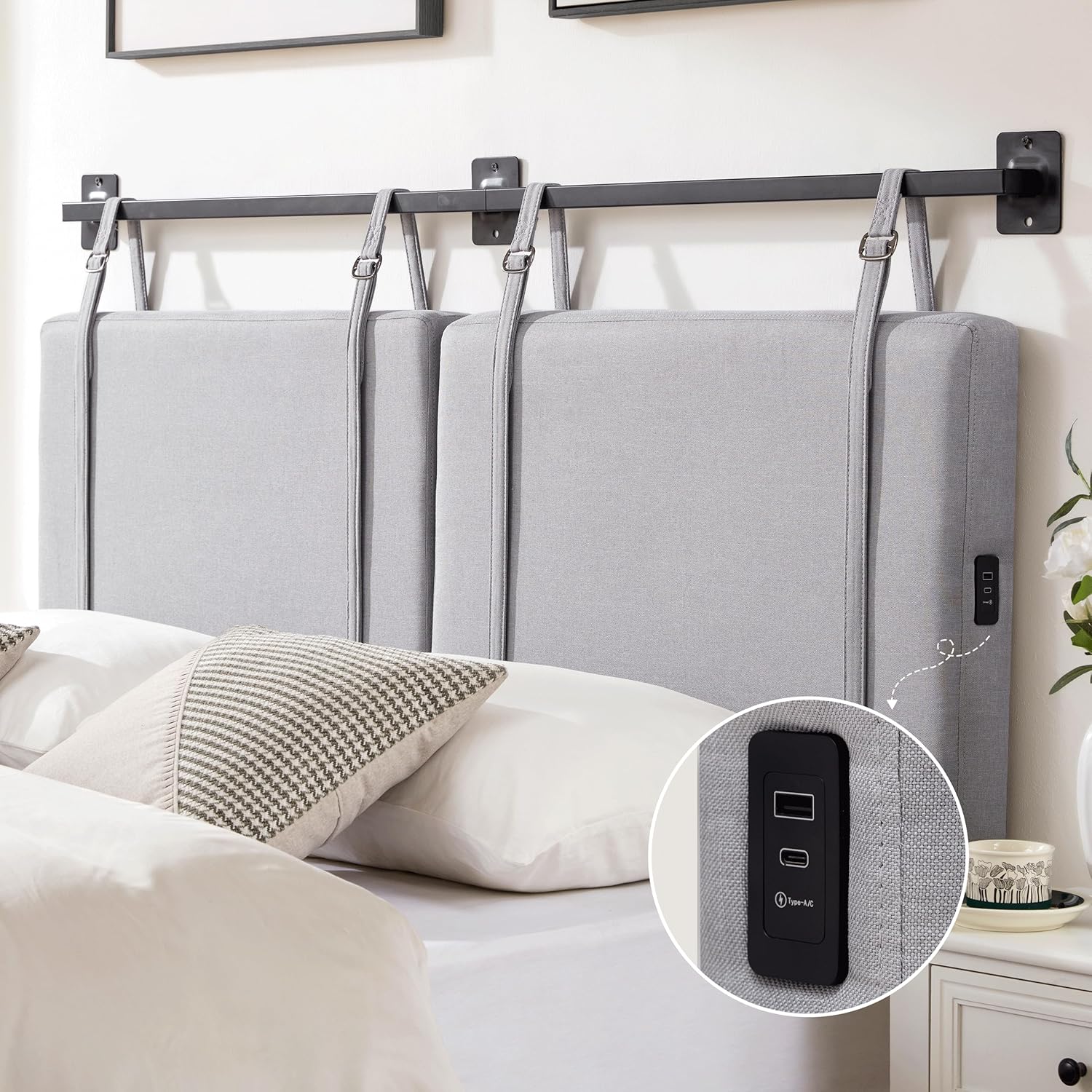
Image: Overview of the Weture Wall Mounted Queen Headboard, showing the two upholstered panels, mounting bar, and integrated USB/Type-C charging port.
Setup and Installation
Follow these steps for proper installation of your Weture Wall Mounted Queen Headboard. Assembly typically takes approximately 20 minutes.
Step 1: Determine Mounting Height
Position the headboard panels behind your bed to determine the desired height. The adjustable fabric straps allow for flexible placement. Mark the desired top edge of the headboard on the wall.

Image: A fully assembled Weture Queen Headboard behind a bed, illustrating the overall appearance and adjustable height capability.
Step 2: Install Wall Brackets and Mounting Bar
- Based on your desired headboard height, measure and mark the positions for the two wall brackets. Ensure they are level and spaced appropriately to support the mounting bar. The total width of the Queen headboard is approximately 62.4 inches (158.5 cm).
- Drill pilot holes at the marked locations. Use appropriate drill bits and wall anchors for your specific wall type (e.g., drywall, wood studs, concrete).
- Securely attach the wall brackets to the wall using the provided mounting hardware.
- Insert the mounting bar into the installed wall brackets. Ensure it is stable and level.

Image: Detailed view showing how the fabric strap with a metal buckle is properly installed over the mounting bar, ensuring secure attachment.
Step 3: Attach Headboard Panels
- Locate the adjustable fabric straps on the back of each headboard panel.
- Hang the headboard panels onto the mounting bar using the fabric straps. Adjust the length of the straps to achieve your desired headboard height and ensure the panels are level.
- The back of the headboard panels features a Velcro design. Once positioned, press the headboard firmly against the wall to engage the Velcro, providing additional stability and secure attachment.
Operating Instructions
Using the USB and Type-C Charging Ports
Your Weture headboard is equipped with integrated USB and Type-C charging ports for convenient device charging.
- Ensure the headboard's power cord is securely plugged into a functional wall outlet.
- Locate the USB and Type-C ports on the side of the headboard panel.
- Connect your compatible electronic device (e.g., smartphone, tablet) to the appropriate port using its charging cable.
- The ports provide a 5V/2.0A output, suitable for charging most small electronic devices.

Image: A close-up view of the integrated USB and Type-C charging ports on the side of the headboard, with devices connected and charging.

Image: A person comfortably leaning against the headboard while using a mobile phone, which is connected to the headboard's charging port.
Maintenance
Cleaning Instructions
To maintain the appearance and longevity of your headboard, follow these cleaning guidelines:
- For general cleaning, wipe the upholstered fabric with a clean, dry cloth.
- Avoid using liquid cleaners, abrasive materials, or harsh chemicals, as these may damage the fabric or finish.
- For spills, blot immediately with a clean, dry cloth. Do not rub.
- Regularly check the mounting hardware to ensure it remains secure.

Image: A close-up view of the linen fabric texture used on the headboard panels, illustrating the material to be cleaned.
Troubleshooting
If you encounter any issues with your Weture Wall Mounted Queen Headboard, please refer to the following common problems and solutions:
| Problem | Possible Cause | Solution |
|---|---|---|
| Headboard feels unstable or loose. | Mounting hardware not securely fastened; Velcro not fully engaged; incorrect wall anchors used. | Ensure wall brackets are firmly attached to wall studs or appropriate anchors. Press headboard panels firmly against the wall to engage the Velcro. Verify straps are correctly adjusted and buckled. If using drywall, ensure appropriate heavy-duty drywall anchors are used. |
| USB/Type-C ports are not charging devices. | Power cord not plugged in; device cable faulty; device incompatible; power outage. | Check that the headboard's power cord is securely plugged into a live wall outlet. Try a different charging cable or device to rule out cable/device issues. Ensure the device is compatible with 5V/2.0A charging. Check household power supply. |
| Headboard panels are not level. | Mounting bar or wall brackets are not level; straps are unevenly adjusted. | Re-check the level of the wall brackets and mounting bar during installation. Adjust the fabric straps on each panel to achieve a level appearance. |
If the problem persists after attempting these solutions, please contact Weture customer support for further assistance.
Specifications
| Feature | Detail |
|---|---|
| Brand | Weture |
| Model | Queen Headboard B0CDBQMR92 |
| Size | Queen |
| Product Dimensions | 60"W x 24.8"H (158.5cm W x 53cm H) |
| Material | Upholstered Linen Fabric, Metal Mounting Bar |
| Mounting Type | Wall Mount |
| Special Features | Adjustable Height, USB & Type-C Charging Ports (5V/2.0A output) |
| Item Weight | 23.6 pounds |
| Color | Gray |
| Care Instructions | Wipe with Dry Cloth |

Image: A diagram illustrating the key dimensions of the Weture Queen Headboard, including width and height measurements in both centimeters and inches.
Warranty and Customer Support
Warranty Information
Weture products are manufactured with quality and care. While specific warranty details may vary, we are committed to ensuring your satisfaction. Please retain your proof of purchase for any warranty claims.
Customer Support
Should you have any questions, concerns, or require assistance with your Weture Wall Mounted Queen Headboard, please do not hesitate to contact our customer support team. You can reach us through the Amazon platform where you made your purchase. We are dedicated to providing prompt and helpful support.
For more information about Weture products, visit the Weture Store on Amazon.