
1. Introduction
Thank you for choosing the Espelho Automatic Pet Feeder DU5L-KH. This device is designed to provide a convenient and reliable feeding solution for your pets, ensuring they receive meals on a consistent schedule. Featuring a 5-liter capacity, dual stainless steel bowls, programmable feeding times, and a voice recording function, this feeder helps maintain healthy eating habits for your cats or dogs.

This image showcases the 5-liter large capacity of the feeder, capable of feeding two pets simultaneously. Two cats, one orange and one grey, are shown eating from the separate stainless steel bowls.
2. Safety Information
- Read all instructions carefully before operating the feeder.
- Keep the feeder away from children and pets when not in use or during assembly.
- Use only dry pet food with a kibble size between 3-13mm to prevent clogging.
- Do not immerse the main unit in water. Only detachable parts are washable.
- Ensure the power adapter is securely connected and placed in a dry area.
- If using batteries, ensure they are inserted correctly and replace them when low to avoid power interruptions.
- Do not attempt to repair or modify the device yourself. Contact customer support for assistance.
3. Product Components
Please check that all components are present in the package:
- Main Feeder Unit (Food Container, Base with Control Panel)
- Lid
- Desiccant Bag
- Stainless Steel Bowls (x2)
- Bowl Divider
- Short Risers (x2)
- Tall Risers (x2)
- USB Power Cable and Adapter
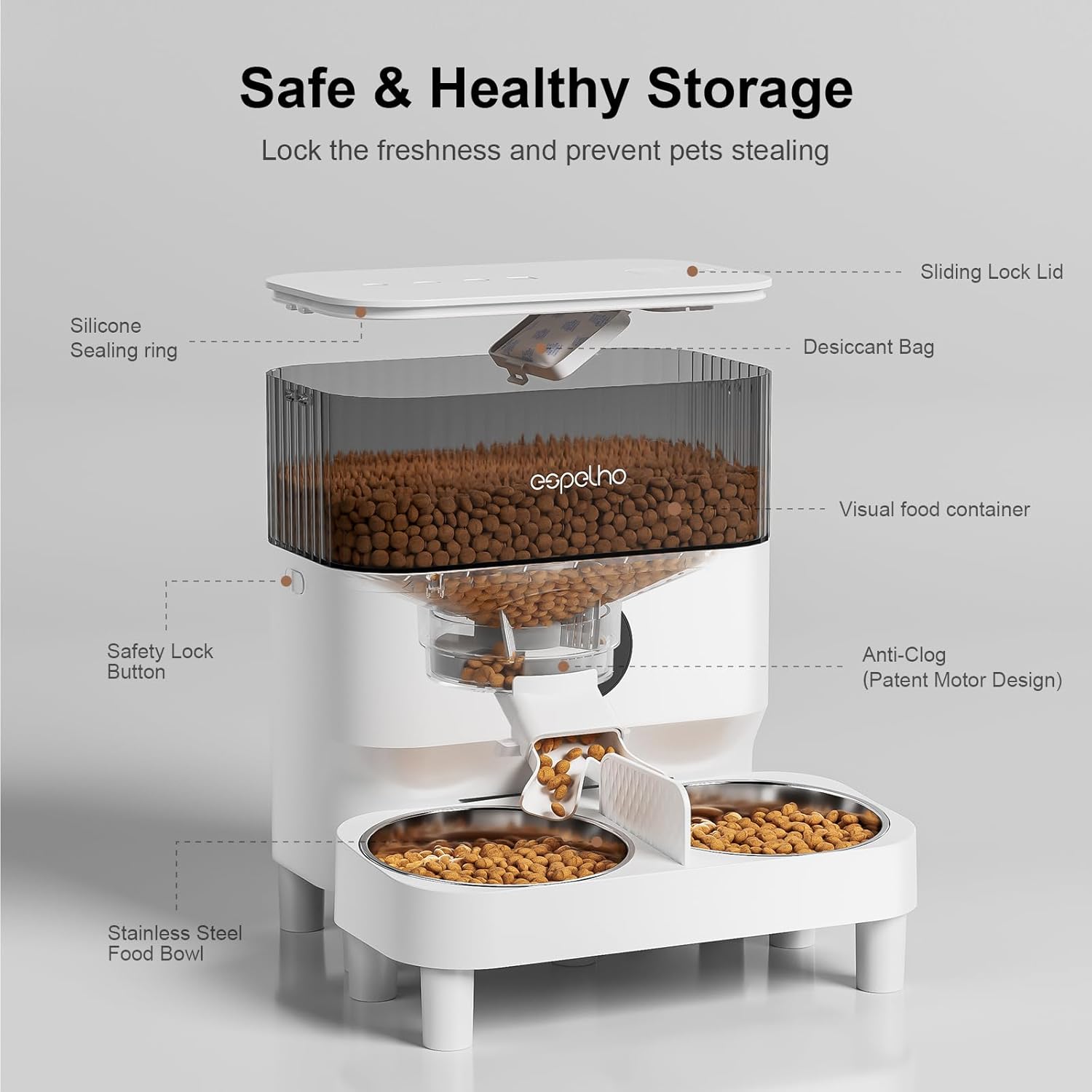
This detailed diagram labels the components of the feeder's food storage system, including the sliding lock lid, silicone sealing ring, desiccant bag compartment, visual food container, safety lock button, anti-clog patent motor design, and stainless steel food bowls, emphasizing safe and healthy food preservation.
4. Setup Instructions
4.1. Assembly
- Attach Bowls and Risers: Decide whether to use the feeder with a single bowl or dual bowls. Insert the stainless steel bowls into the feeder base. If feeding two pets, insert the bowl divider.
- Adjust Height: The feeder comes with short (1 inch) and tall (2 inches) risers. Attach the desired risers to the bottom of the feeder base to adjust the height according to your pet's comfort and size. This helps promote a healthy eating posture.
- Install Desiccant Bag: Open the compartment under the lid and place the desiccant bag inside to keep the food fresh. Close the compartment securely.
- Fill Food Container: Open the lid and pour dry pet food into the transparent food container. Ensure the lid is securely closed and locked to maintain freshness and prevent pets from accessing the food.
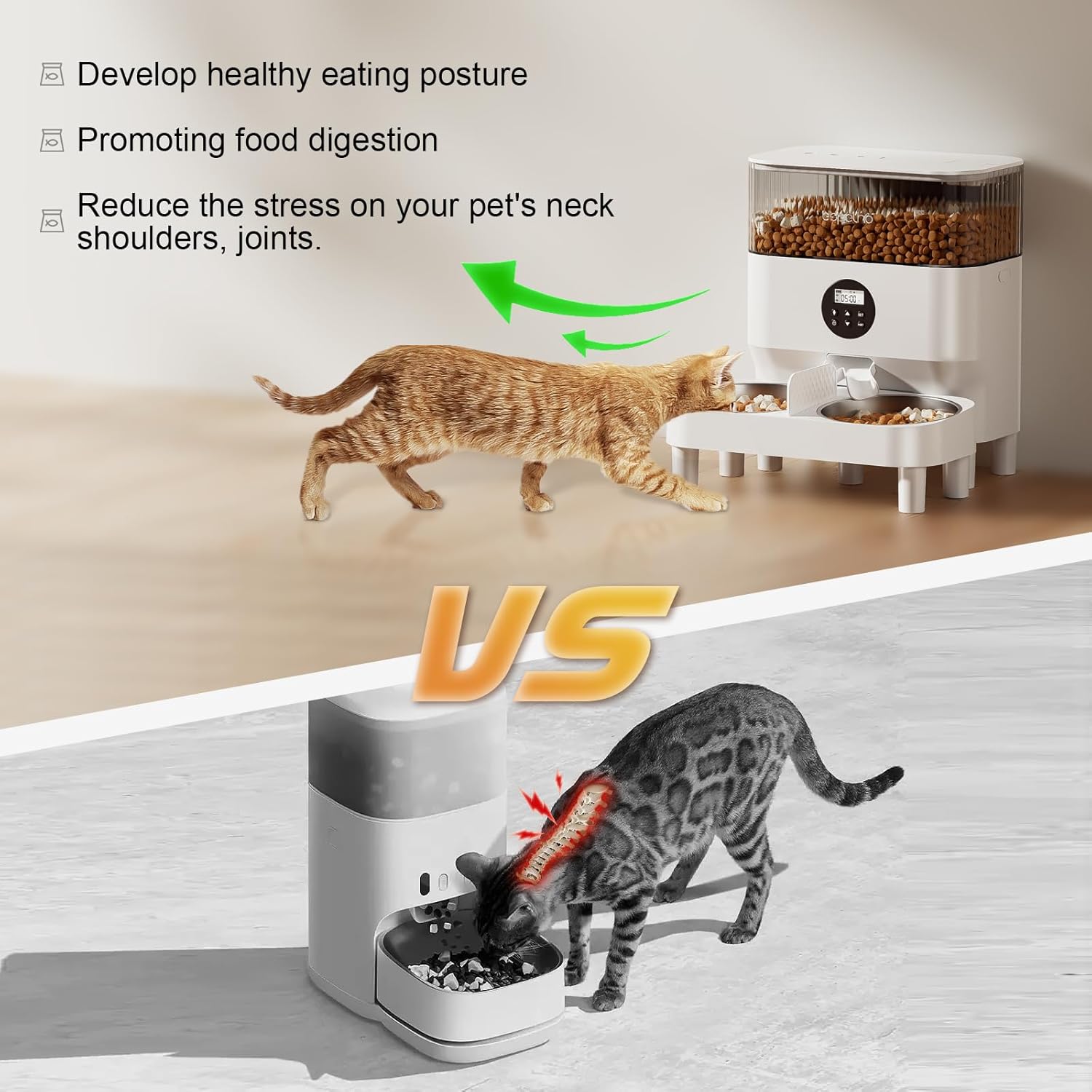
This image compares the Espelho feeder, which promotes a healthy eating posture by elevating the bowls, with a standard feeder that can cause strain on a pet's neck and joints. An arrow indicates the benefit of the elevated design.
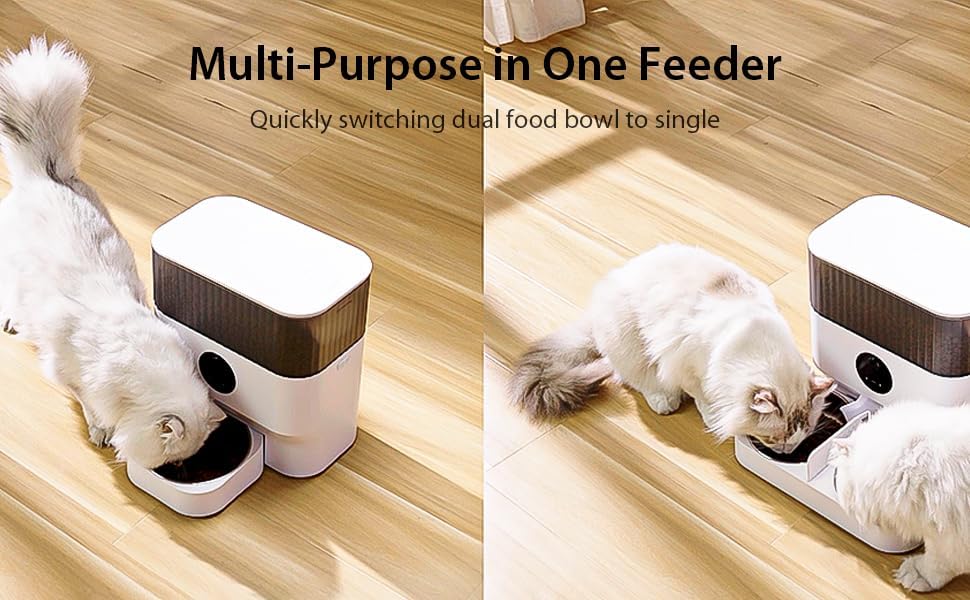
This image demonstrates the feeder's versatility, showing it configured with a single bowl for one pet on the left, and with dual bowls and a divider for two pets on the right. Two white cats are shown eating from the feeder in both configurations.
4.2. Powering the Device
The feeder supports dual power supply options:
- AC Adapter: Connect the USB power cable to the feeder and plug the adapter into a standard wall outlet. This is the primary power source.
- Batteries (Backup): For backup power during outages, insert 3 D-cell batteries (not included) into the battery compartment at the bottom of the feeder. The feeder will automatically switch to battery power if AC power is lost.

This image illustrates the dual power supply options for the feeder: it can be powered by a wall charger (AC adapter) or by batteries (not included), providing flexibility and backup power.
5. Operating Instructions
5.1. Control Panel Overview
The control panel features an LCD display and several buttons for programming:
- SET Button: Enters programming mode and confirms settings.
- UP/DOWN Buttons: Adjust values (time, meal number, portions).
- FEED Button: Dispenses a single portion manually.
- REC Button: Records or plays back your voice message.
5.2. Setting the Current Time
- Press and hold the SET button until the hour digit flashes.
- Use the UP/DOWN buttons to set the current hour. Press SET to confirm.
- The minute digit will flash. Use UP/DOWN to set the current minute. Press SET to confirm and exit time setting.
5.3. Programming Meals
You can program up to 6 meals per day, with up to 20 portions per meal (1 portion = approximately 1/8 cup or 2 tablespoons).
- Press the SET button once to enter meal programming mode. The meal number (e.g., "1") will flash.
- Use UP/DOWN to select the meal number you wish to program (1-6). Press SET.
- The hour digit for the selected meal will flash. Use UP/DOWN to set the feeding hour. Press SET.
- The minute digit will flash. Use UP/DOWN to set the feeding minute. Press SET.
- The portion number will flash. Use UP/DOWN to set the number of portions (1-20) for this meal. Press SET.
- Repeat steps 2-5 for additional meals. To exit programming, press and hold SET or wait for the display to time out.

This image illustrates the feeder's ability to schedule 1-6 meals per day, with up to 20 portions per meal, and recommends a kibble size of 3-13mm for optimal dispensing. It shows a cat resting near the feeder, with a timeline of feeding times below.
5.4. Recording a Voice Message
You can record a 10-second voice message to call your pets at meal times.
- Press and hold the REC button until you hear a beep.
- Speak clearly into the microphone for up to 10 seconds.
- Release the REC button to save the message. The message will play automatically during scheduled meal times.
- To test the recording, press the REC button once.

This image highlights the 10-second voice recording feature, allowing pet owners to record a personalized meal call for their pets. The feeder is shown in a home setting, with sound waves emanating from it.
5.5. Manual Feeding
To dispense a single portion of food immediately, press the FEED button once. This will not affect your programmed feeding schedule.
6. Maintenance and Cleaning
Regular cleaning ensures hygiene and extends the life of your feeder.
- Disassembly: Unplug the feeder from power. Remove the lid, food container, stainless steel bowls, and bowl divider.
- Cleaning: The food container, lid, bowls, and divider are detachable and can be hand-washed with mild soap and water. Rinse thoroughly and dry completely before reassembly.
- Main Unit: Wipe the main feeder base with a damp cloth. Do not immerse the main unit in water.
- Desiccant Bag: Replace the desiccant bag every 1-2 months for optimal food freshness.
- Reassembly: Ensure all parts are dry. Reassemble the feeder in reverse order of disassembly.

This image demonstrates the feeder's easy-to-clean detachable design, showing the food container and bowl assembly separated from the base and being rinsed with water, highlighting its hygienic maintenance.
7. Troubleshooting
| Problem | Possible Cause | Solution |
|---|---|---|
| Food not dispensing or E002 error | Food chute clogged; food container not properly aligned; kibble size too large. | Check for blockages in the food chute. Ensure the food container is correctly seated and locked onto the base. Use recommended kibble size (3-13mm). |
| Uneven food distribution in dual bowls | Natural variation in dispensing mechanism. | This can occur due to the design. If precise equal portions are critical, consider using a single bowl setup or manually adjusting portions. |
| Feeder not powering on | Power adapter not connected; batteries low or incorrectly inserted. | Ensure the power adapter is securely plugged into both the feeder and the wall outlet. Check battery orientation and replace if necessary. |
| Voice recording not playing | No message recorded; volume too low. | Record a new message following the instructions in section 5.4. Ensure the volume is audible. |
8. Specifications
- Model Number: DU5L-KH
- Capacity: 5 Liters (approx. 2-3 kg dry food)
- Dimensions (L x W x H): 25.4 x 15.24 x 35.56 cm
- Weight: 3.29 kg
- Material: Stainless Steel, ABS Plastic
- Target Species: Cat, Dog
- Power Supply: USB (AC adapter included), 3 x D-cell batteries (not included)
- Meals per Day: Up to 6
- Portions per Meal: 1-20 (approx. 1/8 cup per portion)
- Kibble Size: 3-13mm recommended
- Voice Recording: 10 seconds
- Care Instructions: Hand wash detachable parts, wipe main unit. Keep indoors.
9. Warranty and Support
Espelho products are designed for reliability and performance. For warranty information or technical support, please refer to the contact details provided with your purchase or visit the official Espelho website. Please have your model number (DU5L-KH) and purchase date ready when contacting support.


