1. Introduction
This document provides essential information for the use and care of your Generic replacement infrared remote control. This remote is designed to function with specific projector models, including Toumei Cocar C800S, C800W, C800A, C800, C900, and Missyee C900. It operates using infrared (IR) technology and requires two AAA batteries (not included).
Please note that this is a replacement remote control and may not offer all the functionalities or an identical user experience as the original remote. It is crucial to verify your projector's model number against the listed compatible models before use.
2. Setup: Battery Installation
The remote control requires two AAA batteries for operation. Batteries are not included with this product.
- Locate the battery compartment on the back of the remote control.
- Slide the battery compartment cover downwards or in the direction indicated by an arrow to open it.
- Insert two AAA batteries, ensuring the positive (+) and negative (-) terminals align correctly with the markings inside the compartment. Incorrect insertion can prevent the remote from functioning.
- Replace the battery compartment cover by sliding it back into position until it clicks securely.

Image: Rear view of the remote control with the battery cover removed, revealing the slots for two AAA batteries. Ensure correct polarity when inserting batteries.
3. Operating Instructions
Point the remote control directly at the projector's IR receiver for optimal performance. Obstructions between the remote and the projector may interfere with the signal.
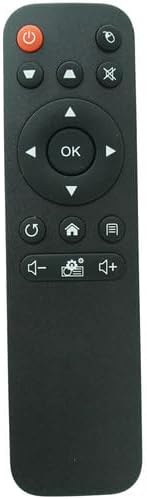
Image: Front view of the remote control, displaying its button layout.
Button Functions:
- Power Button (⏻): Turns the projector on or off.
- Source/Input Button (⌖): Selects the input source (e.g., HDMI, USB).
- Mute Button (🔇): Mutes or unmutes the audio output.
- Directional Pad (Up, Down, Left, Right): Navigates through menus and options.
- OK Button: Confirms selections or enters menus.
- Return/Back Button (↺): Returns to the previous menu or screen.
- Home Button (⌂): Accesses the projector's main home screen.
- Menu/Settings Button (☰): Opens the projector's settings or options menu.
- Volume Down Button (🔉): Decreases the audio volume.
- Volume Up Button (🔊): Increases the audio volume.
- Settings/Gear Button (⚙): Likely provides quick access to specific settings or modes.
4. Maintenance
- Cleaning: Wipe the remote control with a soft, dry cloth. Do not use liquid cleaners or abrasive materials, as they may damage the surface or internal components.
- Battery Replacement: Replace batteries when the remote's response becomes sluggish or stops working. Always replace both batteries simultaneously with new AAA batteries.
- Storage: If the remote control will not be used for an extended period, remove the batteries to prevent leakage and potential damage to the device. Store in a cool, dry place.
- Avoid Exposure: Keep the remote away from direct sunlight, extreme temperatures, and moisture.
5. Troubleshooting
- Remote not responding:
- Ensure batteries are inserted correctly with the correct polarity.
- Replace old batteries with new AAA batteries.
- Check for any obstructions between the remote control and the projector's IR receiver.
- Ensure you are within the effective range and pointing the remote directly at the projector.
- Some functions not working:
- This is a replacement remote; some advanced or specific functions of your original projector remote may not be supported.
- Verify that your projector model is listed as compatible.
6. Specifications
| Brand | Generic |
| Compatible Devices | Toumei Cocar C800S, C800W, C800A, C800, C900 & Missyee C900 Projectors |
| Connectivity Technology | Infrared (IR) |
| Controller Type | Button Control |
| Batteries Required | 2 x AAA (not included) |
7. Important Notes
- This remote control is a replacement unit and is specifically designed for the listed projector models. It may not be compatible with other devices.
- No batteries or additional instructions are included with the product. Please refer to this manual for setup and operation.
- The functionality of this replacement remote may differ slightly from the original remote control that came with your projector.
- Before purchasing or using, ensure your projector's model number is explicitly mentioned in the compatibility list to avoid issues.


