
Product Overview
The Stellar Mounts Easy Flat Mount is a heavy-duty TV wall mount bracket designed for LCD, Curved, OLED & Plasma flat-panel TVs ranging from 37" to 102" with a maximum weight capacity of 165 lbs (75kg). Its low-profile design ensures your TV sits just 1.4 inches from the wall, providing a clean, sleek, and professional appearance. The sliding bracket design allows for horizontal adjustment, ensuring perfect screen placement even after installation. This mount is built with heavy-duty steel construction for secure holding and includes safety screws to anchor the TV rail to the wall bracket, limiting shifting and movement. A bubble level is included for easy installation.
Key Features:
- CONFIRMED FIT: Guaranteed to Mount and fully support TV Model # 65S41.
- PERFECT-VIEW: Seamless and Comfortable visibility from your sofa, kitchen table, or bath tub.
- USER-FRIENDLY: Easy to install and simple to adjust.
- SECURE: Made with Strong, Tough, and Sturdy Steel Material.
- FASHION: The Low Profile Design will give the Silk, Modern look you Desire.
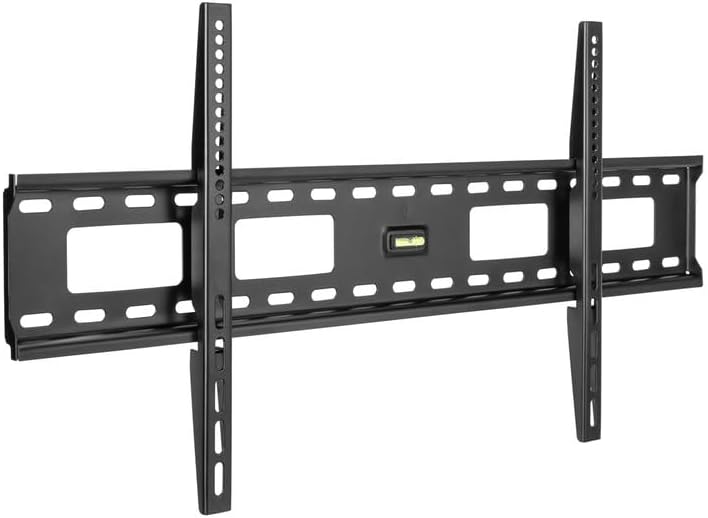
Image: The Stellar Mounts Ultra Slim Flat TV Wall Mount Bracket, showcasing its robust design and integrated bubble level.
Safety Information
Please read all instructions carefully before installation. If you have any questions regarding these instructions, please contact Stellar Mounts customer support. Improper installation can result in serious injury or damage to your TV and property. Ensure the mounting surface can safely support the combined weight of the equipment and all attached hardware. Always use appropriate safety gear and tools during installation. Do not exceed the maximum weight capacity of 165 lbs (75kg).
Package Contents
Verify that all components are present and undamaged before beginning installation:
- TV Wall Mount Bracket
- Mounting Hardware Kit (various screws, anchors, washers)
- Bubble Level
- Instruction Manual (this document)
Specifications
| Feature | Detail |
|---|---|
| Brand | Stellar Mounts |
| Model Number | Flat Mount for 65S41 |
| Item Weight | 5.74 pounds |
| Package Dimensions | 34 x 10.9 x 2.3 inches |
| Color | Black |
| Material | Alloy Steel |
| Mounting Type | Wall Mount |
| Movement Type | Fixed |
| Maximum Compatible Size | 102 Inches |
| Minimum Compatible Size | 37 Inches |
| Weight Capacity | 165 lbs (75 kg) |
| Max VESA Compatibility | 800x400mm |
| Profile from Wall | 1.4 inches |

Image: Visual representation of the mount's versatility, indicating compatibility with TV sizes from 37" to 102", a maximum load of 165 lbs, and VESA compatibility from 200x200mm to 800x400mm.

Image: Diagram illustrating the ultra-slim design, showing the TV's close alignment to the wall with a 20mm (approximately 0.79 inches) profile, which contributes to the overall 1.4 inches distance from the wall once installed.
Setup and Installation
Follow these three easy steps for a secure installation:
- Attach Wall Plate to Wall:
Carefully select the mounting location on your wall. Use the included bubble level to ensure the wall plate is perfectly horizontal. Mark the drilling points, drill pilot holes, and secure the wall plate using the appropriate hardware for your wall type (wood studs, concrete, brick). Ensure all screws are tightened securely.
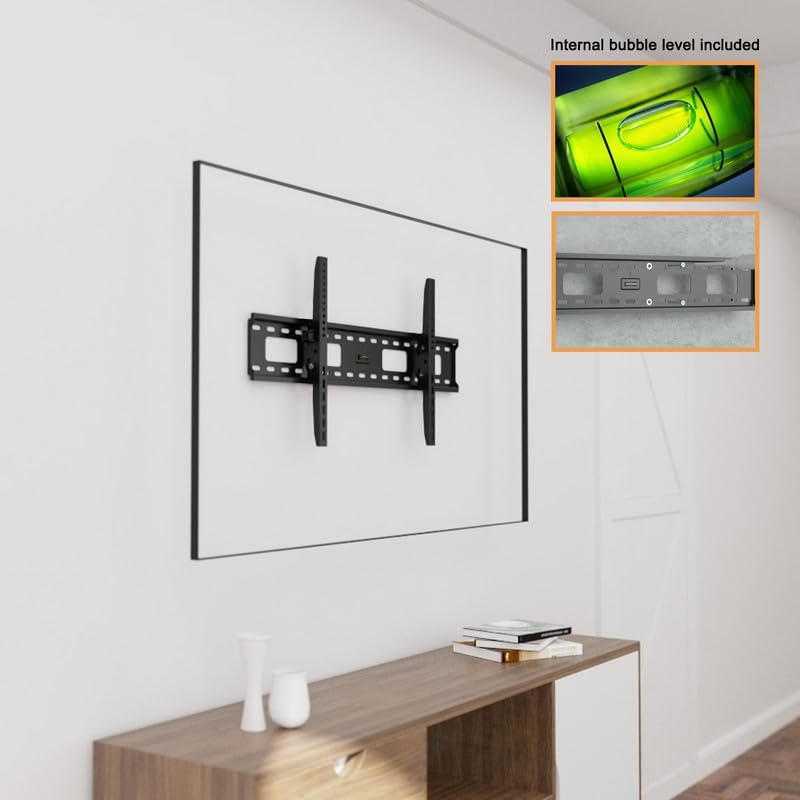
Image: The wall plate of the TV mount securely attached to the wall, demonstrating the use of the integrated bubble level for accurate positioning.
- Attach Bracket to TV:
Identify the VESA mounting holes on the back of your television. Select the correct size screws and spacers from the hardware kit that fit your TV's VESA pattern. Attach the vertical TV brackets to the back of your TV, ensuring they are securely fastened and aligned.
- Attach TV to Wall Plate:
With assistance, carefully lift the television and hook the TV brackets onto the wall plate. Ensure the brackets are properly seated on the wall plate. Use the safety screws to secure the TV brackets to the wall plate, preventing accidental dislodgement. The sliding bracket design allows for minor horizontal adjustments to achieve perfect screen centering.
Installation Video Guide:
Video: An official installation guide for Stellar Mounts, demonstrating the steps to securely mount your TV. While titled for a "Tilting Mount", the core installation principles for attaching the wall plate and TV brackets are similar and helpful for flat mounts.
Operating Instructions
This is a fixed TV wall mount, meaning once installed, the TV position is set. The sliding bracket design allows for minor horizontal adjustments during installation to center your TV. No further operational adjustments are typically required after the TV is securely mounted.
Maintenance
Periodically inspect all mounting screws and connections to ensure they remain tight and secure. Dust the mount with a soft, dry cloth as needed. Avoid using abrasive cleaners or solvents, as they may damage the finish.
Troubleshooting
| Problem | Possible Cause / Solution |
|---|---|
| TV not level after installation. | Ensure the wall plate was installed perfectly level using the bubble level. Minor adjustments can sometimes be made by slightly loosening and re-tightening the TV brackets on the wall plate, if applicable. |
| Mount feels loose on the wall. | Verify all wall mounting screws are fully tightened. Ensure appropriate anchors were used for your wall type. If mounting into drywall without studs, consider relocating to a stud or using heavy-duty toggle bolts (not included). |
| TV does not fit the mount. | Check your TV's VESA pattern against the mount's specifications (Max VESA 800x400mm). Ensure your TV's weight is within the 165 lbs (75kg) limit. |
Warranty and Support
For warranty information or technical support, please contact Stellar Mounts customer service. Refer to the product packaging or the official Stellar Mounts website for the most up-to-date contact details.
This product is from a small business brand. Your support is appreciated.