
Haunted Living 5267929
Haunted Living Reaper Animatronic Bluetooth Drummer Instruction Manual
Model: 5267929
Introduction
This manual provides detailed instructions for the setup, operation, and maintenance of your Haunted Living Reaper Animatronic Bluetooth Drummer. This oversized animatronic is designed to connect with Bluetooth devices to play music, featuring realistic drumming simulation and flashing lights. It can be activated via Bluetooth, battery, 6V 2A DC adapter, sound, motion, or an optional footpad/button. It can also synchronize with the Bluetooth band guitarist (sold separately) for a full band effect.
Product Overview
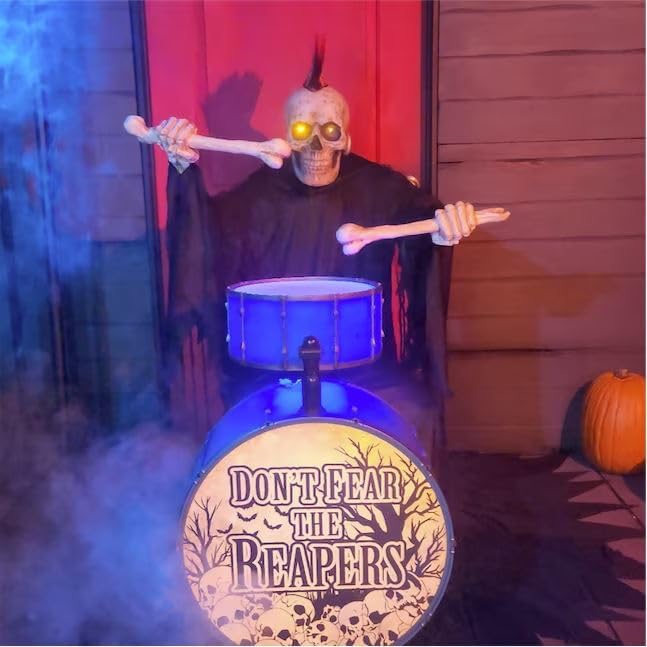
Figure 1: Front view of the Reaper Animatronic playing drums, surrounded by a smoke effect, highlighting its glowing eyes and drum set.

Figure 2: Side view of the Reaper Animatronic, showing its skeletal hands holding drumsticks over the blue drum set.

Figure 3: Front view of the Reaper Animatronic against a plain white background, clearly showing its design and drum set.

Figure 4: Elevated side view of the Reaper Animatronic, providing a different perspective of its pose and the drum components.

Figure 5: The Reaper Animatronic positioned next to a separate guitarist animatronic, demonstrating the potential for a combined display.

Figure 6: The Reaper Animatronic integrated into a larger Halloween band display, featuring multiple animatronics and atmospheric lighting.
Setup
- Unpacking: Carefully remove all components from the packaging. Ensure all parts are present: Reaper animatronic, drum set, and power adapter (if included).
- Assembly:
- Place the Reaper animatronic in its desired location.
- Position the drum set in front of the Reaper.
- Ensure the Reaper's skeletal hands are positioned to hold the drumsticks over the drum.
- Power Options: The animatronic can be powered by:
- Batteries: Insert the required batteries (type and quantity not specified in product data, refer to product packaging for details) into the designated battery compartment.
- DC Adapter: Connect a 6V 2A DC adapter (not always included, check product contents) to the animatronic's power input port and plug it into a standard electrical outlet.
- Placement: Place the animatronic on a stable, flat surface. Ensure there is enough space around it for its animation and for any optional accessories like a footpad.
Operating Instructions
- Activation Modes: The Reaper Animatronic can be activated in several ways:
- Sound Activated: The animatronic will activate when it detects sufficient sound.
- Motion Activated: The animatronic will activate when it detects motion within its sensor range.
- Footpad/Button Activated: If an optional footpad or button is connected (sold separately), the animatronic will activate when pressed.
- Bluetooth Activated: The animatronic can be controlled via Bluetooth.
- Bluetooth Connection:
- Ensure the animatronic is powered on.
- Enable Bluetooth on your mobile device or computer.
- Search for available Bluetooth devices. The animatronic should appear as "Haunted Living Reaper" or similar.
- Select the animatronic to pair. Once paired, you can stream music directly from your device.
- Volume Control: Use the integrated volume control (location not specified, refer to product for details) to adjust the audio output level.
- External Speaker Capacity: The animatronic has external speaker capacity, allowing for connection to external audio systems for enhanced sound (cables/ports not specified, refer to product for details).
- Synchronization with Guitarist: For a full band effect, synchronize the Reaper Animatronic with the Bluetooth band guitarist (sold separately). Follow the pairing instructions for both devices to ensure proper synchronization.
Maintenance
- Cleaning: Use a soft, dry cloth to gently wipe down the animatronic. Do not use abrasive cleaners or solvents, as these may damage the finish or electronic components.
- Storage: When not in use, store the animatronic in its original packaging or a protective container in a cool, dry place away from direct sunlight and extreme temperatures.
- Battery Replacement: If using batteries, replace them when performance degrades. Ensure correct polarity when inserting new batteries. Remove batteries if storing for extended periods to prevent leakage.
- Cable Management: Ensure all cables (power, external speaker) are not kinked or pinched to prevent damage.
Troubleshooting
| Problem | Possible Cause | Solution |
|---|---|---|
| Animatronic does not power on. | No power, dead batteries, or faulty adapter. | Check power connection. Replace batteries or try a different power outlet/adapter. |
| Bluetooth connection fails. | Device not in pairing mode, out of range, or interference. | Ensure animatronic is on and Bluetooth is enabled. Move device closer. Restart both devices. |
| No sound or low sound output. | Volume too low, external speaker not connected properly, or audio source issue. | Increase volume on animatronic and connected device. Check external speaker connections. Verify audio source is playing. |
| Animation is erratic or stops. | Low power, obstruction, or internal mechanism issue. | Ensure sufficient power. Check for any obstructions. If problem persists, contact support. |
Specifications
- Brand: Haunted Living
- Model Number: 5267929
- Color: Various colors
- Product Dimensions: 63.5 x 63.5 x 55.88 cm (25 x 25 x 22 inches)
- Material: Iron
- Product Weight: 454 g (1 lb)
- Theme: Halloween
- Activation: Bluetooth, Battery, 6V 2A DC Adapter, Sound, Motion, Footpad/Button (optional)
- Features: Realistic drumming animation, flashing lights, volume control, external speaker capacity, synchronization with Bluetooth band guitarist (sold separately).
Warranty Information
Specific warranty details for the Haunted Living Reaper Animatronic Bluetooth Drummer are not provided in the available product data. Please refer to the product packaging or the manufacturer's official website for comprehensive warranty information.
Customer Support
For further assistance, technical support, or inquiries regarding your Haunted Living Reaper Animatronic, please refer to the contact information provided on the product packaging or visit the official Haunted Living website. Specific customer support contact details are not available in this manual.
Related documents5267929


Ask a question about this manual
Ask about setup, troubleshooting, compatibility, parts, safety, or missing instructions. Manuals+ will review the question and use this page’s manual context to help answer it.