1. Introduction
Thank you for choosing the MOREKA Model 376 Bluetooth Portable Speaker. This manual provides essential information for the safe and efficient use of your device. Please read it thoroughly before operation and retain it for future reference. The MOREKA 376 is designed for versatility and high-quality audio, featuring 35W power, IPX6 water resistance, TWS stereo pairing, and multiple playback options.

Figure 1.1: MOREKA Model 376 Bluetooth Portable Speaker
2. Product Overview
2.1 Key Features
- High-Fidelity Audio: 35W output for powerful and clear sound with enhanced bass.
- IPX6 Water Resistance: Protected against strong jets of water, suitable for outdoor use.
- True Wireless Stereo (TWS): Connect two Model 376 speakers for an immersive stereo experience.
- Hands-Free Calling: Integrated microphone for convenient call answering.
- Multiple Playback Modes: Bluetooth, AUX, TF Card, USB Drive, and FM Radio.
- Long-Lasting Battery: 3000mAh battery provides extended playback time.
- Dynamic LED Lights: Customizable lighting modes to enhance your audio experience.
- Portable Design: Compact with a convenient carrying strap.
2.2 Package Contents
Ensure all items are present upon unboxing:
- MOREKA Model 376 Bluetooth Portable Speaker
- USB Charging Cable
- AUX Audio Cable
- Carrying Strap
- User Manual

Figure 2.1: Speaker and Included Accessories
2.3 Speaker Components
Familiarize yourself with the speaker's buttons and ports:

Figure 2.2: Top Panel Controls
- Power Button: Press and hold to power on/off. Short press to play/pause or answer/end calls.
- Mode Button (M): Short press to switch between Bluetooth, AUX, TF Card, USB, and FM Radio modes. Long press to change LED light modes.
- Volume Down / Previous Track (-): Short press for previous track. Long press to decrease volume.
- Volume Up / Next Track (+): Short press for next track. Long press to increase volume.
- FM Button: Short press to activate FM radio.

Figure 2.3: Rear Input Ports
- AUX Input: Connect external audio devices via 3.5mm audio cable.
- USB Type-C Charging Port: For charging the speaker.
- Charging Indicator: LED light indicates charging status.
- Micro SD Card Slot: Insert a TF (Micro SD) card for music playback.
- USB Port: Insert a USB flash drive for music playback.
3. Setup
3.1 Charging the Speaker
Before first use, fully charge the speaker. Use the provided USB Type-C cable.
- Connect the USB Type-C cable to the speaker's charging port.
- Connect the other end of the cable to a USB power adapter (5V/2A recommended) or a computer's USB port.
- The charging indicator light will illuminate during charging and turn off when fully charged.
Note: A full charge typically takes 3-4 hours. The speaker has a 3000mAh battery, offering up to 30 hours of playback depending on volume and LED light usage.

Figure 3.1: Battery Capacity and Playback Time
3.2 Powering On/Off
- To Power On: Press and hold the Power Button for approximately 3 seconds. You will hear an audible prompt.
- To Power Off: Press and hold the Power Button for approximately 3 seconds. You will hear an audible prompt.
4. Operating Instructions
4.1 Bluetooth Pairing
- Power on the speaker. It will automatically enter Bluetooth pairing mode, indicated by a flashing LED light.
- On your mobile device (smartphone, tablet, etc.), enable Bluetooth and search for available devices.
- Select "MOREKA 376" from the list of devices.
- Once connected, the speaker will emit an audible confirmation, and the LED light will stop flashing.
- You can now play audio from your device through the speaker.
4.2 True Wireless Stereo (TWS) Pairing
TWS allows you to connect two MOREKA Model 376 speakers for a synchronized stereo sound experience.

Figure 4.1: TWS Pairing Function
- Ensure both MOREKA Model 376 speakers are powered on and not connected to any Bluetooth device.
- On one of the speakers (this will be the primary speaker), double-press the Power Button. The speaker will enter TWS pairing mode.
- The two speakers will automatically search for and connect to each other. You will hear a confirmation tone once connected.
- Now, connect your mobile device to the primary speaker via Bluetooth as described in Section 4.1.
- Audio will now play in stereo through both speakers.
To disconnect TWS: Double-press the Power Button on either speaker.
4.3 Playing Music via AUX Input
- Connect one end of the 3.5mm AUX audio cable to the speaker's AUX Input port.
- Connect the other end to the audio output jack of your external device (e.g., MP3 player, computer).
- Short press the Mode Button (M) until the speaker enters AUX mode.
- Control playback and volume from your external device.
4.4 Playing Music from TF Card / USB Drive
- Insert a TF (Micro SD) card or a USB flash drive containing MP3 audio files into the respective slot on the speaker.
- The speaker will automatically detect the storage device and begin playing music. If not, short press the Mode Button (M) to switch to TF Card or USB mode.
- Use the +/- Buttons for track navigation and volume control.
4.5 FM Radio Mode
- Short press the FM Button to enter FM radio mode.
- The speaker will automatically scan and save available radio stations.
- Use the +/- Buttons to switch between saved stations.
4.6 Hands-Free Calling
When connected via Bluetooth to your smartphone, the speaker supports hands-free calling.

Figure 4.2: Hands-Free Calling Feature
- Answer Call: When an incoming call rings, short press the Power Button to answer.
- End Call: During a call, short press the Power Button to end the call.
- Reject Call: When an incoming call rings, press and hold the Power Button to reject the call.
4.7 LED Light Modes
The speaker features dynamic LED lights with multiple modes.
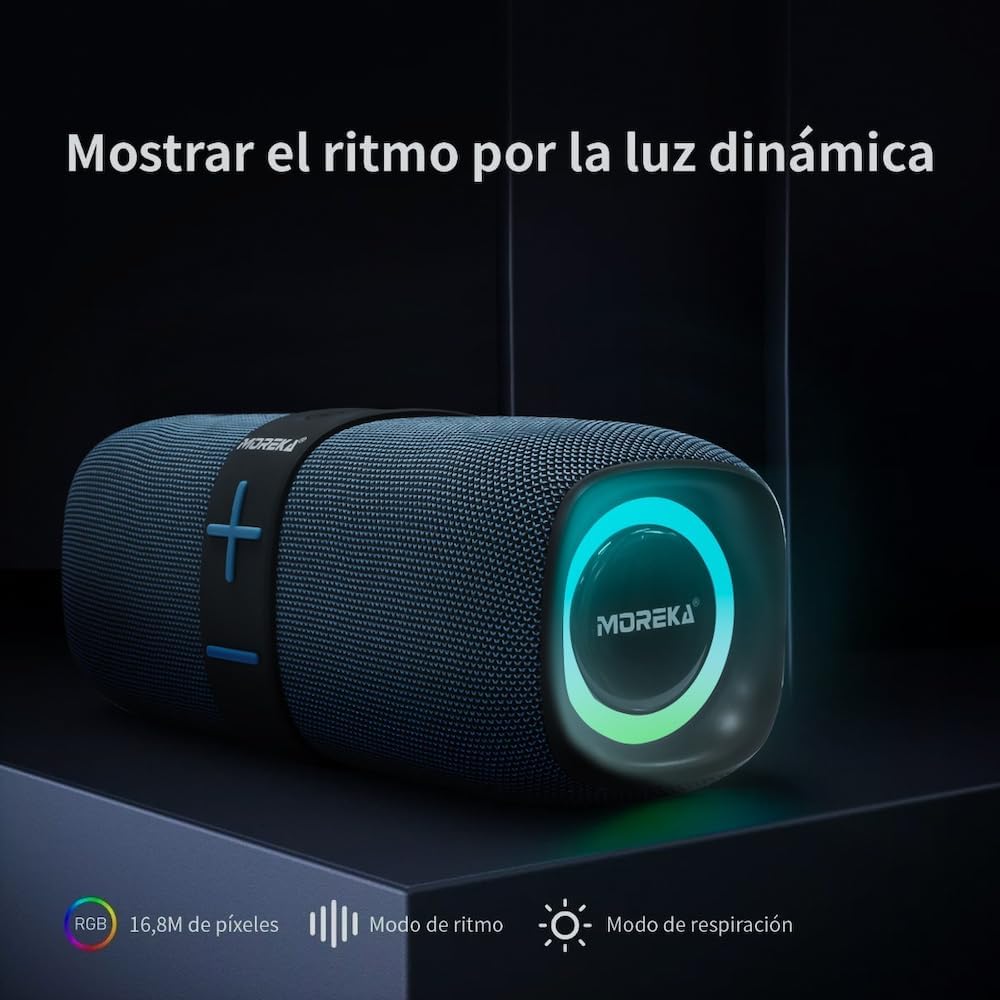
Figure 4.3: Dynamic LED Light Display
- Change Mode: Long press the Mode Button (M) to cycle through different LED light effects (e.g., rhythm mode, breathing mode, off).
5. Maintenance
5.1 Cleaning
To maintain the speaker's appearance and performance:
- Wipe the speaker with a soft, damp cloth.
- Do not use abrasive cleaners, alcohol, or chemical solvents.
- Ensure all ports are dry before charging or connecting cables.
5.2 Water Resistance (IPX6)
The MOREKA Model 376 speaker is IPX6 water-resistant, meaning it can withstand strong jets of water. This makes it suitable for use near pools, beaches, or in light rain.

Figure 5.1: IPX6 Water Resistance
- Caution: Do not submerge the speaker in water. IPX6 rating does not imply full submersion protection.
- Ensure the port cover is securely closed to maintain water resistance.
5.3 Storage
- Store the speaker in a cool, dry place away from direct sunlight and extreme temperatures.
- If storing for an extended period, charge the battery to approximately 50% every few months to prolong its lifespan.
6. Troubleshooting
If you encounter issues with your speaker, refer to the following common problems and solutions:
| Problem | Possible Cause | Solution |
|---|---|---|
| Speaker does not power on. | Low battery. | Charge the speaker for at least 30 minutes. |
| No sound. | Volume too low; incorrect mode; device not connected. | Increase speaker and device volume. Ensure correct input mode (Bluetooth, AUX, etc.). Re-pair Bluetooth device. |
| Cannot pair via Bluetooth. | Speaker not in pairing mode; device Bluetooth off; too far apart. | Ensure speaker is in pairing mode (flashing LED). Turn Bluetooth on/off on your device. Move speaker closer to device. Forget previous connections on your device. |
| TWS pairing fails. | Speakers already connected to other devices; incorrect pairing steps. | Ensure both speakers are disconnected from other Bluetooth devices. Follow TWS pairing steps carefully (Section 4.2). |
| Poor FM radio reception. | Weak signal. | Move the speaker to a location with better signal. |
7. Specifications
Technical details for the MOREKA Model 376 speaker:
| Feature | Detail |
|---|---|
| Model Name | MOREKA 376 |
| Speaker Type | Portable Tower Speaker |
| Max Speaker Output Power | 35 Watts |
| Wireless Technology | Bluetooth |
| Connectivity Technology | USB |
| Audio Output Mode | Stereo |
| Battery Capacity | 3000 mAh |
| Power Source | Battery |
| Waterproof Rating | IPX6 |
| Compatible Devices | Smartphone, Tablet, Laptop |
| Control Method | Voice, Button |
| Material | Plastic |
| Color | Black |
| Product Dimensions | 37cm (depth) x 50cm (width) x 40cm (height) (Note: These dimensions seem unusually large for a portable speaker and might refer to packaging or a different measurement. Please verify if actual product dimensions are needed.) |
8. Warranty and Support
8.1 Warranty Information
All MOREKA products come with a 90-day limited warranty directly from the manufacturer. Additionally, you have 30 days to return your product free of charge. To qualify for these benefits, the product must be complete with all accessories and original packaging, all in perfect condition. The warranty does not apply if the product is damaged due to misuse, impact, or unauthorized repairs.
Please retain the original packaging of the products, as it will be necessary for any warranty claims or returns.
8.2 Customer Support
If you experience any issues with your product or have questions, please contact our customer support directly before initiating a return or claim. We are committed to providing the best solution for you.
Contact details for support are typically found on the product packaging or the retailer's website.