1. Introduction
Thank you for purchasing the MOREKA Bluetooth Speaker Model 372. This portable speaker offers high-quality audio, Bluetooth connectivity, FM radio, and TF card playback, all within a waterproof design. Please read this manual carefully to ensure proper use and to maximize your listening experience.
2. Safety Information
- Do not expose the speaker to extreme temperatures or direct sunlight for extended periods.
- Avoid dropping or subjecting the speaker to strong impacts.
- While the speaker is waterproof, do not submerge it for prolonged periods or expose it to high-pressure water jets. Ensure the charging port cover is securely closed before exposure to water.
- Keep the speaker away from medical devices.
- Do not attempt to disassemble or repair the speaker yourself. Contact qualified service personnel for assistance.
- Use only the provided charging cable or a certified equivalent.
3. Package Contents
Verify that all items are present in your package:
- MOREKA Bluetooth Speaker Model 372
- USB Charging Cable
- User Manual

Image: The MOREKA Bluetooth Speaker Model 372 shown with its retail packaging, indicating the typical contents of the product box.
4. Product Overview
Familiarize yourself with the speaker's components and controls.

Image: A black MOREKA Bluetooth Speaker Model 372, showing its cylindrical shape and fabric mesh exterior.
4.1. Controls and Ports
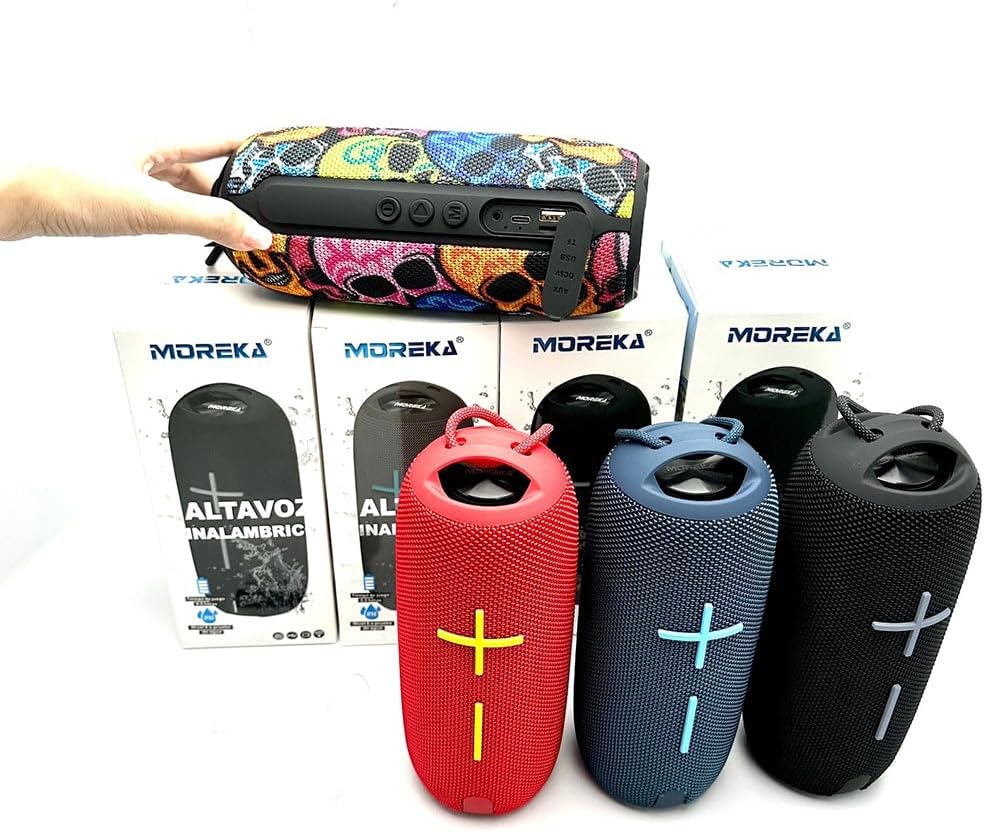
Image: A close-up of the top panel of the MOREKA Bluetooth Speaker, displaying the control buttons including power, play/pause, mode, and volume controls.

Image: A side view of the MOREKA Bluetooth Speaker, highlighting the input ports typically covered by a waterproof flap, such as USB and TF card slots.
- Power Button: Press and hold to turn on/off. Short press to play/pause.
- Mode Button (M): Short press to switch between Bluetooth, FM Radio, and TF Card modes.
- Volume Up (+): Short press to increase volume. Long press for next track/station.
- Volume Down (-): Short press to decrease volume. Long press for previous track/station.
- USB Port: For charging the speaker.
- TF Card Slot: Insert a TF (MicroSD) card for local music playback.
5. Setup
5.1. Charging the Speaker
- Open the waterproof cover on the side of the speaker.
- Connect the small end of the USB charging cable to the speaker's USB port.
- Connect the larger end of the USB cable to a USB power adapter (not included) or a computer's USB port.
- The charging indicator light will illuminate. It will turn off or change color once fully charged.
- Ensure the waterproof cover is securely closed after charging to maintain water resistance.
5.2. Power On/Off
- To Power On: Press and hold the Power button for approximately 3 seconds until you hear an audible prompt.
- To Power Off: Press and hold the Power button for approximately 3 seconds until you hear an audible prompt.
6. Operating Instructions
6.1. Bluetooth Pairing
- Ensure the speaker is powered on and in Bluetooth mode (indicated by a flashing blue LED and an audible prompt). If not, short press the 'M' (Mode) button to switch to Bluetooth mode.
- Enable Bluetooth on your smartphone, tablet, or laptop.
- Search for available devices. The speaker will appear as "MOREKA 372" or similar.
- Select "MOREKA 372" to pair. Once connected, you will hear a confirmation sound, and the LED indicator will stop flashing.
- You can now play audio from your device through the speaker.
6.2. FM Radio Mode
- Power on the speaker.
- Short press the 'M' (Mode) button repeatedly until you enter FM Radio mode.
- To auto-scan and save stations, press and hold the Power/Play/Pause button. The speaker will scan and store available FM stations.
- To switch between saved stations, long press the Volume Up (+) or Volume Down (-) buttons.
6.3. TF Card Playback
- Power on the speaker.
- Insert a TF (MicroSD) card with MP3 audio files into the TF card slot.
- The speaker should automatically switch to TF Card mode and begin playback. If not, short press the 'M' (Mode) button to select TF Card mode.
- Use the Power/Play/Pause button to play or pause.
- Long press Volume Up (+) for the next track, and long press Volume Down (-) for the previous track.
6.4. Volume Control
- Short press the Volume Up (+) button to increase the volume.
- Short press the Volume Down (-) button to decrease the volume.
6.5. Waterproof Feature
The MOREKA Bluetooth Speaker Model 372 is designed to be waterproof. To ensure its water resistance, always make sure the rubber flap covering the charging and TF card ports is securely and completely sealed before exposing the speaker to water or moisture.
7. Maintenance
- Clean the speaker with a soft, dry cloth. Do not use abrasive cleaners or solvents.
- If the speaker gets wet, wipe it dry thoroughly before charging or opening any port covers.
- Store the speaker in a cool, dry place when not in use.
- Avoid storing the speaker with a completely depleted battery for extended periods to prolong battery life. Charge it periodically if not used regularly.
8. Troubleshooting
| Problem | Possible Cause | Solution |
|---|---|---|
| Speaker does not turn on. | Low battery. | Charge the speaker for at least 2 hours. |
| Cannot pair with Bluetooth device. | Speaker not in pairing mode; Bluetooth disabled on device; device too far. | Ensure speaker is in Bluetooth mode (flashing LED). Enable Bluetooth on your device. Move device closer to speaker (within 10 meters). |
| No sound from speaker. | Volume too low; incorrect mode; device not playing. | Increase speaker and device volume. Check if speaker is in the correct mode (Bluetooth, FM, TF Card). Ensure audio is playing on your connected device. |
| FM radio reception is poor. | Weak signal; interference. | Move the speaker to a location with better reception. Re-scan for stations. |
| TF card not playing. | Card not inserted correctly; unsupported file format; corrupted card. | Ensure TF card is fully inserted. Check if audio files are in MP3 format. Try a different TF card. |
9. Specifications
| Feature | Specification |
|---|---|
| Brand | MOREKA |
| Model | 372 |
| Connectivity Technology | Bluetooth, USB |
| Special Features | Bluetooth, Portable, Waterproof, FM Radio, TF Card Support |
| Speaker Maximum Output Power | 8 Watts |
| Power Source | Battery Powered |
| Average Battery Life | 5 Hours |
| Supported Radio Bands | FM |
| Compatible Devices | Laptop, Smartphone, Tablet |
| Rechargeable Battery Included | Yes |

Image: The MOREKA Bluetooth Speaker Model 372 with measurements indicating its approximate dimensions: 22cm in height and 10.31cm in diameter.
10. Warranty and Support
For warranty information or technical support, please refer to the contact details provided with your purchase documentation or visit the official MOREKA website. Keep your proof of purchase for warranty claims.