
COREBAY RC-28R
COREBAY Universal Ceiling Fan Receiver RC-28R Instruction Manual
Model: RC-28R
Introduction
This manual provides detailed instructions for the installation, setup, and operation of your COREBAY Universal Ceiling Fan Receiver, model RC-28R. This receiver is designed to enable remote control functionality for compatible 3-speed AC ceiling fans, including models from brands like Harbor Breeze, Hampton Bay, and Hunter. Please read these instructions carefully before installation to ensure proper function and safety.

Figure 0: COREBAY RC-28R Universal Ceiling Fan Receiver.
Important Safety Information
- WARNING: Always disconnect power at the circuit breaker before installing or servicing the receiver to prevent electric shock.
- Installation should be performed by a qualified electrician or a person with experience in electrical wiring.
- Ensure all wiring connections are secure and comply with local electrical codes.
- Do not exceed the maximum electrical ratings of the receiver (240W for lights, 1.0A for fan motor).
- Verify that the size of your ceiling fan's canopy provides sufficient space for the receiver.
Package Contents
Verify that all items listed below are included in your package:
- 1 x COREBAY RC-28R Ceiling Fan Receiver
- 1 x Instruction Manual
- 6 x Wire Connectors

Figure 1: Contents of the RC-28R Receiver Package.
Compatibility
Compatible Remote Models:
The RC-28R receiver is compatible with various remote control models. To ensure compatibility, check the FCC ID or model number on the back of your existing remote. Compatible models include:
- FAN-53T (2AAZPFAN53T)
- FAN-11T (L3HFAN11T, KUJCE9103)
- FAN-HD (CHQ7030T, UC7030T, L3H2010FANHD, L3H2014FANHD, FAN-HD5)
- FAN-35T (2AAZPFAN35TI, L3HFAN35T, L3HFAN35T1)
- Standard-RR7079T
Fan and Light Compatibility:
- Compatible with most 3-speed AC downrod style ceiling fans.
- Light Dimming: The light dimmer function is compatible with incandescent light bulbs and some dimmable LED lamps. Most LED lights and all CFL lamps are non-dimmable; in these cases, the dimmer will only support ON/OFF functionality and may cause flickering if dimming is attempted.
- Not Recommended: For use with wall-mounted fans or exhaust-type fans.

Figure 2: Compatible Remote Models for RC-28R Receiver.

Figure 3: Fan and Light Bulb Compatibility.
Setup: Setting DIP Switches
Before installing the receiver, you must set the DIP switches on the receiver to match the code on your existing remote control. This ensures proper communication between the remote and the receiver.
- Locate the DIP switches on both your remote control (usually inside the battery compartment) and the RC-28R receiver.
- Using a small tool (like a pen tip), adjust the 4 DIP switches on the receiver to exactly match the ON/OFF positions of the switches on your remote control.
- There are 16 different frequency combinations possible. The default setting is typically "0000" (all switches OFF), but it is recommended to use a unique code to avoid interference with other devices.

Figure 4: Matching DIP Switches on Receiver and Remote Control.
Installation Instructions
Follow these steps carefully to install the COREBAY RC-28R receiver into your ceiling fan.
- Disconnect Power: Before beginning, ensure the power to the ceiling fan is completely turned off at the circuit breaker.
- Access Wiring: Carefully lower the ceiling fan canopy to expose the wiring connections.
- Disconnect Existing Wiring: Disconnect the existing wiring from the ceiling fan to the house wiring. Note the color coding for reconnection.
- Connect Receiver: Refer to the wiring diagram below and connect the receiver wires to the fan and house wiring using the provided wire connectors.
- Input Live Wire (Red/Black from house): Connect to the receiver's "AC 110-120V 60Hz" input wire (usually Red or Black).
- Input Neutral Wire (White from house): Connect to the receiver's "AC 110-120V 60Hz" input wire (usually White).
- Output Light Load Wire (Blue from receiver): Connect to the fan's light fixture wire (usually Blue).
- Output Fan Load Wire (Black from receiver): Connect to the fan's motor wire (usually Black).
- Output Neutral Wire (White from receiver): Connect to the fan's neutral wire (usually White).
- Antenna (Brown wire from receiver): Position the antenna wire for optimal signal reception.
- Secure Receiver: Carefully tuck the receiver and all wiring connections into the fan canopy. Ensure no wires are pinched and there is enough space for the canopy to close properly. The receiver dimensions are approximately 4.7 x 2.1 x 1.18 inches.
- Restore Power: Once all connections are secure and the canopy is reattached, restore power at the circuit breaker.
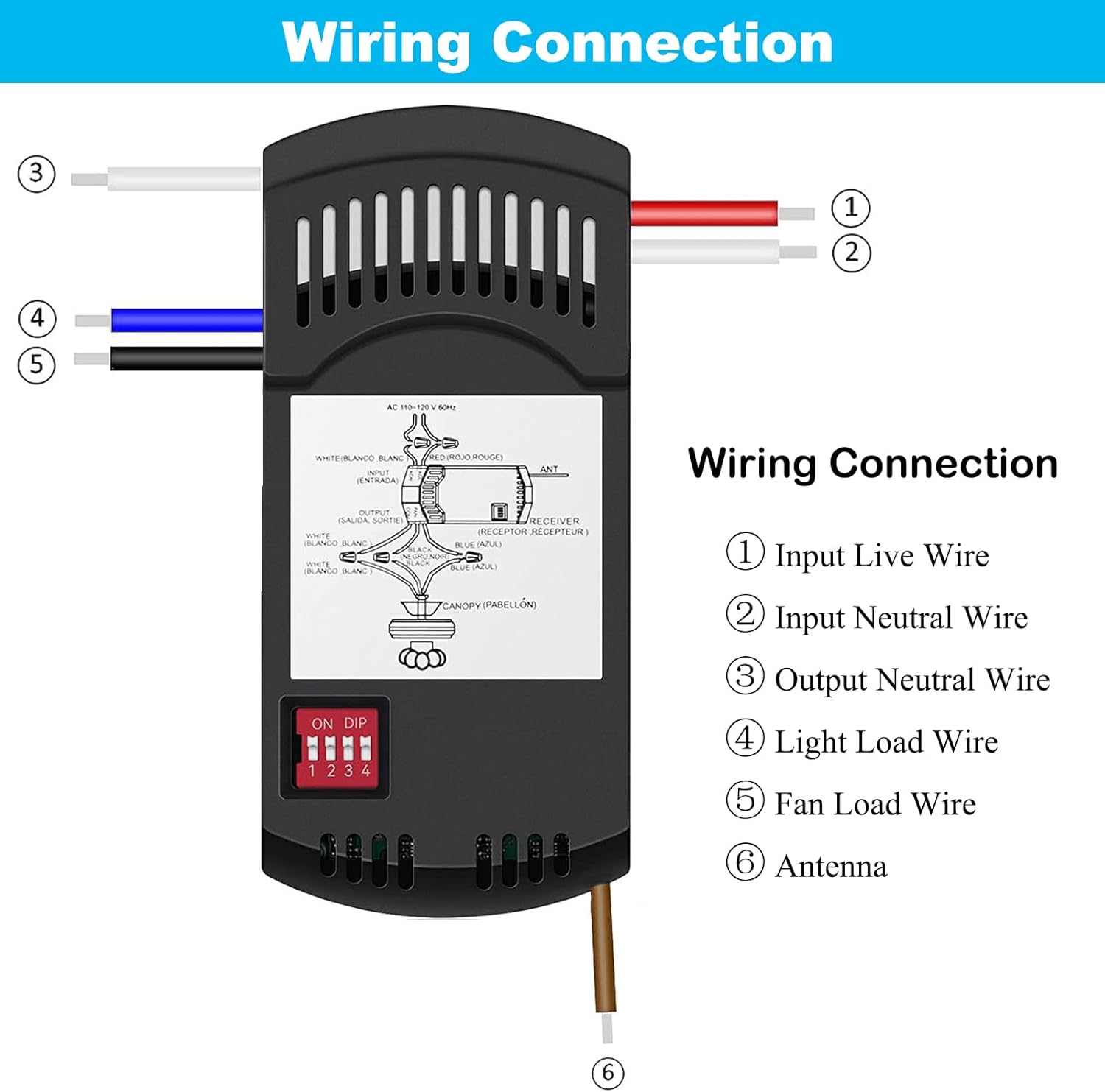
Figure 5: Wiring Connection Diagram.

Figure 6: Installation Steps.
Operating Instructions
After successful installation and matching of DIP switches, your ceiling fan can now be controlled via the compatible remote.
- Fan Speed Control: Use the fan speed buttons (e.g., High, Medium, Low, Off) on your remote to adjust the fan's rotation speed or turn it off.
- Light Control: Use the light button on your remote to turn the light ON or OFF. If your remote and light bulbs support dimming, press and hold the light button to adjust the brightness.
Troubleshooting
| Problem | Possible Cause | Solution |
|---|---|---|
| Fan or Light does not respond to remote. |
|
|
| Lights flicker when dimming. | Non-dimmable LED or CFL bulbs are being used. | Replace with dimmable LED or incandescent bulbs. If using non-dimmable bulbs, the dimmer function will only support ON/OFF. |
| Receiver does not fit in canopy. | Canopy space is too small. | Ensure the canopy has sufficient space (receiver dimensions: 4.7 x 2.1 x 1.18 inches). If not, this receiver may not be suitable for your fan. |
| Interference with other devices. | DIP switch code is too common or shared with another device. | Change the DIP switch code on both the remote and receiver to a unique combination. |
Specifications
| Model Number | RC-28R |
| Product Dimensions | 4.7 x 2.1 x 1.18 inches |
| Item Weight | 3.77 ounces |
| Electrical Rating | AC 110-120V, 60Hz |
| Max. Motor Amps | 1.0A |
| Max. Light Watts | 240W |
| Connectivity Technology | Radio Frequency (RF) |
| Compatible Devices | 3-speed AC Ceiling Fans |
Warranty and Support
Specific warranty details for the COREBAY RC-28R receiver are not provided in this manual. For warranty information, technical support, or assistance with installation and troubleshooting, please contact COREBAY customer service through their official channels or the retailer where the product was purchased.
You can often find support information on the COREBAY brand store page or by searching for "COREBAY customer support" online.
Ask a question about this manual
Ask about setup, troubleshooting, compatibility, parts, safety, or missing instructions. Manuals+ will review the question and use this page’s manual context to help answer it.