
MIUI EZ-1B-Sky Blue
MIUI Bluetooth 5.0 Hearing Protection Headphones User Manual
Model: EZ-1B-Sky Blue
1. Product Overview
The MIUI Bluetooth 5.0 Hearing Protection Headphones are designed to provide effective noise reduction while allowing for audio streaming and communication. Featuring a 29dB Noise Reduction Rating (NRR), these earmuffs protect your ears from harmful sounds in various noisy environments. They are equipped with Bluetooth 5.0 technology for wireless connectivity, an FM radio, and a built-in microphone for calls. The adjustable design and soft ear pads ensure comfort during extended use, and the long-lasting battery provides over 36 hours of continuous operation.

Image: MIUI Bluetooth 5.0 Hearing Protection Headphones in Sky Blue, shown with its product packaging.
Video: An introductory overview of the MIUI Bluetooth 5.0 Protective Headphones, highlighting key features and design.
2. Getting Started
2.1 Package Contents
Before using your headphones, please verify that all items are present:
- Product Host (Hearing Protection Headphones)
- Storage Pouch
- User Manual
- Packaging Box
- Lithium Battery (2000mAh)
- 3.5mm Audio Cable (84cm / 33inch)
- USB Power Cable (91cm / 35.8inch)

Image: A visual representation of all items included in the product package, such as the headphones, cables, and pouch.
2.2 Adjusting the Fit
For optimal comfort and noise reduction, ensure the earmuffs fit snugly over your ears.
- Adjust the headband length to fit your head size. The headband is designed to be adjustable for almost all adult head sizes.
- Position the soft ear cushions to fully cover your ears, creating a seal that isolates noise effectively.

Image: Instructions on how to properly wear and adjust the headphones for a secure and comfortable fit, including Bluetooth connection steps.

Image: A close-up view demonstrating the softness and flexibility of the ear pads, emphasizing comfort and sound isolation.
3. Operating Instructions
3.1 Controls and Functions
The headphones feature intuitive controls for easy operation:
- MODE Button: Switch between Bluetooth mode and FM radio mode.
- +/- Buttons: Adjust volume and switch music tracks.
- On/Off Volume Knob: Turn the device on/off and control the volume.
- LCD Display Screen: Shows current mode, battery status, and FM frequency.
- Call Button: Answer and make calls.
- Type-C Charging Port: For charging the device.
- 3.5mm Headphone Cable Port: For wired audio connection.
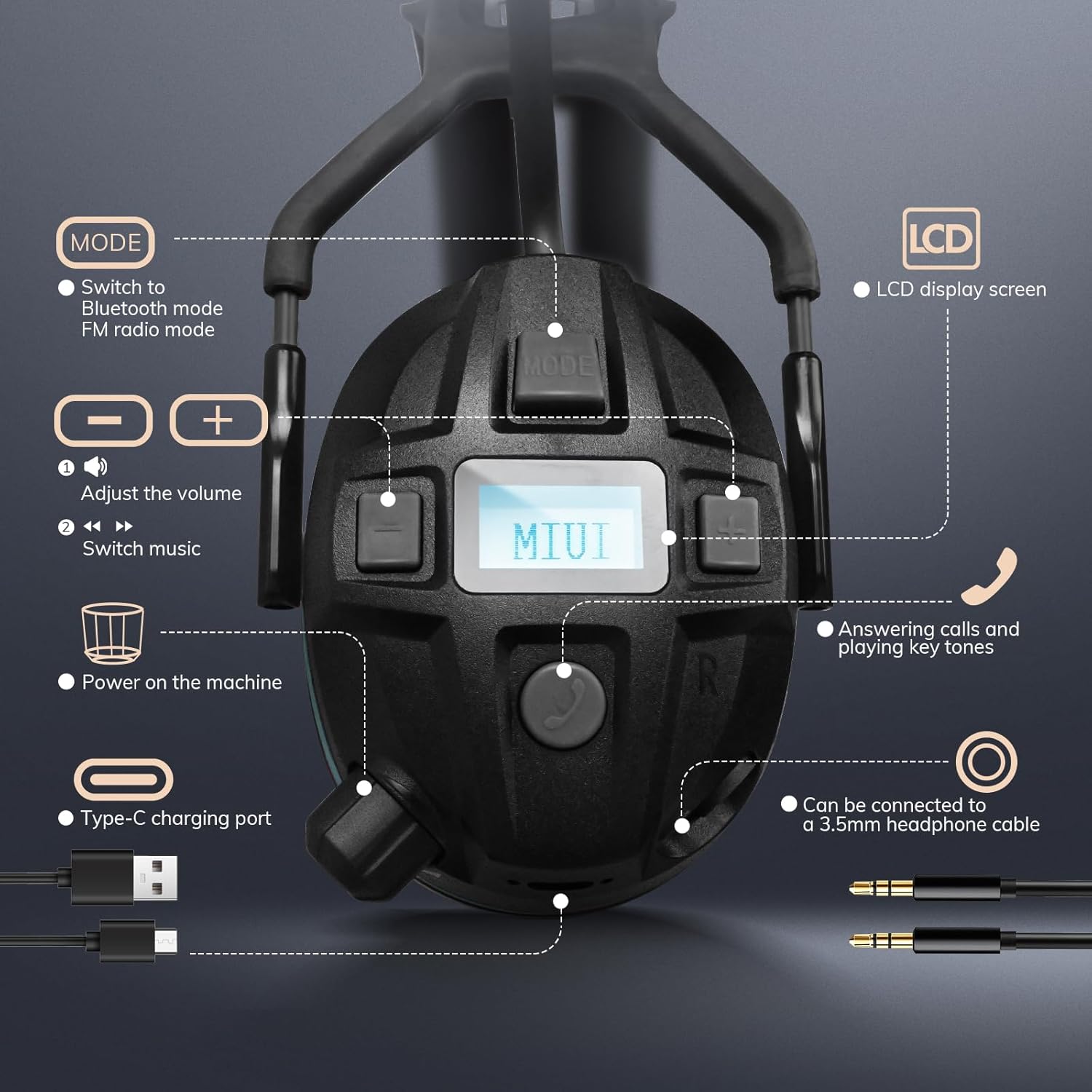
Image: A comprehensive diagram illustrating the location and function of each control button and port on the headphone unit.
3.2 Bluetooth Pairing
To connect your headphones via Bluetooth:
- Turn on the headphones using the On/Off Volume Knob.
- Ensure Bluetooth is enabled on your smartphone or other compatible device.
- Search for "MIUI ANC-1" in your device's Bluetooth settings and select it to pair.
- Once connected, you can stream audio and make calls wirelessly. The effective range for music is approximately 50 meters and for calls is 30 meters.

Image: A visual representation of the Bluetooth 5.0 effective range, demonstrating connectivity within a typical indoor setting and the pairing process on a smartphone.
3.3 FM Radio Operation
To use the FM radio function:
- Press the MODE button to switch to FM radio mode.
- The advanced LCD display will show the current frequency.
- The headphones automatically store more than 15 stations. Use the +/- buttons to navigate between stations.
4. Charging and Battery Life
The headphones are equipped with a 2000mAh rechargeable battery, providing over 36 hours of continuous use on a single charge. Charging time is approximately 5 hours.
- Connect the provided USB Power Cable to the Type-C charging port on the headphones and a suitable USB power source.
- The LCD display will indicate charging status.
- A full charge ensures extended operation, ideal for long work shifts or outdoor activities.
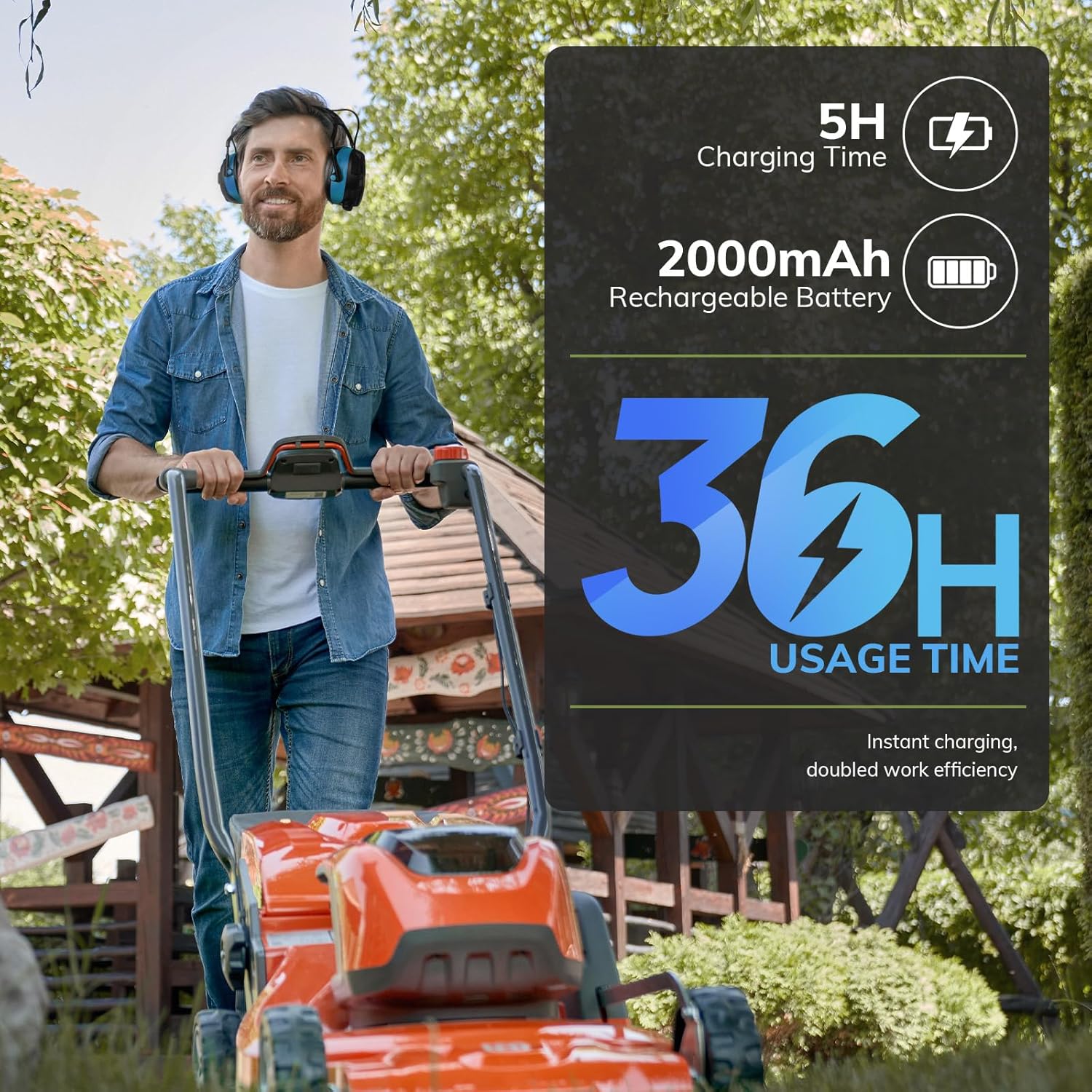
Image: A visual representation of the headphones' impressive battery life, showing a man using them while mowing, alongside charging time and battery capacity details.
5. Safety Information and Usage Scenarios
These hearing protection headphones are designed to reduce exposure to hazardous noise levels. With an SNR of 29dB, they are suitable for various loud environments.
- Loudscaping Work: Protects against noise from chainsaws (approx. 110dB) and lawn mowers/trimmers (approx. 100dB).
- Hardware Work: Reduces noise from grinding or other power tools (approx. 100dB).
- Industrial Environments: Effective in workshops, factory production lines, and construction sites.
- Other Noisy Settings: Suitable for shooting ranges, aviation, and areas with high ambient noise like airports.
Always ensure the earmuffs are worn correctly and fit snugly to achieve the stated noise reduction.

Image: A man operating a lawnmower while wearing the headphones, visually emphasizing the 29dB SNR noise reduction capability.

Image: A collage showcasing different scenarios where the headphones can be used to protect against harmful noise, including woodworking, construction, and general household tasks.
6. Care and Maintenance
- Cleaning: Wipe the headphones with a soft, damp cloth. Do not use abrasive cleaners or immerse the device in water.
- Storage: Store the headphones in the provided storage pouch in a cool, dry place when not in use. Avoid extreme temperatures.
- Battery Care: For optimal battery longevity, charge the headphones regularly, even if not used frequently. Avoid fully discharging the battery for extended periods.
7. Troubleshooting
| Problem | Possible Cause | Solution |
|---|---|---|
| No power | Battery is low or depleted. | Charge the headphones fully. |
| Cannot pair Bluetooth | Headphones not in pairing mode; device Bluetooth off; too far from device. | Ensure headphones are on and in Bluetooth mode. Turn device Bluetooth off/on. Move closer to the device. |
| Poor audio quality (tinny sound, no bass) | Audio source issue; low quality audio file; internal component issue. | Try a different audio source or file. Ensure a stable Bluetooth connection. If problem persists, contact support. |
| FM radio not receiving stations | Weak signal; incorrect mode. | Move to an area with better signal reception. Ensure the headphones are in FM radio mode. |
| Volume balance uneven at low volume | Potential software or hardware calibration issue. | Adjust volume to a higher level if possible. If persistent and disruptive, contact customer support. |
8. Technical Specifications
| Specification | Detail |
|---|---|
| Model Number | EZ-1B-Sky Blue |
| Noise Reduction Rating (NRR) | 29dB |
| Bluetooth Version | 5.0 |
| Battery Capacity | 2000mAh |
| Playtime | Over 36 hours |
| Charging Time | Approx. 5 hours |
| Material | Acrylonitrile Butadiene Styrene (ABS) |
| Item Weight | 1.46 pounds |
| Product Dimensions | 6.34 x 4.06 x 8.23 inches |
| Color | Sky Blue |
9. Warranty and Support
For warranty information and customer support, please refer to the contact details provided on the product packaging or visit the official MIUI website. Keep your purchase receipt for warranty claims.
Ask a question about this manual
Ask about setup, troubleshooting, compatibility, parts, safety, or missing instructions. Manuals+ will review the question and use this page’s manual context to help answer it.