
1. Introduction
Thank you for choosing the ENUOTEK Touch Dimmable LED Wall Mounted Bedside Reading Light. This manual provides essential information for the safe and efficient use of your new light. Please read these instructions carefully before installation and operation, and retain them for future reference.
2. Safety Instructions
- Ensure the power supply is disconnected before installation or maintenance.
- This product is designed for indoor use only. Do not expose to water or high humidity.
- Use only with the provided power adapter.
- Do not attempt to disassemble or modify the light. This may void the warranty and pose a safety risk.
- Keep out of reach of children.
- Avoid direct eye exposure to the LED light source when it is at full brightness.
3. Package Contents
Verify that all items are present in your package:
- LED Wall Mounted Reading Light (Model: LB-W002-02)
- Mounting Hardware (screws, wall anchors, adhesive tape)
- Instruction Manual
4. Product Features
- Compact Design: Space-saving wall-mounted design, ideal for bedside or desk use.
- High Brightness LED: Features SMD2835 LED components, providing up to 500Lm with low 5W power consumption.
- Neutral White Lighting: 4000K color temperature with a 120-degree wide lighting angle for even light distribution.
- Touch Dimmable: Sensitive touch switch on the lamp body allows for 4 brightness levels (100%- 70%- 35%- 15%).
- Memory Function: The light restores to the last brightness level used before power-off.
- 5V/2A USB Output: Integrated USB port for convenient charging of mobile phones, tablets, and other electronic devices.
- Flexible Gooseneck: Steel flexible gooseneck allows for easy adjustment of the light direction.
5. Setup & Installation
The ENUOTEK reading light offers two installation methods to suit various wall surfaces.
5.1 Installation Methods

Figure 5.1: Illustration of screw and adhesive installation options.
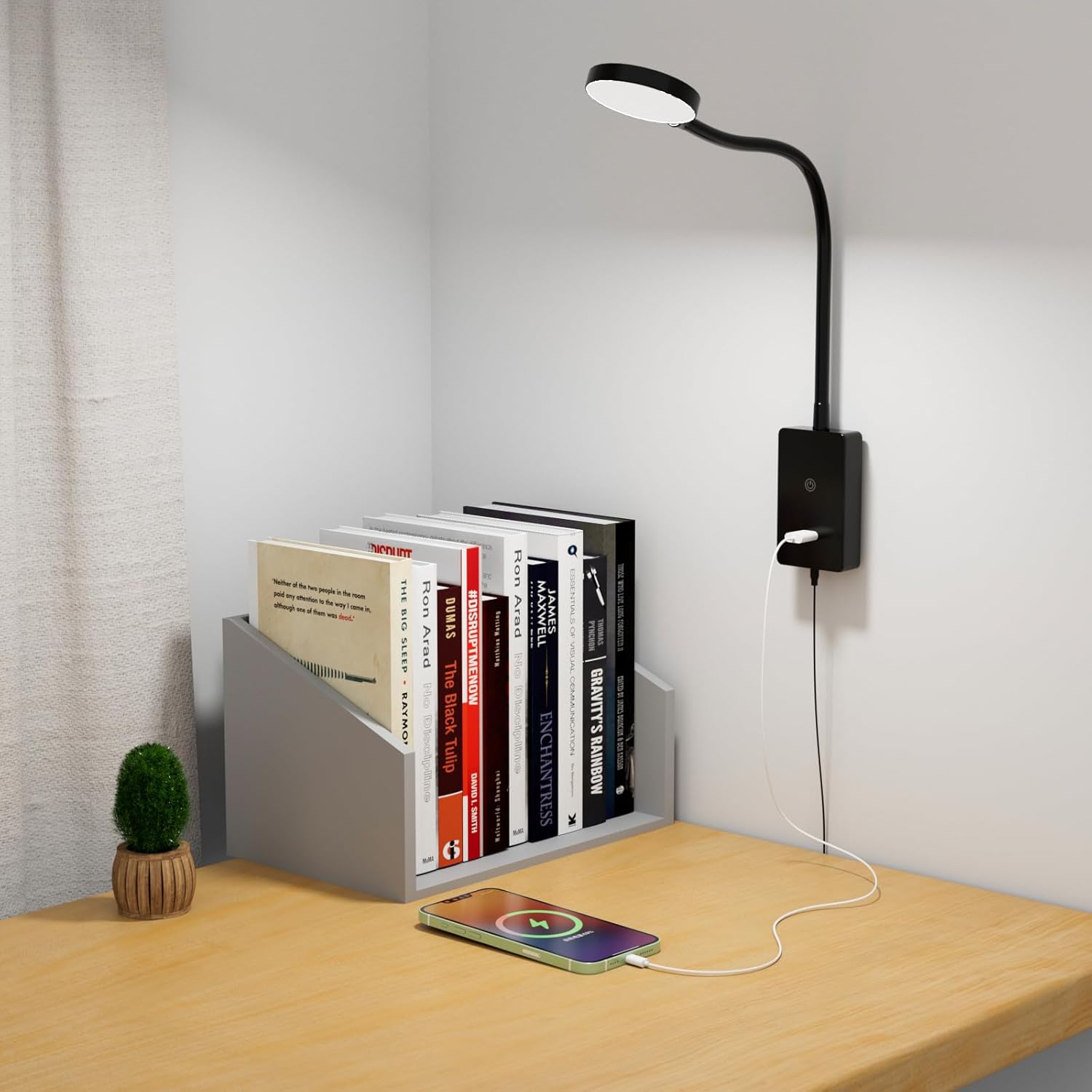
Figure 5.2: The ENUOTEK reading light providing illumination for a desk setup, with a smartphone charging via its USB port.
Method 1: Adhesive Tape Installation (for flat surfaces)
- Clean the desired wall surface thoroughly to ensure it is dry and free of dust or grease.
- Peel off the protective film from the adhesive tape and firmly attach it to the back of the mounting plate.
- Press the mounting plate firmly onto the cleaned wall surface for at least 30 seconds. Allow 24 hours for the adhesive to fully cure before attaching the light.
Method 2: Screw Installation (for uneven surfaces or stronger hold)
- Position the mounting plate on the wall where you want to install the light and mark the two screw hole locations with a pencil.
- Drill pilot holes at the marked locations. If installing into drywall, insert the provided wall anchors.
- Align the mounting plate with the holes and secure it to the wall using the provided screws.
5.2 Attaching the Light and Power Connection
- Once the mounting plate is securely installed, slide the base of the LED reading light onto the mounting plate until it clicks into place.
- Plug the power adapter into a standard 120V AC wall outlet.
Video 5.1: A demonstration of the ENUOTEK LED Wall Mounted Reading Light, including unboxing, features, and installation process.
6. Operating Instructions
6.1 Power On/Off and Dimming
The light features a touch-sensitive switch on its base for easy control.
- To Turn On: Lightly touch the power symbol on the base. The light will turn on at its last used brightness setting due to the memory function.
- To Adjust Brightness: Continue to lightly touch the power symbol to cycle through the 4 brightness levels: 100% (brightest), 70%, 35%, and 15% (dimmest).
- To Turn Off: After cycling through all brightness levels, one more touch will turn the light off.

Figure 6.1: The four step-dimmable brightness levels and the neutral white 4000K light output.
Figure 6.2: A detailed view of the LED light head, highlighting the light source.
6.2 Flexible Gooseneck Adjustment
The flexible gooseneck allows you to direct the light precisely where needed. Gently bend and position the gooseneck to achieve your desired lighting angle.

Figure 6.3: The flexible gooseneck allows for versatile positioning of the light.

Figure 6.4: The light positioned for comfortable bedside reading.
6.3 USB Output Port
The integrated USB port (5V/2A) on the base allows you to charge your electronic devices conveniently while using the light.

Figure 6.5: The 5V/2A USB output port provides efficient charging for devices.
7. Maintenance
To ensure the longevity and optimal performance of your ENUOTEK reading light, follow these simple maintenance guidelines:
- Always unplug the light from the power outlet before cleaning.
- Wipe the light and its base with a soft, dry cloth. Do not use abrasive cleaners, solvents, or harsh chemicals, as these can damage the finish or electrical components.
- Avoid getting moisture into any openings of the light.
8. Troubleshooting
If you encounter any issues with your ENUOTEK reading light, please refer to the following common problems and solutions:
| Problem | Possible Cause | Solution |
|---|---|---|
| Light does not turn on. | No power supply. | Ensure the power adapter is securely plugged into a working wall outlet. Check if the outlet has power. |
| Light flickers or is dim. | Loose connection or power issue. | Check all connections. Ensure the power adapter is fully inserted. Try a different outlet. |
| Dimming function is not working. | Incorrect operation or external dimmer interference. | Ensure you are using the integrated touch switch. This light is not compatible with external dimmer switches. |
| USB charging port not working. | Device cable issue or power supply problem. | Try a different USB cable or device. Ensure the light is powered on. |
If the problem persists after trying these solutions, please contact ENUOTEK customer support for assistance.
9. Specifications

Figure 9.1: Product dimensions and components.
| Specification | Detail |
|---|---|
| Brand | ENUOTEK |
| Model Name | LED Wall Reading Light |
| Part Number | LB-W002-02 |
| Color | Black |
| Material | Acrylonitrile Butadiene Styrene, Metal, Polycarbonate |
| Light Source Type | LED (SMD2835) |
| Wattage | 5 watts |
| Brightness | Max 500 Lumens |
| Color Temperature | 4000 Kelvin (Neutral White) |
| Control Method | Touch Control |
| Dimming Levels | 4 (100%, 70%, 35%, 15%) |
| USB Output | 5V, Max 2A |
| Voltage | 120 Volts |
| Product Dimensions | 20.5"L x 2.4"W x 1"H (52cm L x 6cm W x 2.5cm H) |
| Item Weight | 12.8 ounces (0.8 Pounds) |
| Average Life | 30,000 Hours |
| Installation Type | Wall Mount (Adhesive or Screws) |
| Indoor/Outdoor Usage | Indoor |
10. Warranty & Support
10.1 Warranty Information
This ENUOTEK product comes with a Limited Warranty. Please refer to the warranty card included in your package or contact customer support for specific terms and conditions.
10.2 Customer Support
For any questions, technical assistance, or warranty claims, please contact ENUOTEK customer support. You can typically find contact information on the product packaging or the official ENUOTEK website.
