
Introduction
This manual provides detailed instructions for the NEOBELLA Wireless Keyboard and Mouse Combo (Model S801AG-C). Please read this manual thoroughly before using the product to ensure proper setup and operation. This combo offers a wireless connection, distinctive round keycaps, and a comfortable typing experience.
Setup Instructions
1. Unpacking
Carefully remove the keyboard, mouse, and USB receiver from the packaging. Ensure all components are present.
2. Battery Installation
The keyboard and mouse require batteries for operation. Locate the battery compartments on the underside of both devices.
- Keyboard: Open the battery cover on the back of the keyboard. Insert one (1) AA battery, ensuring correct polarity (+/-). Close the cover.
- Mouse: Open the battery cover on the bottom of the mouse. Insert one (1) AA battery, ensuring correct polarity (+/-). Close the cover.
Note: Batteries are typically not included and must be purchased separately.
3. USB Receiver Connection
The wireless combo uses a single USB receiver for both the keyboard and mouse.
- Locate the USB nano receiver, which is stored in the battery compartment of the mouse for safekeeping during transport.
- Plug the USB receiver into an available USB 2.0 port on your computer, laptop, or compatible device.
- The system should automatically detect and install the necessary drivers. This is a plug-and-play device.

Image Description: This image displays the underside of both the NEOBELLA wireless keyboard and mouse. The keyboard's battery compartment is visible, designed for one AA battery, along with its raising pads. The mouse's bottom panel is open, revealing its battery slot for one AA battery and the dedicated storage slot for the USB nano receiver. This illustrates where to install batteries and find the receiver.
4. Powering On
Both the keyboard and mouse are equipped with power switches to conserve battery life.
- Locate the power switch on the back of the keyboard and slide it to the 'ON' position.
- Locate the power switch on the bottom of the mouse and slide it to the 'ON' position.
- The devices should now be connected to your computer.
Operating Instructions
Basic Usage
Once connected, the keyboard and mouse function as standard input devices. The keyboard features a full layout with a numeric keypad and function keys. The mouse provides standard left-click, right-click, and scroll wheel functionality.
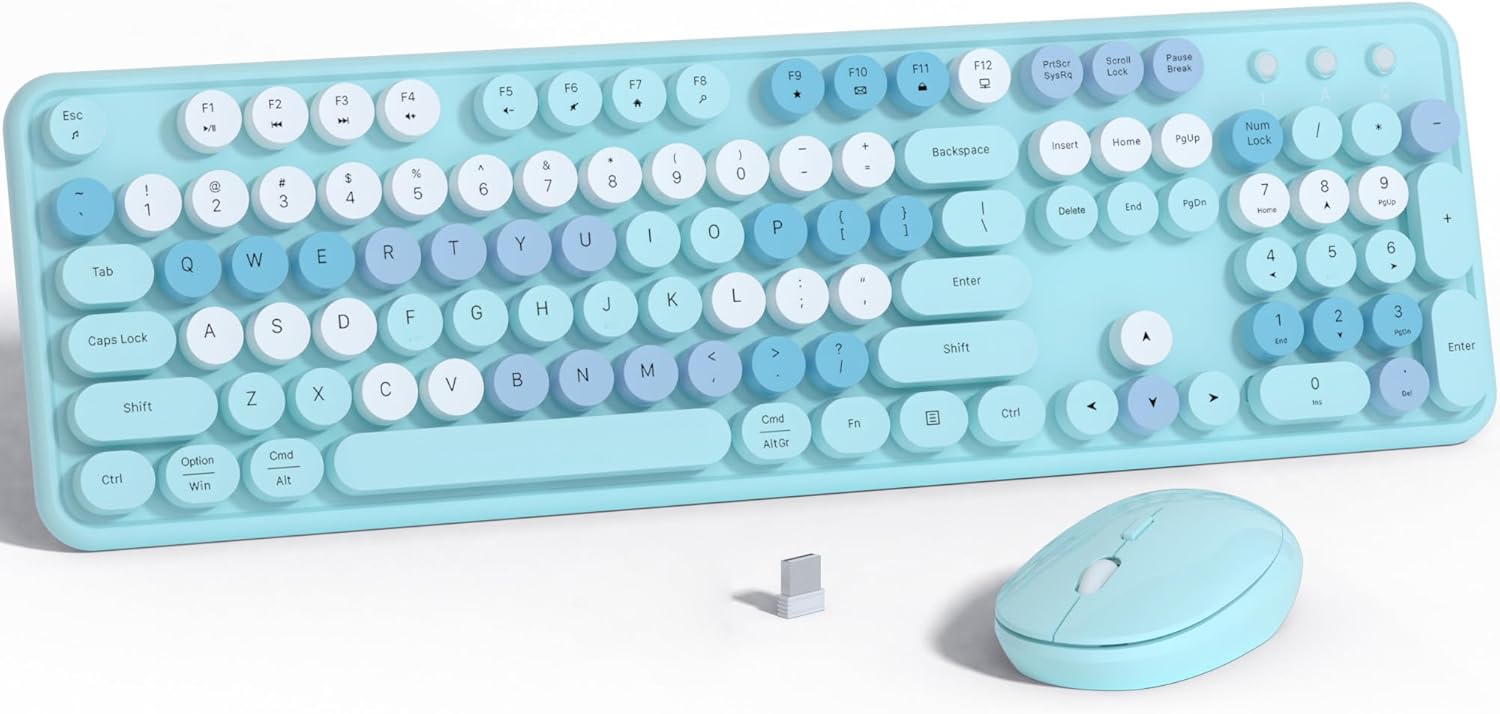
Image Description: This image shows the NEOBELLA wireless keyboard and mouse combo. The keyboard features blue and colorful floating round keycaps, a full layout including a numeric pad, and a light blue base. The matching light blue wireless mouse and the small USB receiver are positioned in front of the keyboard.
Power Saving Features
To extend battery life, both the keyboard and mouse have an auto-sleep function. If inactive for a period, they will enter a low-power sleep mode. To wake them, simply press any key on the keyboard or move/click the mouse.
Keycap Design and Typing Feel
The keyboard features unique floating round keycaps designed for a comfortable and distinctive typing experience. The keys provide a 'clicky' tactile feedback.

Image Description: A close-up view of the NEOBELLA keyboard's round, concave keycaps. The image highlights the ergonomic design of the keycaps, which are shaped to fit the fingertip, aiming to provide a smooth and comfortable typing feel. A diagram illustrates the internal structure of a keycap and switch.
Compatibility
This wireless keyboard and mouse set is compatible with various devices, including PCs, laptops, and tablets. For devices that only have a Type-C port, an appropriate adapter (not included) will be required to connect the USB receiver.

Image Description: This diagram illustrates the wireless connectivity of the NEOBELLA keyboard and mouse combo. The central USB receiver is shown wirelessly communicating with the keyboard and mouse, which are then connected to various devices including a laptop, a tablet, and a desktop monitor, demonstrating broad compatibility.
Maintenance
Cleaning
To maintain the appearance and functionality of your keyboard and mouse:
- Use a soft, dry cloth to wipe down the surfaces of both devices.
- For deeper cleaning, the keycaps can be carefully removed. Use a keycap puller (if available) or gently pry them off. Clean the keycaps and the keyboard base with a soft brush or compressed air. Ensure all parts are dry before reattaching keycaps.
- Avoid using harsh chemicals or abrasive materials, as these can damage the finish.
Battery Replacement
When the devices stop responding or exhibit intermittent connectivity, it may be time to replace the batteries. Follow the battery installation steps outlined in the 'Setup Instructions' section.
Troubleshooting
If you encounter issues with your NEOBELLA Wireless Keyboard and Mouse Combo, please refer to the following common solutions:
| Problem | Possible Cause | Solution |
|---|---|---|
| Keyboard or mouse not responding | Low or dead batteries; Power switch off; USB receiver disconnected; Driver issue. | Replace batteries in both devices. Ensure power switches are ON. Re-insert the USB receiver into a different USB port. Restart your computer. |
| Intermittent connection or lag | Interference; Distance from receiver; Low batteries. | Move devices closer to the USB receiver. Ensure no large metal objects are between devices and receiver. Replace batteries. Avoid using the receiver near other wireless devices (e.g., Wi-Fi routers). |
| Certain keys not working or double input | Debris under keycap; Keycap misalignment; Software conflict. | Carefully remove the affected keycap and clean underneath. Re-seat the keycap firmly. Test on another computer to rule out software issues. |
| Mouse cursor erratic or not moving | Dirty optical sensor; Unsuitable surface; Low batteries. | Clean the optical sensor on the bottom of the mouse. Use a mouse pad or a smooth, non-reflective surface. Replace batteries. |
| USB receiver not recognized | Faulty USB port; Driver issue. | Try a different USB port. Restart your computer. Ensure your operating system is up to date. |
If the problem persists after trying these solutions, please contact NEOBELLA customer support for further assistance.
Specifications
| Feature | Detail |
|---|---|
| Model Number | S801AG-C |
| Connectivity Technology | 2.4GHz Wireless USB NANO Receiver |
| Keyboard Dimensions | Approximately 17.3 inches (Length) |
| Mouse Dimensions | Approximately 4.52 x 1.77 x 1.57 inches (Length x Width x Height) |
| Item Weight | 2.05 pounds (approximate, for the combo) |
| Power Source | 1x AA battery for Keyboard, 1x AA battery for Mouse |
| Special Features | Colorful Floating Round Keycaps, Power Switch, Auto-Sleep Function |
| Compatible Devices | PC, Laptop, Tablet, Projector, Television (adapter may be required for Type-C only devices) |
| Color | Blue-Colorful |

Image Description: This image provides a detailed diagram of the NEOBELLA keyboard and mouse, illustrating their dimensions and internal components. It shows the keyboard's length (17.3 inches) and the mouse's dimensions (4.52in x 1.77in x 1.57in). Battery compartments for one AA battery in both devices are clearly marked, along with the location of the USB receiver inside the mouse.
Warranty and Support
Warranty Information
NEOBELLA provides one year of technical support for this keyboard and mouse combo. Please retain your proof of purchase for warranty claims.
Customer Support
For technical assistance, troubleshooting, or warranty inquiries, please contact NEOBELLA customer support through the retailer's platform or the official NEOBELLA website. Please have your product model number (S801AG-C) and purchase details ready when contacting support.