
TUTOTAK TUTOTAK TB01BB0432
TUTOTAK C-Shaped Side Table User Manual
Model: TB01BB0432
1. Introduction
The TUTOTAK C-Shaped Side Table is a versatile and compact furniture piece designed to enhance convenience in your living space. This innovative table features a unique C-shaped frame, allowing it to slide easily under sofas or beds, bringing its surface closer to you. It includes an integrated charging station with AC outlets and USB ports, providing easy access to power for your electronic devices. With its two-tier storage design, it offers practical space for books, magazines, and other essentials, making it an ideal companion for reading, working, or enjoying snacks in your living room or bedroom.
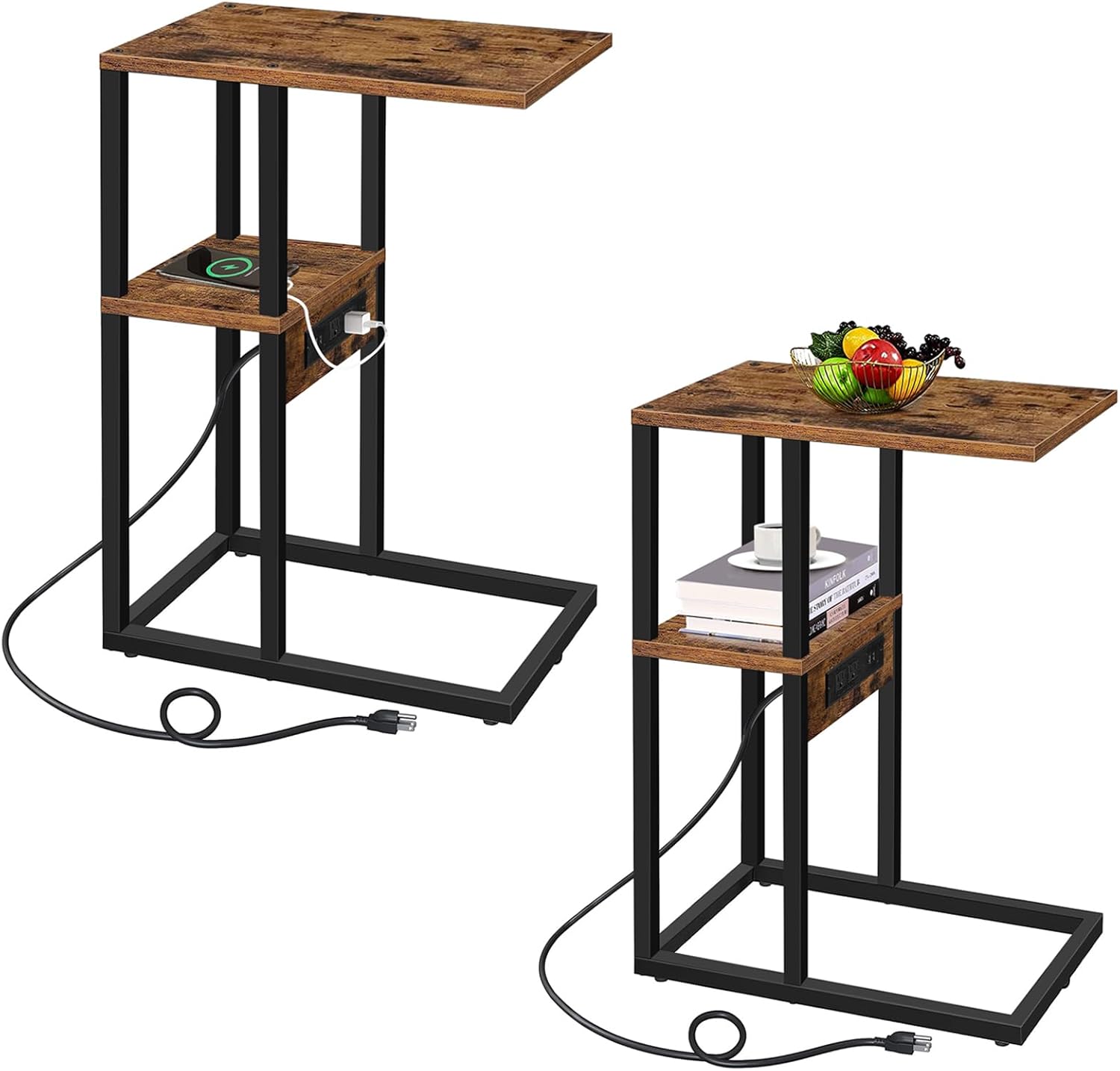
Image 1.1: Overview of the TUTOTAK C-Shaped Side Table.
2. Safety Information
Please read and understand all safety instructions before assembling and using the TUTOTAK C-Shaped Side Table. Failure to follow these instructions may result in electric shock, fire, or serious injury.
- Electrical Safety: Ensure the product is properly grounded to prevent electrical shock. Do not overload USB ports or outlets with multiple devices beyond their rated capacity.
- Stability: Ensure the table is stable and will not tip when in use. Avoid placing excessively heavy items on the table, especially on the cantilevered top.
- Water Exposure: Keep the table away from water sources and damp environments to avoid electrical hazards and damage to the wood material.
- Placement: Place the table on a flat, stable surface. Do not use on uneven ground.
- Children and Pets: Keep small parts and packaging materials away from children and pets during assembly. Ensure the power cord is routed safely to prevent tripping hazards.
3. Package Contents
Before beginning assembly, verify that all parts listed below are present and undamaged. If any parts are missing or damaged, please contact TUTOTAK customer service.
| Item | Description | Quantity (per table) |
|---|---|---|
| Tabletop Panel | Main top surface of the table. | 1 |
| Middle Shelf Panel | Intermediate storage shelf. | 1 |
| Frame Components | Metal support bars and base. | Various |
| Power Strip | Integrated unit with 2 AC outlets and 2 USB ports. | 1 |
| Hardware Pack | Screws, bolts, Allen wrench, etc. | 1 set |
| Assembly Guide | Step-by-step instruction manual. | 1 |

Image 3.1: Components of the C-Shaped Side Table.
4. Setup & Assembly
Assembly of the TUTOTAK C-Shaped Side Table is designed to be straightforward and easy. An assembly guide is included in your package, and no special tools are required beyond what is provided.
Assembly Steps:
- Unpack and Identify: Carefully unpack all components and lay them out on a clean, soft surface to prevent scratches. Identify each part using the provided assembly guide.
- Assemble Frame: Begin by connecting the metal frame components according to the instructions in the assembly guide. Ensure all screws are finger-tightened initially.
- Attach Shelves: Secure the middle shelf panel and the tabletop panel to the assembled frame using the designated hardware. Pay attention to the orientation of the middle shelf to accommodate the power strip.
- Install Power Strip: Insert the power strip into its designated slot on the middle shelf. The power strip is designed for adjustable installation, allowing it to be placed on either the inner or outer side of the shelf based on your preference and socket layout. Secure it firmly.
- Final Tightening: Once all components are in place, systematically tighten all screws with the provided Allen wrench. Do not overtighten.
- Placement: Position the assembled table in your desired location. The C-shaped design allows it to slide under most sofas or beds.

Image 4.1: Adjustable Power Socket Installation.
5. Operating Instructions
Using the Charging Station:
- Power Connection: Plug the table's power cord into a standard grounded wall outlet.
- AC Outlets: The charging station features two (2) standard AC outlets (125V/12A). Use these for devices requiring a wall plug, such as lamps, laptops, or small appliances.
- USB Ports: Two (2) USB ports (5V/2A) are available for charging smartphones, tablets, and other USB-powered devices. Connect your device's USB cable to the port.
- Overload Protection: Avoid plugging in high-power devices simultaneously that exceed the total wattage capacity of the power strip. Refer to the specifications for maximum load.

Image 5.1: Detail of the Power Strip.
Utilizing Storage and Design:
- C-Shaped Design: Slide the table's base under your sofa, couch, or bed to bring the tabletop closer for convenient access to drinks, snacks, or your laptop.
- Two-Tier Storage: Use the top surface for immediate access items like remotes, drinks, or a laptop. The middle shelf provides additional storage for books, magazines, or charging accessories.
6. Maintenance
Proper care and maintenance will ensure the longevity and appearance of your TUTOTAK C-Shaped Side Table.
- Cleaning: Wipe surfaces with a soft, damp cloth. Avoid using harsh chemicals, abrasive cleaners, or polishes that may damage the finish.
- Spills: Immediately wipe up any spills to prevent moisture damage to the engineered wood.
- Electrical Components: Ensure the power strip and cord remain dry and free from dust. Do not attempt to clean the electrical components with liquids.
- Hardware Check: Periodically check all screws and connections to ensure they remain tight. Retighten if necessary to maintain stability.
- Sunlight Exposure: Avoid prolonged exposure to direct sunlight, which can cause fading or warping of the wood finish.
7. Troubleshooting
If you encounter any issues with your TUTOTAK C-Shaped Side Table, refer to the following common problems and solutions:
| Problem | Possible Cause | Solution |
|---|---|---|
| Power outlets/USB ports not working. |
|
|
| Table feels wobbly or unstable. |
|
|
| Scratches or damage to surface. |
|
|
8. Specifications
| Feature | Detail |
|---|---|
| Brand | TUTOTAK |
| Model Name | TUTOTAK TB01BB0432 |
| Product Dimensions (D x W x H) | 11.8"D x 15.4"W x 23.4"H |
| Item Weight | 7.2 Kilograms |
| Maximum Weight Recommendation | 40 Pounds |
| Color | Brown |
| Material Type | Engineered Wood (Frame, Top, Base) |
| AC Outlets | 2 (125V/12A) |
| USB Ports | 2 (5V/2A) |
| Power Cord Length | 4.9 Feet (approx. 59 inches) |
| Recommended Uses | End table, Snack table, Laptop table, Coffee table |
| Indoor/Outdoor Usage | Indoor |

Image 8.1: Product Dimensions.
9. Support & Warranty
TUTOTAK is committed to providing high-quality products and excellent customer service. Every C-Shaped Side Table is thoroughly tested to ensure quality and reliability.
Customer Service:
If you have any questions, concerns, or require assistance with your product, please do not hesitate to contact our friendly and professional customer service team. We aim to respond to all inquiries within 24 hours.
For contact information, please refer to the packaging or the official TUTOTAK website.
Warranty Information:
Specific warranty details may vary. Please refer to the warranty card included with your product or visit the TUTOTAK official website for the most up-to-date warranty policy and registration information.
Ask a question about this manual
Ask about setup, troubleshooting, compatibility, parts, safety, or missing instructions. Manuals+ will review the question and use this page’s manual context to help answer it.