
M25
Generic M25 TWS Wireless Bluetooth 5.3 Earbuds User Manual
Model: M25
1. Introduction
Thank you for choosing the Generic M25 TWS Wireless Bluetooth 5.3 Earbuds. These earbuds are designed to provide a high-quality audio experience with features like Bluetooth 5.3 connectivity, noise reduction, and a built-in microphone for clear calls. This manual will guide you through the setup, operation, and maintenance of your new earbuds.
2. Package Contents
- M25 TWS Wireless Bluetooth Earbuds (Left and Right)
- Charging Case
- Charging Cable
- User Manual
3. Product Overview
The M25 earbuds feature a compact design with a magnetic charging case. The case includes a digital display showing battery levels for both the case and individual earbuds.

Image 3.1: The M25 TWS earbuds shown outside their charging case, with the case lid open, displaying the digital battery indicator. The earbuds are black with a blue LED ring.

Image 3.2: A close-up of the M25 charging case, highlighting the magnetic lid mechanism. The lid opens and closes smoothly without requiring excessive force.
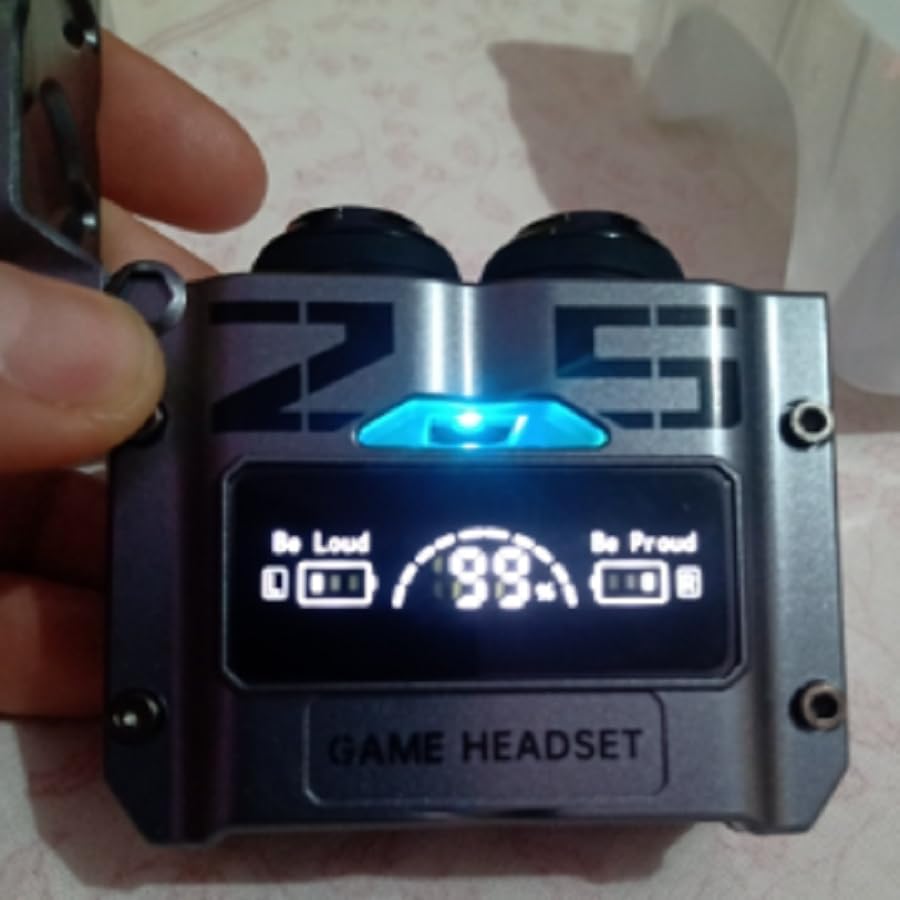
Image 3.3: The M25 charging case with earbuds inserted, showing the digital display. The display indicates the charging status and battery percentage of both the case and the individual earbuds.
4. Setup
4.1 Charging the Earbuds and Case
- Place the earbuds into the charging case. Ensure they are correctly seated in their respective slots.
- Connect the charging cable to the charging port on the case and to a USB power source.
- The digital display on the case will show the charging status. The earbuds will also indicate charging (e.g., with an LED light).
- Once fully charged, disconnect the charging cable.
4.2 Bluetooth Pairing
- Ensure the earbuds are charged.
- Open the charging case lid. The earbuds will automatically enter pairing mode (indicated by flashing LED lights on the earbuds).
- On your device (smartphone, tablet, etc.), enable Bluetooth.
- Search for available Bluetooth devices and select "M25" from the list.
- Once connected, the earbuds' LED lights will stop flashing, and a voice prompt may confirm the connection.
- The earbuds will automatically reconnect to the last paired device when removed from the case, if Bluetooth is enabled on the device.
5. Operating Instructions
5.1 Power On/Off
- Power On: Open the charging case lid, or long-press the touch area on both earbuds for a few seconds.
- Power Off: Place the earbuds back into the charging case and close the lid, or long-press the touch area on both earbuds for a few seconds until they power off.
5.2 Music Playback
- Play/Pause: Single tap the touch area on either earbud.
- Next Track: Double tap the touch area on the right earbud.
- Previous Track: Double tap the touch area on the left earbud.
- Volume Up: Triple tap the touch area on the right earbud.
- Volume Down: Triple tap the touch area on the left earbud.
5.3 Phone Calls
- Answer/End Call: Single tap the touch area on either earbud.
- Reject Call: Long-press the touch area on either earbud for 2 seconds.
5.4 Voice Assistant
- Activate Voice Assistant: Long-press the touch area on either earbud for 3 seconds.
6. Maintenance
- Cleaning: Regularly clean the earbuds and charging case with a soft, dry, lint-free cloth. Do not use harsh chemicals or abrasive materials.
- Storage: When not in use, store the earbuds in their charging case to protect them and keep them charged.
- Water Resistance: The earbuds are water-resistant, but not waterproof. Avoid submerging them in water or exposing them to heavy rain. Dry them thoroughly if they get wet.
- Battery Care: To prolong battery life, avoid fully discharging the earbuds and case frequently. Charge them regularly.
7. Troubleshooting
| Problem | Possible Cause | Solution |
|---|---|---|
| Earbuds not pairing | Earbuds not in pairing mode; Bluetooth off on device; out of range. | Ensure earbuds are out of case and in pairing mode. Turn Bluetooth on/off on your device. Move closer to the device. |
| No sound from earbuds | Volume too low; earbuds not connected; media paused. | Increase volume on device and earbuds. Reconnect earbuds. Check if media is playing. |
| One earbud not working | Low battery; connection issue. | Place both earbuds in the case to charge. Re-pair the earbuds. |
| Charging case not charging | Faulty cable/adapter; dirty charging port. | Try a different charging cable and adapter. Clean the charging port gently. |
8. Specifications
- Model Name: M25
- Connectivity Technology: Wireless
- Wireless Communication Technology: Bluetooth 5.3
- Compatible Devices: Mobile Phones, Tablets, Gaming Consoles
- Water Resistance Level: Water Resistant
- Control Method: Remote (Touch Control)
- Special Features: Rechargeable Battery, Noise Isolation, Sweatproof
- Power Source Type: Electric Power
- Color: Black
- Ear Placement: In-Ear
- Noise Control: Sound Isolation
9. Warranty and Support
This product comes with a manufacturer's warranty of 2 months from the date of purchase. Please retain your proof of purchase for warranty claims.
For technical support or warranty inquiries, please contact your retailer or the manufacturer directly through their official support channels.
Ask a question about this manual
Ask about setup, troubleshooting, compatibility, parts, safety, or missing instructions. Manuals+ will review the question and use this page’s manual context to help answer it.