Introduction
This manual provides essential information for the safe and effective use of your Hwagol Magnetic USB Charger. Please read this manual thoroughly before use to ensure proper operation and to prevent damage to the charger or your smartwatch. This charger is specifically designed for smartwatches with a 2.84mm (0.11 inches) magnetic charging port distance, including models G20 and G28.
Product Overview
The Hwagol Magnetic USB Charger is a replacement charging cable designed for various smartwatch brands. It features a magnetic connection for easy and secure attachment, along with built-in safety mechanisms to protect your device during charging.
Key Features:
- Wide Compatibility: Designed for smartwatches with a 2.84mm (0.11 inches) magnetic charging port distance, including G20 and G28 models.
- Safe Charging: Equipped with an integrated voltage regulator to protect against overcurrent and short-circuit damage. Features overvoltage and overcurrent protection for stable current transmission.
- Magnetic Connection: Strong magnetic force ensures a delicate touch connection to the smartwatch's charging area, making charging convenient.
- Fast and Stable Performance: Supports various USB power sources (power adapter, car USB adapter, power bank, laptop USB port) for efficient and stable charging.
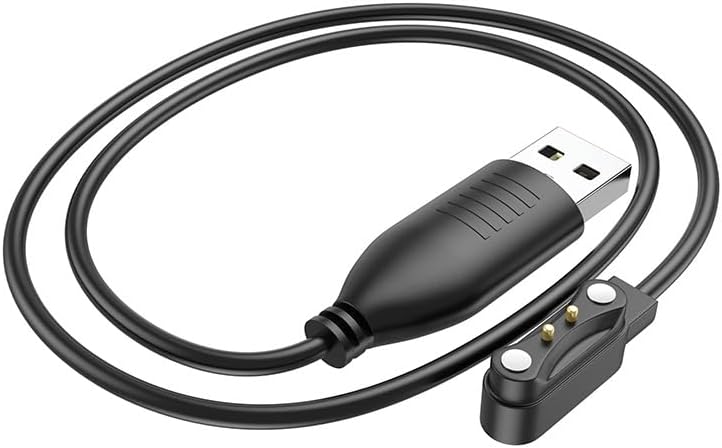
Image: The Hwagol Magnetic USB Charger cable, featuring a standard USB-A connector on one end and a magnetic two-pin charging head on the other. The cable is black and coiled.
Setup
Connecting the Charger:
- Verify Compatibility: Before connecting, measure the distance between the magnetic charging ports on your smartwatch. This charger is compatible with smartwatches where the distance between the magnet charging ports is 2.84mm (0.11 inches).
- Connect to Power Source: Insert the standard USB-A end of the Hwagol charger cable into a compatible USB power source. This can be a wall adapter, a car USB adapter, a power bank, or a USB port on a laptop or computer.
- Attach to Smartwatch: Gently bring the magnetic charging head of the cable close to the charging area on your smartwatch. The magnetic force will automatically align and snap the pins into place.
- Check Polarity (if needed): If the charger does not connect or initiate charging immediately, try reversing the orientation of the magnetic charging head. Due to the nature of magnetic suction charging, it may only connect in one specific direction.
Operating Instructions
Charging Your Smartwatch:
Once the Hwagol Magnetic USB Charger is correctly connected to both a power source and your smartwatch, the charging process should begin automatically. Your smartwatch display will typically show a charging indicator (e.g., a battery icon with a lightning bolt or a percentage increase).
- Ensure the connection remains stable throughout the charging cycle.
- The built-in voltage regulator and protection functions work to ensure a safe and efficient charge, preventing damage from power fluctuations.
- Charging time may vary depending on your smartwatch's battery capacity and the power output of your USB source.
Maintenance
Care and Storage:
- Cleaning: Keep the charging cable and its magnetic pins clean. Use a soft, dry cloth to gently wipe away any dust, dirt, or debris that may accumulate. Avoid using liquids or abrasive cleaners.
- Handling: Do not excessively bend, twist, or pull the cable, especially near the connectors. This can damage the internal wiring and reduce the cable's lifespan.
- Storage: Store the charger in a cool, dry place away from direct sunlight, extreme temperatures, and high humidity when not in use. Avoid tangling the cable.
- Protection: Do not expose the charger to water or other liquids. If the charger becomes wet, disconnect it immediately and allow it to dry completely before reuse.
Troubleshooting
Common Issues and Solutions:
- Smartwatch not charging:
- Ensure the magnetic pins on the charger are correctly aligned with the charging ports on your smartwatch. Try reversing the cable's orientation if it doesn't connect.
- Verify that the USB power source is active and providing power. Try plugging the USB end into a different port or adapter.
- Confirm that the distance between your smartwatch's magnetic charging ports is indeed 2.84mm (0.11 inches). This charger is designed for this specific spacing.
- Check for any debris or obstruction on the charging pins of both the cable and the smartwatch.
- Slow charging:
- Ensure you are using a stable and sufficient power source. While compatible with various USB ports, some may provide lower current, leading to slower charging.
- Avoid using the smartwatch extensively while it is charging, as this can prolong the charging time.
- Magnetic connection is weak or doesn't hold:
- Ensure both the smartwatch's charging area and the charger's magnetic head are clean and free of dust or foreign objects, which can interfere with the magnetic attraction.
- Confirm that the cable is designed for your specific smartwatch model (G20/G28 or compatible models with 2.84mm pin spacing). Incompatible models may not have a secure magnetic fit.
Specifications
| Attribute | Detail |
|---|---|
| Brand | Hwagol |
| Model Number | G20cdx |
| Color | Black |
| Connections | USB-A |
| Special Features | Fast Charging, Magnetic Connection, Overcurrent Protection, Overvoltage Protection |
| Compatible Devices | Smartwatches (G20, G28, and others with 2.84mm magnetic pin spacing) |
| Material | Plastic |
| Components Included | 1 charging cable |
| Compliance | RoHS, UL |
Warranty and Support
For product support, technical assistance, or warranty inquiries, please contact Hwagol customer service through your original point of purchase. Please retain your purchase receipt or proof of purchase, as it may be required for warranty claims.
Hwagol is committed to providing quality products and customer satisfaction. If you encounter any issues not covered in this manual, please reach out to our support team for further assistance.