Introduction
This manual provides instructions for the replacement remote control model DG11J1-92, designed for use with Hisense and NOMA Aire Conditioners. Please note that this is a replacement unit, and while it offers core functionalities, some advanced features present on your original remote may not be supported. The remote may be supplied in either black or white, chosen randomly.
Product Overview
Familiarize yourself with the layout and functions of your new remote control.
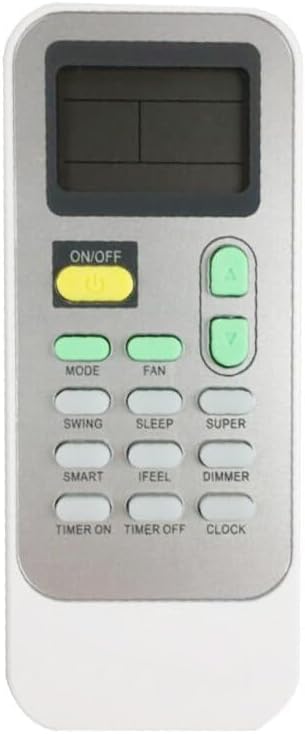
Figure 1: Front View of Remote Control
This image displays the front of the DG11J1-92 remote control. Key buttons visible include ON/OFF, Mode, Fan, Swing, Sleep, Super, Smart, iFeel, Dimmer, Timer On, Timer Off, and Clock, along with temperature adjustment buttons. An LCD screen is present at the top.

Figure 2: Back View of Remote Control
This image shows the back of the DG11J1-92 remote control. The battery compartment cover is visible at the bottom, and the model number "DG11J1-92" is clearly printed on a label in the upper-middle section.
Button Functions:
- ON/OFF: Powers the air conditioner on or off.
- MODE: Cycles through operating modes (e.g., Cool, Heat, Fan, Dry, Auto).
- FAN: Adjusts fan speed.
- SWING: Controls the louver swing direction.
- SLEEP: Activates sleep mode for quiet operation and energy saving.
- SUPER: Engages rapid cooling/heating.
- SMART: Automatically adjusts settings for optimal comfort.
- IFEEL: Senses temperature at the remote's location for precise control.
- DIMMER: Adjusts the brightness of the air conditioner's display.
- TIMER ON/OFF: Sets a timer for the unit to turn on or off.
- CLOCK: Sets the current time on the remote.
- Temperature Up/Down (▲/▼): Adjusts the desired temperature.
Setup
Battery Installation:
- Locate the battery compartment on the back of the remote control (refer to Figure 2).
- Slide the battery compartment cover downwards to open it.
- Insert two new AAA batteries (not included), ensuring the positive (+) and negative (-) terminals align correctly with the markings inside the compartment.
- Slide the battery compartment cover back into place until it clicks securely.
Note: This remote control does not require pairing for most Hisense and NOMA air conditioner models. Simply insert batteries and point it towards your air conditioner unit.
Operating Instructions
To operate your air conditioner using this remote control, ensure there are no obstructions between the remote and the air conditioner's receiver.
- Turning On/Off: Press the ON/OFF button once to power the unit on or off.
- Changing Mode: Press the MODE button repeatedly to cycle through available operating modes (e.g., Cool, Heat, Fan, Dry, Auto). The selected mode will typically be displayed on the remote's LCD screen.
- Adjusting Temperature: Use the ▲ (Up) and ▼ (Down) buttons to set your desired temperature.
- Fan Speed Control: Press the FAN button to adjust the fan speed (e.g., Low, Medium, High, Auto).
- Timer Function:
- To set a turn-on timer, press TIMER ON, then use temperature buttons to set the desired time, and press TIMER ON again to confirm.
- To set a turn-off timer, press TIMER OFF, then use temperature buttons to set the desired time, and press TIMER OFF again to confirm.
- Special Functions: Utilize buttons like SLEEP, SUPER, SMART, IFEEL, and DIMMER as per your air conditioner's capabilities. Refer to your air conditioner's original manual for detailed explanations of these specific functions.
Maintenance
Cleaning the Remote:
Wipe the remote control with a soft, dry cloth. Do not use liquid cleaners or abrasive materials, as they may damage the surface or internal components.
Battery Replacement:
Replace batteries when the remote's range decreases or the display becomes dim. Always replace both batteries at the same time with new ones of the same type (AAA). Remove batteries if the remote will not be used for an extended period to prevent leakage.
Troubleshooting
| Problem | Possible Cause | Solution |
|---|---|---|
| Remote not responding. | Dead or incorrectly installed batteries. Obstruction between remote and AC unit. | Replace batteries, ensuring correct polarity. Remove any obstructions. Ensure remote is pointed directly at the AC unit's receiver. |
| Some functions do not work. | This is a replacement remote; some original functions may not be supported. | This is expected behavior for a compatible replacement remote. Verify if the function is critical for basic operation. |
| Short operating range. | Low battery power. Interference. | Replace batteries. Reduce interference from other electronic devices. |
Specifications
- Model: DG11J1-92
- Material: ABS Plastic
- Color: Black or White (randomly supplied)
- Special Feature: Ergonomic design
- Power Source: 2 x AAA Batteries (not included)
- Compatibility: Suitable for Hisense and NOMA Aire Conditioners (DG11J1-92 original remote replacement)
Important Notes
- This product is a replacement remote control and is not a genuine OEM (Original Equipment Manufacturer) part.
- Some functions of your original remote may not be fully replicated or supported by this replacement unit.
- The color of the remote control (black or white) will be sent randomly.
- For optimal compatibility, it is recommended to verify your original remote's part number or your air conditioner unit's model number.
- The package includes one (1) remote control only; batteries are not included.


